https://github.com/ldbc/ldbc_snb_datagen_spark
Synthetic graph generator for the LDBC Social Network Benchmark, running on Spark
https://github.com/ldbc/ldbc_snb_datagen_spark
snb
Last synced: 6 months ago
JSON representation
Synthetic graph generator for the LDBC Social Network Benchmark, running on Spark
- Host: GitHub
- URL: https://github.com/ldbc/ldbc_snb_datagen_spark
- Owner: ldbc
- License: apache-2.0
- Created: 2015-01-07T08:28:41.000Z (over 11 years ago)
- Default Branch: main
- Last Pushed: 2025-01-03T19:34:09.000Z (over 1 year ago)
- Last Synced: 2025-03-28T14:06:14.681Z (about 1 year ago)
- Topics: snb
- Language: Java
- Homepage: https://ldbcouncil.org/benchmarks/snb
- Size: 290 MB
- Stars: 169
- Watchers: 16
- Forks: 58
- Open Issues: 10
-
Metadata Files:
- Readme: README.md
- Contributing: contributing.md
- License: LICENSE.txt
- Code of conduct: code_of_conduct.md
Awesome Lists containing this project
README

# LDBC SNB Datagen (Spark-based)
[](https://circleci.com/gh/ldbc/ldbc_snb_datagen_spark)
The LDBC SNB Data Generator (Datagen) produces the datasets for the [LDBC Social Network Benchmark's workloads](https://ldbcouncil.org/benchmarks/snb/). The generator is designed to produce directed labelled graphs that mimic the characteristics of those graphs of real data. A detailed description of the schema produced by Datagen, as well as the format of the output files, can be found in the latest version of official [LDBC SNB specification document](https://github.com/ldbc/ldbc_snb_docs).
:scroll: If you wish to cite the LDBC SNB, please refer to the [documentation repository](https://github.com/ldbc/ldbc_snb_docs#how-to-cite-ldbc-benchmarks).
:warning: There are two different versions of the Datagen:
* The [Hadoop-based Datagen](https://github.com/ldbc/ldbc_snb_datagen_hadoop/) generates the Interactive workload's SF1-1000 data sets.
* For the BI workload, use the Spark-based Datagen (in this repository).
* For the Interactive workloads's larger data sets, see the [conversion script in the driver repository](https://github.com/ldbc/ldbc_snb_interactive_driver/blob/main/scripts/README.md).
For each commit on the `main` branch, the CI deploys [freshly generated small data sets](https://ldbcouncil.org/ldbc_snb_datagen_spark/).
## Quick start
### Build the JAR
To assemble the JAR file with SBT, run:
```bash
sbt assembly
```
### Install Python tools
Some of the build utilities are written in Python. To use them, you have to create a Python virtual environment
and install the dependencies.
E.g. with [pyenv](https://github.com/pyenv/pyenv) and [pyenv-virtualenv](https://github.com/pyenv/pyenv-virtualenv):
```bash
pyenv install 3.7.13
pyenv virtualenv 3.7.13 ldbc_datagen_tools
pyenv local ldbc_datagen_tools
pip install -U pip
pip install ./tools
```
If the environment already exists, activate it with:
```bash
pyenv activate
```
### Running locally
The `./tools/run.py` script is intended for **local runs**. To use it, download and extract Spark as follows.
#### Spark 3.2.x
Spark 3.2.x is the recommended runtime to use. The rest of the instructions are provided assuming Spark 3.2.x.
To place Spark under `/opt/`:
```bash
scripts/get-spark-to-opt.sh
export SPARK_HOME="/opt/spark-3.2.2-bin-hadoop3.2"
export PATH="${SPARK_HOME}/bin":"${PATH}"
```
To place it under `${HOME}/`:
```bash
scripts/get-spark-to-home.sh
export SPARK_HOME="${HOME}/spark-3.2.2-bin-hadoop3.2"
export PATH="${SPARK_HOME}/bin":"${PATH}"
```
Both Java 8 and Java 11 are supported, but Java 17 is not (Spark 3.2.2 will fail, since it uses internal Java APIs and does not set the permissions appropriately).
#### Building the project
Run:
```bash
scripts/build.sh
```
#### Running the generator
Once you have Spark in place and built the JAR file, run the generator as follows:
```bash
export PLATFORM_VERSION=$(sbt -batch -error 'print platformVersion')
export DATAGEN_VERSION=$(sbt -batch -error 'print version')
export LDBC_SNB_DATAGEN_JAR=$(sbt -batch -error 'print assembly / assemblyOutputPath')
./tools/run.py --
```
#### Runtime configuration arguments
The runtime configuration arguments determine the amount of memory, number of threads, degree of parallelism. For a list of arguments, see:
```bash
./tools/run.py --help
```
To generate a single `part-*` file, reduce the parallelism (number of Spark partitions) to 1.
```bash
./tools/run.py --parallelism 1 -- --format csv --scale-factor 0.003 --mode bi
```
#### Generator configuration arguments
The generator configuration arguments allow the configuration of the output directory, output format, layout, etc.
To get a complete list of the arguments, pass `--help` to the JAR file:
```bash
./tools/run.py -- --help
```
* Generating `csv-composite-merged-fk` files in **BI mode** resulting in compressed `.csv.gz` files:
```bash
./tools/run.py -- --format csv --scale-factor 0.003 --mode bi --format-options compression=gzip
```
* Generating `csv-composite-merged-fk` files in **BI mode** and generating factors:
```bash
./tools/run.py -- --format csv --scale-factor 0.003 --mode bi --generate-factors
```
* Generating CSVs in **raw mode**:
```bash
./tools/run.py -- --format csv --scale-factor 0.003 --mode raw --output-dir sf0.003-raw
```
* Generating Parquet files in **BI mode**:
```bash
./tools/run.py -- --format parquet --scale-factor 0.003 --mode bi
```
* Use epoch milliseconds encoded as longs for serializing date and datetime values in **BI mode** (this is equivalent to using the [`LongDateFormatter` in the Hadoop Datagen](https://github.com/ldbc/ldbc_snb_datagen_hadoop/blob/v0.3.8/src/main/java/ldbc/snb/datagen/util/formatter/LongDateFormatter.java)):
```bash
./tools/run.py -- --format csv --scale-factor 0.003 --mode bi --epoch-millis
```
* For the **BI mode**, the `--format-options` argument allows passing formatting options such as timestamp/date formats, the presence/abscence of headers (see the [Spark formatting options](https://spark.apache.org/docs/2.4.8/api/scala/index.html#org.apache.spark.sql.DataFrameWriter) for details), and whether quoting the fields in the CSV required:
```bash
./tools/run.py -- --format csv --scale-factor 0.003 --mode bi --format-options timestampFormat=MM/dd/y\ HH:mm:ss,dateFormat=MM/dd/y,header=false,quoteAll=true
```
* The `--explode-attrs` argument implies one of the `csv-singular-{projected-fk,merged-fk}` formats, which has separate files to store multi-valued attributes (`email`, `speaks`).
```bash
./tools/run.py -- --format csv --scale-factor 0.003 --mode bi --explode-attrs
```
* The `--explode-edges` argument implies one of the `csv-{composite,singular}-projected-fk` formats, which has separate files to store many-to-one edges (e.g. `Person_isLocatedIn_City`, `Tag_hasType_TagClass`, etc.).
```bash
./tools/run.py -- --format csv --scale-factor 0.003 --mode bi --explode-edges
```
* The `--explode-attrs` and `--explode-edges` arguments together imply the `csv-singular-projected-fk` format:
```bash
./tools/run.py -- --format csv --scale-factor 0.003 --mode bi --explode-attrs --explode-edges
```
To change the Spark configuration directory, adjust the `SPARK_CONF_DIR` environment variable.
A complex example:
```bash
export SPARK_CONF_DIR=./conf
./tools/run.py --parallelism 4 --memory 8G -- --format csv --format-options timestampFormat=MM/dd/y\ HH:mm:ss,dateFormat=MM/dd/y --explode-edges --explode-attrs --mode bi --scale-factor 0.003
```
It is also possible to pass a parameter file:
```bash
./tools/run.py -- --format csv --param-file params.ini
```
### Docker images
SNB Datagen images are available via [Docker Hub](https://hub.docker.com/orgs/ldbc/repositories).
The image tags follow the pattern `${DATAGEN_VERSION/+/-}-${PLATFORM_VERSION}`, e.g `ldbc/datagen-standalone:0.5.0-2.12_spark3.2`.
When building images ensure that you [use BuildKit](https://docs.docker.com/develop/develop-images/build_enhancements/#to-enable-buildkit-builds).
#### Standalone Docker image
The standalone image bundles Spark with the JAR and Python helpers, so you can run a workload in a container similarly to a local run, as you can
see in this example:
```bash
export SF=0.003
mkdir -p out_sf${SF}_bi # create output directory
docker run \
--mount type=bind,source="$(pwd)"/out_sf${SF}_bi,target=/out \
--mount type=bind,source="$(pwd)"/conf,target=/conf,readonly \
-e SPARK_CONF_DIR=/conf \
ldbc/datagen-standalone:${DATAGEN_VERSION/+/-}-${PLATFORM_VERSION} \
--parallelism 1 \
-- \
--format csv \
--scale-factor ${SF} \
--mode bi \
--generate-factors
```
The standalone Docker image can be built with the provided Dockerfile. To build, execute the following command from the repository directory:
```bash
export PLATFORM_VERSION=$(sbt -batch -error 'print platformVersion')
export DATAGEN_VERSION=$(sbt -batch -error 'print version')
export DOCKER_BUILDKIT=1
docker build . --target=standalone -t ldbc/datagen-standalone:${DATAGEN_VERSION/+/-}-${PLATFORM_VERSION}
```
#### JAR-only image
The `ldbc/datagen-jar` image contains the assembly JAR, so it can bundled in your custom container:
```docker
FROM my-spark-image
ARG VERSION
COPY --from=ldbc/datagen-jar:${VERSION} /jar /lib/ldbc-datagen.jar
```
The JAR-only Docker image can be built with the provided Dockerfile. To build, execute the following command from the repository directory:
```bash
docker build . --target=jar -t ldbc/datagen-jar:${DATAGEN_VERSION/+/-}-${PLATFORM_VERSION}
```
#### Pushing to Docker Hub
To release a new snapshot version on Docker Hub, run:
```bash
docker tag ldbc/datagen-jar:${DATAGEN_VERSION/+/-}-${PLATFORM_VERSION} ldbc/datagen-jar:latest
docker push ldbc/datagen-jar:${DATAGEN_VERSION/+/-}-${PLATFORM_VERSION}
docker push ldbc/datagen-jar:latest
docker tag ldbc/datagen-standalone:${DATAGEN_VERSION/+/-}-${PLATFORM_VERSION} ldbc/datagen-standalone:latest
docker push ldbc/datagen-standalone:${DATAGEN_VERSION/+/-}-${PLATFORM_VERSION}
docker push ldbc/datagen-standalone:latest
```
To release a new stable version, create a new Git tag (e.g. by creating a new release on GitHub), then build the Docker image and push it.
### Elastic MapReduce
We provide scripts to run Datagen on AWS EMR. See the README in the [`./tools/emr`](tools/emr) directory for details.
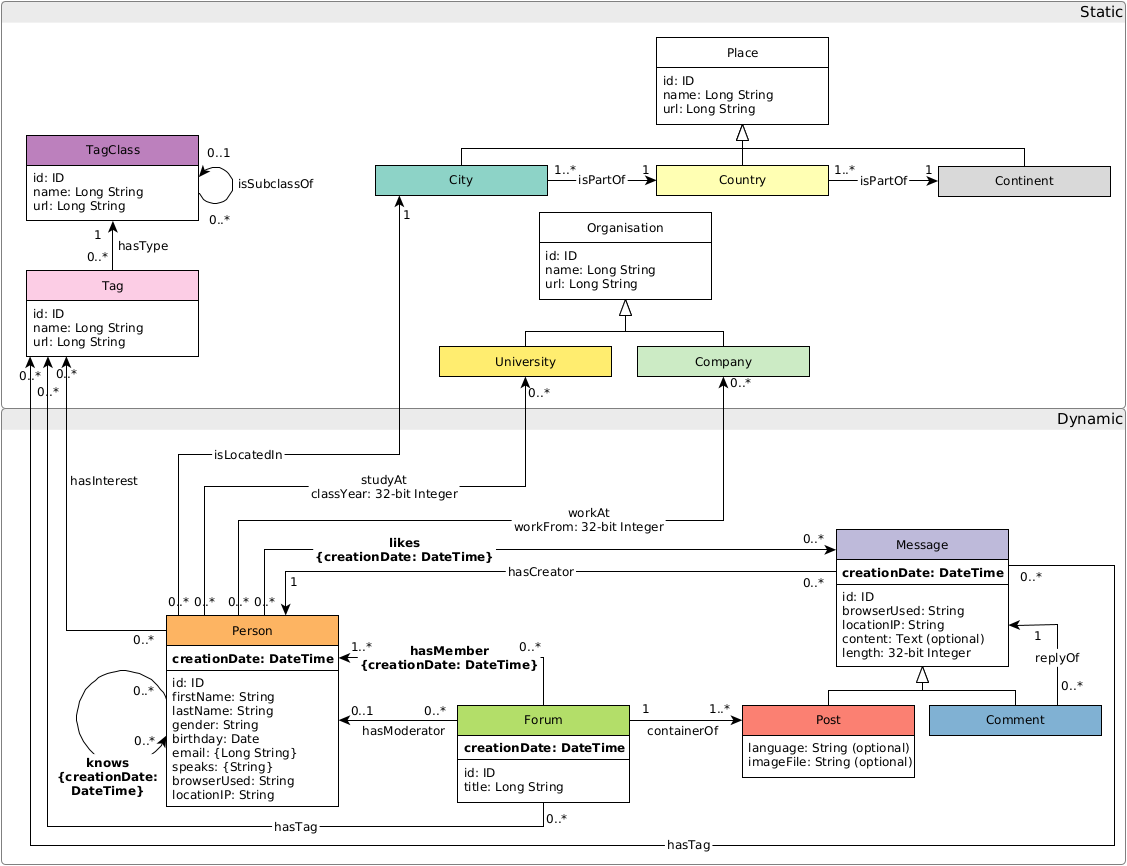
## Graph schema
The graph schema is as follows:
## Troubleshooting
* When running the tests, they might throw a `java.net.UnknownHostException: your_hostname: your_hostname: Name or service not known` coming from `org.apache.hadoop.mapreduce.JobSubmitter.submitJobInternal`. The solution is to add an entry of your machine's hostname to the `/etc/hosts` file: `127.0.1.1 your_hostname`.
* If you are using Docker and Spark runs out of space, make sure that Docker has enough space to store its containers. To move the location of the Docker containers to a larger disk, stop Docker, edit (or create) the `/etc/docker/daemon.json` file and add `{ "data-root": "/path/to/new/docker/data/dir" }`, then sync the old folder if needed, and restart Docker. (See [more detailed instructions](https://www.guguweb.com/2019/02/07/how-to-move-docker-data-directory-to-another-location-on-ubuntu/)).
* If you are using a local Spark installation and run out of space in `/tmp` (`java.io.IOException: No space left on device`), set the `SPARK_LOCAL_DIRS` to point to a directory with enough free space.
* The Docker image may throw the following error when generating factors `java.io.FileNotFoundException: /tmp/blockmgr-.../.../temp_shuffle_... (No file descriptors available)`. This error occurs on Fedora 36 host machines. Changing to an Ubuntu 22.04 host machine resolves the problem. Related issue: [#420](https://github.com/ldbc/ldbc_snb_datagen_spark/issues/420).