https://github.com/ldo-cert/orochi
The Volatility Collaborative GUI
https://github.com/ldo-cert/orochi
dask hacktoberfest memory-dump orochi volatility volatility-framework volatility-gui
Last synced: 6 months ago
JSON representation
The Volatility Collaborative GUI
- Host: GitHub
- URL: https://github.com/ldo-cert/orochi
- Owner: LDO-CERT
- License: mit
- Created: 2020-05-18T14:01:45.000Z (about 6 years ago)
- Default Branch: master
- Last Pushed: 2026-01-12T13:13:15.000Z (7 months ago)
- Last Synced: 2026-01-14T16:00:05.032Z (6 months ago)
- Topics: dask, hacktoberfest, memory-dump, orochi, volatility, volatility-framework, volatility-gui
- Language: JavaScript
- Homepage:
- Size: 74.4 MB
- Stars: 264
- Watchers: 10
- Forks: 25
- Open Issues: 67
-
Metadata Files:
- Readme: README.md
- Changelog: CHANGELOG.md
- Contributing: CONTRIBUTING.md
- License: LICENSE
- Code of conduct: CODE_OF_CONDUCT.md
- Security: SECURITY.md
Awesome Lists containing this project
README
# Orochi
[](http://shields.io/)
[](https://github.com/LDO-CERT/orochi/blob/master/LICENSE)
[](https://github.com/pydanny/cookiecutter-django/)
[](https://github.com/LDO-CERT/orochi/actions/workflows/push.yml)
[](https://github.com/LDO-CERT/orochi/actions/workflows/codeql-analysis.yml)
[](https://bestpractices.coreinfrastructure.org/projects/5014)
[](https://gitter.im/ldo-cert-orochi?utm_source=badge&utm_medium=badge&utm_campaign=pr-badge&utm_content=badge)
---
> 🧠 **Orochi** — A modern, distributed web interface for collaborative memory forensics built on **Volatility 3**, **Django**, and **Dask**.

---
## Table of Contents
- [About Orochi](#about-orochi)
- [Fastest Way to Try Orochi](#fastest-way-to-try-orochi)
- [Architecture Overview](#architecture-overview)
- [Getting Started](#getting-started)
- [Installation](#installation)
- [Quick Start Guide](#quick-start-guide)
- [Video Guide](#video-guide)
- [Documentation](#documentation)
- [Community](#community)
- [Contributing](#contributing)
- [Origin of the Name](#origin-of-the-name)
---
## About Orochi
**Orochi** is an open-source framework for collaborative forensic memory dump analysis.
It lets multiple analysts upload, analyze, and correlate memory dumps simultaneously via an intuitive web interface.

---
## 🚀 Fastest Way to Try Orochi
If you just want to get hands-on immediately:
```bash
git clone https://github.com/LDO-CERT/orochi.git
cd orochi
sudo docker-compose up
```
Then open [https://localhost](https://localhost) and log in with:
**Username:** `admin` **Password:** `admin`
At first run, Orochi will need to download **Volatility plugins** and **symbol files**.
You can do this directly from the **Admin Page** or by running the management commands described below.
---
Orochi combines the power of Volatility 3 with distributed task management and a modern web stack:
- 🧩 **[Volatility 3](https://github.com/volatilityfoundation/volatility3):** Memory forensics framework for extracting digital artifacts.
- ⚙️ **[Dask](https://github.com/dask/dask):** Parallel computing library that distributes plugin execution across workers.
- 🗄️ **[PostgreSQL](https://www.postgresql.org/):** Database for user and analysis metadata.
- ✉️ **[Mailpit](https://github.com/axllent/mailpit):** Local SMTP service for user registration emails.
- 🧱 **[Django WSGI / ASGI](https://www.djangoproject.com/):** Core web backend, including real-time WebSocket updates.
- 🔁 **[Redis](https://github.com/redis/redis):** Message broker and cache for asynchronous communications.
- 🌐 **[Nginx](https://github.com/nginx/nginx):** Reverse proxy providing HTTPS termination.
- 🐳 **[Docker Compose](https://docs.docker.com/compose/):** Orchestrates the entire Orochi stack for both x64 and arm64 platforms.
```mermaid
flowchart TB
%% Orientation: Top -> Bottom
%% Frontend (visible label)
subgraph FRONTEND[Frontend]
direction TB
client["Client (Browser)"]
nginx["Nginx (Reverse Proxy)"]
end
%% Application Layer
subgraph APP[Application Layer]
direction TB
wsgi["Django WSGI (REST / Pages)"]
asgi["Django ASGI (WebSockets / Realtime)"]
end
%% Core Services
subgraph CORE[Core Services]
direction TB
postgres["PostgreSQL (Primary Datastore)"]
redis["Redis (Cache & Channels)"]
mailpit["Mailpit (SMTP for Sign-up)"]
end
%% Distributed Execution
subgraph DASK[Distributed Execution]
direction TB
scheduler["Dask Scheduler"]
worker1["Dask Worker 01 (Volatility 3)"]
worker2["Dask Worker 02 (Volatility 3)"]
end
storage["Uploads Storage (/media/uploads)"]
%% Ingress
client -->|HTTPS| nginx
nginx --> wsgi
nginx --> asgi
%% Database access
wsgi <-->|auth, metadata, results R/W| postgres
asgi -->|state / R/W| postgres
%% Redis roles
wsgi -->|cache| redis
asgi -->|channels| redis
%% Email (SMTP)
wsgi -->|SMTP| mailpit
%% Task submission & execution
wsgi -->|submit tasks| scheduler
scheduler --> worker1
scheduler --> worker2
%% Files
wsgi <-->|upload/download| storage
worker1 <-->|read/write| storage
worker2 <-->|read/write| storage
worker1 -->|store analysis results| postgres
worker2 -->|store analysis results| postgres
```
---
### Installation
Orochi supports **multi-architecture builds** for both `x64 (amd64)` and `arm64` systems (e.g., Apple Silicon).
#### Clone the Repository
```bash
git clone https://github.com/LDO-CERT/orochi.git
cd orochi
```
#### Configure Environment Variables
Set your environment configuration in `.envs/.local/.postgres`:
```
POSTGRES_HOST=postgres
POSTGRES_PORT=5432
POSTGRES_DB=orochi
POSTGRES_USER=debug
POSTGRES_PASSWORD=debug
```
And `.envs/.local/.django`:
```
USE_DOCKER=yes
IPYTHONDIR=/app/.ipython
REDIS_URL=redis://redis:6379/0
DASK_SCHEDULER_URL=tcp://scheduler:8786
```
> 💡 **Tip:** You can adjust the number of Dask workers in `docker-compose.yml` by editing the `replicas` value under the **worker** service.
#### Build or Pull the Images
To pull prebuilt images:
```bash
docker-compose pull
```
Or build locally:
```bash
docker-compose build
```
#### Start the Stack
```bash
docker-compose up
```
Check the running containers:
```bash
docker ps -a
```
Example output:
```
NAME IMAGE COMMAND SERVICE STATUS
orochi-worker-2 ghcr.io/ldo-cert/orochi_worker:new "/usr/bin/tini -g --…" worker Up 5 weeks
orochi_nginx ghcr.io/ldo-cert/orochi_nginx:new "/docker-entrypoint.…" nginx Up 2 weeks (healthy) 0.0.0.0:443->443/tcp
...
```
Once the containers are running, Orochi will be available at:
🔗 [https://127.0.0.1](https://127.0.0.1)
#### Update & Sync Plugins / Symbols
```bash
docker-compose run --rm django python manage.py plugins_sync
docker-compose run --rm django python manage.py symbols_sync
```
> ⚙️ These commands can also be executed directly from the Admin page if new plugins or symbols are available.
---
1. Register a user via **Sign Up**
2. Log in with your credentials
3. Upload a memory dump (supports `.raw`, `.mem`, and zipped files)
4. Choose the OS and optional color label
5. Orochi automatically runs the enabled Volatility plugins in parallel via **Dask**
6. View results, compare dumps, and bookmark findings
**Default URLs:**
| Service | URL |
| --------------- | -------------------------------------------------- |
| Orochi Homepage | [https://127.0.0.1](https://127.0.0.1) |
| Admin Panel | [https://127.0.0.1/admin](https://127.0.0.1/admin) |
| Mailpit | [http://127.0.0.1:8025](http://127.0.0.1:8025) |
| Dask Dashboard | [http://127.0.0.1:8787](http://127.0.0.1:8787) |
---
[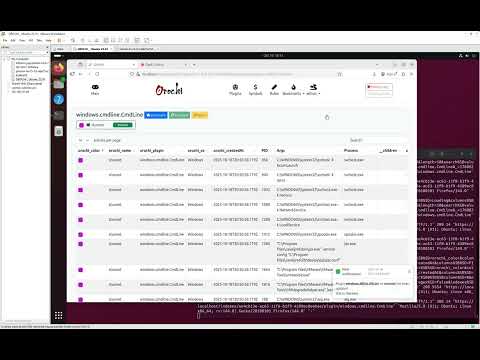](https://youtu.be/9g8EfC0OK7k)
**Watch a complete 15-minute setup and walkthrough** showing how to install, configure, and use Orochi.
**Guide Timestamps:**
- **00:00** ➡️ _Introduction:_ Cloning the GitHub repository
- **00:30** ➡️ _Docker Launch:_ Starting Orochi with `docker-compose up`
- **03:00** ➡️ _Platform Access:_ Opening the web interface
- **03:35** ➡️ _Admin Configuration:_ Downloading plugins & symbols
- **04:00** ➡️ _Dask Monitoring:_ Observing parallel analysis tasks
- **05:20** ➡️ _Memory Dump Upload:_ Uploading and analyzing a file
- **10:45** ➡️ _Download Process:_ Retrieving dumped artifacts
- **12:15** ➡️ _Regipy Plugins:_ Viewing parsed registry data
- **12:40** ➡️ _Hex Viewer:_ Navigating memory data in hex
- **14:35** ➡️ _Bookmarks:_ Saving and revisiting filtered results
---
- [Users Guide](docs/Users-Guide.md)
- [Admin Guide](docs/Admin-Guide.md)
- [API Guide](docs/API-Guide.md)
- [Deploy to Swarm Guide](docs/Deploy-to-Swarm-Guide.md)
---
Join discussions and get help on [Gitter](https://gitter.im/ldo-cert-orochi/community).
We welcome questions, feedback, and new ideas to improve Orochi!
> 💡 **Tip:** You can also open GitHub Discussions or Issues directly in this repository.
---
We love community contributions!
Please review the [Contributing Guidelines](CONTRIBUTING.md) and [Code of Conduct](CODE_OF_CONDUCT.md).
> 🧩 Pull requests are welcome — from typo fixes to new integrations and plugin improvements.
---
> _"Its eyes are like akakagachi, it has one body with eight heads and eight tails. Moss and cypress grow on its back, its belly is constantly bloody and inflamed."_
[Read the full legend on Wikipedia →](https://en.wikipedia.org/wiki/Yamata_no_Orochi)
🗡️ _Let's go cut tails and find your Kusanagi-no-Tsurugi!_
---
© 2025 LDO-CERT — Collaborative Memory Forensics Platform