https://github.com/leafOfTree/WindowTabs
A utility that brings browser-style tabbed window management to the desktop.
https://github.com/leafOfTree/WindowTabs
Last synced: over 1 year ago
JSON representation
A utility that brings browser-style tabbed window management to the desktop.
- Host: GitHub
- URL: https://github.com/leafOfTree/WindowTabs
- Owner: leafOfTree
- License: mit
- Created: 2019-07-04T10:19:51.000Z (about 7 years ago)
- Default Branch: master
- Last Pushed: 2024-10-28T03:52:33.000Z (over 1 year ago)
- Last Synced: 2024-10-28T05:49:29.085Z (over 1 year ago)
- Language: C#
- Homepage:
- Size: 73.5 MB
- Stars: 402
- Watchers: 10
- Forks: 49
- Open Issues: 7
-
Metadata Files:
- Readme: README.md
- License: LICENSE
Awesome Lists containing this project
README

# WindowTabs
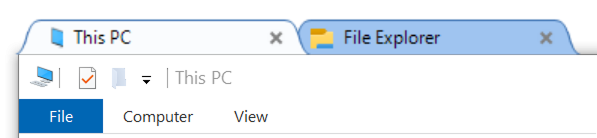
A utility that brings browser-style tabbed window management to the desktop.
## History
It was originally developed by Maurice Flanagan in 2009 and was provided as free and paid versions.
The author who no longer has time to maintain it has open-sourced it. See the original repository: [mauricef/WindowTabs](https://github.com/mauricef/WindowTabs).
This repository is a fork of [payaneco's repository](https://github.com/payaneco/WindowTabs) which is from [redgis'](https://github.com/redgis/WindowTabs). Now, it compiles and runs successfully on Win7, Win10 and Win11.
## Download
You can download my prebuilt files from the [releases](https://github.com/leafOfTree/WindowTabs/releases) page. You can also compile the `exe` file as below.
## Usage
- Run `WindowTabs.exe`. It will run in the background.
- Configure for which window group and tab are enabled, along with other settings.
- Right click on the notification icon at the bottom right corner.
- Right click on the tab title.
## Contribution
Any help is very welcome. Feel free to create issues or pull requests. If you'd like to fix issues, you can pick [any open issue](https://github.com/leafOfTree/WindowTabs/issues?q=is%3Aissue%20state%3Aopen).
## Compilation
Tested on Win10 with Visual Studio 2019 or 2022.
- Clone
```
git clone https://github.com/leafOfTree/WindowTabs
```
- Install
- [Visual Studio 2022 community edition](https://visualstudio.microsoft.com/)
`.NET desktop development` needs to be selected in the installer.
- [WiX Toolset build tools V3.14.1](https://wixtoolset.org/docs/wix3/)
- [WiX Toolset Visual Studio 2022 Extension](https://marketplace.visualstudio.com/items?itemName=WixToolset.WixToolsetVisualStudio2022Extension)
> You need to close Visual Studio first to install the extension. Visual Studio 2019 and its WiX extension also work.
- Compile and Release
Launch Visual Studio, open this project by "File > Open > Project/Solution", and select "WindowTabs.sln".
If you choose the `Release` configuration and click `Start`, you will get a release version `WindowTabs\WtProgram\bin\Release\WindowTabs.exe`.
- Debug
Choose the `Debug` configuration and it will compile to `WindowTabs\WtProgram\bin\Debug\WindowTabs.exe`.
Tips
- In Visual Studio editor, click on the left gray column to add a breakpoint on the current line. Then start `Debug` and you can see runtime details.
- You can also debug using `System.Diagnostics.Debug.WriteLine("Hello, world");` in code to print logs
## Project Structure
- Entry point: `Program.fs` this.run
- Tray icon (Notify icon): `NotifyIconPlugin.fs` this.icon
- Settings Window: `DesktopManagerForm.fs`. Its tabs are under `ManagerViewService/Views/`
- Tree: `treeviewadv/`. Probably from https://sourceforge.net/projects/treeviewadv/
- Taskbar group: `SuperBarPlugin.fs`
- GUI framework: WinForms
## Changes
2025
- Add text color option in Appearnce
- Add buttons to use preset theme colors: dark mode and blue variant in Appearnce
- Fix tabs overlap the minimize button when aligning right
- Support mouse hover to activate tab
- Add options to save default values of auto hide and align tabs
2024
- Improve UI - layout, color, and font
- Support close all tabs from taskbar button rightclick menu
- Fix WindowTabs's alt+tab collapse when there is no open window
- Support Visual Studio 2022
- Remove task window peek (preview) to fix task switch error
- Use the last file name as tab name
- UI improvement on icon and task switch form border
- Add option to deactivate `ctrl+1`... hotkeys
- Add `New window` item to tab context menu
- Support settings file at the same path of exe file
2023
- Recognize ApplicationFrameWindow based Apps like Photo and Mail.
- Fix null exception on toggling Fade out... option.
- Adjust settings font and display.
- Fix the extra empty tab for File Explorer.
- Update packages for Win10.
- Fix desktop `Programs` title missing issue.
## Refs
- [mauricef/WindowTabs](https://github.com/mauricef/WindowTabs) the original repository
- [redgis/WindowTabs](https://github.com/redgis/WindowTabs)
- [payaneco/WindowTabs](https://github.com/payaneco/WindowTabs)
- [leafoftree/WindowTabs](https://github.com/leafOfTree/WindowTabs)