https://github.com/leandroveronezi/go-recognizer
Face detection and recognition using golang
https://github.com/leandroveronezi/go-recognizer
cnn-classification dlib-face-detection dlib-face-recognition face-detection face-recognition golang
Last synced: 6 months ago
JSON representation
Face detection and recognition using golang
- Host: GitHub
- URL: https://github.com/leandroveronezi/go-recognizer
- Owner: leandroveronezi
- License: mit
- Created: 2020-02-29T19:07:10.000Z (over 6 years ago)
- Default Branch: master
- Last Pushed: 2023-04-17T18:00:38.000Z (about 3 years ago)
- Last Synced: 2026-01-13T19:58:35.452Z (6 months ago)
- Topics: cnn-classification, dlib-face-detection, dlib-face-recognition, face-detection, face-recognition, golang
- Language: Go
- Homepage: https://leandroveronezi.github.io/go-recognizer
- Size: 27.8 MB
- Stars: 73
- Watchers: 3
- Forks: 13
- Open Issues: 0
-
Metadata Files:
- Readme: README.md
- License: LICENSE
Awesome Lists containing this project
README
## Face detection and recognition using golang
[](https://goreportcard.com/report/github.com/leandroveronezi/go-recognizer)
[](https://godoc.org/github.com/leandroveronezi/go-recognizer)


[](https://github.com/Kagami/go-face)
## Requirements
go-recognizer require go-face to compile. go-face need to have dlib (>= 19.10) and libjpeg development packages installed.
### Ubuntu 18.10+, Debian sid
Latest versions of Ubuntu and Debian provide suitable dlib package so just run:
```bash
# Ubuntu
sudo apt-get install libdlib-dev libblas-dev libatlas-base-dev liblapack-dev libjpeg-turbo8-dev
# Debian
sudo apt-get install libdlib-dev libblas-dev libatlas-base-dev liblapack-dev libjpeg62-turbo-dev
```
### macOS
Make sure you have [Homebrew](https://brew.sh) installed.
```bash
brew install dlib
```
### Windows
Make sure you have [MSYS2](https://www.msys2.org) installed.
1. Run `MSYS2 MSYS` shell from Start menu
2. Run `pacman -Syu` and if it asks you to close the shell do that
3. Run `pacman -Syu` again
4. Run `pacman -S mingw-w64-x86_64-gcc mingw-w64-x86_64-dlib`
5.
1. If you already have Go and Git installed and available in PATH uncomment
`set MSYS2_PATH_TYPE=inherit` line in `msys2_shell.cmd` located in MSYS2
installation folder
2. Otherwise run `pacman -S mingw-w64-x86_64-go git`
6. Run `MSYS2 MinGW 64-bit` shell from Start menu to compile and use go-face
### Other systems
Try to install dlib/libjpeg with package manager of your distribution or
[compile from sources](http://dlib.net/compile.html). Note that go-face won't
work with old packages of dlib such as libdlib18. Alternatively create issue
with the name of your system and someone might help you with the installation
process.
## Usage
To use go-recognizer in your Go code:
```go
import "github.com/leandroveronezi/go-recognizer"
```
To install go-recognizer in your $GOPATH:
```bash
go get github.com/leandroveronezi/go-recognizer
```
## Models
Currently `shape_predictor_5_face_landmarks.dat`, `mmod_human_face_detector.dat` and
`dlib_face_recognition_resnet_model_v1.dat` are required. You may download them
from [dlib-models](https://github.com/davisking/dlib-models) repo:
```bash
mkdir models && cd models
wget https://github.com/davisking/dlib-models/raw/master/shape_predictor_5_face_landmarks.dat.bz2
bunzip2 shape_predictor_5_face_landmarks.dat.bz2
wget https://github.com/davisking/dlib-models/raw/master/dlib_face_recognition_resnet_model_v1.dat.bz2
bunzip2 dlib_face_recognition_resnet_model_v1.dat.bz2
wget https://github.com/davisking/dlib-models/raw/master/mmod_human_face_detector.dat.bz2
bunzip2 mmod_human_face_detector.dat.bz2
```
## Examples
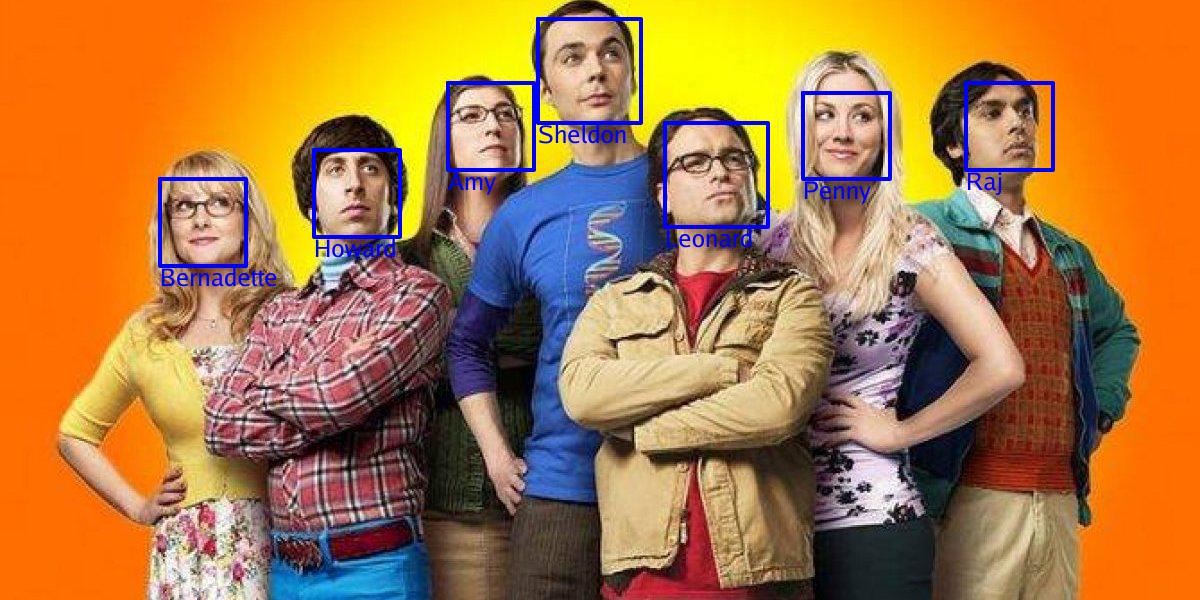
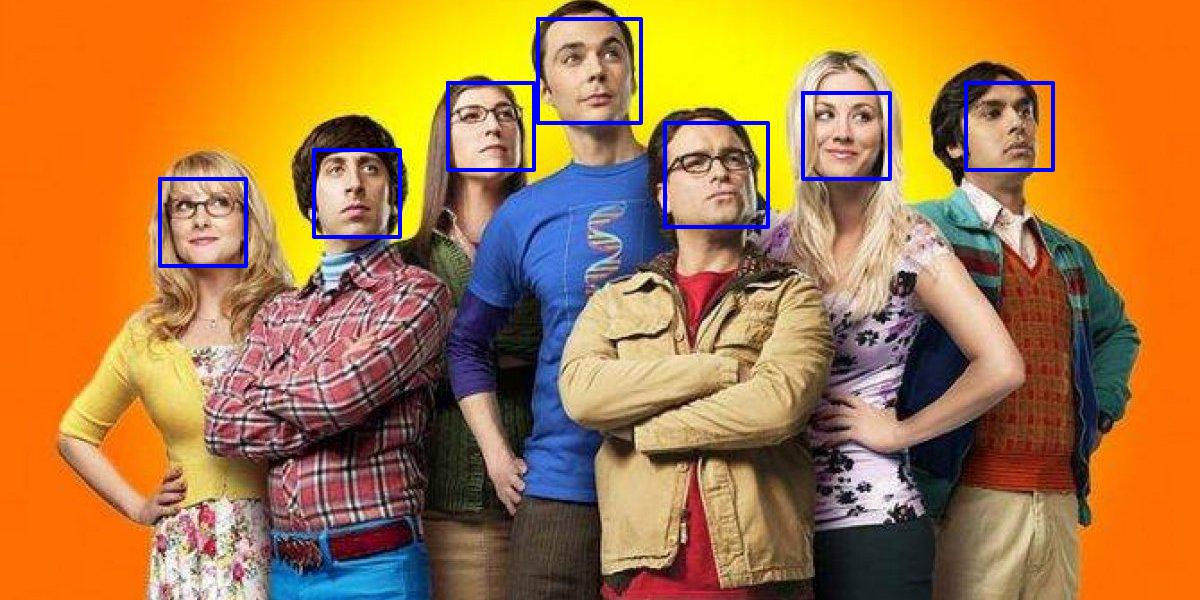
###### Face detection
```go
package main
import (
"fmt"
"github.com/leandroveronezi/go-recognizer"
"path/filepath"
)
const fotosDir = "fotos"
const dataDir = "models"
func main() {
rec := recognizer.Recognizer{}
err := rec.Init(dataDir)
if err != nil {
fmt.Println(err)
return
}
rec.Tolerance = 0.4
rec.UseGray = true
rec.UseCNN = false
defer rec.Close()
faces, err := rec.RecognizeMultiples(filepath.Join(fotosDir, "elenco3.jpg"))
if err != nil {
fmt.Println(err)
return
}
img, err := rec.DrawFaces2(filepath.Join(fotosDir, "elenco3.jpg"), faces)
if err != nil {
fmt.Println(err)
return
}
rec.SaveImage("faces2.jpeg", img)
}
```
###### Face recognition
```go
package main
import (
"fmt"
"github.com/leandroveronezi/go-recognizer"
"path/filepath"
)
const fotosDir = "fotos"
const dataDir = "models"
func addFile(rec *recognizer.Recognizer, Path, Id string) {
err := rec.AddImageToDataset(Path, Id)
if err != nil {
fmt.Println(err)
return
}
}
func main() {
rec := recognizer.Recognizer{}
err := rec.Init(dataDir)
if err != nil {
fmt.Println(err)
return
}
rec.Tolerance = 0.4
rec.UseGray = true
rec.UseCNN = false
defer rec.Close()
addFile(&rec, filepath.Join(fotosDir, "amy.jpg"), "Amy")
addFile(&rec, filepath.Join(fotosDir, "bernadette.jpg"), "Bernadette")
addFile(&rec, filepath.Join(fotosDir, "howard.jpg"), "Howard")
addFile(&rec, filepath.Join(fotosDir, "penny.jpg"), "Penny")
addFile(&rec, filepath.Join(fotosDir, "raj.jpg"), "Raj")
addFile(&rec, filepath.Join(fotosDir, "sheldon.jpg"), "Sheldon")
addFile(&rec, filepath.Join(fotosDir, "leonard.jpg"), "Leonard")
rec.SetSamples()
faces, err := rec.ClassifyMultiples(filepath.Join(fotosDir, "elenco3.jpg"))
if err != nil {
fmt.Println(err)
return
}
img, err := rec.DrawFaces(filepath.Join(fotosDir, "elenco3.jpg"), faces)
if err != nil {
fmt.Println(err)
return
}
rec.SaveImage("faces.jpg", img)
}
```