https://github.com/lemariva/nrf24amini
Arduino Pro Mini node compatible with nRF24Things (Android Things)
https://github.com/lemariva/nrf24amini
arduino nrf24l01 sensor-network
Last synced: about 2 months ago
JSON representation
Arduino Pro Mini node compatible with nRF24Things (Android Things)
- Host: GitHub
- URL: https://github.com/lemariva/nrf24amini
- Owner: lemariva
- License: apache-2.0
- Created: 2018-06-30T10:10:43.000Z (almost 8 years ago)
- Default Branch: master
- Last Pushed: 2018-06-30T18:25:49.000Z (almost 8 years ago)
- Last Synced: 2025-02-05T00:28:15.559Z (over 1 year ago)
- Topics: arduino, nrf24l01, sensor-network
- Language: C++
- Homepage:
- Size: 90.8 KB
- Stars: 1
- Watchers: 3
- Forks: 1
- Open Issues: 0
-
Metadata Files:
- Readme: README.md
- License: LICENSE
Awesome Lists containing this project
README
# nrf24amini
Arduino Pro Mini node compatible with [nRF24Things](https://github.com/lemariva/nRF24Things) (Android Things)
## Requirements
### Hardware
* [Arduino Mini Pro (3.3V)](https://www.banggood.com/10Pcs-Pro-Mini-ATMEGA328P-3-3V-8M-Interactive-Media-Upgrade-Version-For-Arduino-p-1193822.html?p=QW0903761303201409LG)
* [NRF24L01+](https://www.banggood.com/NRF24L01-Wireless-Module-2_4-Ghz-RF-Transceiver-SPI-Board-1_9-to-3_6V-p-1243622.html?p=QW0903761303201409LG) or [Long Distance NRF24L01+](https://www.banggood.com/10Pcs-1100-Meter-Long-Distance-NRF24L01PALNA-Wireless-Module-With-Antenna-p-1066643.html?p=QW0903761303201409LG)
* [FTDI-1232](https://www.banggood.com/FuriousFPV-FTDI-1232-for-True-D-Diversity-Receiver-Fatshark-Dominator-Goggles-p-1189544.html?p=QW0903761303201409LG)
* [Jumper Cables](https://www.banggood.com/120pcs-Multicolored-Dupont-Wire-Male-to-Female-Male-to-Male-Female-to-Female-Jumper-Wire-Kit-p-1262667.html?p=QW0903761303201409LG)
### Software
* [nRF24](https://github.com/nRF24) Libraries
* RF24
* RF24Network
* RF24Mesh
* [Arduino IDE](https://www.arduino.cc/en/Main/Software?)
## Preview
[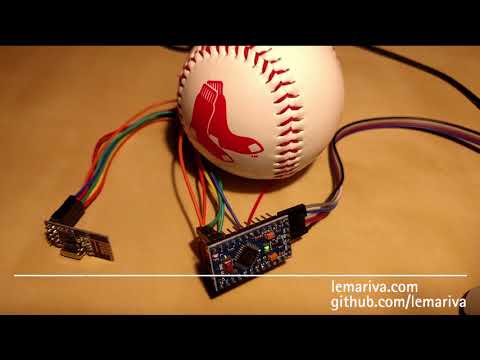](https://www.youtube.com/watch?v=tzyviVtebbg)
## Connection
| |
|:-:|
| |
|
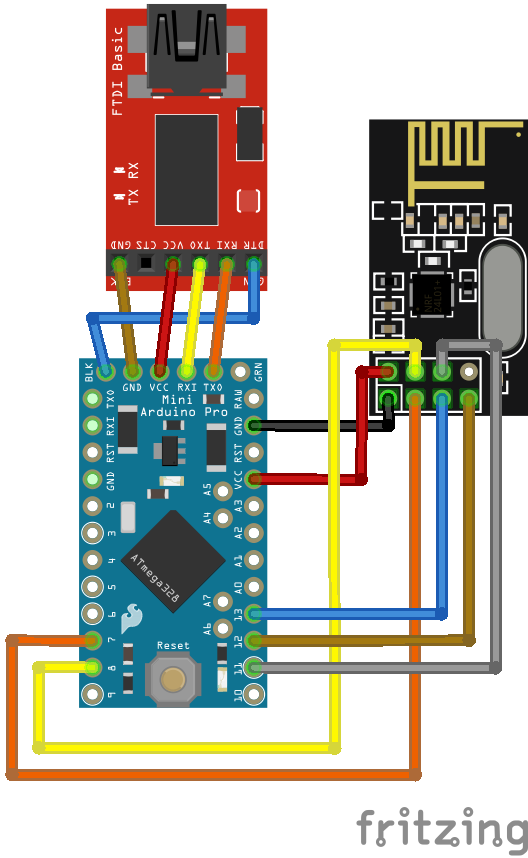
|Fig. 1: FTDI-1232, Arduino Mini Pro (3.3V) & NRF24L01+|
Please check that the Arduino Mini Pro is a 3.3V compatible version. The NRF24L01+ does not support 5V. If you use an Arduino 5V version, you need to not only supply the nrf24l01+ with 3.3V but also the signals (CE, CSN, MOSI, MISO) should be 3.3V too.
The FTDI1232 board muss work with 3.3V too. The board that I linked in the section hardware has a jumper to set its voltage to 3.3V.
## Instructions
1. Connect the boards as described in the Connection section. Check voltage jumpers!
2. Install the Arduino Ide and open it.
3. Connect the FTDI1232 to your computer.
4. Go to the menu "Tools" > "Programmer" and select "AVRISP mkII".
5. Go to the menu "Board" and select "Arduino Pro or Pro Mini".
6. Go to the menu "Processor" and select "ATMega328P (3.3V, 8MHz)".
7. Go to the menu "Sketch" > "Include Library" and open "Manage Libraries"
* Search for RF24 and install the following libraries:
* RF24 by TMRh20 Version 1.3.1
* RF24Network by TMRh20 Version 1.0.8
* RF24Mesh by TMRh20 Version 1.0.51
8. Go to the folder where the libraries were installed (on Windows - `C:\Users\\Documents\Arduino\libraries` and edit the following files:
* `RF24Mesh\RF24Mesh_config.h` [line 13]
* `#define MESH_DEFAULT_CHANNEL 76`
* `RF24Network\RF24Network.cpp` [line 1247-1248]
* `static uint8_t address_translation[] = { 0xc3,0x3c,0x33,0xce,0x3e,0xe3,0xec }`
* `uint64_t result = 0xCCCCCCCCCCL;`
9. Upload the code with the `Upload` button, and have fun!
## Credits
Libraries from TMRh20 and maniacbug:
* RF24
* RF24Network
* RF24Mesh
## Licenses
Licenses include, but are not limited to the following (check respective files):
* GNU
* Apache 2.0
* etc...