https://github.com/lengocduy/dllogging
Unify and modularize abstract logging framework written in Swift
https://github.com/lengocduy/dllogging
logger logging logging-framework swift swiftlog
Last synced: about 1 year ago
JSON representation
Unify and modularize abstract logging framework written in Swift
- Host: GitHub
- URL: https://github.com/lengocduy/dllogging
- Owner: lengocduy
- License: mit
- Created: 2020-06-15T18:50:00.000Z (about 6 years ago)
- Default Branch: master
- Last Pushed: 2021-10-25T18:06:38.000Z (over 4 years ago)
- Last Synced: 2025-04-11T23:52:03.829Z (about 1 year ago)
- Topics: logger, logging, logging-framework, swift, swiftlog
- Language: Swift
- Homepage: https://lengocduy.github.io/DLLogging/
- Size: 2.1 MB
- Stars: 0
- Watchers: 1
- Forks: 2
- Open Issues: 1
-
Metadata Files:
- Readme: README.md
- Changelog: CHANGELOG.md
- License: LICENSE.md
Awesome Lists containing this project
README
# DLLogging

[](http://cocoapods.org/pods/DLLogging)
[](http://cocoapods.org/pods/DLLogging)
[](http://cocoapods.org/pods/DLLogging)
[](https://github.com/Carthage/Carthage)
An abstract Logging Framework supports:
- Unified Logging.
- Modularize, Centralize Logging.
- Plugin the new logging easier.
- Fully customize format logging's message.
- Built-in Loggings
- Console Logging
- PrintLogging: Swift's print.
- PrintDebugLogging: Swift's debugPrint.
- File Logging
- Write the log message to file.
- It flushes the content as Data with a UTF-8 encoding and call back to client for process each configured TimeInterval and clear content.
## Log Level supports
1. 🗣 Verbose: A verbose message, usually useful when working on a specific problem.
2. 🔍 Debug: A debug message that may be useful to a developer.
3. ℹ️ Info: An info message that highlight the progress of the application at coarse-grained level.
4. ⚠️ Warning: A warning message, may indicate a possible error.
5. ❗️ Error: An error occurred, but it's recoverable, just info about what happened.
6. 🛑 Severe: A server error occurred.
## Requirements
- Xcode 11+
- Swift 5.0+
## How
### Setup
1. Use Framework's default setup.
```
import UIKit
import DLLogging
@UIApplicationMain
class AppDelegate: UIResponder, UIApplicationDelegate {
func application(_ application: UIApplication, didFinishLaunchingWithOptions launchOptions: [UIApplication.LaunchOptionsKey: Any]?) -> Bool {
// Override point for customization after application launch.
/// Setup Logging
LoggerManager.sharedInstance.initialize()
return true
}
}
```
2. Use supported Loggings.
```
import UIKit
import DLLogging
@UIApplicationMain
class AppDelegate: UIResponder, UIApplicationDelegate {
func application(_ application: UIApplication, didFinishLaunchingWithOptions launchOptions: [UIApplication.LaunchOptionsKey: Any]?) -> Bool {
/// Setup Logging
let logFormatter = LogFormatterImpl()
LoggerManager.sharedInstance.addLogging(LoggerFactoryImpl.makeConsoleLogging(logFormatter: logFormatter))
LoggerManager.sharedInstance.addLogging(LoggerFactoryImpl.makeFileLogging(fileName: "logs"))
/// Disable LogLevels. Enable all LogLevels by default
LoggerManager.sharedInstance.disableLogLevels([LogLevel.info, LogLevel.error])
return true
}
}
```
3. Add your custom Logging.
```
import UIKit
import DLLogging
@UIApplicationMain
class AppDelegate: UIResponder, UIApplicationDelegate {
func application(_ application: UIApplication, didFinishLaunchingWithOptions launchOptions: [UIApplication.LaunchOptionsKey: Any]?) -> Bool {
// Override point for customization after application launch.
/// Setup Logging
let logFormatter = LogFormatterImpl()
let testLogging = TestLogging(logFormatter: logFormatter)
LoggerManager.sharedInstance.addLogging(testLogging)
return true
}
}
/// Your custom Logging.
final class TestLogging: BaseLogging {
let logger = OSLog.init(subsystem: "com.domain.loggingdemo", category: "main")
override func receiveMessage(_ message: LogMessage) {
if let formattedMessage = logFormatter?.formatMessage(message) {
os_log("%@", log: logger, type: OSLogType.debug, formattedMessage)
} else {
os_log("Your message %@", message.text)
}
}
}
```
4. Add your custom Formatter.
```
import UIKit
import DLLogging
@UIApplicationMain
class AppDelegate: UIResponder, UIApplicationDelegate {
func application(_ application: UIApplication, didFinishLaunchingWithOptions launchOptions: [UIApplication.LaunchOptionsKey: Any]?) -> Bool {
// Override point for customization after application launch.
/// Setup Logging
let logFormatter = CustomLoggingFormatter()
let testLogging = LoggerFactoryImpl.makeConsoleLogging(logFormatter: logFormatter)
LoggerManager.sharedInstance.addLogging(testLogging)
return true
}
}
/// Your custom Formatter
final class CustomLoggingFormatter: LogFormatter {
func formatMessage(_ message: LogMessage) -> String {
return "[\(message.level.symbol)][\(message.function)] -> \(message.text)"
}
}
```
### Use
```
/// Invoke
Log.info(message: "info")
Log.debug(message: "debug")
Log.verbose(message: "verbose")
Log.warning(message: "warning")
Log.error(message: "error")
Log.severe(message: "severe")
/// Output
2020-07-16T18:50:09.254+0700 [ℹ️][ViewController.swift:18:viewDidLoad()] -> info
2020-07-16T18:50:09.256+0700 [🔍][ViewController.swift:19:viewDidLoad()] -> debug
2020-07-16T18:50:09.256+0700 [🗣][ViewController.swift:20:viewDidLoad()] -> verbose
2020-07-16T18:50:09.257+0700 [⚠️][ViewController.swift:21:viewDidLoad()] -> warning
2020-07-16T18:50:09.257+0700 [❗️][ViewController.swift:22:viewDidLoad()] -> error
2020-07-16T18:50:09.257+0700 [🛑][ViewController.swift:23:viewDidLoad()] -> severe
```
## Installation
There are three ways to install `DLLogging`
### CocoaPods
Just add to your project's `Podfile`:
```
pod 'DLLogging', '~> 1.2'
```
### Carthage
Add following to `Cartfile`:
```
github "lengocduy/DLLogging" ~> 1.2
```
- To building platform-independent xcframeworks xcode12 and above [here](https://github.com/Carthage/Carthage#building-platform-independent-xcframeworks-xcode-12-and-above)
- To migrating from framework bundles to xcframework [here](https://github.com/Carthage/Carthage#migrating-a-project-from-framework-bundles-to-xcframeworks)
### Swift Package Manager
Create a `Package.swift` file:
```
// swift-tools-version:5.0
import PackageDescription
let package = Package(
name: "TestLogging",
dependencies: [
.package(url: "https://github.com/lengocduy/DLLogging.git", from: "1.2.0"),
],
targets: [
.target(
name: "TestLogging",
dependencies: ["DLLogging"])
]
)
```
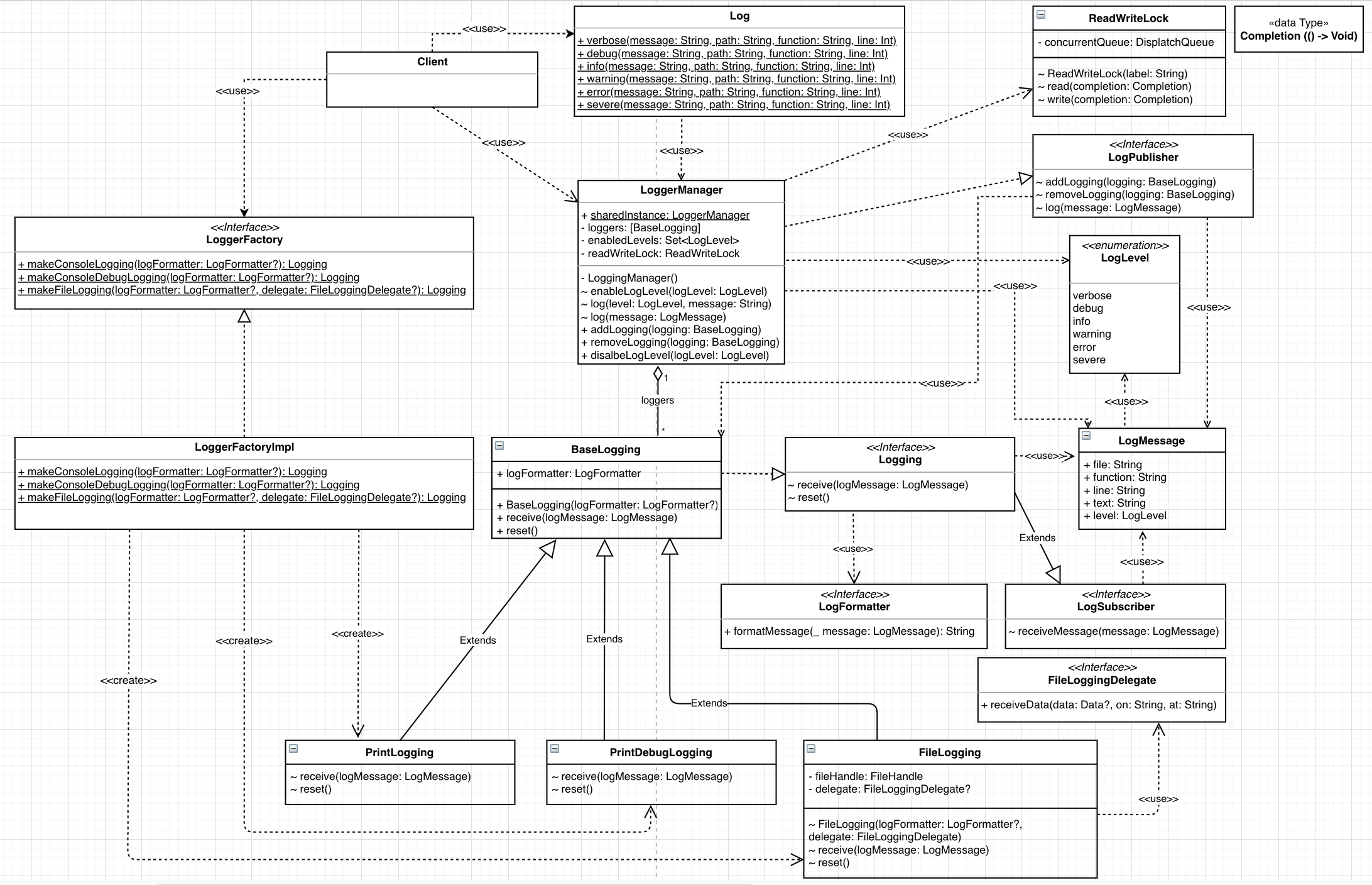
## Architecture
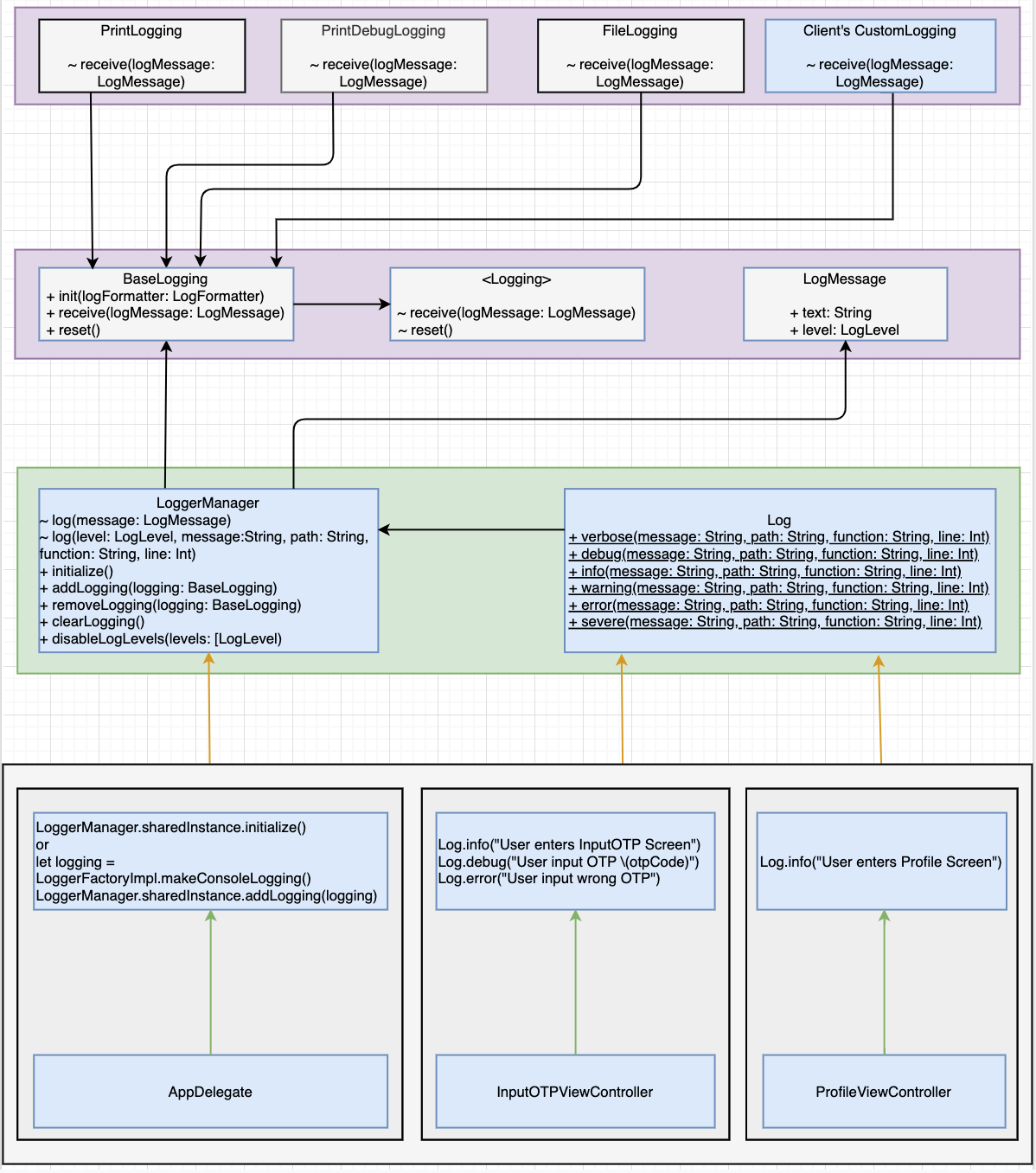
## Interaction Flow
## License
DLLogging is available under the MIT license. See the [LICENSE](LICENSE.md) file for more info.