https://github.com/leny/atom-w3c-validation
Validate your HTML and CSS files using W3C validators.
https://github.com/leny/atom-w3c-validation
Last synced: 5 months ago
JSON representation
Validate your HTML and CSS files using W3C validators.
- Host: GitHub
- URL: https://github.com/leny/atom-w3c-validation
- Owner: leny
- License: mit
- Created: 2015-02-04T00:23:56.000Z (over 11 years ago)
- Default Branch: master
- Last Pushed: 2019-01-23T14:43:51.000Z (over 7 years ago)
- Last Synced: 2025-10-08T07:41:10.366Z (10 months ago)
- Language: JavaScript
- Size: 52.7 KB
- Stars: 12
- Watchers: 3
- Forks: 5
- Open Issues: 23
-
Metadata Files:
- Readme: README.md
- Changelog: CHANGELOG.md
- License: LICENSE.md
Awesome Lists containing this project
README
# atom-w3c-validation
> Validate your HTML and CSS file using [W3C markup validator](http://validator.w3.org/) or [W3C CSS validator](http://http://jigsaw.w3.org/css-validator/).
* * *
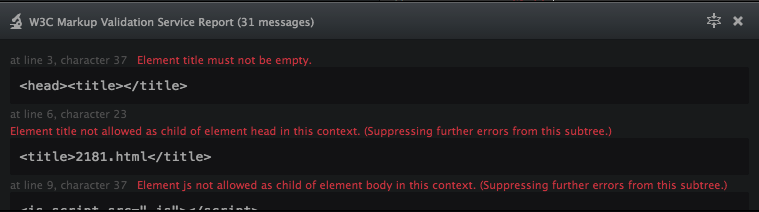
## Usage
The package validate on save by default (you can disable this behavior in the settings). You can also use the comma,d `w3c-validation:validate`.
**Note:** the validation process is made by requesting the code to the online [W3C markup validator](http://validator.w3.org/) or [W3C CSS validator](http://http://jigsaw.w3.org/css-validator/). This can take some time.
### Settings
#### Validate on save
`validateOnSave`: Make a validation each time you save an HTML file.
#### Validate on change
`validateOnChange`: Make a validation each time you change an HTML file.
#### Hide on no errors
`hideOnNoErrors`: Hide the panel if there was no errors.
#### Use fold mode as default
`useFoldModeAsDefault`: Fold the results panel by default.
#### CSS Profile
`cssProfile`: Profile to use for CSS file validation (default: css3). *For CSS files only*
#### CSS Media
`cssMedia`: Media to use for CSS file validation (default: all). *For CSS files only*
#### CSS Report severity
`cssReportType`: CSS Report severity (default: normal). *For CSS files only*
## Keybindings
With the success of Atom, it's really difficult to choose keybindings that will not enter in conflict whit anyone else's packages, so I have removed the default keystrokes and let the keymap empty to let you set your own keybindings.