https://github.com/leoherzog/groupie
Google Group advanced management — Modify or copy settings, duplicate groups, and more
https://github.com/leoherzog/groupie
apps-script google-apps-script google-groups
Last synced: 13 days ago
JSON representation
Google Group advanced management — Modify or copy settings, duplicate groups, and more
- Host: GitHub
- URL: https://github.com/leoherzog/groupie
- Owner: leoherzog
- License: mit
- Created: 2026-06-16T19:21:57.000Z (about 1 month ago)
- Default Branch: main
- Last Pushed: 2026-06-16T20:55:34.000Z (about 1 month ago)
- Last Synced: 2026-06-16T22:27:10.796Z (about 1 month ago)
- Topics: apps-script, google-apps-script, google-groups
- Language: HTML
- Homepage:
- Size: 84 KB
- Stars: 0
- Watchers: 0
- Forks: 0
- Open Issues: 0
-
Metadata Files:
- Readme: README.md
- License: LICENSE
Awesome Lists containing this project
README
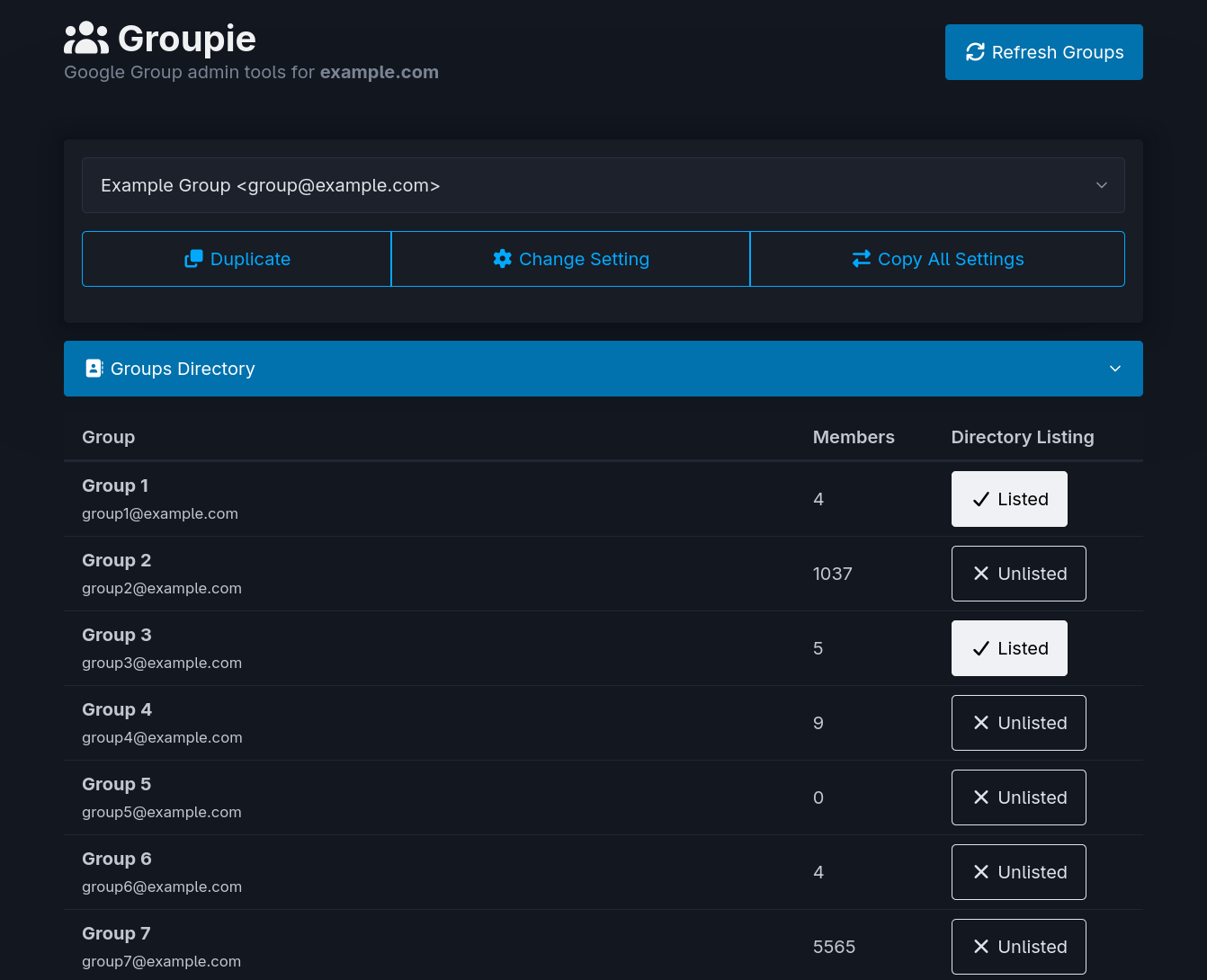
# Groupie
A single, modernized admin toolbox for **Google Groups for Workspace**.
### Basics
[Google Groups for Workspace](https://support.google.com/a/topic/25838) lets admins create mailing lists for their domain — different from the public-facing [Google Groups](https://groups.google.com/) forums. Each group carries a large set of settings, many of them awkward to read and manage in bulk through the Admin Console or Google Groups UI. Groupie works with them directly through the [Admin Groups Settings API](https://developers.google.com/workspace/admin/groups-settings/v1/reference/groups).
Groupie grabs every group on your domain and gives you one place to manage them:
- **Duplicate** a group — spin up a new group that inherits all of an existing one's settings, with your own email, name, and description.
- **Change Setting** — pick a group, pick a single setting, and see its current and possible values before you change it.
- **Copy All Settings** — overwrite every setting on a destination group with those of a source group, optionally including the description.
- **Groups Directory** — a table of every group with its member count and a one-click toggle to list/unlist it from your domain's email autocomplete directory.
### Setup
> [!IMPORTANT]
> API calls run against the Admin SDK and require Workspace admin privileges over groups. Depending on the deployment model you choose below, that's either the account that deploys the app (Option A) or each person who uses it (Option B).
#### Option A — Run as the domain administrator
The web app makes its API calls with **your** admin privileges, so anyone you grant access can use the tool without being an admin themselves.
- **Execute as:** `Me (your-admin@yourdomain.com)`
- **Who has access:** `Anyone within yourdomain.com`
> [!WARNING]
> Anyone who can open the app gets the full power of these tools running as you. Restrict access (or use Option B) if that's broader than you want.
#### Option B — Run as the user accessing the web app
The web app makes its API calls with **the visitor's** privileges, so each person who uses it must themselves be a Workspace admin with group management rights. Each admin logs in to the tool and runs the actions as themselves.
- **Execute as:** `User accessing the web app`
- **Who has access:** `Anyone within yourdomain.com`
1. Create a [new Google Apps Script project](https://script.google.com/). If using Option A above, make sure to create the new project as the domain administrator.
2. Copy the code from [`Code.gs`](https://raw.githubusercontent.com/leoherzog/groupie/main/Code.gs) into `Code.gs` in the project.
3. Create a new HTML file with the `Files ➕` button in the left sidebar, choose `HTML`, name it `index` (`.html` is added automatically), and copy the code from [`index.html`](https://raw.githubusercontent.com/leoherzog/groupie/main/index.html) into it.
4. In the `Services ➕` section of the left sidebar, add the **Admin SDK API** (`AdminDirectory`) and the **Groups Settings API** (`AdminGroupsSettings`).
5. Click `Deploy` → `New deployment`, choose the `Web app` type, and pick one of the two deployment models above.
### Updating
When updates are released here on GitHub, copy the newer [`Code.gs`](https://raw.githubusercontent.com/leoherzog/groupie/main/Code.gs) and [`index.html`](https://raw.githubusercontent.com/leoherzog/groupie/main/index.html) into your project, then go to `Deploy` → `Manage deployments`. Click the `✏️ Edit` button on your deployment, choose `New version` under the `Version` dropdown, and click `Deploy`.
- - -
Feel free to take a look at the source and adapt as you please. I would love to see some pull requests for improvements.
Groupie is licensed under the [MIT License](LICENSE).
- - -
### About Me


