https://github.com/leonvogt/hotwire-native-dev-tools
A lightweight dev tool to debug and inspect Hotwire Native apps, right from your mobile app
https://github.com/leonvogt/hotwire-native-dev-tools
hotwire-native
Last synced: about 1 year ago
JSON representation
A lightweight dev tool to debug and inspect Hotwire Native apps, right from your mobile app
- Host: GitHub
- URL: https://github.com/leonvogt/hotwire-native-dev-tools
- Owner: leonvogt
- License: mit
- Created: 2025-01-06T22:42:03.000Z (over 1 year ago)
- Default Branch: main
- Last Pushed: 2025-05-26T19:20:17.000Z (about 1 year ago)
- Last Synced: 2025-06-10T23:45:31.510Z (about 1 year ago)
- Topics: hotwire-native
- Language: JavaScript
- Homepage:
- Size: 120 KB
- Stars: 38
- Watchers: 1
- Forks: 0
- Open Issues: 5
-
Metadata Files:
- Readme: README.md
- License: LICENSE
Awesome Lists containing this project
README
Hotwire Native Dev Tools
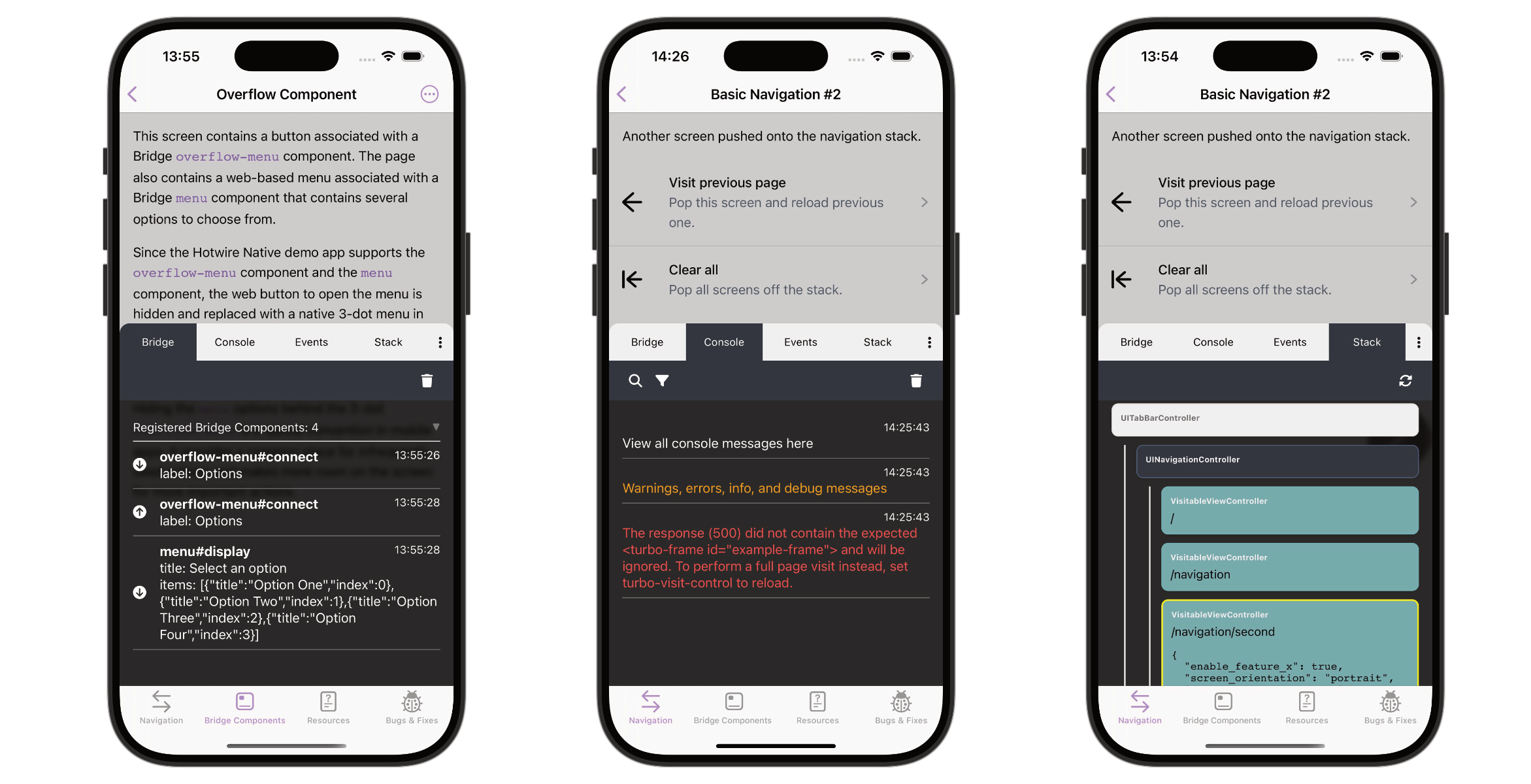
Hotwire Native Dev Tools aims to support the development process of Hotwire Native apps by providing a set of tools to inspect and debug the app.
- 🔍 Inspect the bridge communication and native stack
- 🪵 View console logs right in the mobile app
- ⚠️ Detect common Turbo issues
- 📦 No dependencies
## Installation
```bash
npm install hotwire-native-dev-tools
```
or
```bash
yarn add hotwire-native-dev-tools
```
## Usage (JS)
**Basic usage:**
```js
import { setupDevTools } from 'hotwire-native-dev-tools';
setupDevTools();
```
However, since you probably want to use the dev tools only during mobile app development, **the recommended approach is to create a custom entrypoint** that you load only when needed:
**Example Rails + Vite:**
```js
// app/javascript/entrypoints/hotwire_native_dev_tools.js
import { setupDevTools } from 'hotwire-native-dev-tools';
setupDevTools();
```
```erb
// layout/application.html.erb
<%= vite_javascript_tag "hotwire_native_dev_tools" if Rails.env.development? && hotwire_native_app? %>
```
**Tip**: Place the `vite_javascript_tag` early to capture all console logs and messages.
This way, you'll minimize the chances of missing console logs or bridge messages that are sent before the dev tools are initialized.
---
**Example Rails + Importmap:**
```rb
pin "hotwire-native-dev-tools"
pin "dev-tools", preload: false
```
```js
// app/javascript/dev-tools.js
import { setupDevTools } from 'hotwire-native-dev-tools';
setupDevTools();
```
```erb
// layout/application.html.erb
<%= javascript_importmap_tags %>
<%= javascript_import_module_tag "dev-tools" if Rails.env.development? && hotwire_native_app? %>
```
---
Alternatively, if you prefer not to create a custom entrypoint, you can use a JavaScript condition to determine whether the dev tools should be loaded:
```js
import { setupDevTools } from 'hotwire-native-dev-tools';
const isDev = process.env.NODE_ENV === 'development';
setupDevTools({
enabled: isDev,
});
```
Please note that your JS condition may vary depending on your setup and needs.
The downside of this approach is that you ship the JS code of the dev tools to the client, even if the client is not in development mode.
This dev tools package is quite small (~15kb), but if you want to avoid shipping unnecessary code to the client, you should use the custom entrypoint approach.
## Usage (Native)
Some features, such as the Native Stack and PathConfiguration properties, are only available if you add the dev tool bridge components to your app:
### iOS
1. Copy the Swift file [DevToolsComponent.swift](https://github.com/leonvogt/hotwire-native-dev-tools/blob/main/ios/DevToolsComponent.swift) into your Xcode project
2. Register the component
```diff
class AppDelegate: UIResponder, UIApplicationDelegate {
func application(_ application: UIApplication, didFinishLaunchingWithOptions launchOptions: [UIApplication.LaunchOptionsKey: Any]?) -> Bool {
Hotwire.registerBridgeComponents([
+ DevToolsComponent.self
])
return true
}
}
```
### Android
1. Copy the Kotlin file [DevToolsComponent.kt](https://github.com/leonvogt/hotwire-native-dev-tools/blob/main/android/DevToolsComponent.kt) into your Android Studio project
2. Update the package names where the comments say `// Replace with your package name`
3. Register the component
```diff
+ import replace.with.your.package.name.DevToolsComponent
class DemoApplication : Application() {
override fun onCreate() {
super.onCreate()
Hotwire.registerBridgeComponents(
+ BridgeComponentFactory("dev-tools", ::DevToolsComponent),
)
}
}
```
## Development
- Fork the project locally
- `npm install`
- `npm run dev`
**Setting Up the Package Locally**
One way to link the package locally is to use `yarn link`.
This allows you to develop the package and test it in another project.
In the root of this project run:
```bash
yarn link
```
In the project you want to use the package run:
```bash
yarn link hotwire-native-dev-tools
```
## Contributing
Bug reports and pull requests are welcome on GitHub at https://github.com/leonvogt/hotwire-native-dev-tools.
Any contributions, whether it's a bug fix, a new feature, or just a suggestion for improvement, are most welcome.