https://github.com/lepsch/bezier_kit
Bezier curves and paths in Dart for building vector applications
https://github.com/lepsch/bezier_kit
bezier bezier-curves curve geometry intersection quadratic
Last synced: 8 months ago
JSON representation
Bezier curves and paths in Dart for building vector applications
- Host: GitHub
- URL: https://github.com/lepsch/bezier_kit
- Owner: lepsch
- License: mit
- Created: 2024-01-09T13:19:02.000Z (over 2 years ago)
- Default Branch: main
- Last Pushed: 2024-12-01T12:35:06.000Z (over 1 year ago)
- Last Synced: 2025-10-22T22:55:48.300Z (8 months ago)
- Topics: bezier, bezier-curves, curve, geometry, intersection, quadratic
- Language: Dart
- Homepage:
- Size: 2.06 MB
- Stars: 1
- Watchers: 1
- Forks: 0
- Open Issues: 0
-
Metadata Files:
- Readme: README.md
- Changelog: CHANGELOG.md
- License: LICENSE
Awesome Lists containing this project
README
# bezier_kit
[](https://github.com/lepsch/bezier_kit/actions/workflows/dart.yaml)
`bezier_kit` is a comprehensive Bezier Path library written in Dart.
## About
`bezier_kit` has been manually converted from the original
[BezierKit in Swift](https://github.com/hfutrell/BezierKit).
It's based on the fork of [BezierKit ref 11a87c26](https://github.com/hfutrell/BezierKit/commits/11a87c261d03ac4d0a7c8d20595b841e5307e8cb)
from June 28 of 2022 (version 0.15.0).
## Features
- [x] Constructs linear (line segment), quadratic, and cubic Bézier curves
- [x] Determines positions, derivatives, and normals along curves
- [x] Lengths of curves via Legendre-Gauss quadrature
- [x] Intersects curves and computes cubic curve self-intersection to any degree of accuracy
- [x] Determines bounding boxes, extrema,
- [x] Locates nearest on-curve location to point
- [x] to any degree of accuracy
- [x] Splits curves into subcurves
- [x] Offsets and outlines curves
- [ ] Comprehensive Unit and Integration Test Coverage
- [ ] Complete Documentation
## Installation
Dart
```shell
dart pub add dart_lapack
```
Flutter
```shell
flutter pub add dart_lapack
```
## Usage
### Constructing & Drawing Curves
`bezier_kit` supports cubic Bezier curves (`CubicCurve`) and quadratic Bezier
curves (`QuadraticCurve`) as well as line segments (`LineSegment`) each of which
adopts the `BezierCurve` protocol that encompasses most API functionality.
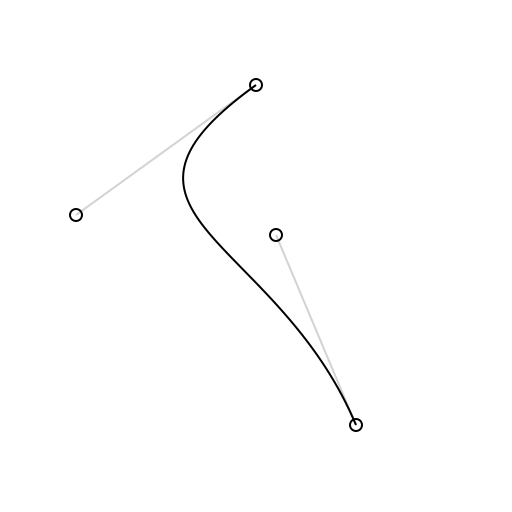
```dart
import 'package:bezier_kit/bezier_kit.dart';
final curve = CubicCurve(
p0: Point(x: 100, y: 25),
p1: Point(x: 10, y: 90),
p2: Point(x: 110, y: 100),
p3: Point(x: 150, y: 195),
);
final canvas: Canvas = ... // your graphics context here
final draw = Draw(canvas);
draw.drawSkeleton(curve: curve); // draws visual representation of curve control points
draw.drawCurve(curve: curve); // draws the curve itself
```
### Intersecting Curves
The `intersections(with curve: BezierCurve) -> [Intersection]` method determines each intersection between `self` and `curve` as an array of `Intersection` objects. Each intersection has two fields: `t1` represents the t-value for `self` at the intersection while `t2` represents the t-value for `curve` at the intersection. You can use the `ponit(at:)` method on either of the curves to calculate the coordinates of the intersection by passing in the corresponding t-value for the curve.
Cubic curves may self-intersect which can be determined by calling the `selfIntersections()` method.
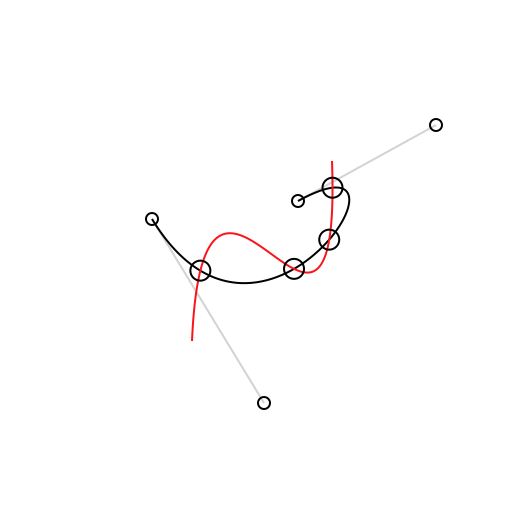
```dart
final intersections = curve1.intersectionsWithCurve(curve2);
final points = intersections.map((i) => curve1.point(at: i.t1));
draw.drawCurve(curve: curve1);
draw.drawCurve(curve: curve2);
for (final p in points) {
draw.drawPoint(origin: p);
}
```
### Splitting Curves
The `split(from:, to:)` method produces a subcurve over a given range of t-values. The `split(at:)` method can be used to produce a left subcurve and right subcurve created by splitting across a single t-value.
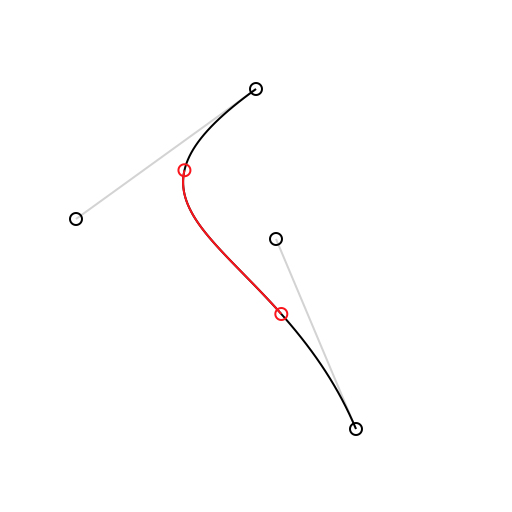
```dart
draw.setColor(color: Draw.lightGrey);
draw.drawSkeleton(curve: curve);
draw.drawCurve(curve: curve);
final subcurve = curve.split(from: 0.25, to: 0.75); // or try (leftCurve, rightCurve) = curve.split(at:)
draw.setColor(color: Draw.red);
draw.drawCurve(curve: subcurve);
draw.drawCircle(center: curve.point(at: 0.25), radius: 3);
draw.drawCircle(center: curve.point(at: 0.75), radius: 3);
```
### Determining Bounding Boxes
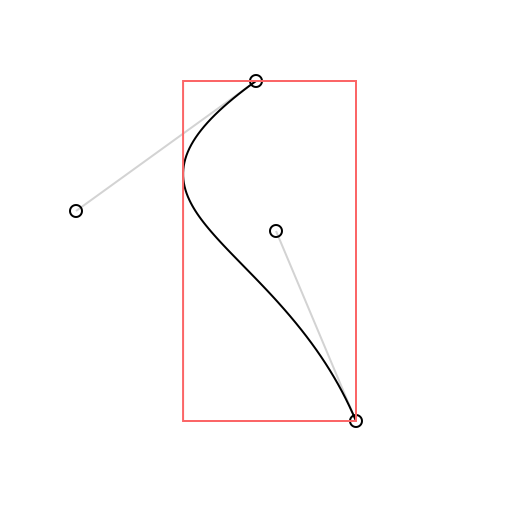
```dart
final boundingBox = curve.boundingBox;
draw.drawSkeleton(context, curve: curve);
draw.drawCurve(context, curve: curve);
draw.setColor(context, color: Draw.pinkish);
draw.drawBoundingBox(context, boundingBox: curve.boundingBox);
```
### More
`bezier_kit` is a powerful library with **a lot** of functionality. For the time
being the best way to see what it offers is to build the example Flutter app and
check out each of the provided demos.
## Testing
`bezier_kit` includes the entire test suite from the original sources converted
from Swift to Dart.
To run the test suite do:
```shell
dart test
```
## License
`bezier_kit` is released under the MIT license. [See LICENSE](https://github.com/lepsch/bezier_kit/blob/main/LICENSE) for details.