https://github.com/letea/react-library
A react library.
https://github.com/letea/react-library
developing library npm todo working
Last synced: 2 months ago
JSON representation
A react library.
- Host: GitHub
- URL: https://github.com/letea/react-library
- Owner: letea
- Created: 2020-09-07T06:14:16.000Z (almost 6 years ago)
- Default Branch: main
- Last Pushed: 2021-01-24T09:29:35.000Z (over 5 years ago)
- Last Synced: 2025-10-18T22:57:29.140Z (8 months ago)
- Topics: developing, library, npm, todo, working
- Language: JavaScript
- Homepage:
- Size: 1.11 MB
- Stars: 2
- Watchers: 1
- Forks: 0
- Open Issues: 0
-
Metadata Files:
- Readme: README.md
Awesome Lists containing this project
README
# React Library
[](https://badge.fury.io/js/%40letea%2Freact)
A react library for component & hooks.
[Live Demo](https://codesandbox.io/s/react-with-letea-library-w2p64)
## Install
```bash
npm install @letea/react
```
## Important!!!
If you want to use components, please make sure your bundler includes the path of the library `node_modules/@letea/react` to handle jsx compiling.
## Contents
### Component
#### Background
* [BackgroundFixedImage](#backgroundfixedimage)
* [BackgroundGallery](#backgroundgallery)
* [BackgroundGalleryWithOrientation](#backgroundgallerywithorientation)
* [BackgroundVideo](#backgroundvideo)
#### Canvas
* [Flashlight](#flashlight)
* [Lighting](#lighting)
* [Processing](#processing)
* [Scratcher](#scratcher)
#### Element
* [ElementInView](#elementinview)
* [HorizontalScroll](#horizontalscroll)
* [Marquee](#marquee)
#### Image
* [Gallery](#gallery)
* [ImageLoader](#imageloader)
#### Layout
* [FullPage](#fullpage)
* [FullscreenLoading](#fullscreenloading)
* [LandscapeTip](#landscapetip)
* [LayoutLoading](#layoutloading)
* [LayoutTransition](#layouttransition)
* [Mask](#mask)
#### Media
* [VideoPlayer](#videoplayer)
#### Notification
* [Toast](#toast)
#### Text
* [Clipboard](#clipboard)
* [Code](#code)
* [EmbedRunKit](#embedrunkit)
* [QRCode](#qrcode)
#### Tool
* [FPS](#fps)
* [Frame](#frame)
* [RenderCounter](#rendercounter)
* [WindowSize](#windowsize)
### Hooks
#### Document
* [useDocumentTitle](#usedocumenttitle)
#### Element
* [useElementInView](#useelementinview)
#### Event
* [useEvent](#useevent)
* [useEvents](#useevents)
#### Form
* [useInputCheckbox](#useinputcheckbox)
* [useInputNumber](#useinputnumber)
* [useInputText](#useinputtext)
* [useKnobs](#useknobs)
* [useSelect](#useselect)
#### Image
* [useImage](#useimage)
#### Script
* [useScript](#usescript)
#### State
* [useDebounceState](#usedebouncestate)
* [useThrottleState](#usethrottlestate)
#### Time
* [useCountdown](#usecountdown)
* [useInterval](#useinterval)
* [useTimeout](#usetimeout)
#### Window
* [useIsWindowEventTriggering](#useiswindoweventtriggering)
* [useWindowBlur](#usewindowblur)
* [useWindowEvent](#usewindowevent)
* [useWindowEvents](#usewindowevents)
* [useWindowLoad](#usewindowload)
* [useWindowOrientation](#usewindoworientation)
* [useWindowSize](#usewindowsize)
# Component
## Background
## BackgroundFixedImage
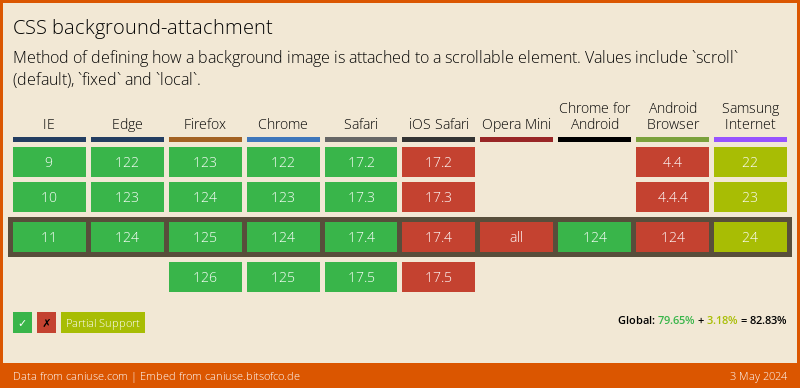
Allow you to have a fixed background image. Because of iOS Device does not support background-attachment: fixed.
### props
```js
defaultProps = {
image: "", // required
};
```
### usage
```js
import BackgroundFixedImage from "@letea/react/components/BackgroundFixedImage";
function Example() {
return (
<>
>
);
}
```
### Demo
[BackgroundFixedImage](https://storybook.letea.me/?path=/story/playground-components-background--backgroundfixedimage)
### Can I Use
## BackgroundGallery
A background with a gallery.
### props
```js
defaultProps = {
images: [], // required
duration: 3000, // optional
transition: 1000, // optional
};
```
### usage
```js
import BackgroundGallery from "@letea/react/components/BackgroundGallery";
function Example() {
return (
);
}
```
### Demo
[Ghost of Tsushima](https://storybook.letea.me/?path=/story/playground-websites--ghost-of-tsushima)
## BackgroundGalleryWithOrientation
A background with a gallery feature. Support two types(portrait and landscape).
### props
```js
defaultProps = {
portraitImages: [], // require
landscapeImages: [], // require
duration: 3000, // optional
transition: 1000, // optional
};
```
### usage
```js
import BackgroundGalleryWithOrientation from "@letea/react/components/BackgroundGalleryWithOrientation";
function Example() {
return (
);
}
```
### Demo
[BackgroundGalleryWithOrientation](https://storybook.letea.me/?path=/story/playground-components-background--backgroundgallery-with-orientation)
## BackgroundVideo
A background with a video.
### props
```js
defaultProps = {
video: "", // required
poster: "", // optional
isFixed: false, // optional, it will be position: absolute; if the value is false.
};
```
### usage
```js
import BackgroundVideo from "@letea/react/components/BackgroundVideo";
function Example() {
return (
<>
>
);
}
```
### Demo
[TENET](https://storybook.letea.me/?path=/story/playground-websites--tenet)
## Canvas
## Flashlight
A flashlight effect by canvas. You can control the flashlight by mouse/touch move.
### props
```js
defaultProps = {
defaultMouseX: window.innerWidth / 2, // optional
defaultMouseY: window.innerHeight / 2, // optional
};
```
### usage
```js
import Flashlight from "@letea/react/components/Flashlight";
function Example() {
return ;
}
```
### Demo
[Flashlight](https://storybook.letea.me/?path=/story/playground-components-canvas--flashlight)
### notes
* Watch out!
## Lighting
A lighting flash effect by canvas.
### usage
```js
import Lighting from "@letea/react/components/Lighting";
function Example() {
return ;
}
```
### Demo
[Lighting](https://storybook.letea.me/?path=/story/playground-components-canvas--lighting)
### notes
* You will hate me.
## Processing
Allow you to write p5.js in React.
### props
```js
defaultProps = {
sketch: null, // (p5) => { /* your code */ }
hasSoundLibrary: false, // Using p5.sound library or not
isIgnoreLoadingMessage: false, // Ignore Loading Message or not
isPositionFixed: false, // CSS default is absolute position
zIndex: null, // CSS default is 0
};
```
### usage
```js
import Processing from "@letea/react/components/Processing";
function Example() {
const sketch = (p5) => {
p5.setup = () => {
p5.createCanvas(p5.windowWidth, p5.windowHeight);
p5.background(0);
};
p5.draw = () => {
p5.ellipse(p5.mouseX, p5.mouseY, 50, 50);
};
};
return ;
}
```
### Demo
[Processing](https://storybook.letea.me/?path=/story/components-canvas-4--processing)
### notes
* If you want to create a canvas full fill with parent element, use "p5.canvas.parentElement" to get width and height.
* If you want to use Amplitude from p5.sound, use window\.p5 instead of p5 from parameter.
## Scratcher
A scratcher effect by canvas.
### usage
```js
import Scratcher from "@letea/react/components/Scratcher";
function Example() {
return (
<>
>
);
}
```
### Demo
[Scratcher](https://storybook.letea.me/?path=/story/components-canvas-4--scratcher)
## Element
## ElementInView
To detect if the element is in the view of the browser. It will pass the "isInView" variable to children.
### props
```js
defaultProps = {
isDebug: false, // optional, will return size of window, bounding client rect of element and position if value is true.
hasPosition: false, // optional, will return *xAxis and *yAxis if value is true. (the unit is percentage, xAxis is from left to right, yAxis is from top to bottom)
offsetTop: 0, // optional, to set offset *top for element in view. (the unit is percentage, the value is relative to element's height)
offsetRight: 0, // optional, to set offset *right for element in view. (the unit is percentage, the value is relative to element's width)
offsetBottom: 0, // optional, to set offset *bottom for element in view. (the unit is percentage, the value is relative to element's height)
offsetLeft: 0, // optional, to set offset *left for element in view. (the unit is percentage, the value is relative to element's width)
onReady: () => {}, // optional, trigger when component is ready.
onMove: () => {}, // optional, trigger when component moving.
onEnter: () => {}, // optional, trigger when component enter the browser's view.
onLeave: () => {}, // optional, trigger when component leave the browser's view.
};
```
### usage
```js
import ElementInView from "@letea/react/components/ElementInView";
function Example() {
return (
);
}
```
### Demo
[ElementInView](https://storybook.letea.me/?path=/story/playground-components-element--elementinview)
## HorizontalScroll
A horizontal scroll effect for mobile devices.
### props
```js
defaultProps = {
hideScrollbar: true, // optional
};
```
### usage
```js
import HorizontalScroll from "@letea/react/components/HorizontalScroll";
function Example() {
return (
);
}
```
### Demo
[HorizontalScroll](https://storybook.letea.me/?path=/story/components-element-3--horizontalscroll)
### notes
* The children should be display: 'inline-block' or 'inline-flex'.
* iOS hide scrollbar natively.
## Marquee
A marquee slider.
### props
```js
defaultProps = {
animationDuration: 40000, // optional, the unit is millisecond.
isPausedOnHover: false, // optional
};
```
### usage
```js
import Marquee from "@letea/react/components/Marquee";
function Example() {
return (
);
}
```
### Demo
[Marquee](https://storybook.letea.me/?path=/story/components-element-3--marquee)
### notes
* The children should be 'display: inline-block' or 'inline-flex'.
## Image
## Gallery
A simple gallery.
### props
```js
defaultProps = {
images: [], // required
duration: 3000, // optional
transition: 1000, // optional
};
```
### usage
```js
import Gallery from "@letea/react/components/Gallery";
function Example() {
return ;
}
```
### Demo
[Gallery](https://storybook.letea.me/?path=/story/components-image-2--gallery)
## ImageLoader
A component loads images and gives you a callback when images are loaded.
### props
```js
defaultProps = {
images: [], // required
onEachLoad: (loadedImages) => {}, // optional
onAllLoad: (loadedImages) => {}, // optional
};
```
### usage
```js
import ImageLoader from "@letea/react/components/ImageLoader";
function Example() {
return (
{
// Do something...
}}
onAllLoad={(loadedImages) => {
// Do something...
}}
/>
);
}
```
### Demo
[ImageLoader](https://storybook.letea.me/?path=/story/components-image-2--imageloader)
## Layout
## FullPage
Create a full-page layout and keeps the height of content is equal to or greater than the height of the window.
### props
```js
defaultProps = {
isDebug: false, // optional, it will display contrastive colors if the value is true.
enableMinWidth: 0, // optional
offsetHeight: 0, // optional, to adjust the size of height.
paddingTop: 0, // optional, add padding top to content.
paddingBottom: 0, // optional, add padding bottom to content.
};
```
### usage
```js
import FullPage from "@letea/react/components/FullPage";
function Example() {
return (
);
}
```
### Demo
[FullPage](https://storybook.letea.me/?path=/story/playground-components-layout--fullpage)
## FullscreenLoading
Display a fullscreen loading.
### props
```js
// openFullscreenLoading
defaultProps = {
Spinner: null, // Your spinner component
zIndex: 9999, // optional
backgroundColor: "rgba(0, 0, 0, 0.75)", // optional
onClick: () => {}, // optional
};
// closeFullscreenLoading
defaultProps = {};
```
### usage
```js
import FullscreenLoading from "@letea/react/components/FullscreenLoading";
function Example() {
return (
<>
{
openFullscreenLoading();
}}
/>
{
closeFullscreenLoading();
}}
/>
>
);
}
```
### Demo
[FullscreenLoading](https://storybook.letea.me/?path=/story/components-layout-6--fullscreenloading)
## LandscapeTip
Sometimes you want to hint users something. For example, browsing on the mobile web in the landscape is suck.
### props
```js
defaultProps = {
message: "", // optional
zIndex: 9999, // optional
};
```
### usage
```js
import LandscapeTip from "@letea/react/components/LandscapeTip";
function Example() {
return ;
}
```
### Demo
[LandscapeTip](https://storybook.letea.me/?path=/story/playground-components-layout--landscapetip)
## LayoutLoading
It's a layout of loading(load images), allow you to get user \*permissions by click/touch after loaded. (ex. Autoplay video/audio with sound, vibrate API)
### props
```js
defaultProps = {
images: [], // optional
getUserPermission: false, // optional
onLoad: () => {}, // optional
zIndex: 9999, // optional
isFixed: true, // optional
};
```
### usage
```js
import LayoutLoading from "@letea/react/components/LayoutLoading";
function Example() {
const [isLoaded, setIsLoaded] = useState(false);
return (
<>
{!isLoaded && (
{
setIsLoaded(true);
}}
/>
)}
{isLoaded && }
>
);
}
```
### Demo
[LayoutLoading](https://storybook.letea.me/?path=/story/components-layout-6--layoutloading)
## LayoutTransition
A layout of transition.
### props
```js
defaultProps = {
start: false, // required
url: "", // required
duration: 1000, // optional, value of animation-duration, unit is millisecond.
frames: 0, // optional, value of animation-timing-function
reverse: false, // optional, value of animation-direction
infinite: false, // optional, value of animation-iteration-count
forwards: false, // optional, value of animation-fill-mode
onFinish: null, // optional, trigger on animation end.
};
```
### usage
```js
import LayoutTransition from "@letea/react/components/LayoutTransition";
function Example() {
return (
{
// do something...
}}
/>
);
}
```
### Demo
[LayoutTransition](https://storybook.letea.me/?path=/story/components-layout-6--layouttransition)
## Mask
A mask covers the layout.
### props
```js
defaultProps = {
isFixed: false, // optional
zIndex: 9999, // optional
};
```
### usage
```js
import Mask from "@letea/react/components/Mask";
function Example() {
return (
<>
>
);
}
```
### Demo
[Mask](https://storybook.letea.me/?path=/story/components-layout-6--mask)
## Media
## VideoPlayer
A video player uses the native interface.
### props
```js
defaultProps = {
src: "", // required
poster: "", // optional
hasControls: false, // optional
hasContextMenu: false, // optional
hasPreload: true, // optional
isAutoPlay: false, // optional
isPlaysInline: false, // optional
isMuted: false, // optional
isLoop: false, // optional
isPauseOnBlur: false, // optional
isCoverSize: false, // optional
onCanPlay: (event) => {}, // optional
onError: (event) => {}, // optional
onPlay: (event) => {}, // optional
onPlaying: (event) => {}, // optional
onTimeUpdate: (event) => {}, // optional
onPause: (event) => {}, // optional
onEnded: (event) => {}, // optional
onVolumeChange: (event) => {}, // optional
onFullscreen: () => {}, // optional
onFullscreenExit: () => {}, // optional
};
```
### usage
```js
import VideoPlayer from "@letea/react/components/VideoPlayer";
function Example() {
return ;
}
```
### Demo
[VideoPlayer](https://storybook.letea.me/?path=/story/components-media-1--videoplayer)
## Notification
## Toast
Display a message at the corner.
### usage
```js
import Toast from "@letea/react/components/Toast";
function Example() {
return (
<>
{
toast("Hello There");
}}
/>
{
toast({ message: "Hello There", duration: 1500 });
}}
/>
>
);
}
```
### Demo
[Toast](https://storybook.letea.me/?path=/story/components-notification-1--toast)
## Text
## Clipboard
Allow users to copy text.
### props
```js
defaultProps = {
text: "", // optional
isDebugMode: false, // optional
onSuccess: () => {}, // optional
onFail: () => {}, // optional
};
```
### usage
```js
import Clipboard from "@letea/react/components/Clipboard";
function Example() {
return Copy Text;
}
```
### Demo
[Clipboard](https://storybook.letea.me/?path=/story/components-text-4--clipboard)
### references
* [clipboard.js](https://clipboardjs.com/)
## Code
Display source code with syntax highlight.
### props
```js
defaultProps = {
code: "", // required
};
```
### usage
```js
import Code from "@letea/react/components/Code";
function Example() {
return
}
```
### Demo
[Code](https://storybook.letea.me/?path=/story/components-text-4--code)
### notes
* Import Hack Typeface in the head of HTML for the best experience.
### references
* [highlight.js](https://highlightjs.org/)
* [Hack](https://sourcefoundry.org/hack/)
## EmbedRunKit
Allow you to test javascript code via RunKit.
### usage
```js
import EmbedRunKit from "@letea/react/components/EmbedRunKit";
function Example() {
return ;
}
```
### Demo
[EmbedRunKit](https://storybook.letea.me/?path=/story/components-text-4--embedrunkit)
## QRCode
Convert text to QR code.
### props
```js
defaultProps = {
text: "", // optional
width: 150, // optional
height: 150, // optional
};
```
### usage
```js
import QRCode from "@letea/react/components/QRCode";
function Example() {
return ;
}
```
### Demo
[QRCode](https://storybook.letea.me/?path=/story/components-text-4--qrcode)
### references
* [QR Code Generator](http://goQR.me)
## Tool
## FPS
Display FPS(Frame per Second).
### props
```js
defaultProps = {
isFixed: false, // optional, default position is absolute.
zIndex: 9999, // optional
};
```
### usage
```js
import FPS from "@letea/react/components/FPS";
function Example() {
return ;
}
```
### Demo
[FPS](https://storybook.letea.me/?path=/story/components-tool-4--fps)
## Frame
Display frame for developing layout, style is base on Storybook.
### props
```js
defaultProps = {
isFixed: false, // optional, default position is absolute.
zIndex: -1, // optional
};
```
### usage
```js
import Frame from "@letea/react/components/Frame";
function Example() {
return ;
}
```
### Demo
[Frame](https://storybook.letea.me/?path=/story/components-tool-4--frame)
### references
* [Storybook](https://storybook.js.org/)
## RenderCounter
Display render counts.
### usage
```js
import RenderCounter from "@letea/react/components/RenderCounter";
function Example() {
return (
);
}
```
### Demo
[RenderCounter](https://storybook.letea.me/?path=/story/components-tool-4--rendercounter)
## WindowSize
Display the size of the window, base on Chrome's inspect style.
### props
```js
defaultProps = {
isFixed: true, // optional
zIndex: 9999, // optional
autoHide: false, // optional
hideDelay: 1000, // optional, it will enable if audHide is true.
};
```
### usage
```js
import WindowSize from "@letea/react/components/WindowSize";
function Example() {
return ;
}
```
### Demo
[WindowSize](https://storybook.letea.me/?path=/story/components-tool-4--windowsize)
# Hooks
## Document
## useDocumentTitle
Allow you to get or update the title of the document.
### usage
```js
import useDocumentTitle from "@letea/react/hooks/useDocumentTitle";
const [title, setTitle] = useDocumentTitle();
```
### Demo
[useDocumentTitle](https://storybook.letea.me/?path=/story/hooks-document-1--usedocumenttitle)
## Element
## useElementInView
To detect if the element is in the view of the browser.
### usage
```js
import useElementInView from "@letea/react/hooks/useElementInView";
// Basic
const element = useElementInView({
target: targetRef,
});
// element => {
// isInView // check is element in view.
// }
// Basic with Position
const element = useElementInView({
target: targetRef,
hasPosition: true,
});
// element => {
// isInView,
// xAxis, => the xAxis of element.
// yAxis => the yAxis of element.
// }
// Debug
const element = useElementInView({
target: targetRef,
isDebug: true,
});
// element => {
// isInView,
// xAxis,
// yAxis,
// windowWidth, => the width of window.
// windowHeight, => the height of window.
// top, => the top of element.
// right, => the right of element.
// bottom, => the bottom of element.
// left, => the left of element.
// width, => the width of element.
// height => the height of element.
// }
```
### Demo
[useElementInView](https://storybook.letea.me/?path=/story/playground-hooks-element--useelementinview)
## Event
## useEvent
Add an event to an element. You don't need to remove it manually.
### usage
```js
import useEvent from "@letea/react/hooks/useEvent";
useEvent({
eventName: "click",
target: targetRef,
callback: () => {
// Do something...
},
});
```
### Demo
[useEvent](https://storybook.letea.me/?path=/story/hooks-event-2--useevent)
## useEvents
Add multiple events to elements. You don't need to remove it manually. The best part is you can let events share a/an method/element or use each of the methods/elements.
### usage
```js
import useEvents from "@letea/react/hooks/useEvents";
useEvents({
eventNames: ["mousedown", "mouseup"],
targets: [aRef],
callbacks: [
() => {
// Do something for mousedown & mouseup
},
],
});
// Trigger when mousedown or mouseup, share with a function and an element.
useEvents({
eventNames: ["mousedown", "mouseup"],
targets: [aRef],
callbacks: [
() => {
// Do something for mousedown event.
},
() => {
// Do something for mouseup event.
},
],
});
// Trigger when mousedown or mouseup, use each of functions, share with an element.
```
### Demo
[useEvents](https://storybook.letea.me/?path=/story/hooks-event-2--useevents)
### notes
* The length of eventNames should be equal to or greater than targets and callbacks.
## Form
## useInputCheckbox
Allow you to get or update the value of the checkbox.
### usage
```js
import useInputCheckbox from "@letea/react/hooks/useInputCheckbox";
function Example() {
const [value, setValue] = useInputCheckbox(false);
return ;
}
```
### Demo
[useInputCheckbox](https://storybook.letea.me/?path=/story/hooks-form-5--useinputcheckbox)
## useInputNumber
Allow you to get or update the value of the input.
### usage
```js
import useInputNumber from "@letea/react/hooks/useInputNumber";
function Example() {
const [value, setValue] = useInputNumber(0);
return ;
}
```
### Demo
[useInputNumber](https://storybook.letea.me/?path=/story/hooks-form-5--useinputnumber)
## useInputText
Allow you to get or update the value of the input.
### usage
```js
import useInputText from "@letea/react/hooks/useInputText";
function BasicExample() {
const [value, setValue] = useInputText("Message");
return ;
}
function AdvanceExample() {
const [value, setValue] = useInputText({
defaultValue: Message,
hasDebounce: true,
debounceTime: 600,
});
return ;
}
```
### Demo
[useInputText](https://storybook.letea.me/?path=/story/hooks-form-5--useinputtext)
### notes
* If you want to use a checkbox, check out the useInputCheckbox.
## useKnobs
Allow you to create a value control easily. The idea is base on Storybook addon-knobs.
### usage
```js
import useKnobs from "@letea/react/hooks/useKnobs";
function Example() {
const textValue = text({ defaultValue: "Message", label: "Text" });
const numberValue = number({ defaultValue: 0, label: "Number" });
const booleanValue = boolean({ defaultValue: false, label: "Boolean" });
const { value: selectValue, index: selectIndex } = select({
options: ["Apple", "Banana", "Piapple"],
label: "Select",
});
button({
label: "Button",
handler: () => {
// Do something...
},
});
return (
{`Text: ${textValue}`}
{`Number: ${numberValue}`}
{`Boolean: ${booleanValue}`}
{`Select Value: ${selectValue}`}
{`Select Index: ${selectIndex}`}
);
}
```
### Demo
[useKnobs](https://storybook.letea.me/?path=/story/hooks-form-5--useknobs)
### references
* [Storybook Addon Knobs](https://github.com/storybookjs/storybook/tree/master/addons/knobs)
## useSelect
Allow you to get or update the index of the select.
### usage
```js
import useSelect from "@letea/react/hooks/useSelect";
function Example() {
const [index, setIndex] = useSelect(0);
return (
a
b
c
);
}
```
### Demo
[useSelect](https://storybook.letea.me/?path=/story/hooks-form-5--useselect)
## Image
## useImage
Get an image with status.
### usage
```js
import useImage from "@letea/react/hooks/useImage";
const [image, status] = useImage({
url: "https://www.example.com/sample.jpg",
});
// image => "https://www.example.com/sample.jpg"
// status => "loading", "loaded", "failed"
```
### Demo
[useImage](https://storybook.letea.me/?path=/story/hooks-image-1--useimage)
## Script
## useScript
Allow you to load script with URL.
### usage
```js
import useScript from "@letea/react/hooks/useScript";
const isScriptLoaded = useScript("https://cdn.jsdelivr.net/npm/sweetalert2@10");
```
### Demo
[useScript](https://storybook.letea.me/?path=/story/hooks-script-1--usescript)
### notes
* Base on useScript from useHooks.
### references
* [useScript React Hook - useHooks](https://usehooks.com/useScript/)
## State
## useDebounceState
useState with debounce!
### usage
```js
import useDebounceState from "@letea/react/hooks/useDebounceState";
const [value, setValue] = useDebounceState({
defaultValue: "Apple",
});
setValue("Banana");
```
### Demo
[useDebounceState](https://storybook.letea.me/?path=/story/hooks-state-2--usedebouncestate)
## useThrottleState
useState with throttle!
### usage
```js
import useThrottleState from "@letea/react/hooks/useThrottleState";
const [value, setValue] = useThrottleState({
defaultValue: "Apple",
});
setValue("Banana");
```
### Demo
[useThrottleState](https://storybook.letea.me/?path=/story/hooks-state-2--usethrottlestate)
## Time
## useCountdown
Create a countdown.
### usage
```js
import useCountdown from "@letea/react/hooks/useCountdown";
const [counts, isFinish] = useCountdown({
defaultCounts: 999,
speed: 1000,
formatToHHMMSS: false,
});
// counts => 999
// isFinish => false, true
```
### Demo
[useCountdown](https://storybook.letea.me/?path=/story/hooks-time-3--usecountdown)
## useInterval
Allow you to use setInterval without handle clearInterval.
### usage
```js
import useInterval from "@letea/react/hooks/useInterval";
useInterval({
callback: () => {
// Do something...
},
duration: 1000,
startInterval: true,
});
```
### Demo
[useInterval](https://storybook.letea.me/?path=/story/hooks-time-3--useinterval)
## useTimeout
Allow you to use setTimeout without handle clearTimeout.
### usage
```js
import useTimeout from "@letea/react/hooks/useTimeout";
useTimeout({
callback: () => {
// Do something...
},
duration: 1000,
startTimeout: true,
});
```
### Demo
[useTimeout](https://storybook.letea.me/?path=/story/hooks-time-3--usetimeout)
## Window
## useIsWindowEventTriggering
Get a value to check if the event of the window is triggering or not.
### usage
```js
import useIsWindowEventTriggering from "@letea/react/hooks/useIsWindowEventTriggering";
const isResizing = useIsWindowEventTriggering({
eventName: "resize",
duration: 1500,
});
// isResizing => true, false
```
### Demo
[useIsWindowEventTriggering](https://storybook.letea.me/?path=/story/hooks-window-7--useiswindoweventtriggering)
## useWindowBlur
Get a value to check if the window is blurred or not.
### usage
```js
import useWindowBlur from "@letea/react/hooks/useWindowBlur";
const isWindowBlurred = useWindowBlur();
// isWindowLoaded => true, false
```
### Demo
[useWindowBlur](https://storybook.letea.me/?path=/story/hooks-window-7--usewindowblur)
## useWindowEvent
Add an event of window, you don't need to remove it manually.
### usage
```js
import useWindowEvent from "@letea/react/hooks/useWindowEvent";
useWindowEvent({
eventName: "click",
callback: () => {
// Do something...
},
});
```
### Demo
[useWindowEvent](https://storybook.letea.me/?path=/story/hooks-window-7--usewindowevent)
## useWindowEvents
Add multiple events to the window. You don't need to remove it manually. The best part is you can let events share a method or use each of the methods.
### usage
```js
import useWindowEvents from "@letea/react/hooks/useWindowEvents";
useWindowEvents({
eventNames: ["mousedown", "mouseup"],
callbacks: [
() => {
// Do something...
},
],
});
// Trigger when mousedown or mouseup, share with a method.
useWindowEvents({
eventNames: ["mousedown", "mouseup"],
callbacks: [
() => {
// Do something for mousedown event.
},
() => {
// Do something for mouseup event.
},
],
});
// Trigger when mousedown or mouseup, use each of methods.
```
### Demo
[useWindowEvents](https://storybook.letea.me/?path=/story/hooks-window-7--usewindowevents)
## useWindowLoad
Get a value to check if the window is loaded or not.
### usage
```js
import useWindowLoad from "@letea/react/hooks/useWindowLoad";
const isWindowLoaded = useWindowLoad();
// isWindowLoaded => true, false
```
### Demo
[useWindowLoad](https://storybook.letea.me/?path=/story/hooks-window-7--usewindowload)
## useWindowOrientation
Get the orientation of the window, including the resized window.
### usage
```js
import useWindowOrientation from "@letea/react/hooks/useWindowOrientation";
const { isLandscape, isPortrait } = useWindowOrientation();
// isLandscape => true
// isPortrait => false
```
### Demo
[useWindowOrientation](https://storybook.letea.me/?path=/story/hooks-window-7--usewindoworientation)
## useWindowSize
Get the size of the window, including the resized window.
### usage
```js
import useWindowSize from "@letea/react/hooks/useWindowSize";
const { windowWidth, windowHeight } = useWindowSize();
// windowWidth => 1920
// windowHeight => 1080
```
### Demo
[useWindowSize](https://storybook.letea.me/?path=/story/hooks-window-7--usewindowsize)