https://github.com/lfilho/cosco.vim
VIM colon and semicolon insertion bliss
https://github.com/lfilho/cosco.vim
Last synced: 9 months ago
JSON representation
VIM colon and semicolon insertion bliss
- Host: GitHub
- URL: https://github.com/lfilho/cosco.vim
- Owner: lfilho
- License: mit
- Created: 2013-10-25T14:52:30.000Z (about 12 years ago)
- Default Branch: master
- Last Pushed: 2022-04-08T06:07:25.000Z (over 3 years ago)
- Last Synced: 2025-04-04T07:06:23.782Z (9 months ago)
- Language: Vim script
- Homepage:
- Size: 45.9 KB
- Stars: 112
- Watchers: 5
- Forks: 14
- Open Issues: 5
-
Metadata Files:
- Readme: README.md
- Contributing: CONTRIBUTING.md
- License: LICENSE
Awesome Lists containing this project
README
cosco.vim
=========
**Co**mma and **s**emi-**co**lon insertion bliss for vim.
*Cosco's official vim.org page: http://www.vim.org/scripts/script.php?script_id=4758*
## What Cosco does:
Appends, substitutes or removes a comma or a semi-colon to the end of your line, based on its context.
It:
* Takes into consideration previous and next lines endings, as well line indentations.
* Ignores blank lines.
* Will maintain your cursor's original position.
The best way to describe it is with examples.
## Demo / Examples
Examples (as well this plugin) were created with javascript in mind (but the plugin works for any kind of file).
[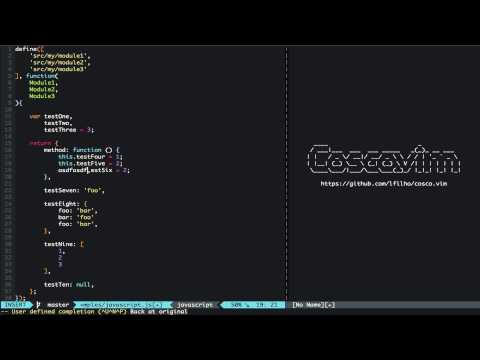](http://www.youtube.com/watch?v=xCSjdqf8sOY)
*(Click the image to watch the video)*
## Dependencies
This plugin depends on [tpope/vim-repeat](https://github.com/tpope/vim-repeat) being installed in order to have the repeat functionality.
## Installation
1. Add `lfilho/cosco.vim` to your [Plug](https://github.com/junegunn/vim-plug), [Vundle](https://github.com/gmarik/vundle), [NeoBundle](https://github.com/Shougo/neobundle.vim), [pathogen](https://github.com/tpope/vim-pathogen), or [manually copy the files](http://superuser.com/a/404820)... You know the deal.
2. Run your Plugn/Vundle/NeoBundle/pathogen process of updating / installing new bundles... (Links above should help you)
3. [Use it](#usage)
4. Profit!
## Usage
Cosco command won't override any mappings or commands you might already have. You have to add them yourself. (Good vim plugin writing practice!).
Here you can find two examples on how to do this. Put them on your `.vimrc`.
### Using it via command
Go to the target line then: `:CommaOrSemiColon`
### Using it via mappings
An example mapping, using the key combo `;` for both `normal` and `insert` modes:
```VimL
autocmd FileType javascript,css,YOUR_LANG nmap ; (cosco-commaOrSemiColon)
autocmd FileType javascript,css,YOUR_LANG imap ; (cosco-commaOrSemiColon)
```
and then you can just type `;`.
### Repeating it
You can repeat it with `.` key as long as you have [tpope/vim-repeat](https://github.com/tpope/vim-repeat) installed.
## Configuration Options
### Ignoring comment lines
If you are in a comment line and don't want the plugin to act on it, put the following in your `.vimrc`:
```vim
let g:cosco_ignore_comment_lines = 1 " Default : 0
```
It uses the underlying vim syntax mechanism, so it will work for any language. Naturally, this requires `syntax` to be enabled in your vim.
**Caveat:** You have to be **inside** the comment for this to work. That is, if you have the following line:
```javascript
var foo = 'bar' // A comment
```
Or a merely indented comment:
```javascript
// A comment
```
And the cursor is placed anywhere before the `//`, it won't work as vim won't identify the current cursor position's syntax to be a comment. Pull Requests are welcome to improve this.
### Ignoring filetypes
If you want to explicitly declare a set of filetypes that cosco will ignore you can add one of the following lines to your `.vimrc`:
```vim
let g:cosco_filetype_whitelist = ['php', 'javascript']
let g:cosco_filetype_blacklist = ['vim', 'bash']
```
These variables must be declared as a list (array) of languages recognized by vim
**Whitelist**
The `g:cosco_filetype_whitelist` variable is used to declare a list of filetypes that cosco will work in. If this variable is declared, cosco will ignore any filetype that is not specified in the whitelist variable.
**Blacklist**
The `g:cosco_filetype_blacklist` variable is used to declare a list of filetypes that cosco will ignore. If this variable is declared, cosco will ignore any filetype that is specified in the blacklist variable.
If neither of these variables are declared in the `.vimrc` cosco will work in any filetype.
The `g:cosco_filetype_whitelist` variable will override and ignore the `g:cosco_filetype_blacklist` variable if both variables are declared in your `.vimrc`.
**Getting the current filetype**
You can easily get the current filetype by calling:
```vim
:set ft?
```
**Custom regex ignore patterns per filetype**
For more granular control, if you need to ignore a regex pattern per filetype you can use this dictionary `g:cosco_ignore_ft_pattern`, for example:
```
let g:cosco_ignore_ft_pattern = {
\ 'cpp': '^#',
\ 'c': '^#',
\ 'd': '^.*cornerCase',
\}
```
## Auto CommaOrSemicolon Insertion Mode (Experimental)
Auto insertion of a comma or a semicolon is also supported through the function:
```vim
:call AutoCommaOrSemiColon()
```
To activate the AutoCommaOrSemiColon by default add the following line to your `.vimrc`:
```vim
let g:auto_comma_or_semicolon = 1 " Default : 0
```
For faster toggle you can use the command:
```vim
:AutoCommaOrSemiColonToggle
```
or better map it to the desireable key-bindings,`F9` for example:
```vim
nmap :AutoCommaOrSemiColonToggle
```
This will show a message about the current state of the auto insetion mode (ON / OFF).
By default what triggers the auto insertion is leaving insert mode (`InsertLeave` event). This can be modified by changing the desired events in the events list:
```vim
let g:auto_comma_or_semicolon_events = ["InsertLeave"]
```
__**Warning**__:
> *This feature is currently experimental and still not mature enough to work for many vim events (e.g:* "TextChangedI"*) or in many places in your code, so use with care.*
## Tests
Tests are done with [vim-unittest](https://github.com/h1mesuke/vim-unittest).
## Known caveats
```javascript
){
'use strict';
var foo = 2,
bar = null;
```
Will change the `use strict` line ending to a comma (it thinks we are inside a hash declaration). Can't really address this issue without a `var` (specific to javascript) check. Might be resolved if we develop a language extension to this plugin.
## TODO and wish list
* Write plugin's vim documentation
* Write all the examples possible
* Improve test coverage
* Write mappings examples using autocommand grouping
* Write a better javascript integration, possible reading from an option .eslint and/or .jshint file (settings for comma dangling, etc)