https://github.com/liaohch3/claude-tap
Intercept and inspect Coding Agent API traffic from Claude Code, Codex CLI, Gemini CLI, Cursor CLI, OpenCode, Kimi, Pi, and Hermes in a local trace viewer.
https://github.com/liaohch3/claude-tap
agent-debugging agent-observability ai-agents ai-tools api-debugging claude-code codex codex-cli cursor-cli developer-tools gemini-cli hermes-agent kimi llm llm-proxy opencode pi-coding-agent proxy trace trace-viewer
Last synced: about 1 month ago
JSON representation
Intercept and inspect Coding Agent API traffic from Claude Code, Codex CLI, Gemini CLI, Cursor CLI, OpenCode, Kimi, Pi, and Hermes in a local trace viewer.
- Host: GitHub
- URL: https://github.com/liaohch3/claude-tap
- Owner: liaohch3
- License: mit
- Created: 2026-02-15T12:51:26.000Z (5 months ago)
- Default Branch: main
- Last Pushed: 2026-05-24T11:08:54.000Z (about 2 months ago)
- Last Synced: 2026-05-24T11:09:05.869Z (about 2 months ago)
- Topics: agent-debugging, agent-observability, ai-agents, ai-tools, api-debugging, claude-code, codex, codex-cli, cursor-cli, developer-tools, gemini-cli, hermes-agent, kimi, llm, llm-proxy, opencode, pi-coding-agent, proxy, trace, trace-viewer
- Language: Python
- Size: 73.5 MB
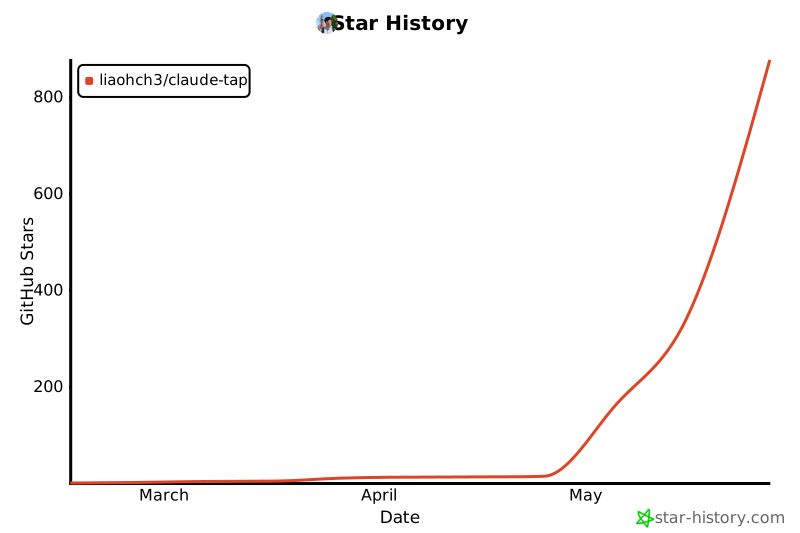
- Stars: 786
- Watchers: 1
- Forks: 94
- Open Issues: 16
-
Metadata Files:
- Readme: README.md
- Changelog: CHANGELOG.md
- Contributing: CONTRIBUTING.md
- License: LICENSE
- Code of conduct: CODE_OF_CONDUCT.md
- Security: SECURITY.md
- Support: docs/support-matrix.md
- Agents: AGENTS.md
Awesome Lists containing this project
- awesome-infra-for-ai - liaohch3/claude-tap - A local proxy and trace viewer for AI coding agents, capturing and inspecting API traffic to debug agent behavior and analyze prompts, messages, and tool definitions. (LLMOps / LLM Observability & Tracing)
- awesome-ChatGPT-repositories - claude-tap - Intercept and inspect Coding Agent API traffic from Claude Code, Codex CLI, Gemini CLI, Cursor CLI, OpenCode, Kimi, Pi, and Hermes in a local trace viewer. (CLIs / Usage)
- awesome-hermes - claude-tap - contained HTML viewer. (Deployment and Operations / Skills and skill ecosystems)
README
# claude-tap
[](https://pypi.org/project/claude-tap/)
[](https://pypi.org/project/claude-tap/)
[](https://pypi.org/project/claude-tap/)
[](https://github.com/liaohch3/claude-tap/blob/main/LICENSE)
[](https://github.com/liaohch3/claude-tap/stargazers)
[](#contributors)
[中文文档](README_zh.md)
`claude-tap` is a local proxy and trace viewer for AI coding agents. Run your CLI through it, then inspect the real API traffic: system prompts, conversation history, tool schemas, tool calls, streaming responses, token usage, and request diffs.
It works with [Claude Code](https://docs.anthropic.com/en/docs/claude-code), [Codex CLI](https://github.com/openai/codex), [Gemini CLI](https://github.com/google-gemini/gemini-cli), [Kimi CLI](https://github.com/MoonshotAI/kimi-cli), [OpenCode](https://opencode.ai), [Pi](https://github.com/badlogic/pi-mono/tree/main/packages/coding-agent), [Hermes Agent](https://github.com/NousResearch/hermes-agent), [Cursor CLI](https://cursor.com/cli), [Qoder CLI](https://qoder.com/cli), [Antigravity CLI](https://antigravity.google/product/antigravity-cli), and [CodeBuddy CLI](https://www.codebuddy.ai).

Open a real agent run, inspect every request, and compare how context changes between turns.

Light viewer overview

Dark mode for long review sessions

Structured diff across adjacent requests
## Why use it
- 👀 **See the exact context**: inspect prompts, messages, tool definitions, tool calls, tool results, streaming chunks, and token usage.
- 🔎 **Debug behavior with evidence**: compare adjacent requests and pinpoint which prompt, message, tool, or parameter changed.
- 📦 **Share one portable artifact**: each run writes a JSONL trace and a self-contained HTML viewer for review or archiving.
- 🔒 **Keep traces on your machine**: no hosted dashboard is required, and common auth headers are redacted before recording.
- 🧩 **Use one workflow across clients**: trace Claude Code, Codex CLI, Gemini CLI, Kimi CLI, OpenCode, Pi, Hermes Agent, Cursor CLI, Qoder CLI, and CodeBuddy.
## Supported Clients
| Client | Typical use |
|--------|-------------|
| [Claude Code](https://docs.anthropic.com/en/docs/claude-code) | Anthropic API or Claude-compatible gateways such as DeepSeek / GLM |
| [Codex CLI](https://github.com/openai/codex) | OpenAI API key mode or ChatGPT subscription OAuth |
| [Gemini CLI](https://github.com/google-gemini/gemini-cli) | Google OAuth / Code Assist traffic |
| [Kimi CLI](https://github.com/MoonshotAI/kimi-cli) | Kimi Code or Moonshot Open Platform |
| [OpenCode](https://opencode.ai) | Multi-provider OpenCode sessions |
| [Pi](https://github.com/badlogic/pi-mono/tree/main/packages/coding-agent) | Pi sessions, including OpenAI Codex OAuth providers |
| [Hermes Agent](https://github.com/NousResearch/hermes-agent) | Multi-provider Hermes TUI or gateway sessions |
| [Cursor CLI](https://cursor.com/cli) | Cursor Agent sessions plus readable local transcript import |
| [Qoder CLI](https://qoder.com/cli) | Qoder Agent sessions through forward proxy mode |
| [Antigravity CLI](https://antigravity.google/product/antigravity-cli) | Antigravity Agent sessions through forward proxy mode |
| [CodeBuddy CLI](https://www.codebuddy.ai) | Tencent CodeBuddy SaaS or internal Copilot endpoint |
## Install
Requires Python 3.11+ and the client you want to trace.
```bash
# Recommended
uv tool install claude-tap
# Or with pip
pip install claude-tap
```
Upgrade: `claude-tap update`, `uv tool upgrade claude-tap`, or `pip install --upgrade claude-tap`
## Quick Start
Run the client you want to inspect through `claude-tap`. Flags after `--` are passed to the selected client.
```bash
# Claude Code with the live browser viewer enabled by default
claude-tap
# Restore pre-v0.1.75 behavior: no live viewer server
claude-tap --tap-no-live
# Codex CLI
claude-tap --tap-client codex
# Gemini CLI
claude-tap --tap-client gemini -- -p "hello"
# Kimi CLI
claude-tap --tap-client kimi
# Pi
claude-tap --tap-client pi -- --model openai-codex/gpt-5.3-codex-spark -p "hello"
# Cursor CLI
claude-tap --tap-client cursor -- -p --trust --model auto "hello"
# Qoder CLI
claude-tap --tap-client qoder -- -p "hello" --permission-mode dont_ask
# Antigravity CLI
claude-tap --tap-client agy
# CodeBuddy CLI
claude-tap --tap-client codebuddy
```
Claude Code examples
```bash
# Pass flags through to Claude Code
claude-tap -- --model claude-opus-4-6
claude-tap -c # continue last conversation
# Skip all permission prompts (auto-accept tool calls)
claude-tap -- --dangerously-skip-permissions
# Live viewer is on by default; pass Claude flags after --
claude-tap -- --dangerously-skip-permissions --model claude-sonnet-4-6
```
`claude-tap` auto-detects custom Claude Code upstreams from `ANTHROPIC_BASE_URL`
in your environment or Claude settings. Use `--tap-target` only when you want to
override that detected target.
For the Claude Code VS Code extension, set `Claude Code: Claude Process Wrapper` to `claude-tap`; on Windows, use the full `claude-tap.exe` path if VS Code cannot find it.
Claude Code with DeepSeek API
Full English guide: [Claude Code with DeepSeek API](docs/guides/deepseek-claude-code.md). Simplified Chinese version: [Claude Code 搭配 DeepSeek API](docs/guides/deepseek-claude-code.zh.md).
```bash
export ANTHROPIC_AUTH_TOKEN=""
unset ANTHROPIC_API_KEY
export ANTHROPIC_MODEL="deepseek-v4-pro[1m]"
export ANTHROPIC_DEFAULT_OPUS_MODEL="deepseek-v4-pro[1m]"
export ANTHROPIC_DEFAULT_SONNET_MODEL="deepseek-v4-pro[1m]"
export ANTHROPIC_DEFAULT_HAIKU_MODEL="deepseek-v4-flash"
export CLAUDE_CODE_SUBAGENT_MODEL="deepseek-v4-flash"
export CLAUDE_CODE_EFFORT_LEVEL=max
export ANTHROPIC_BASE_URL=https://api.deepseek.com/anthropic
```
```bash
claude-tap -- --permission-mode bypassPermissions
```
`claude-tap` reads the DeepSeek upstream from `ANTHROPIC_BASE_URL`, then launches Claude Code against the local proxy. Use `--tap-target https://api.deepseek.com/anthropic` only as a manual override.
Codex CLI auth modes and examples
Codex CLI supports two authentication modes with different upstream targets:
| Auth Mode | How to authenticate | Upstream target | Notes |
|-----------|-------------------|-----------------|-------|
| **OAuth** (ChatGPT subscription) | `codex login` | `https://chatgpt.com/backend-api/codex` | Default for ChatGPT Plus/Pro/Team users |
| **API Key** | Set `OPENAI_API_KEY` | `https://api.openai.com` (default) | Pay-per-use via OpenAI Platform |
`claude-tap` auto-detects the Codex target from your auth state when possible.
```bash
# OAuth users (ChatGPT Plus/Pro/Team) — auto-detected after `codex login`
claude-tap --tap-client codex
# If auto-detection cannot read your Codex auth file, specify the target explicitly
claude-tap --tap-client codex --tap-target https://chatgpt.com/backend-api/codex
# API Key users — default OpenAI API target works out of the box
claude-tap --tap-client codex
# With specific model
claude-tap --tap-client codex -- --model codex-mini-latest
# Full auto-approval (skip all permission prompts)
claude-tap --tap-client codex -- --full-auto
# OAuth + full auto; live viewer is enabled by default
claude-tap --tap-client codex -- --full-auto
```
Kimi CLI examples
Kimi CLI uses reverse proxy mode by default through `KIMI_BASE_URL`. Use your existing Kimi CLI auth/config; the default upstream target is the Kimi Code API.
```bash
claude-tap --tap-client kimi
claude-tap --tap-client kimi -- --thinking
# Use Moonshot Open Platform instead of Kimi Code
claude-tap --tap-client kimi --tap-target https://api.moonshot.ai/v1
```
Gemini CLI examples
Gemini CLI uses forward proxy mode by default. Google OAuth / Code Assist traffic goes to several Google endpoints, so forward proxy capture is the safest default. Reverse mode remains available for API-key or Vertex-style flows that honor `GOOGLE_GEMINI_BASE_URL` or `GOOGLE_VERTEX_BASE_URL`.
```bash
# Google OAuth / Code Assist
claude-tap --tap-client gemini -- -p "hello"
# Live viewer is enabled by default
claude-tap --tap-client gemini -- -p "hello"
# Reverse mode for compatible API-key / Vertex flows
claude-tap --tap-client gemini --tap-proxy-mode reverse -- -p "hello"
```
OpenCode examples
[OpenCode](https://opencode.ai) is a multi-provider terminal AI assistant. Because it can talk to many providers, claude-tap defaults to **forward proxy** mode for opencode: it injects `HTTPS_PROXY` plus the local CA into the child process so traffic to any provider is captured.
```bash
# Forward proxy mode — captures every provider opencode talks to (default)
claude-tap --tap-client opencode
# Live viewer is enabled by default
claude-tap --tap-client opencode
# Reverse mode — only works when using Anthropic provider (single ANTHROPIC_BASE_URL)
claude-tap --tap-client opencode --tap-proxy-mode reverse
```
Pi examples
[Pi](https://github.com/badlogic/pi-mono/tree/main/packages/coding-agent) is a multi-provider coding agent. claude-tap defaults to **forward proxy** mode for Pi because Pi can use subscription OAuth providers such as `openai-codex` and custom API-key providers from its model registry.
```bash
# OpenAI Codex OAuth via Pi's openai-codex provider
claude-tap --tap-client pi -- --model openai-codex/gpt-5.3-codex-spark -p "hello"
# Live viewer is enabled by default
claude-tap --tap-client pi -- --model openai-codex/gpt-5.3-codex-spark -p "hello"
# Read-only tool capture
claude-tap --tap-client pi -- --model openai-codex/gpt-5.3-codex-spark --tools bash -p "Run pwd"
```
Pi stores OAuth credentials in `~/.pi/agent/auth.json` after `/login`. If you keep Pi credentials in another directory, set `PI_CODING_AGENT_DIR` before launching `claude-tap`.
Hermes Agent examples
Hermes Agent is a multi-provider Python AI agent (Nous Portal, OpenRouter, NVIDIA NIM, Xiaomi MiMo, GLM, Kimi, MiniMax, Hugging Face, OpenAI, Anthropic, custom). Because it can talk to any of these providers — and `httpx` / `requests` both honor `HTTPS_PROXY` natively — claude-tap defaults to **forward proxy** mode for hermes: it injects `HTTPS_PROXY` plus the local CA into the child process so any provider is captured.
```bash
# Interactive TUI — the recommended way for local trace capture.
claude-tap --tap-client hermes
# Gateway mode — captures LLM calls triggered by incoming platform messages (Slack, Telegram, etc.).
# Requires a messaging platform configured in ~/.hermes/.env.
# claude-tap auto-rewrites `gateway start` → `gateway run` so the gateway runs in the
# foreground and inherits HTTPS_PROXY; without this, the daemon spawned by systemd/launchd
# would not go through the proxy and no traces would be recorded.
claude-tap --tap-client hermes -- gateway start
# Reverse mode is opt-in and only useful when ~/.hermes is configured with an
# OpenAI-compatible provider that reads OPENAI_BASE_URL.
claude-tap --tap-client hermes --tap-proxy-mode reverse
```
> **Note:** Gateway mode only produces traces when a configured messaging platform (Slack, Telegram, etc.) delivers a message to the bot. Without an active platform integration, the gateway makes no LLM calls and no traces are recorded.
Cursor CLI examples
Cursor CLI uses forward proxy mode by default. Use `--model auto` on free plans, and omit `--mode ask` when you want tool calls.
```bash
claude-tap --tap-client cursor -- -p --trust --model auto "hello"
claude-tap --tap-client cursor -- -p --trust --model auto --continue "continue"
```
## Guides and Integrations
- [OpenClaw setup guide](docs/guides/OPENCLAW_README.md) for integrating `claude-tap` with OpenClaw. Simplified Chinese version: [OpenClaw 设置指南](docs/guides/OPENCLAW_README.zh.md).
- [Claude Code with DeepSeek API](docs/guides/deepseek-claude-code.md) for routing Claude Code through DeepSeek's Anthropic-compatible API. Simplified Chinese version: [Claude Code 搭配 DeepSeek API](docs/guides/deepseek-claude-code.zh.md).
- [Client support matrix](docs/support-matrix.md) for exact environment variables, proxy modes, and URL rewrite rules.
Qoder CLI examples
Qoder CLI talks to multiple Qoder endpoints, so claude-tap defaults to **forward proxy** mode for `--tap-client qoder`.
```bash
# Browser login, PAT, or job token must be configured before launch.
qodercli login
claude-tap --tap-client qoder -- -p "hello" --permission-mode dont_ask
```
Antigravity CLI examples
Antigravity CLI talks to multiple Google/Antigravity endpoints, so claude-tap defaults to **forward proxy** mode for `--tap-client agy`. Its Code Assist model API also honors `CLOUD_CODE_URL`; claude-tap injects that automatically so model requests such as `/v1internal:streamGenerateContent` are captured by the same local proxy.
On macOS, Antigravity may not honor per-process CA environment variables. claude-tap automatically trusts the local CA in your current user's login keychain on first `agy` launch. This does not use `sudo` or the System keychain, though macOS may prompt to unlock the login keychain.
```bash
claude-tap --tap-client agy --tap-live
# Optional: trust the CA separately before launching a forward-proxy client.
claude-tap trust-ca
```
CodeBuddy CLI examples
CodeBuddy uses reverse proxy mode by default. claude-tap auto-detects the upstream from CodeBuddy's own login cache (`~/.codebuddy/local_storage/`), so iOA / WeChat / Google-Github / Enterprise-Domain login modes all work without any extra flag. When the cache is missing (e.g. before first login), it falls back to `https://copilot.tencent.com/v2`.
```bash
# Auto-detected endpoint (works for all four login modes once logged in)
claude-tap --tap-client codebuddy
# Explicit override (e.g. external SaaS or staging)
claude-tap --tap-client codebuddy --tap-target https://www.codebuddy.ai/v2
# Or via environment variable
CODEBUDDY_BASE_URL=https://www.codebuddy.ai/v2 claude-tap --tap-client codebuddy -- -p "Reply OK"
```
Viewer, export, and advanced options
```bash
# Live viewer runs by default while a client runs
claude-tap
# Disable live viewer for scripts, CI, remote shells, or old behavior
claude-tap --tap-no-live
# Browse saved traces without launching a client
claude-tap dashboard
# Regenerate a self-contained HTML viewer from JSONL
claude-tap export .traces/2026-02-28/trace_141557.jsonl -o trace.html
# Store traces in another directory, or keep fewer sessions
claude-tap --tap-output-dir ./my-traces
claude-tap --tap-max-traces 10
# Start only the proxy for custom setups
claude-tap --tap-no-launch --tap-port 8080
# Disable browser auto-open for live and generated viewers
claude-tap --tap-no-open
```
In proxy-only mode, start your client in another terminal and point its base URL or proxy settings at the local proxy. Use the [client support matrix](docs/support-matrix.md) for exact wiring.
### CLI Options
All flags are forwarded to the selected client, except these `--tap-*` ones:
```
--tap-client CLIENT Client to launch: claude (default), agy, codex, gemini, kimi, opencode, pi, hermes, cursor, qoder, or codebuddy
--tap-target URL Upstream API URL (default: auto per client)
--tap-live Start real-time viewer while the client runs (default: on)
--tap-no-live Disable the real-time viewer server (pre-v0.1.75 behavior)
--tap-live-port PORT Port for live viewer server (default: auto)
--tap-no-open Don't auto-open live or generated HTML viewers in a browser
--tap-output-dir DIR Trace output directory (default: ./.traces)
--tap-port PORT Proxy port (default: auto)
--tap-host HOST Bind address (default: 127.0.0.1, or 0.0.0.0 in --tap-no-launch mode)
--tap-no-launch Only start the proxy, don't launch client
--tap-max-traces N Max trace sessions to keep (default: 50, 0 = unlimited)
--tap-no-update-check Disable PyPI update check on startup
--tap-no-auto-update Check for updates but don't auto-download
--tap-proxy-mode MODE Proxy mode: reverse or forward (default: reverse for claude/codex/kimi/codebuddy, forward for agy/gemini/opencode/pi/hermes/cursor/qoder)
--tap-trust-ca On macOS, explicitly trust the local CA in the user login keychain before launch (agy does this automatically)
```
## Viewer Features
### Trace viewer capabilities
The viewer is a single self-contained HTML file (zero external dependencies):
- **Structural diff** — compare consecutive requests to see exactly what changed: new/removed messages, system prompt diffs, character-level inline highlighting
- **Path filtering** — filter by API endpoint (e.g., `/v1/messages` only)
- **Model grouping** — sidebar groups requests by model, with Claude-family priority ordering
- **Token usage breakdown** — input / output / cache read / cache creation
- **Tool inspector** — expandable cards with tool name, description, and parameter schema
- **Search** — full-text search across messages, tools, prompts, and responses
- **Dark mode** — toggle light/dark themes (respects system preference)
- **Keyboard navigation** — `j`/`k` or arrow keys
- **Copy helpers** — one-click copy of request JSON or cURL command
- **i18n** — English, 简体中文, 日本語, 한국어, Français, العربية, Deutsch, Русский
## Architecture

How it works
**How it works:**
1. `claude-tap` starts a reverse or forward proxy and spawns the selected client
2. Base URL clients are pointed at the reverse proxy; clients without base URL support use proxy/CA environment variables
3. SSE and WebSocket streams are forwarded as chunks/messages arrive with low proxy overhead
4. Each request-response pair or WebSocket session is recorded to a dated `trace_*.jsonl`
5. On exit, a self-contained HTML viewer is generated
6. Live mode is enabled by default and broadcasts updates to the browser via SSE
**Key features:** 🔒 Common auth headers auto-redacted · ⚡ Low-overhead streaming · 📦 Self-contained viewer · 🔄 Real-time live mode
## Community
### Star History
### Contributors
Thanks goes to these contributors:

liaohch3
💻 📖 🚧 ⚠️

BKK
💻

YoungCan-Wang
💻

0xkrypton
💻

CYJiang
💻

陈展鹏
📖

devtalker
💻

Yaguang Ding
💻

Sephy
💻
## Contributing
Contributions are welcome. Start with [CONTRIBUTING.md](CONTRIBUTING.md).
## License
MIT