https://github.com/libxengine/libxengine
xengine is network,protocol,video and audio codec,streammedia protocol toolkit with c c++
https://github.com/libxengine/libxengine
avcodec client database epoll flv http http2 iocp kqueue network protocol rfc rtmp server streammedia toolkit webrtc websocket
Last synced: 4 months ago
JSON representation
xengine is network,protocol,video and audio codec,streammedia protocol toolkit with c c++
- Host: GitHub
- URL: https://github.com/libxengine/libxengine
- Owner: libxengine
- License: lgpl-3.0
- Created: 2021-05-04T03:50:36.000Z (about 5 years ago)
- Default Branch: master
- Last Pushed: 2026-01-13T06:35:19.000Z (6 months ago)
- Last Synced: 2026-01-17T05:07:17.260Z (5 months ago)
- Topics: avcodec, client, database, epoll, flv, http, http2, iocp, kqueue, network, protocol, rfc, rtmp, server, streammedia, toolkit, webrtc, websocket
- Language: C
- Homepage: https://www.xyry.org
- Size: 756 MB
- Stars: 44
- Watchers: 3
- Forks: 14
- Open Issues: 15
-
Metadata Files:
- Readme: README.en.md
- Changelog: CHANGELOG
- Contributing: CONTRIBUTING.md
- License: LICENSE
- Code of conduct: CODE_OF_CONDUCT.md
- Security: SECURITY.md
- Copyright: COPYRIGHT
Awesome Lists containing this project
README
[中文](README.md) || [English](README.en.md)
# XEngine
Network and Media Development Kit, Communication Engine and Middleware, Network Communication Development Framework, Streaming Media Development Framework, Audio and Video Development Framework
## Now Version is
V9.34.0.1001
## Note
You should read README.md(English:README.en.md) first. If you can, please read XEngine_Docment/开发人员必读.docx
For more content,please visit our website: www.xyry.org
## Description
XEngine is a stable and reliable cross-platform development framework written in C/C++, supporting Windows, Linux, macOS, Android, and iOS. It provides 47 modules (SO, DLL, DYLIB) and thousands of API functions for you to use, enabling you to rapidly develop and deploy your application environment on top of this framework.
The engine offers a wide range of interfaces for backend services, network protocols, streaming media, and audio/video codec functionalities. With this framework, you can quickly develop and deploy a variety of large-scale or small-to-medium-sized servers and related applications.
XEngine is a comprehensive development framework focused on network protocols, streaming media, audio/video processing, and server-side functionalities. It includes libraries that support the entire service lifecycle and helps you tackle complex challenges from the network I/O layer to the application layer — including performance issues.
You can think of XEngine as a lightweight C-language alternative to the Boost library, but more oriented towards network communication, backend services, network protocols, streaming protocols, and audio/video codec tasks. Using the APIs provided by this framework, you can develop the programs or services you need, including but not limited to: chat services, video conferencing, voice conferencing, file services, remote monitoring, logging services, HTTP services, proxy services, data forwarding, messaging, security authentication, streaming services, audio/video encoding and decoding, P2P tools, and other related services.
XEngine features a fully-fledged thread pool model (covering everything from network I/O to business logic), unlike the pseudo-thread-pool models commonly seen on the market. It also doesn’t rely on complex coroutine systems, allowing you to build truly high-performance servers.
## Software goals
For personal:Once you’ve mastered this communication development engine, you’ll find that building related applications becomes a smooth and enjoyable experience in your future work or studies. While others may just be starting to write code, you could already be wrapping up months' worth of development work.
For Enterprises:A task that might normally take a team of 2–5 people around 3–6 months to complete can be accomplished by just 1–2 people in under a month using this framework—significantly reducing both time and costs for the company.
This development kit uses a unified C-style interface for all exports. The functions of each module can be used independently or together, giving you the flexibility to choose only the modules you need.
Now, it's time to start learning this engine...
#### learn to
If you want to use this framework, it may take a week to fully learn to get started.
You can understand the infrastructure through the documentation, you can find Function by search header file or comments
#### learning method
If you want to do network service communication development, you need to understand the XEngine_Core module of the XEngine_Core component and the XClient_Socket module of the XEngine_Client component
You can also look at HelpComponents_Packets of the XEngine_HelpComponents component to see how network packets are handled
More advanced use can be combined with the HelpComponents_XLog log module under the XEngine_HelpComponents component and the HelpComponents_Database database module
When you are familiar with this framework, you can use the XEngine_StreamMedia component to develop streaming media or XEngine_AVCodec to develop audio and video codec functions
You can also use the XEngine_RfcComponents component to develop some common protocol services, such as HTTP, WEBSOCKET, SIP, etc...
#### Learn tutorials
You can also watch the video tutorials we provide to learn more about how to use each component module:https://www.xyry.org/Learn.docx
## Deployment environment
We recommend you to use git tool download and update(windows can use TortoiseGit),only english path
Note: More available system versions will only be released on github. It is recommended to use github
git clone https://gitee.com/libxengine/libxengine.git
git clone https://github.com/libxengine/libxengine.git
#### Windows
After downloading via GIT, you can directly run the XEngine_WINEnv64.bat file located in the main directory. By default, the installation script only configures the header file variables for the development environment. If you use parameter 1, it will copy all modules into the system
Note: The git version defaults to 64bit. If you need 32BIT or ARM64, you need to download it from the github release page and put it in another directory to run the XEngine_WINEnv32 or XEngine_WINEnvArm64 script file
After the execution is successful, the user environment variable of this directory will be added to your system
Take Visual Studio as an example, add in your project->properties->VC++ directory
include directory $(XEngine_Include) header file environment
add $(XEngine_Lib32) to the library directory for x86 arch
add $(XEngine_Lib64) for x64 arch
add $(XEngine_LibArm64) for arm64 arch
###### how to use
When using our library under WINDOWS, you need to enable WSAStartup(MAKEWORD(2,2),&st_WSAData) when you program start and use WSAClean() when your program destory to use our network library
link to the library,sush as base library:#pragma comment(lib,"XEngine_BaseLib/XEngine_BaseLib")
###### Runtime library
The software we release is compiled using MD. The runtime library of VS2022 is required
Most of the time, the runtime library is already installed on the system, if not, then we recommend that you install it
x86(VS2015-VS2022):https://aka.ms/vs/17/release/vc_redist.x86.exe
X64(VS2015-VS2022):https://aka.ms/vs/17/release/vc_redist.x64.exe
ARM64(VS2022):https://aka.ms/vs/17/release/vc_redist.arm64.exe
###### UPDate
Use git to pull directly
#### Linux
We provide an environment setup script, which is written based on Ubuntu 24.04. Our software supports most Linux distribution systems. If you are using a different system, customization may be required. You can view the installation instructions by using the -h parameter with the installation script.
Note: The cores of different Linux distributions are separate and cannot be supported simultaneously.
Linux offers both ARM64 and X64 system environments. The Git repository is based on Ubuntu 24.04 x86_64.For ARM64, you need to download it manually from the release page and then run the installation script.
###### how to use
open terminal
cd libxengine
chmod 777 *
sudo ./XEngine_LINEnv.sh -i 3
the script can be run by self
We recommend that you execute the environment configuration script twice to check whether the environment installation is successful
link to the library,sush as base library:-lXEngine_BaseLib
###### UPDate
terminate execution in the xengine dir:git pull
Execute the command after success:sudo ./XEngine_LINEnv.sh -b -i 6 to clean,and sudo ./XEngine_LINEnv.sh -b -i 3 to install
If there is a major update, it is recommended to clean up and run sudo . /XEngine_LINEnv.sh -i 3 to reprocess the environment.
#### MacOS
MacOS requires system 13 and above,install like to linux,you can view the installation method through the -h parameter of the installation script.
please make sure xcode is installed in you system before execution this script.if not,please execution:xcode-select --install
When configuring the brew environment, you need to manually enter the password and press Enter to confirm the information
We recommend that you execute the environment configuration script twice to check whether the environment installation is successful
macos provides ARM64 and X64 system environment, the git repository is x86_64. arm64 need to go to the release page to download the,and run the install script
###### how to use
The installation does not require administrator permissions, just run: ./XEngine_LINEnv.sh -i 3
Updates can also be updated through git, then cleaned up with -i 6, and installed with -i 3
the script can be run by self
#### Android
copy depend file into your project,ANDROID environment needs to be downloaded from the GITHUB release page
support ANDROID system 10 and above,ARM64
#### IOS(IPHONE)
Due to system limitations, you can only copy the dependent shared libraries to your program directory and put them together,IOS environment needs to be downloaded from the GITHUB release page
Support IOS15 and above systems, ARM64-bit architecture is required
## System Version
load header file:
#include //Precompiled, Windows may require
#include
using namespace *; //C++ NAME SPACE
#include
#include //maybe need
#include
#include
#include
## Directory Structure
*libxengine SDK Release dir
* XEngine_Mac MacOS System Release version folder(x86_64)
* XEngine_Windows WINDOWS Release version folder(x86_64)
* XEngine_Linux LINUX release version folder(UBuntu24.04_x86_64)
* XEngine_Include Header Folder
* --XEngine_CommHdr.h Public header file
* --XEngine_ProtocolHdr.h protocol header
* --XEngine_Types.h Function conversion header files for non-WINDOWS system platforms
* --XEngine_* Components Header
* XEngine_Docment Docment Dir
* --SDK服务协议.docx Protocol Docment
* --开发人员必读.docx Xengine docment
* --开发文档.docx develop docment
* --结构图
* XEngine_Configure Configure file Dir,for http and sip configure
* CODE_OF_CONDUCT.md Contribution content description
* CONTRIBUTING.md CONTRIBUTING List
* README.en.md english readme
* README.md chinese readme
* XEngine_LINEnv.sh Linux And MacOS Env XEngine Install Configure Script
* XEngine_WINEnv32.bat Windows Env 32BIT XEngine Install Configure Script
* XEngine_WINEnv64.bat Windows Env 64BIT XEngine Install Configure Script
* XEngine_WINEnvArm64.bat Windows Env Arm64 XEngine Install Configure Script
* SECURITY.md Version Maintenance Security Update Instructions
* XEngine_APIDoc.chm API Docment
* CHANGELOG Latest version update instructions
* COPYRIGHT Third-party library copyright notice
* HOSTORY update history
* LICENSE XEngine copyright notice
## Follow us
If you think this software is helpful to you, please give us a START
and wechat qr scan to follow us

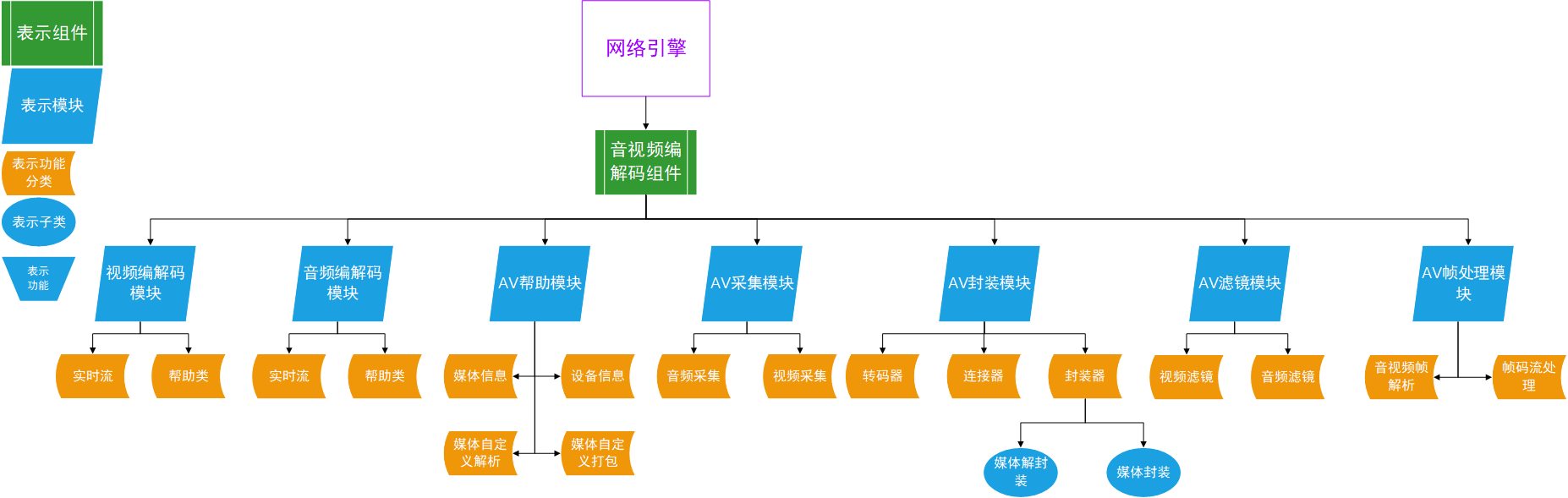
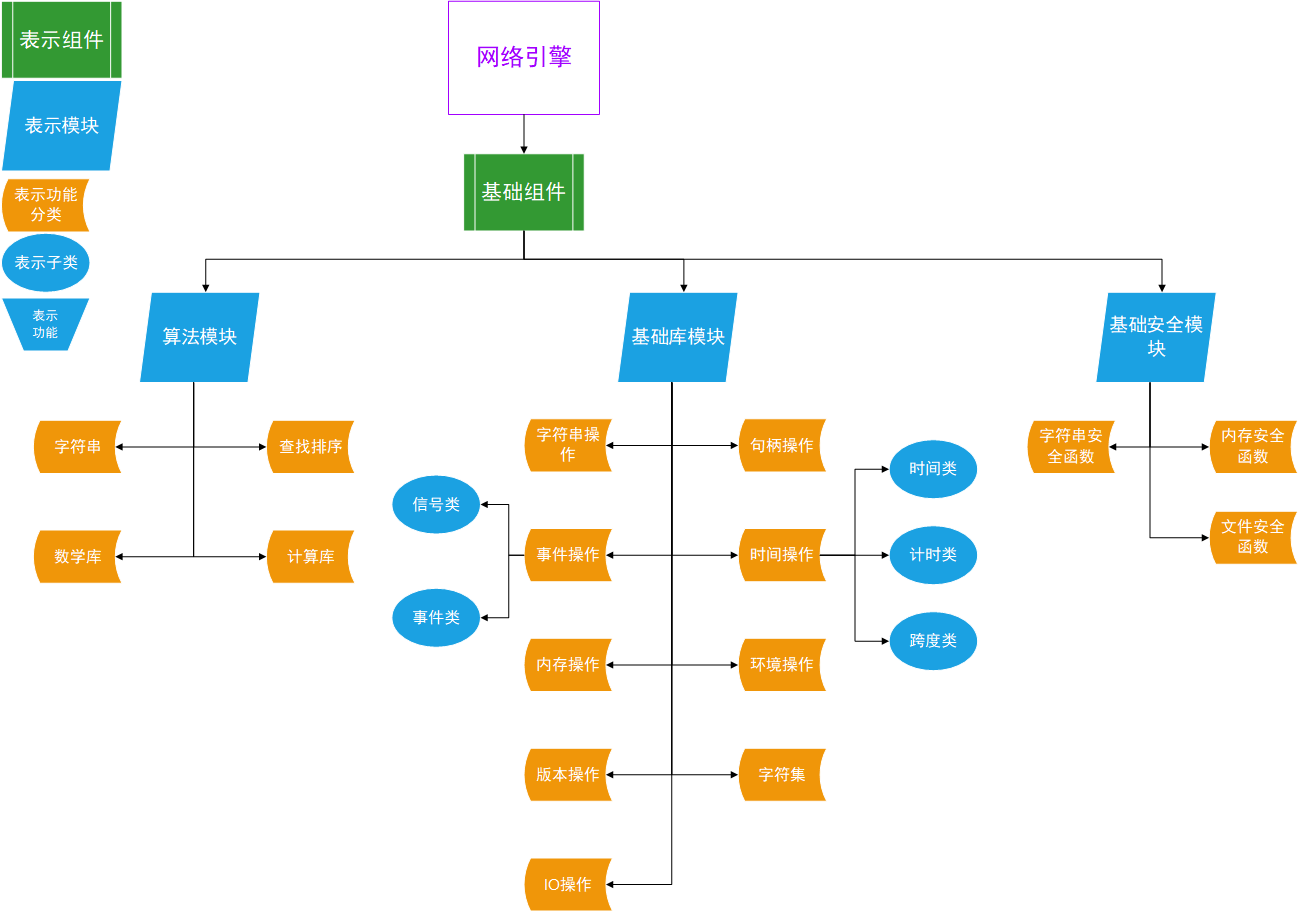
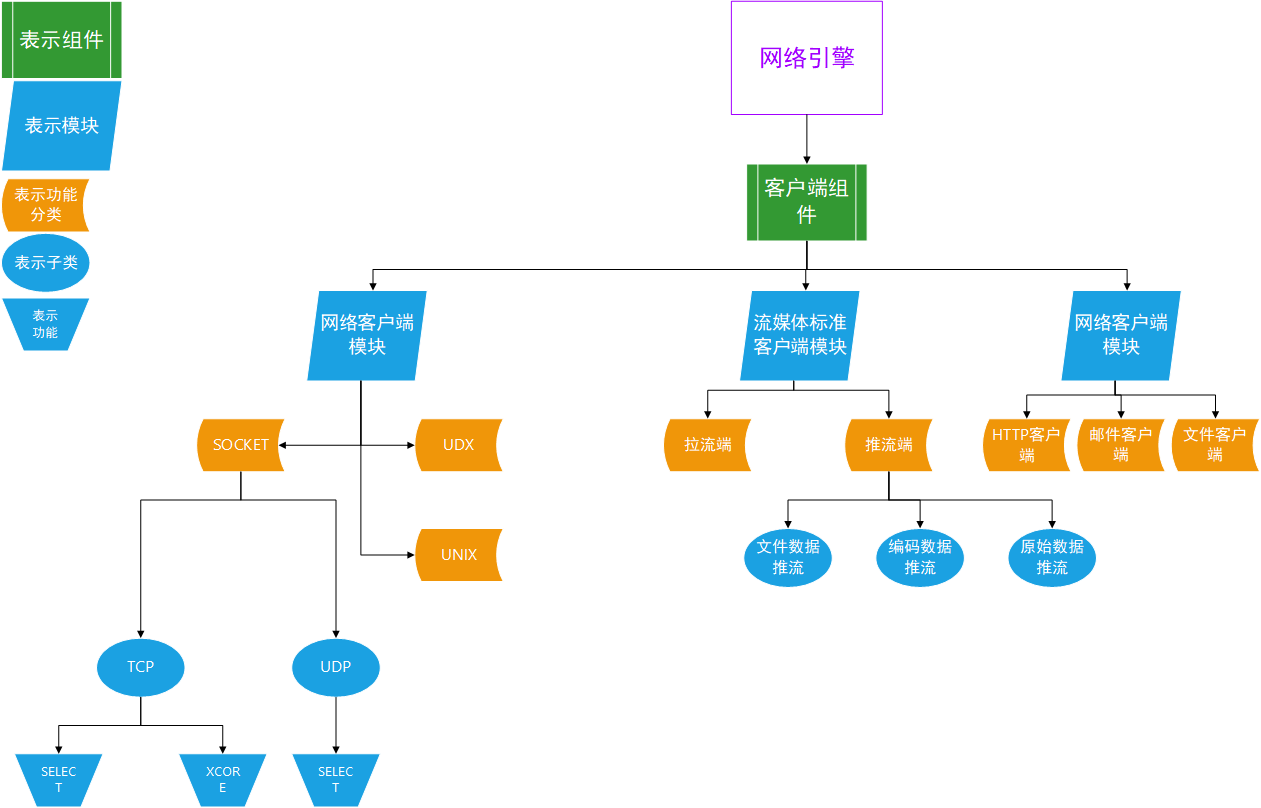
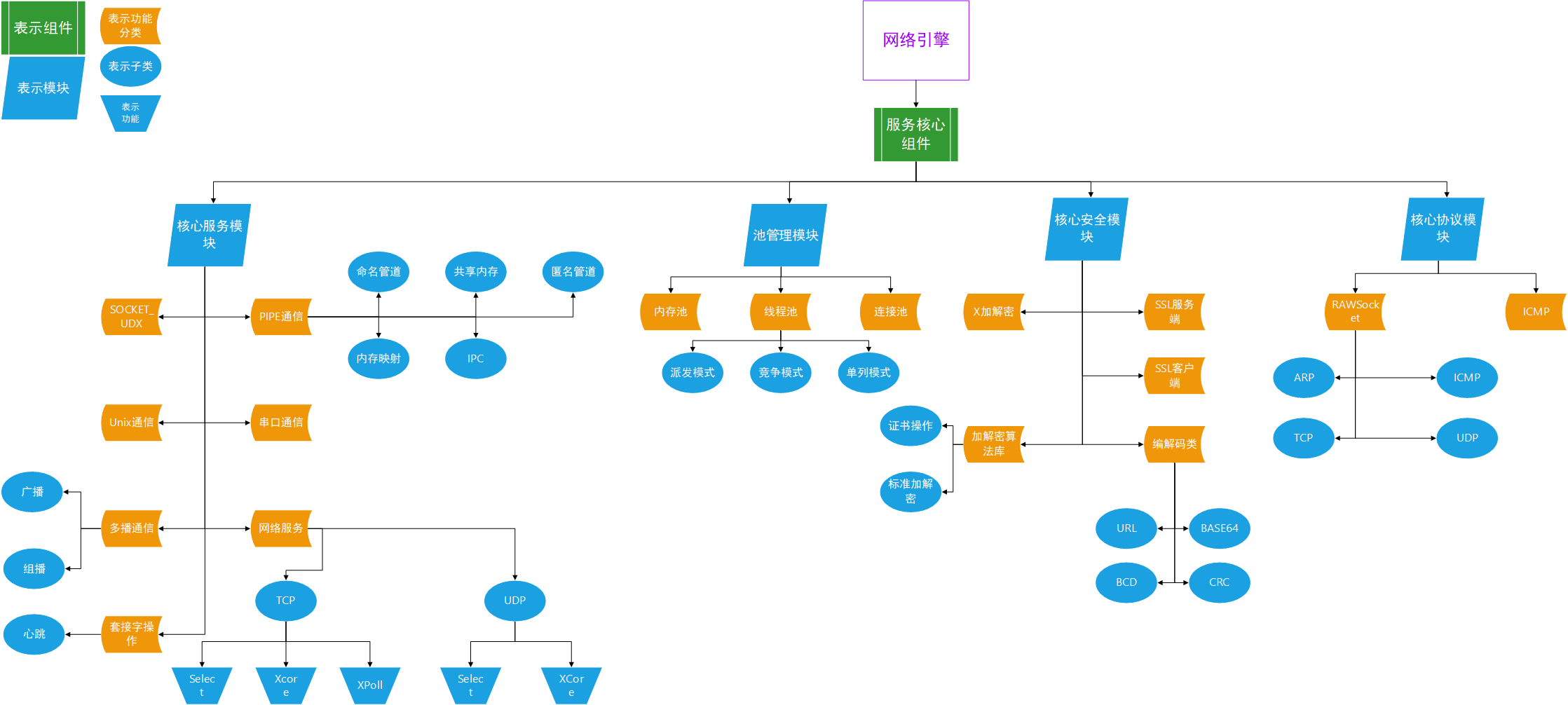
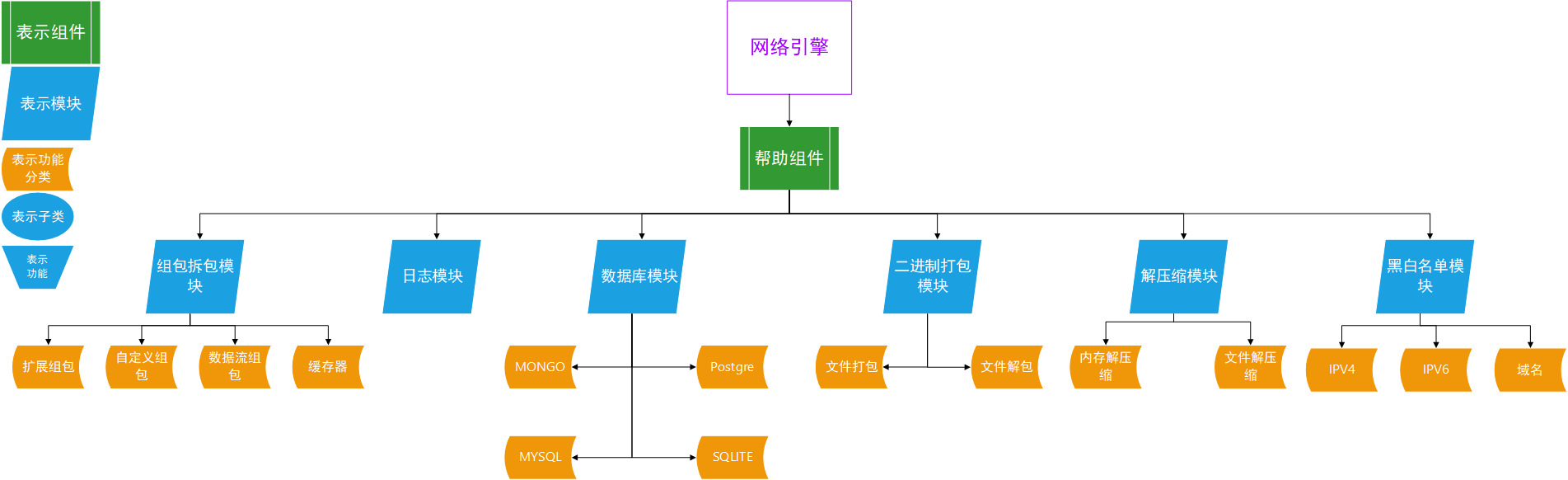
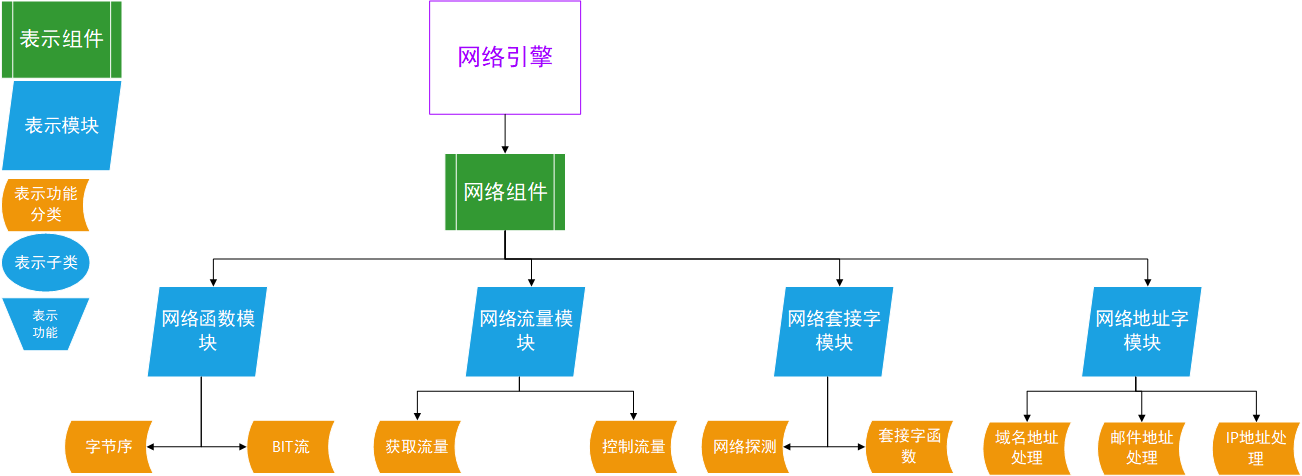
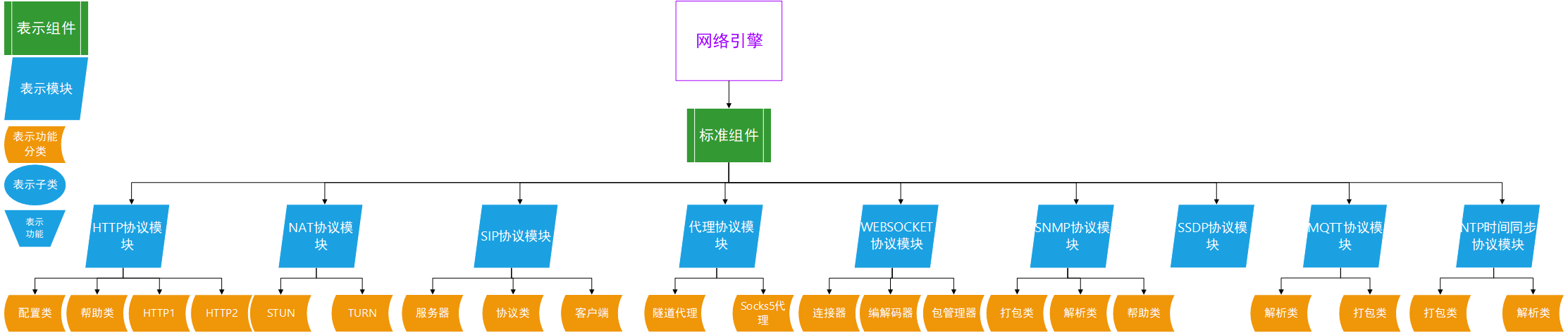
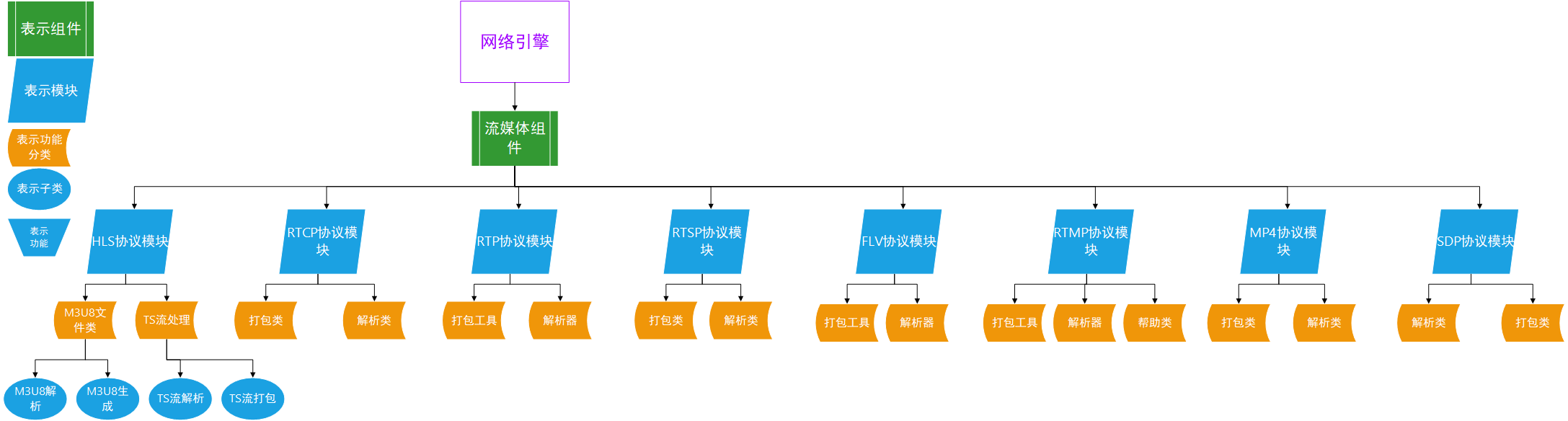
### component struct
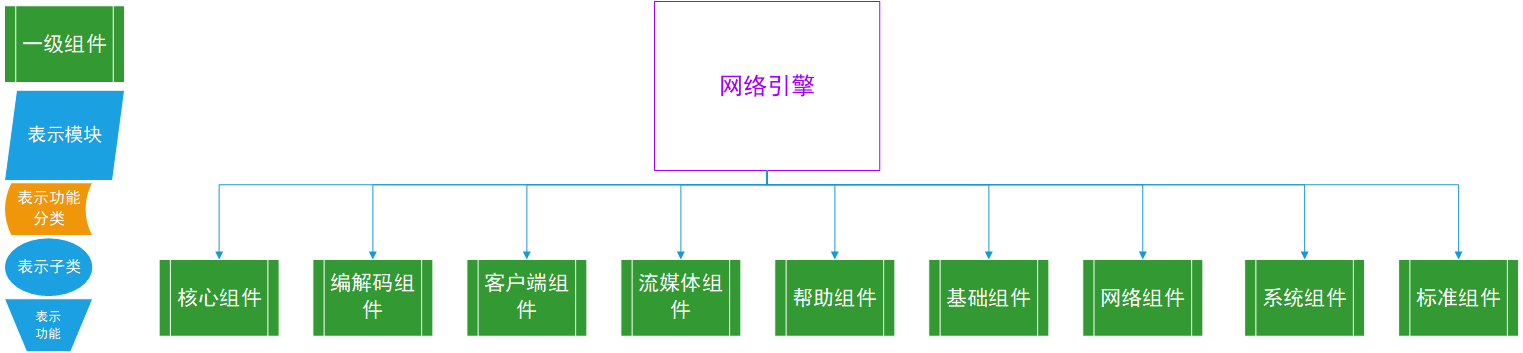
* Codec component: used for audio and video codec development and filter, transcoding and other operations
* Basic components: including basic time, string, algorithm, file, event, handle and other operations
* Client Components: Contains regular TCP and UDP client development, as well as other advanced client development SDKs
* Core components: including various high-performance network services, high-performance thread pools and network-related basic protocol development, etc.
* Helping components: including protocol group unpacking, binary group unpacking, decompression, database related SDK development
* Network components: SDKs for network-related protocols and tools development
* Standard Components: Modules developed for protocols introduced by the RFC standards organization.
* Streaming Media Components: Interface modules for client-server protocol-related development of streaming media protocols
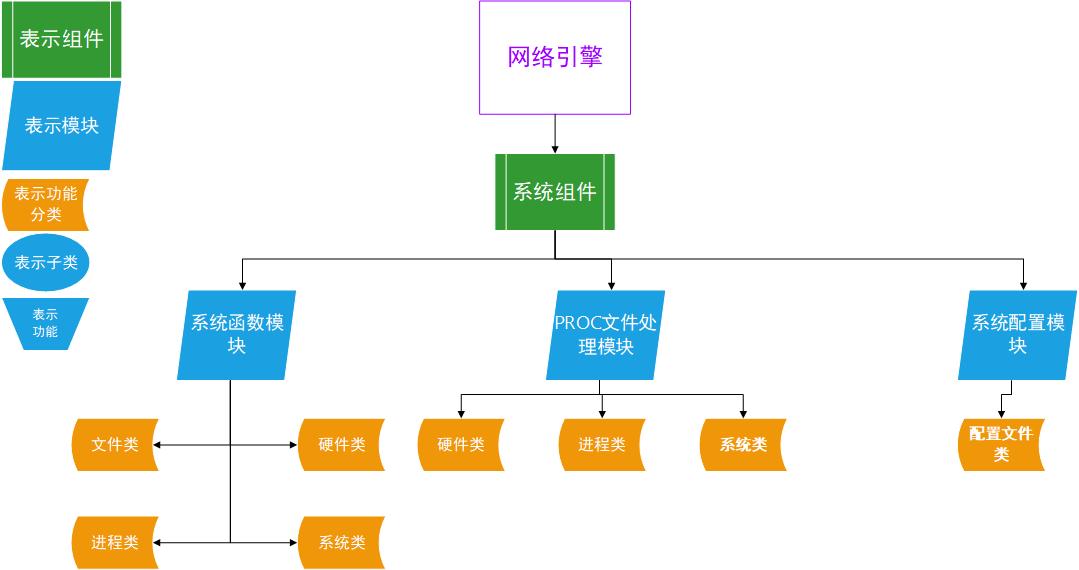
* System components: SDK development components related to the system platform
## Contribution Guidelines
Repository: https://github.com/libxengine/xengine
License Information: https://www.xyry.org/auth.html
If you are contributing code, please fork the repository and write your code in your own fork. Once completed, submit a PR to the develop branch of our repository.
You must strictly follow the coding standards outlined in the Development Document.docx when writing your code.refer<环境配置.docx>to configure your develop env
If you only need to compile and use the code, please switch to the master branch in our repository, as the develop branch is for development purposes and is not intended for regular use.
## Software Architecture
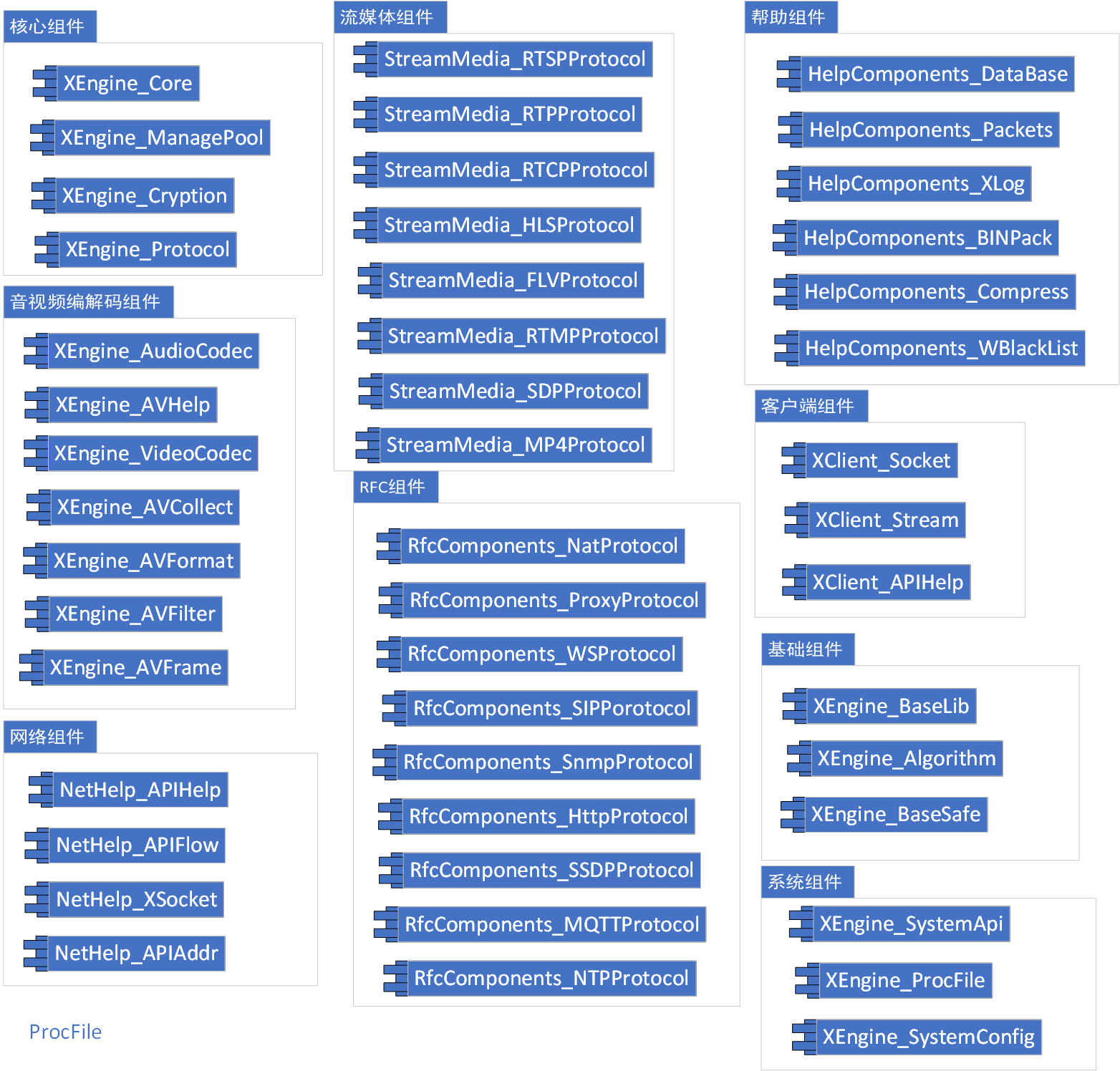
### components struct picture