https://github.com/lightinn/dofus-hunters
Dofus overlay tool (insired by Ganymède)
https://github.com/lightinn/dofus-hunters
Last synced: 10 months ago
JSON representation
Dofus overlay tool (insired by Ganymède)
- Host: GitHub
- URL: https://github.com/lightinn/dofus-hunters
- Owner: LightInn
- Created: 2025-01-29T19:15:43.000Z (over 1 year ago)
- Default Branch: master
- Last Pushed: 2025-07-20T20:02:28.000Z (11 months ago)
- Last Synced: 2025-07-29T03:16:32.381Z (11 months ago)
- Language: Rust
- Homepage:
- Size: 15 MB
- Stars: 4
- Watchers: 1
- Forks: 0
- Open Issues: 12
-
Metadata Files:
- Readme: README.md
Awesome Lists containing this project
README
# DOFUS-hunteRS
[](#)
[](https://www.rust-lang.org/)
[](https://tauri.app/)
[](#)
[](LICENSE)
```
____ __ __ __
/ __ \____ / /_____ ____ / /_ / /____ _____
/ / / / __ \/ __/ __ \/ __ \/ __/ / __/ _ \/ ___/
/ /_/ / /_/ / /_/ /_/ / / / / /_ / /_/ __/ /
\____/ .___/\__/\____/_/ /_/\__/ \__/\___/_/
/_/ hunteRS ~ Tauri Desktop App ~
```
> **Dofus overlay tool** (inspired by Ganymède) – Not a bot, just an assistive tool for treasure hunts in Dofus.
> ⚠️ *Currently English-only. Private API. Still a work in progress!*
---
## 📌 Overview
- **Demo VIDEO**:
- [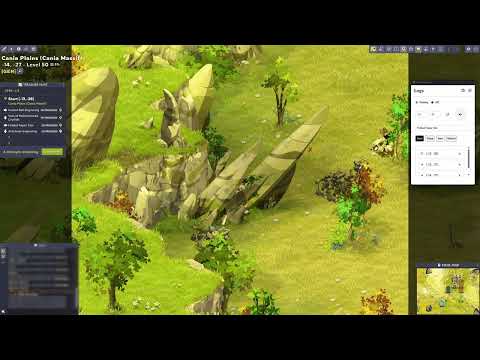](https://www.youtube.com/watch?v=yhh_wEjSPN8)
- **Screenshot**:
-

---
## 🚀 Features
- **Dofus overlay**: Screen analysis with OCR and OpenCV.
- **Clue management**: Fetches hints from your custom API.
- **Built-in settings manager**: Configure directly from the app.
- **Rust + Tauri**: Fast, lightweight, and smooth desktop experience.
- **Inspired by Ganymède**: But with extra Rust magic!
---
## ⚡ Installation & Requirements
### 1. Microsoft C++ & WebView2
- Install **Microsoft C++ Build Tools** and **Microsoft Edge WebView2** (required for Tauri).
### 2. Rust & Tauri
- Install [Rust](https://www.rust-lang.org/tools/install) and set the MSVC toolchain as default.
- (Optional) Install [Node.js](https://nodejs.org/) if you plan to tweak the frontend.
- Ensure Tauri is installable via `cargo`.
### 3. OpenCV (Required for OCR)
- Install via **Chocolatey**:
```powershell
choco install llvm opencv
```
- Or via **vcpkg**:
```powershell
vcpkg install llvm opencv4[contrib,nonfree]
```
- Set environment variables (`OPENCV_LINK_PATHS`, etc.).
### 4. Clang/LLVM
- Download the latest version from [LLVM releases](https://github.com/llvm/llvm-project/releases).
- Add paths to environment variables (`LLVM_CONFIG_PATH`, `LIBCLANG_PATH`).
---
## 🛠 Running the App (Dev)
1. **Clone the repo**:
```bash
git clone https://github.com/LightInn/dofus-hunteRS.git
cd dofus-hunters
```
2. **Install dependencies**:
```bash
pnpm install
```
(or `npm install`, `yarn install` – whichever you prefer)
3. **Start in dev mode**:
```bash
pnpm tauri dev
```
4. **Configure settings directly in the app** (Settings tab).
---
## ⚠️ Important Notices
> **🔴 OCR cannot be disabled**
> The app relies on OpenCV-based OCR, and there are currently no native Rust bindings available to replace it.
> **🔴 English-only for now**
> The tool only works with the **English** version of Dofus.
> **🔴 This is NOT a bot**
> The app does not automate gameplay. It simply provides an assistive overlay for easier treasure hunts.
> **🔴 Work in Progress**
> Expect bugs, incomplete features, and frequent updates.
---
## 🤝 Contributing
Pull requests are more than welcome! Whether it's improving the UI, optimizing the OCR, or porting the project to other OS, your contributions can make a difference.
Open an **issue** or a **pull request** and let’s discuss!
---
## 📜 License
This project is open-source under the **MIT License**. See the [LICENSE](LICENSE) file for details.
---
## 🎉 Credits
- **Tauri** for making desktop dev enjoyable.
- **Rust** for its unmatched speed.
- **Dofus community** for the inspiration.
- **You**, for testing and contributing!
---
*Happy hunting! (And remember, we're not bots.)*
```