https://github.com/limitkr/supabase-hooks
react hooks for Supabase
https://github.com/limitkr/supabase-hooks
react react-hooks supabase supabase-hooks
Last synced: 10 months ago
JSON representation
react hooks for Supabase
- Host: GitHub
- URL: https://github.com/limitkr/supabase-hooks
- Owner: limitkr
- License: mit
- Archived: true
- Created: 2023-03-09T12:54:36.000Z (over 3 years ago)
- Default Branch: main
- Last Pushed: 2023-04-11T16:34:02.000Z (over 3 years ago)
- Last Synced: 2025-08-08T19:04:08.498Z (12 months ago)
- Topics: react, react-hooks, supabase, supabase-hooks
- Language: TypeScript
- Homepage:
- Size: 92.8 KB
- Stars: 0
- Watchers: 1
- Forks: 0
- Open Issues: 1
-
Metadata Files:
- Readme: README.md
- License: LICENSE.md
Awesome Lists containing this project
README
# supabase-hooks
React hooks library for [Supabase](https://github.com/supabase/supabase) ⭐
# Contents
1. [Install](#install)
2. [Usage](#usage)
- [NextJS Example](#nextjs-example)
3. [Run the Test](#run-the-test)
4. [API](#api)
- [useClient](#useclientt)
- [useDatabase](#usedatabasetfrom)
- [unstable_useDatabase](#unstableusedatabasefrom-options)
# Install
```shell
npm install @limitkr/supabase-hooks
# or yarn package manager
yarn add @limitkr/supabase-hooks
```
> :warning: This is an experimental repo, still under development.
# Usage
## NextJS Example
Import the `` at the project root:
```tsx
import { createClient } from "@supabase/supabase-js";
import { SHProvider } from "@limitkr/supabase-hooks";
import type { AppProps } from "next/app";
import type { Database } from "database.types"; // Supabase Database types
const client = createClient(
/* Supabase URL */,
/* Supabase Key */
);
export default function MyApp({ Component, pageProps }: AppProps) {
return (
)
}
```
And use the hook you want anywhere on the page.
```tsx
import { useDatabase } from "@limitkr/supabase-hooks";
import type { Database } from "database.types"; // Supabase Database types
export default function MyPage() {
const { data: posts, isLoading } = useDatabase("posts");
return isLoading ? (
Loading...
) : (
{posts.map((post) => (
{post.title}
))}
);
}
```
# Breaking changes
From version v1.0.0-beta.6, the second generic type must be put in the `useDatabase` hook to provide the correct type hint. For example:
```ts
const { data } = useDatabase("posts");
```
# Use unstable feature
> :warning: This feature is still in the experimental stage.
> You may experience unintended bugs!
To use the hooks that are currently in development, you can
import the exported hooks from the unstable folder.
This package allows data fetching to be used with filters and uses
better type definitions exported from Supabase.
```ts
import { unstable_useDatabase } from "@limitkr/supabase-hooks/unstable"
```
Check the [documentation](src/hooks/unstable/README.md).
# Run the Test
This project uses Jest's `setupFiles` feature to change the process.env variable before running the test. So you need to
read the description below if you want to run the test.
## Setup
At the root of the project, create a _.jest_ folder. You can also create it with the command below:
```shell
mkdir .jest
```
And then create the _setEnvVar.js_ file in the folder. assign the env variables in the _setEnvVar.js_.
```js
// .jest/setEnvVar.js
process.env.SUPABASE_URL = /* Your Supabase URL */
process.env.SUPABASE_ANON_KEY = /* Your Supabase Key */
```
And create new empty supabase instance for testing, and create a new table like the image below.
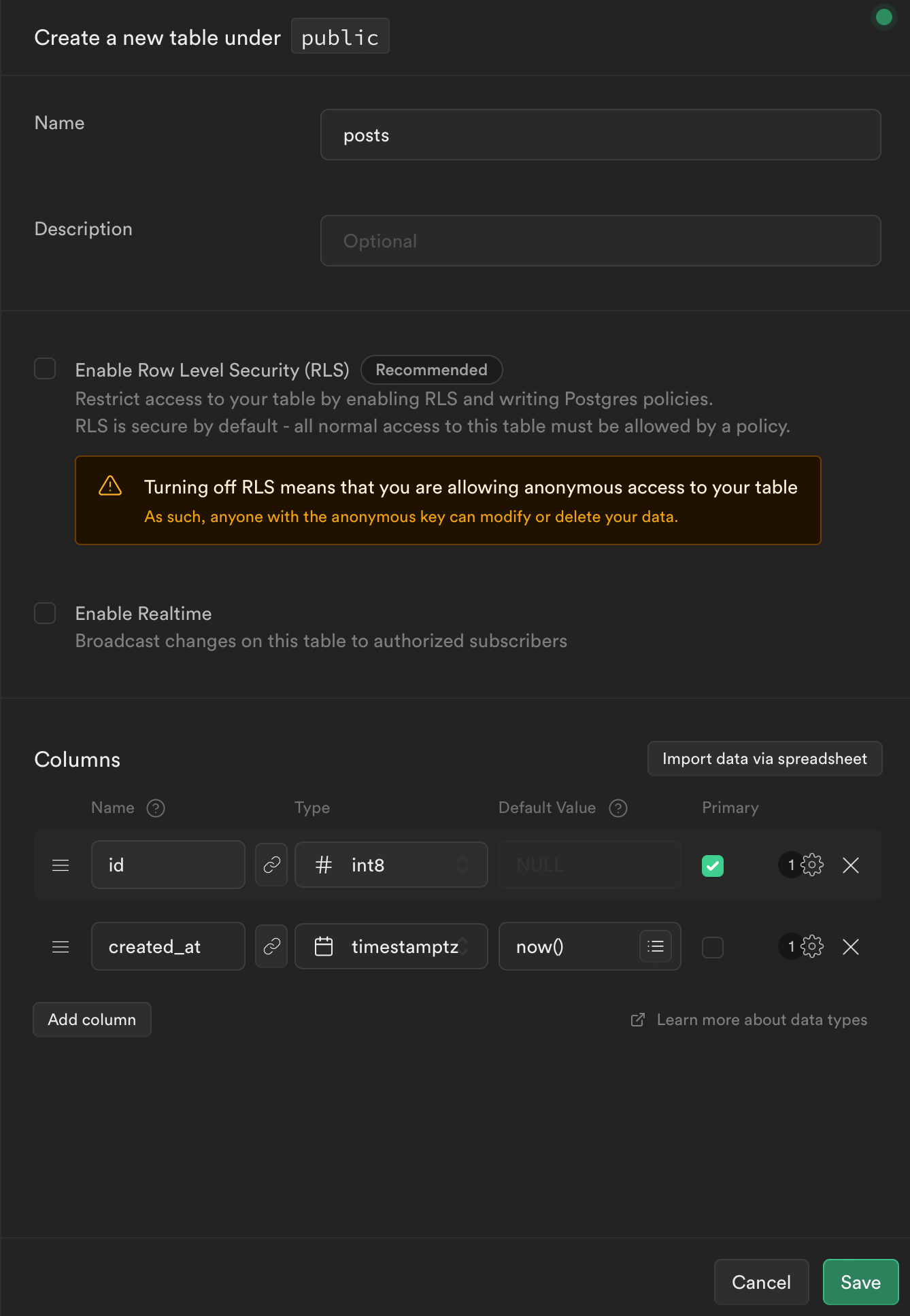
Now you can run the test!
# API
## `useClient()`
```ts
const useClient = () =>
ReturnType>;
```
Returns the Supabase client.
## `useDatabase(from)`
```ts
const useDatabase = (
from: TableKey,
options: UseDatabaseOptions
) => {
return { data, isLoading, insertData, updateData, upsertData, deleteData };
};
```
Returns 4 Supabase database methods: `insert`, `update`, `delete`, `upsert`. Returns 2 Variables:
- `isLoading` - Variable that indicate whether data is being loaded.
- `data` - fetched data that Select a table using the 'key' value defined in the `from` parameter.
You can use filtering in some database methods. For example, to delete data when a specific ID matches:
```tsx
import { useDatabase } from "@limitkr/supabase-hooks";
export default function Example() {
const { deleteData } = useDatabase("posts");
return (
await deleteData.eq("id", 1)}>Delete
);
}
```
> :warning: In the data fetch(`select`) method, filtering options will be added soon.
### `from: K extends TableKey | string`
The table name to operate on.
> :information_source: If you use a database type extracted from 'Supabase' into the generic type, you can get a better type hint.
### `options: UseDatabaseOptions`
```ts
interface UseDatabaseOptions {
selectSingle?: boolean;
disableFetch?: boolean;
}
```
#### `selectSingle: boolean`
default: `false`
If `true`, one single object type is returned, not an array type. This is the same method as below.
```ts
await supabaseClient.from(/* from */).select().single();
```
#### `disableFetch: boolean`
default: `false`
If `true`, the `useDatabase` hook does not automatically fetch data. This is useful if you want to use the
`useDatabase` hook for data insertion or delete methods.