https://github.com/lintangwisesa/rpi_tasbihdigital
Digital tasbih counter using Raspberry Pi, Flask & SQLite database
https://github.com/lintangwisesa/rpi_tasbihdigital
flask python raspberry-pi sqlite3
Last synced: about 2 months ago
JSON representation
Digital tasbih counter using Raspberry Pi, Flask & SQLite database
- Host: GitHub
- URL: https://github.com/lintangwisesa/rpi_tasbihdigital
- Owner: LintangWisesa
- Created: 2020-05-09T08:27:44.000Z (about 6 years ago)
- Default Branch: master
- Last Pushed: 2020-05-10T06:35:15.000Z (about 6 years ago)
- Last Synced: 2025-02-26T00:48:28.401Z (over 1 year ago)
- Topics: flask, python, raspberry-pi, sqlite3
- Language: Python
- Size: 84 KB
- Stars: 0
- Watchers: 3
- Forks: 0
- Open Issues: 0
-
Metadata Files:
- Readme: README.md
Awesome Lists containing this project
README

# Raspberry Pi Digital Tasbih Counter
## 📋 Project Summary
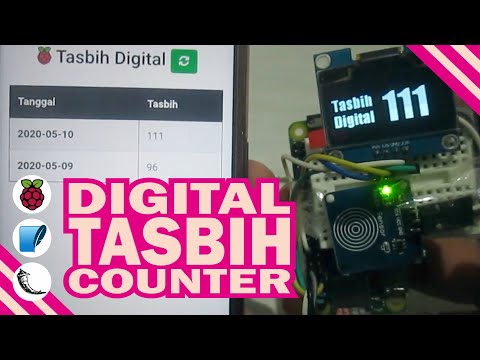
Klik gambar berikut untuk melihat video demo:
[](https://youtu.be/aIpisSb1dhc)
Tasbih digital berbasis Raspberry Pi dengan fitur: 1) menghitung jumlah tasbih layaknya digital tasbih komersil, 2) data hasil hitung tersimpan di database SQLite dan 3) monitor rekapitulasi total tasbih harian dengan mengakses IP address Raspberry Pi (via Flask server). Hardware: Raspberry Pi Zero W (Wireless), touch sensor dan 1.3 inch OLED display (SH1106). Software: diprogram dengan Python 3, package GPIO & Luma.OLED, Flask server dan database SQLite.
## 📋 Project Tutorial
This project is built on __Raspberry Pi Zero W (Wireless)__ with __Raspbian OS (Buster)__ and __Python 3.x__ (I'm using 3.8). So make sure you've installed Python 3.x also __git__ to clone this project from my github.
- ### 0. Tools & Materials
- __Raspberry Pi Zero Wireless__ (you can use any type of mini PC) which has been installed Raspbian OS (or any compatible OS).
- __1.3" OLED display SH1106__ (or any OLED module such as 0.96" SSD1306)
- __Touch sensor__
- Some jumper wires & a breadboard
- ### 1. Clone this project
Clone this project from my github repo. [Download here](https://github.com/LintangWisesa/RPi_TasbihDigital) or clone it from your terminal (make sure you've installed *__git__* on your Pi):
```bash
$ git clone https://github.com/LintangWisesa/RPi_TasbihDigital.git
$ cd RPi_TasbihDigital
```
- ### 2. Database (SQLite) Preparation
Install SQLite on your Pi:
```bash
$ sudo apt-get install sqlite3
```
I've included the database on this repo, named ```tasbih.db```. If you wanna make this project easier, simply just use my database and go to the next step. But if you want to make your own, follow these following step.
- Open SQLite shell with worked database named ```tasbih.db```:
```bash
$ sqlite3 tasbih.db
```
- Create ```tasbihcount``` table with columns: ```id```, ```tasbih``` and ```tanggal```:
```bash
sqlite> create table tasbihcount (
id integer primary key autoincrement,
tasbih int,
tanggal date default CURRENT_DATE
);
sqlite> .tables
sqlite> .fullschema
```
- Optional: check your database/table by inserting an initial data.
```bash
sqlite> insert into tasbihcount (tasbih) values (1);
sqlite> select tanggal, sum(tasbih) from tasbihcount group by tanggal;
```
- Exit from SQLite shell:
```bash
sqlite> .quit
```
- ### 3. Raspberry Pi (GPIO & apps) Preparation
In this project I used 1.3" OLED display, also I'll create a Flask server application. So we need install several packages needed, especially ```Luma.OLED``` & ```Flask``` library:
```bash
$ sudo apt install python3-dev python3-pip libfreetype6-dev libjpeg-dev build-essential libopenjp2-7 libtiff5
$ sudo pip3 install luma.oled
```
Connect 1.3" OLED display & touch sensor to Raspberry Pi, follow basic diagram/image below:
> -- _image will be here_ --
- ### 4. Run ```tasbih_device.py```
Execute ```tasbih_device.py```:
```bash
$ python3 tasbih_device.py
```
Your OLED display will show a title text __Tasbih Digital__, and you're ready to go! Try to touch its sensor, the tasbih counter will add +1 value every touch detected.
- ### 5. Run ```tasbih_app.py```
You can also monitor the daily recapitulation of the numbers of tasbih. Simply check your IP address, then find your Pi's. Insert your Pi's IP on ```tasbih_app.py```.
```bash
$ sudo nano tasbih_app.py
```
Insert your IP on this line.
```python
if __name__ == '__main__':
app.run(
debug = True,
host = 'XXX.XXX.XX.XX' # your IP address
)
```
Then execute ```tasbih_app.py```:
```bash
$ python3 tasbih_app.py
```
Now you can check your tasbih status by requesting to its IP, port 5000 from any gadget that you have. For example from your smartphone, go to its browser then type ```XXX.XXX.XX.XX:YYYY```. It will show a daily recapitulation table of the numbers of tasbih. Enjoy!
#### Lintang Wisesa :love_letter: _lintangwisesa@ymail.com_
[Facebook](https://www.facebook.com/lintangbagus) |
[Twitter](https://twitter.com/Lintang_Wisesa) |
[Youtube](https://www.youtube.com/user/lintangbagus) |
[LinkedIn](https://www.linkedin.com/in/lintangwisesa/) |
:octocat: [GitHub](https://github.com/LintangWisesa) |
[Hackster](https://www.hackster.io/lintangwisesa)