https://github.com/linux-profile/email-profile
📩 Email Profile
https://github.com/linux-profile/email-profile
Last synced: 2 months ago
JSON representation
📩 Email Profile
- Host: GitHub
- URL: https://github.com/linux-profile/email-profile
- Owner: linux-profile
- License: mit
- Created: 2023-04-09T16:11:08.000Z (about 3 years ago)
- Default Branch: master
- Last Pushed: 2025-09-14T02:10:02.000Z (9 months ago)
- Last Synced: 2025-10-04T01:35:21.010Z (9 months ago)
- Language: Python
- Homepage: https://linux-profile.github.io/email-profile/
- Size: 396 KB
- Stars: 0
- Watchers: 1
- Forks: 0
- Open Issues: 0
-
Metadata Files:
- Readme: README.md
- License: LICENSE
Awesome Lists containing this project
README
# email-profile
[](https://pypi.org/project/email-profile/)
[](https://pypi.org/project/email-profile/)
[](https://github.com/linux-profile/email-profile/actions)
[](LICENSE)
[](https://pypi.org/project/email-profile/)
The simplest way to work with email in Python. No boilerplate, no low-level IMAP commands, no headaches.
Just connect, read, search, send, backup, and restore — with one class.
```python
from email_profile import Email
with Email("user@gmail.com", "app_password") as app:
for msg in app.inbox.where().messages():
print(f"{msg.date} | {msg.from_} | {msg.subject}")
```
That's it. No server configuration needed — email-profile auto-discovers your IMAP server from your email address.
---
- **Documentation**: [linux-profile.github.io/email-profile](https://linux-profile.github.io/email-profile/)
- **Source Code**: [github.com/linux-profile/email-profile](https://github.com/linux-profile/email-profile)
- **PyPI**: [pypi.org/project/email-profile](https://pypi.org/project/email-profile/)
---
## Install
```bash
pip install email-profile
```
## Why email-profile?
Most Python email libraries make you deal with `imaplib` directly, parse raw bytes, manage connections manually, and write dozens of lines just to read your inbox.
**email-profile gives you a clean, human API:**
- Write `Email("user@gmail.com", "pw")` instead of configuring IMAP servers manually
- Write `app.inbox.where(Q.unseen()).first()` instead of raw IMAP search commands
- Write `app.sync()` instead of building your own backup system
- Write `app.send(to="...", subject="...", body="...")` instead of constructing MIME messages
It combines IMAP + SMTP + storage + sync in a single library. No other Python package does this.
## Quick Start
### Connect
Three ways to connect — pick the one that fits:
```python
from email_profile import Email
# Just email + password (auto-discovers the server)
with Email("user@gmail.com", "app_password") as app:
print(app.mailboxes())
# From .env file (great for production)
with Email.from_env() as app:
print(app.mailboxes())
# Explicit server (when you need full control)
with Email("imap.gmail.com", "user@gmail.com", "app_password") as app:
print(app.mailboxes())
```
### Read Emails
```python
with Email.from_env() as app:
# How many emails?
print(app.inbox.where().count())
# Read them
for msg in app.inbox.where().messages():
print(f"{msg.date} | {msg.from_} | {msg.subject}")
# Just the first one
msg = app.inbox.where().first()
# Only headers (much faster for large mailboxes)
for msg in app.inbox.where().messages(mode="headers"):
print(msg.subject)
```
### Search
Find exactly what you need with composable queries:
```python
from email_profile import Email, Q
from datetime import date
with Email.from_env() as app:
# Combine conditions with & (AND), | (OR), ~ (NOT)
q = Q.subject("meeting") & Q.unseen()
print(app.inbox.where(q).count())
# From Alice or Bob
q = Q.from_("alice@x.com") | Q.from_("bob@x.com")
# Everything except seen emails
q = ~Q.seen()
# Emails from 2025, larger than 1MB
q = Q.since(date(2025, 1, 1)) & Q.before(date(2025, 12, 31)) & Q.larger(1_000_000)
```
Or use validated kwargs if you prefer:
```python
from email_profile import Query
query = Query(subject="report", unseen=True, since=date(2025, 1, 1))
query = Query(subject="report").exclude(subject="spam").or_(subject="urgent")
```
Built-in shortcuts for common searches:
```python
app.unread().count()
app.recent(days=7).count()
app.search("invoice").count()
```
### Send Emails
Send, reply, and forward — with automatic SMTP discovery:
```python
with Email.from_env() as app:
# Simple
app.send(to="recipient@x.com", subject="Hello", body="Hi there!")
# HTML + attachments + CC
app.send(
to=["alice@x.com", "bob@x.com"],
subject="Report",
body="See attached.",
html="
Report
",
attachments=["report.pdf"],
cc="manager@x.com",
)
# Reply to an email (preserves threading)
msg = app.inbox.where().first()
app.reply(msg, body="Thanks!")
# Forward
app.forward(msg, to="colleague@x.com", body="FYI")
```
### Backup & Restore
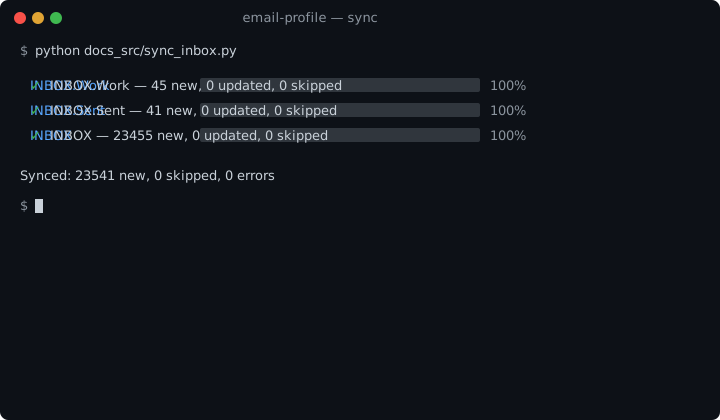
Sync your entire mailbox to a local SQLite database. Incremental — only downloads new emails. Parallel — multiple mailboxes at once. With progress bars.
```python
with Email.from_env() as app:
# Backup everything (compares by Message-ID, skips duplicates)
result = app.sync()
print(f"{result.inserted} new, {result.skipped} skipped")
# Backup one mailbox
result = app.sync(mailbox="INBOX")
# Force re-download (skip duplicate check)
result = app.sync(skip_duplicates=False)
# Restore to server (e.g. after migrating)
count = app.restore()
```
### Mailbox Operations
```python
with Email.from_env() as app:
# Built-in folder shortcuts (auto-detected across languages)
app.inbox # INBOX
app.sent # Sent / Enviados / Enviadas
app.trash # Trash / Lixeira / Papelera
app.drafts # Drafts / Rascunhos
app.spam # Spam / Junk / Lixo Eletrônico
# Any folder by name
work = app.mailbox("INBOX.Work")
# Message operations
work.mark_seen(uid)
work.move(uid, "INBOX.Archive")
work.delete(uid)
```
### Custom Storage
Storage is lazily initialized — `email.db` is only created when `sync()` or `restore()` is first called.
```python
from email_profile import Email, StorageSQLite
# Default: saves to ./email.db on first sync
with Email.from_env() as app:
app.sync()
# Custom path
with Email.from_env() as app:
app.storage = StorageSQLite("./backup.db")
app.sync()
```
## Features
| Feature | Description |
|---|---|
| **Auto-discovery** | Detects IMAP/SMTP servers from email domain (50+ providers) |
| **Unified API** | IMAP + SMTP in a single `Email` class |
| **Query Builder** | Composable search with `Q` (AND, OR, NOT) and validated `Query` kwargs |
| **Sync & Restore** | Incremental backup to SQLite, restore to any server |
| **Parallel** | Multi-threaded sync and restore with configurable workers |
| **Progress** | Rich progress bars with per-mailbox status |
| **Retry** | Exponential backoff on transient failures |
| **Send** | Send, reply, forward with HTML, attachments, CC/BCC |
| **Storage** | Pluggable storage backend (SQLite default) |
| **Flags** | Read/unread, flag, delete, move, copy operations |
| **Context Manager** | `with Email(...) as app:` for automatic cleanup |
## Supported Providers
Auto-discovery works out of the box. Just use your email and password — no server configuration needed.
| | Provider | IMAP Server |
|---|---|---|
|  | Gmail | imap.gmail.com |
|  | Outlook / Hotmail / Live | outlook.office365.com |
|  | Yahoo | imap.mail.yahoo.com |
|  | iCloud | imap.mail.me.com |
|  | Zoho | imap.zoho.com |
|  | ProtonMail (Bridge) | 127.0.0.1:1143 |
|  | AOL | imap.aol.com |
|  | Yandex | imap.yandex.com |
|  | Mail.ru | imap.mail.ru |
|  | GMX | imap.gmx.com |
|  | Hostinger | imap.hostinger.com |
|  | GoDaddy | imap.secureserver.net |
|  | Namecheap | mail.privateemail.com |
|  | Gandi | mail.gandi.net |
|  | OVH | ssl0.ovh.net |
|  | Ionos (1&1) | imap.ionos.com |
|  | Fastmail | imap.fastmail.com |
| | Rackspace | secure.emailsrvr.com |
| | Titan | imap.titan.email |
| | Locaweb | imap.locaweb.com.br |
| | KingHost | imap.kinghost.net |
| | UOL | imap.uol.com.br |
| | Terra | imap.terra.com.br |
Any server with DNS SRV or MX records is also detected automatically.
## Environment Variables
```env
EMAIL_USERNAME=user@example.com
EMAIL_PASSWORD=app_password
EMAIL_SERVER=imap.example.com # optional, auto-discovered
```
## License
MIT