https://github.com/linuxbeginnings/nixos-hyprland
Flake to install Hyprland and related pkgs
https://github.com/linuxbeginnings/nixos-hyprland
hyprland nixos
Last synced: 3 months ago
JSON representation
Flake to install Hyprland and related pkgs
- Host: GitHub
- URL: https://github.com/linuxbeginnings/nixos-hyprland
- Owner: LinuxBeginnings
- Created: 2026-01-02T10:50:42.000Z (6 months ago)
- Default Branch: main
- Last Pushed: 2026-03-03T19:38:47.000Z (4 months ago)
- Last Synced: 2026-03-03T23:24:36.568Z (4 months ago)
- Topics: hyprland, nixos
- Language: Nix
- Homepage:
- Size: 63.5 MB
- Stars: 1
- Watchers: 0
- Forks: 0
- Open Issues: 0
-
Metadata Files:
- Readme: README.md
- Changelog: CHANGELOG.md
- Contributing: CONTRIBUTING.es.md
- Funding: .github/FUNDING.yml
- Code of conduct: CODE_OF_CONDUCT.es.md
- Agents: AGENTS.md
Awesome Lists containing this project
README
# 💌 ** KooL's ❄️ NixOS-Hyprland Install Script ** 💌

   
👇 KOOL's Hyprland-Dots related Links 👇

KooL Hyprland-Dotfiles Showcase


https://github.com/user-attachments/assets/49bc12b2-abaf-45de-a21c-67aacd9bb872
> [!CAUTION]
> This is not purely written in Nix-Language. You should check ZaneyOS. Link below
> [!IMPORTANT]
> The install scripts assumes a clean installation of NixOS or the understanding that it will replace any existing configuration
> It will not merge into an existing NixOS configuration. You can use this code at your on your own risk.
> Currently, this project is on the unstable nixpkgs channel. When 25.11 becomes the new stable branch, the plan it to stay there, then move to the next stable
- Being on the unstable channel is a bigger challenge to support. An update can't prevent a rebuild, or require updating nix settings.
- Make sure to read Hyprland's [WIKI](https://wiki.hyprland.org/Nix/Hyprland-on-NixOS/)
🪧🪧🪧 Important announcement 🪧🪧🪧
- ** This Repo does not contain Hyprland configuration files. (Dotfiles)! **
- You can either, use KoolDots's, create your own configuration, or try to use another project's config.
- Make sure you have all the requirements first. I.e. fonts, supporting packages, at the correct version
- This new release adds Home Manger, but only manages a small set of packages
- NeoVim via NIXVIM
- Ghostty
- bat
- bottom
- btop
- eza
- fzf
- git
- tealdir
- yazi
> ** Not all of the configuration files in this project are written in NIX language **
- The `auto-install.sh` script will install Hyprland config files, (Dotfiles) from [`KooL's Hyprland-Dots`](https://github.com/LinuxBeginnings/Hyprland-Dots)
- These Hyprland dotfiles are constantly evolving / improving
- You can check the CHANGELOG here [`Hyprland-Dots-Changelogs`](https://github.com/LinuxBeginnings/Hyprland-Dots/wiki/Changelogs)
- GTK Themes and Icons will be pulled from [`LINK`](https://github.com/LinuxBeginnings/GTK-themes-icons), including Bibata Cursor Modern Ice
- You will be prompted if you want to download wallpapers from here: [`REPO`](https://github.com/LinuxBeginnings/Wallpaper-Bank)
> [Note:] The wallpapers contain AI generated and AI enhanced images. If this is an issue for you enter "N" when prompted to download them
> [!IMPORTANT]
> Take note of the requirements
>
👋 👋 👋 Requirements
- You must be running on NixOS 24.11+
- 25.05+ recommended
- BARE minimum space required is 64GB. 128GB+ is recommended as NixOS is a space-hungry distro
- Must have installed NIXOS using **GPT partition ** & Boot **UEFI**
- `/boot` must be at least 1GB. (Some are now recommending 2GB b/c of firmware size increases)
- Systemd-boot is configured as the default bootloader
> [!TIP]
> if you use GRUB as bootloader you need to edit `hosts/default/config.nix` before install and `flake.nix` for additional grub themes
🖥️ Multi Host & User Configuration
- You can now define separate settings for different host machines and users!
- Easily specify extra packages for your users in the users.nix file.
- Easy to understand file structure and simple, but encompassing, configuration.
📦 How To Install Packages?
- You can search the [Nix Packages](https://search.nixos.org/packages?)
- [Options](https://search.nixos.org/options?) pages for what a package may be named or if it has options available that take care of configuration hurdles you may face.
- By default, all the packages are in `$HOME/NixOS-Hyprland`
- Then edit `hosts//configs.nix` , `hosts//packages-fonts.nix` and/or `hosts//user.nix` depending on what you want.
- The `config.nix` file is for system packages with options. ie `programs.hyprland.enable=true`
- `$HOME/NixOS-Hyprland/modules/packages.nix` are where you add programs for all hosts globally.
- The packages-fonts.nix file is for adding packagesa or fonts, for that specific host. Changes made to `user.nix` are only available to the current user.
- Once you are finished editing, run:
```
sudo nixos-rebuild switch --flake ~/NixOS-Hyprland/#
```
🙋 Having Issues / Questions?
- Please feel free to raise an issue on the repo, please label a feature request with the title beginning with [feature request], thank you!
- If you have a question about KooL's Hyprland dots, see [`KooL's Dots WIKI`](https://github.com/LinuxBeginnings/Hyprland-Dots/wiki). Contained within the wiki is an FAQ, along with other pages for tips, keybinds, and more!
## ⬇️ Installation
#### 📽 Youtube video for using this script
- [KooL's Hyprland Dots on NixOS](https://youtu.be/nJLnRgnLPWI)
📜 1. Using auto install Script: <
- This is the easiest and recommended way of starting out.
- This script is NOT meant to allow you to change every option that you can in the flake.
- It won't help you install extra packages.
- It is simply here so you can get my configuration installed with as little chance of breakages.
- It is up to you to fiddle with to your heart's content!
- Simply copy this and run it:
```
nix-shell -p git vim curl pciutils
sh <(curl -L https://github.com/LinuxBeginnings/NixOS-Hyprland/raw/refs/heads/main/auto-install.sh)
```
> [!NOTE]
> pciutils is necessary to detect if you have an Nvidia card.
🦽 2. Manual:
- Run this command to ensure git, curl, vim & pciutils are installed: Note: or nano if you prefer nano for editing
```
nix-shell -p git vim curl pciutils
```
- Clone this repo & CD into it:
```
git clone --depth 1 https://github.com/LinuxBeginnings/NixOS-Hyprland.git ~/NixOS-Hyprland
cd ~/NixOS-Hyprland
```
- _You should stay in this directory for the rest of the install_
- Create the host directory for your machine(s)
```
cp -r hosts/default hosts/
```
- Edit as required the `config.nix` , `packages-fonts.nix` and/or `users.nix` in `hosts//`
- then generate your hardware.nix with:
```
sudo nixos-generate-config --show-hardware-config > hosts//hardware.nix
```
- Run this to enable flakes and install the flake replacing hostname with whatever you put as the hostname:
```
NIX_CONFIG="experimental-features = nix-command flakes"
sudo nixos-rebuild switch --flake .#hostname
```
Once done, you can install the GTK Themes and Hyprland-Dots. Links are above
👉🏻 3. Alternative
- auto install by running `./install.sh` after cloning and CD into NixOS-Hyprland
> [!NOTE]
> install.sh is a stripped version of auto-install.sh as it will not re-download repo
- Run this command to ensure git, curl, vim & pciutils are installed: Note: or nano if you prefer nano for editing
```
nix-shell -p git curl pciutils
```
- Clone this repo into your home directory & CD into it:
```
git clone --depth 1 https://github.com/LinuxBeginnings/NixOS-Hyprland.git ~/NixOS-Hyprland
cd ~/NixOS-Hyprland
```
> [!IMPORTANT]
> need to download in your home directory as some part of the installer are going back again to ~/NixOS-Hyprland
- _You should stay in this directory for the rest of the install_
- edit `hosts/default/config.nix` to your liking. Once you are satisfied, ran `./install.sh`
Now when you want to rebuild the configuration, you have access to an alias called `flake-rebuild` that will rebuild the flake!
Hope you enjoy! 🎉
💔 known issues 💔
- GTK themes, icons, and the cursor, are not applied automatically. gsettings does not seem to work.
- You can set GTK themes, icons, and the cursor, using nwg-look
🪤 My NixOS configs
- on this repo [`KooL's NIXOS Configs`](https://github.com/LinuxBeginnings/NixOS-configs)
🎞️ AGS Overview DEMO
- in case you wonder, here is a short demo of AGS overview [Youtube LINK](https://youtu.be/zY5SLNPBJTs)
⌨ Keybinds
- Keybinds [`CLICK`](https://github.com/LinuxBeginnings/Hyprland-Dots/wiki/Keybinds)
- Tmux Cheatsheet [`English`](assets/tmux.cheatsheet.md) | [`Español`](assets/tmux.cheatsheet.es.md)
- Intro to Neovim [`English`](assets/Intro-to-Neovim.md) | [`Español`](assets/Intro-to-Neovim.es.md)
> [!TIP] > KooL's Dots v2.3.7 has a searchable keybind function via rofi. (SUPER SHIFT K) or right click the `HINTS` waybar button
⌚ Setting timezone
- By default, your timezone is configured automatically using the internet.
- To set your timezone manually, edit `host//config.nix`
#### 🫥 Improving performance for Older Nvidia Cards using driver 470
- [`SEE HERE`](https://github.com/LinuxBeginnings/Hyprland-Dots/discussions/123#discussion-6035205)
🔙 Reverting back to your default configs
- If you use flakes, you can just simply locate your default or previous configs. CD into it and execute `sudo nixos-rebuild switch --flake .#`
- If you didn't have flakes enabled previously, simply running `sudo nixos-rebuild switch` will revert you to your default configs contained in `/etc/nixos/`
- ⚠️ just remember to clean up your nix/store to remove unnessary garbage from your system `sudo nix-collect-garbage -d`
- OR, simply just revert into a previous generation of your system by choosing which generation to boot via your bootloader.
#### 📒 Final Notes
- join my discord channel [`Discord`](https://discord.gg/RZJgC7KAKm)
- Feel free to copy, re-distribute, and use this script however you want. Would appreciate if you give me some loves by crediting my work :)
✍️ Contributing
- As stated above, these script does not contain actual config files. These are only the installer of packages
- If you want to contribute and/or test the Hyprland-Dotfiles (development branch), [`Hyprland-Dots-Development`](https://github.com/LinuxBeginnings/Hyprland-Dots/tree/development)
- Want to contribute on KooL-Hyprland-Dots Click [`HERE`](https://github.com/LinuxBeginnings/Hyprland-Dots/blob/main/CONTRIBUTING.md) for a guide how to contribute
- Want to contribute on This Installer? Click [`HERE`](https://github.com/LinuxBeginnings/NixOS-Hyprland/blob/main/CONTRIBUTING.md) for a guide how to contribute
👍👍👍 Thanks and Credits!
- [`Hyprland`](https://hyprland.org/) Of course to Hyprland and @vaxerski for this awesome Dynamic Tiling Manager.
- [`ZaneyOS`](https://gitlab.com/Zaney/zaneyos) - template including auto installation script and idea. ZaneyOS is a NixOS-Hyprland with home-manager. Written in pure nix language
💖 Support
- a Star on my Github repos would be nice 🌟
- Subscribe to my Youtube Channel [YouTube](https://www.youtube.com/@LinuxBeginnings)
📹 Youtube videos (Click to view and watch the playlist) 📹
[](https://youtube.com/playlist?list=PLDtGd5Fw5_GjXCznR0BzCJJDIQSZJRbxx&si=iaNjLulFdsZ6AV-t)
🥰🥰 💖💖 👍👍👍
[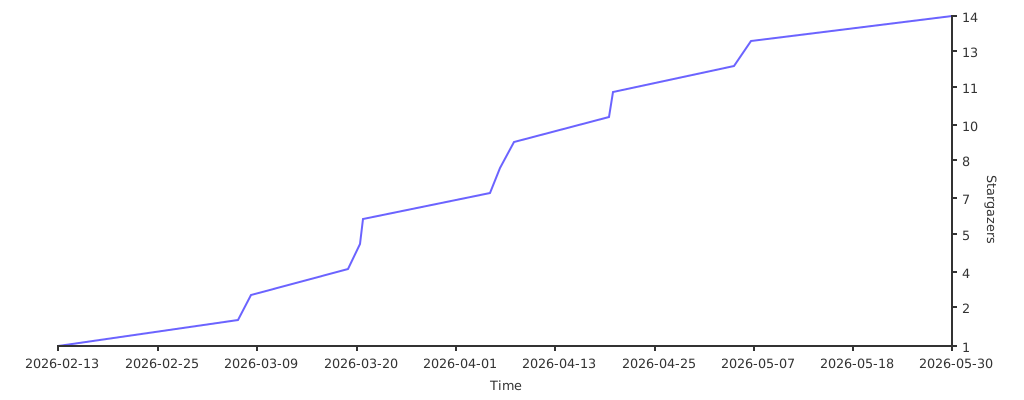](https://starchart.cc/LinuxBeginnings/NixOS-Hyprland)