https://github.com/lipme/vue-svg-msa
A VueJs module to create an multiple sequence alignment in SVG. https://www.npmjs.com/package/vue-svg-msa
https://github.com/lipme/vue-svg-msa
alignment bioinformatics msa
Last synced: 5 months ago
JSON representation
A VueJs module to create an multiple sequence alignment in SVG. https://www.npmjs.com/package/vue-svg-msa
- Host: GitHub
- URL: https://github.com/lipme/vue-svg-msa
- Owner: lipme
- License: apache-2.0
- Created: 2020-12-10T12:55:55.000Z (over 5 years ago)
- Default Branch: master
- Last Pushed: 2021-06-18T13:25:32.000Z (about 5 years ago)
- Last Synced: 2025-05-22T09:52:19.709Z (about 1 year ago)
- Topics: alignment, bioinformatics, msa
- Language: Vue
- Homepage:
- Size: 1.77 MB
- Stars: 2
- Watchers: 1
- Forks: 0
- Open Issues: 0
-
Metadata Files:
- Readme: README.md
- License: LICENSE
Awesome Lists containing this project
README
# vue-svg-msa
VueJs component to build a svg multiple sequence alignment.
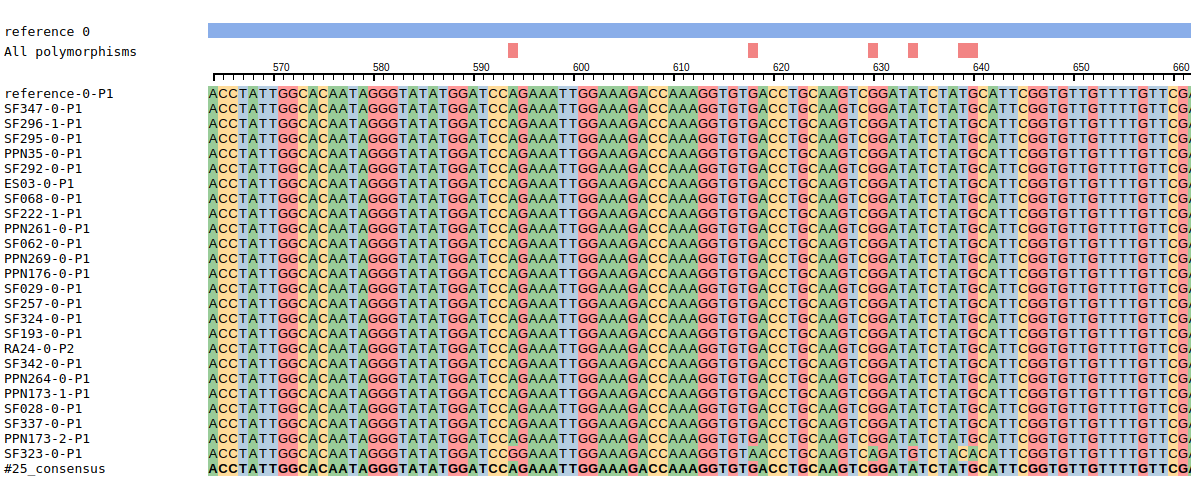
## Installation
npm install --save vue-svg-msa
npm install --save vue-clipboard2
## Usage
in main.js, add:
```
import VueClipboard from "vue-clipboard2";
Vue.use(VueClipboard);
```
Now you can use it in your component:
```
import {SvgMsa} from 'vue-svg-msa'
import 'vue-svg-msa/dist/vue-svg-msa.css'
```
```
```
Only the 'seqs' attribute is mandatory.
**seqs** is an array as:
```
seqs: [
{
seq: 'ATCATCATCATCATCATACTCATTTTTACAT---CATCATACTACATCATCATATACTCATTTTTACATCATC-TCTT',
id: 'seqid1',
name: 'sequence1',
color: 'red',
titleColor: 'blue',
isConsensus: false,
isNode: false
},
...
],
```
Only the 'seq' and 'id' attributes are mandatory. If the 'titleColor' attribute is defined, the name of the sequence is written in this color.
The 'color' attribute is the nucleotide background color only applied when the 'coloring' attribute of svg-msa is equal to 'seqcolor'. The sequences for which the attribute **isConsensus** is true are displayed in bold.
The name of the sequences for which the attribute **isNode** is true can be clicked, and an event named 'select-node' emits the id of the sequence.
**type** is the composition of the sequences: 'nt' for nucleotides (value by default) or 'aa' for amino acids.
**start** and **end** are respectively the start and end positions (1-based) of the sequence regions to be displayed.
To display additional tracks in the top of the svg, complete the **tracks** array.
**tracks** is an array as:
```
tracks: [
{
"features": [
{
"positions": [[1,20],[52,80]],
"type": "exon",
"color": "green",
"fill-opacity": "0.5"
},
{
"positions": [[21,51]],
"type": "intron",
"color": "yellow"
}
],
"trackLabel": "exon/intron"
}]
```
If **display-track-tooltip** is true, display the type and the positions of the feature when hovering with the mouse
**coloring** allows to colored the nucleotides. The accepted values are 'no', 'seqcolor', 'auto', 'metadata'. It is allowed to mix the values, eg 'seqcolor|metadata'
If the value is 'metadata', the styles described in the **metadata** array are apply to the svg image.
```
metadata: [
{
label: "Conservation level",
categories: [
{
label: "high level",
style: {
fill: "red",
"fill-opacity": 0.5,
stroke: "black",
},
regions: [
{
id: "seqid1",
ranges: [
[1, 31],
[35, 78],
],
},
{
id: "seqid2",
ranges: [[1, 31]],
},
],
},
],
}, {...}
]
```
In a region (=an element of the 'regions' array), if the 'id' attribute is empty or missing, the regions of all the sequences would be colored.
In a region, if the 'ranges' attribute is empty or missing, all the sequence would be colored.
Note: 'label' attributes are not used.
**selectedseqs** is an array of sequence ids which will be highlighted in the msa.
**glyphs** is an array used to display glyphs to makes possible to add information to describe the sequences.
for now, for all the sequences of a categorie, a colored circle is drawn to the left of the sequence
```
glyphs: [
{
label: 'resistant/not_resistant',
categories: [
{ label: 'resistant', style: { fill: 'red' }, ids: ['seqid1'] },
{ label: 'not resistant', style: { fill: 'pink' }, ids: ['seqid2', 'seqid3'] }
]
}, ...
]
```
If **display-glyph-tooltip** is true, display the label of the glyph when hovering the mouse over a circle
**resolution** allows the values 'sequence' (by default) and 'nt'. If "nt", the rendering quality would be better and hovering the mouse over a nucleotide gives access to its position in the sequence.
**highlight-selection**: by default, if there are selected sequences, metadata on non selected sequences will appear with less opacity. If the highlight-selection property is set to
'always', metadata on non selected sequences will appear with less opacity even if there is no selected sequences. On the contrary, if the highlight-selection property is set to
'never', metadata will appear always with the same opacity, whatever if the sequence is selected or not.
##Contributors
LIPM Bioinfo Team
- Erika Sallet
- Ludovic Cottret
- Sebastien Carrere
- Ludovic Legrand
- Jerome Gouzy
##Contact
ludovic.cottret@inrae.fr