https://github.com/litespeedtech/lscache-drupal
LSCache Plugin for Drupal
https://github.com/litespeedtech/lscache-drupal
Last synced: over 1 year ago
JSON representation
LSCache Plugin for Drupal
- Host: GitHub
- URL: https://github.com/litespeedtech/lscache-drupal
- Owner: litespeedtech
- License: gpl-3.0
- Created: 2018-01-03T19:30:33.000Z (over 8 years ago)
- Default Branch: master
- Last Pushed: 2024-11-07T12:57:12.000Z (over 1 year ago)
- Last Synced: 2025-04-21T02:05:15.633Z (over 1 year ago)
- Language: PHP
- Size: 9.21 MB
- Stars: 15
- Watchers: 9
- Forks: 15
- Open Issues: 12
-
Metadata Files:
- Readme: README.md
- License: LICENSE
Awesome Lists containing this project
README
LiteSpeed Cache for Drupal 8+
============================
* Fastest Page cache for Drupal CMS.
* Page Cache for both Logged In and Logged Out users.
* Auto Purge relate Page Caches when content changes.
* Drush and non-Drush cli commands for Cache warmup/clear.
* Web GUI warmup will also warm up **Private Cache for Logged In Users** if enabled.
* Supports latest releases of Drupal 8+, 9+, 10+ and 11+ .
See [the LiteSpeed Website](https://www.litespeedtech.com/products/cache-plugins/drupal-acceleration) for more information about LiteSpeed Cache for Drupal.
See [the full documentation](https://docs.litespeedtech.com/lscache/lscdrupal/) for more installation and configuration help.
Prerequisites
-------------
This version of LiteSpeed Cache requires Drupal 8 or later and LiteSpeed Web Server (LSWS) 5.2.3 or later.
Download
-------------
Download the LiteSpeed Cache Module to your local computer from:
https://github.com/litespeedtech/lscache-drupal/archive/master.zip
Click to show details

If you use Composer to manage dependencies or using Drupal 11+, using the following command to download:
```
composer require litespeedtech/lscache-drupal
```
Install Plugin
-------------
Once you have downloaded the plugin, you can install by visiting:
http://example.com/admin/modules/install
Using the browse button, you can upload the plugin you just downloaded and start the installation. Once installed, enable the plugin by going to:
http://example.com/drupal/admin/modules
Click to show details

* Use the search box to search for a module.
* Check the checkbox next to **LiteSpeed Cache**.
* Click **Install**.
* Turn on LiteSpeed Cache in **Module Settings**.
Configuration
-------------
This step is optional. Once the plugin is activated, your cache is already up and running, but on the configuration screen, you can customize few settings.
Go to
http://example.com/admin/config/development/lscache
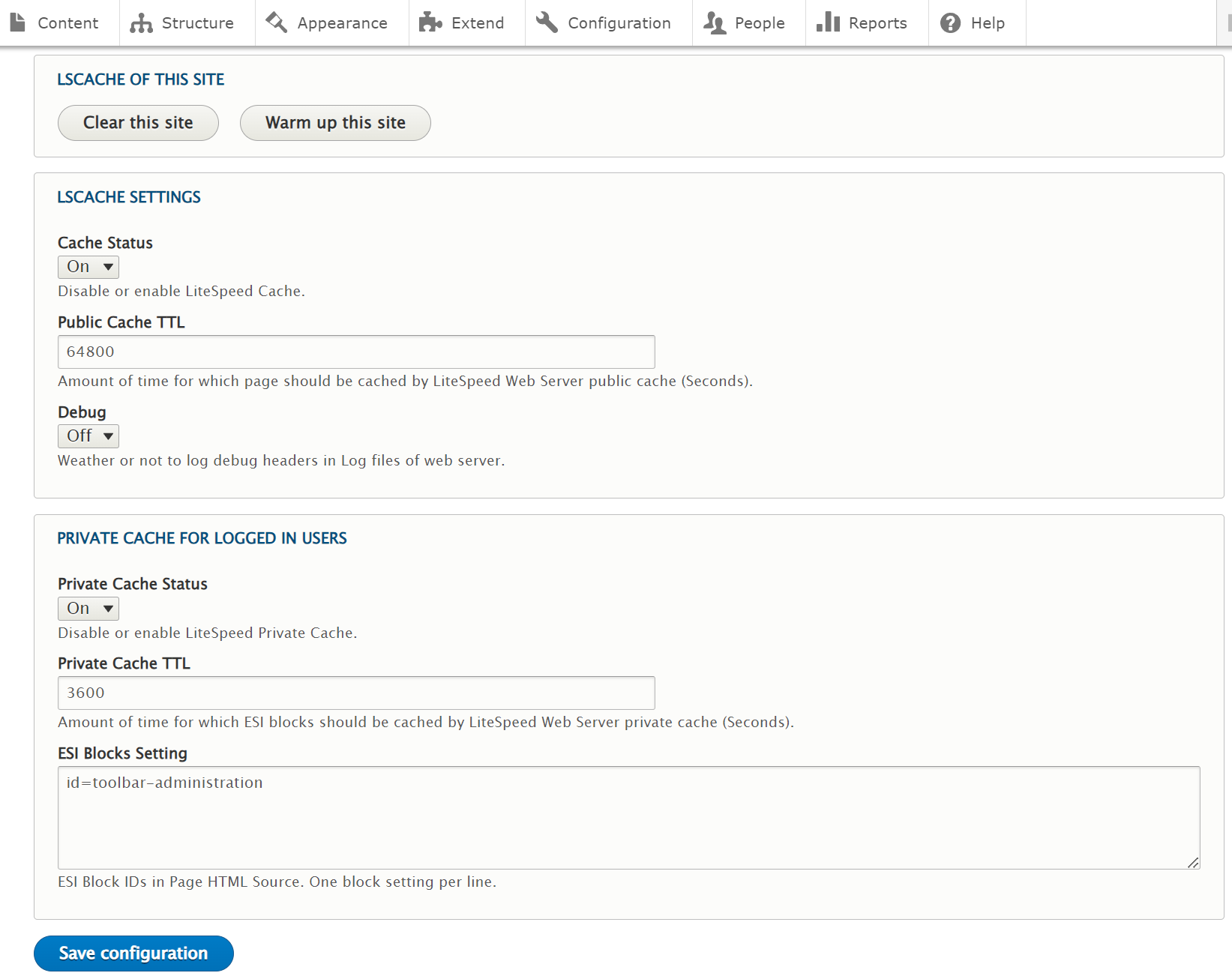
* **Warmup this site**: Warm up the LSCache of the current Drupal site. It will also warm up **Private Cache for Logged In Users** if enabled.
* **Clear this site**: Clears the LSCache of the current Drupal site. It will not clear the LSCache of other sites if you have multiple CMS sites running on the same virtual host.
* **Public Cache TTL**: Amount of time LiteSpeed Web Server will save pages in the public cache.
* **Private Cache TTL**: Amount of time LiteSpeed web server will save **ESI Block Contents** in the Private cache. OpenLiteSpeed does not support Private Cache.
* **ESI Blocks Setting**: The list of ESI blocks on general logged in pages. The ESI Block name should be the same as the `div id` inside the HTML source. For example, in the following `div` block, the ESI Block name would be `bar-administrator`:
```
...
```
* **Debug**: If turned on, LiteSpeed Cache will print the LSCache header to LSWS log files.
CLI commands
-------------
CLI commands are only allowed to execute from the website host server.
**Purge All Cache**
```
curl -N "http://example.com/lscpurgeall"
```
or in `/drupal_root/vendor/bin` folder, execute `drush` command:
```
./drush lscache:purgeall example.com
```
**WarmUp whole website**
```
curl -N "http://example.com/lscwarmup"
```
or in `/drupal_root/vendor/bin` folder, execute `drush` command:
```
./drush lscache:warmup example.com
```
CLI `warmup` command can only warm up public page caches. If you want to warm up **Private Cache for Logged In Users**, you need to use the Web GUI warmup in the LSCache admin panel.