https://github.com/livehelperchat/cbscheduler
Callback scheduler extension for new and old widgets.
https://github.com/livehelperchat/cbscheduler
Last synced: 11 months ago
JSON representation
Callback scheduler extension for new and old widgets.
- Host: GitHub
- URL: https://github.com/livehelperchat/cbscheduler
- Owner: LiveHelperChat
- Created: 2020-06-25T14:01:05.000Z (almost 6 years ago)
- Default Branch: master
- Last Pushed: 2025-05-12T10:59:04.000Z (about 1 year ago)
- Last Synced: 2025-06-19T20:44:36.114Z (12 months ago)
- Language: PHP
- Size: 3.26 MB
- Stars: 2
- Watchers: 4
- Forks: 2
- Open Issues: 9
-
Metadata Files:
- Readme: README.md
Awesome Lists containing this project
README
## What's the purpose of this extension?
This extension adds options to schedule a callback from chat widget.
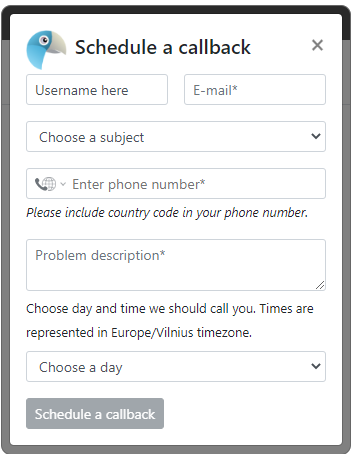
See youtube video https://youtu.be/LF3q311KesQ
## Integration with a bot
You can trigger modal window also from a bot.
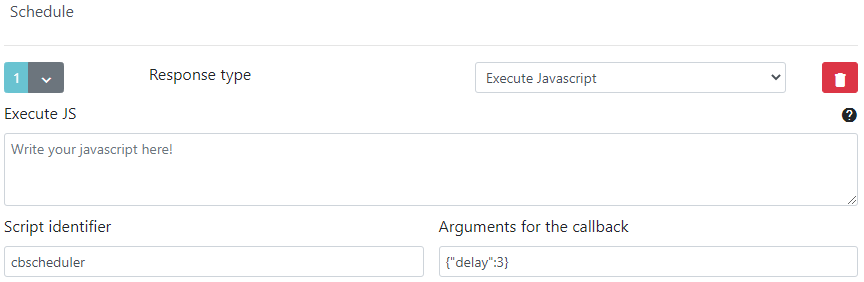
## Direct URL
`https://example.com/cbscheduler/schedule/(department)//(theme)/`
## Install
Execute SQL file `doc/install.sql` or
`php cron.php -s site_admin -e cbscheduler -c cron/update_structure`
Install composer dependencies
`composer.phar update`
Activate extensions in Live Helper Chat settings file.
`
...
'extensions' =>
array (
'cbscheduler'
),
...
`
## Why my visitor can't cancel a call?
Call can be canceled only if
* All unique attributes matches scheduled call
* Call status is scheduled
## Updating
You can update two ways. By executing this command
> php cron.php -s site_admin -e cbscheduler -c cron/update_structure
Or by executing SQL queries from.
https://github.com/LiveHelperChat/cbscheduler/tree/master/doc/db_updates
## Commands in the chat
You can use this command in the chat to show modal window for the visitor `!schedule`
## Showing schedule form directly from the page.
You can also have a custom button on your website to show window and modal window instantly.
### New widget javascript
Open in the widget
```js
// New widget
// For this cenario to work you have in your embed code to pass at-least one department.
// We will use very first department and it's schedule in that case.
// Opening popup is not supported
function scheduleCallbackNewWidget(){
window.$_LHC.eventListener.emitEvent('sendChildExtEvent',[{'cmd':'cbscheduler','arg':{}}]);
// Delay for 5 seconds
// window.$_LHC.eventListener.emitEvent('sendChildExtEvent',[{'cmd':'cbscheduler','arg':{"delay":5}}]);
window.$_LHC.eventListener.emitEvent('showWidget');
}
```
Event directly from the widget. Can be used in `custom_html` attribute in widget theme.
```js
window.lhcHelperfunctions.emitEvent('extensionExecute',['cbscheduler',[{'delay':3}]])
```
### Old widget javascript
```js
// Old widget
function scheduleCallbackNewWidget(){
lh_inst.executeExtension('cbscheduler',{"delay":0});
// Delay for 5 seconds
// lh_inst.executeExtension('cbscheduler',{"delay":5});
}
```