https://github.com/livehelperchat/elasticsearch
Elasticsearch integration for live helper chat to boost statistic generation.
https://github.com/livehelperchat/elasticsearch
Last synced: 9 months ago
JSON representation
Elasticsearch integration for live helper chat to boost statistic generation.
- Host: GitHub
- URL: https://github.com/livehelperchat/elasticsearch
- Owner: LiveHelperChat
- Created: 2017-07-25T07:12:20.000Z (almost 9 years ago)
- Default Branch: master
- Last Pushed: 2025-09-03T11:28:00.000Z (9 months ago)
- Last Synced: 2025-09-03T12:13:47.023Z (9 months ago)
- Language: PHP
- Size: 1.73 MB
- Stars: 8
- Watchers: 4
- Forks: 5
- Open Issues: 0
-
Metadata Files:
- Readme: readme.md
Awesome Lists containing this project
README
### Author
Remigijus Kiminas, Live Helper Chat
### ElasticSearch versions support
- For ElasticSearch 7.x-8.x use master branch. If for 7.x you encounter some issues just use master-7.x branch.
- For ElasticSearch 5-6 use master-5.x-6.x branch
## Description
This plugin enables statistic generation using only Elastic Search. MySQL is not a good solution for statistic generation, but Elastic Search does great job on that.
- Eliminates MySQL Queries in statistic generation
- Allows to search withing messages with keyword
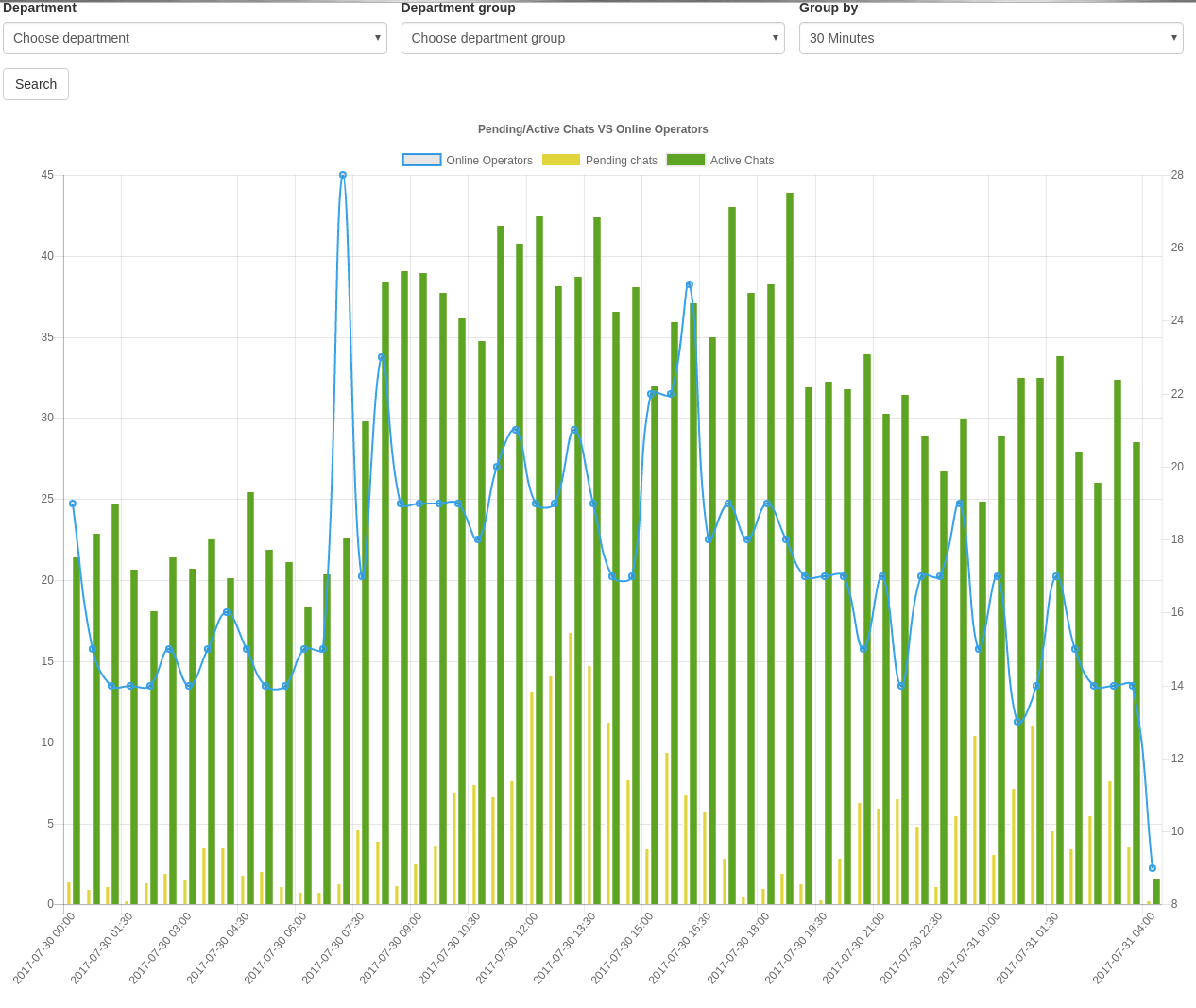
- Allows to generate Online Operators/Active/Pending chat's chart
## How it works?
- After chat close event chat is indexed within cronjob.
- Also there is cronjob which indexes existing data.
## Future plans
- Remove older chat's than 3 months and implement fallback if record is not found in MySQL. At the moment we just duplicate records.
## Install
1. Put elasticsearch folder in extensions folder.
2. copy `extension/elasticsearch/settings.ini.default.php` to `extension/elasticsearch/settings.ini.php` and edit settings
3. Activate extension in main settings `lhc_web/settings/settings.ini.php` file
```
'extensions' =>
array (
'elasticsearch'
),
```
4. Go to back office and clear cache.
5. Go to Modules -> Elastic Search
6. Click create index and later update structure
7. Execute doc/install.sql
#### Indexing existing chats
`php cron.php -s site_admin -e elasticsearch -c cron/index_chats`
#### Indexing existing messages
`php cron.php -s site_admin -e elasticsearch -c cron/index_msg`
#### Indexing existing online sessions
`php cron.php -s site_admin -e elasticsearch -c cron/index_os`
#### Indexing existing participant data
`php cron.php -s site_admin -e elasticsearch -c cron/index_participant`
#### Setup automatic indexing [Required]
`*/5 * * * * cd /home/www/lhc && php cron.php -s site_admin -e elasticsearch -c cron/cron > log_index.txt /dev/null 2>&1`
#### Used to generate online operators/Active/Pending chat's chart [Optional]
`* * * * * cd /home/www/lhc && php cron.php -s site_admin -e elasticsearch -c cron/cron_1m > cron_1m.txt /dev/null 2>&1`
#### Used to remove duplicates every week [Optional]
Duplicates can happen because elastic does not quarantine transactions. So this will make sure that there are no duplicates in ElasticSearch.
`22 8 4 * * cd /home/www/lhc && php cron.php -s site_admin -e elasticsearch -c cron/remove_duplicates > log_duplicates.txt /dev/null 2>&1`
#### Reindex recent chats [Optional]
Sometimes elastic search might miss chat's in it's index especially if it just hangs or some other bad things happens. This reindex last 16 hours chats to be sure they are presented in ElasticSearch.
`36 */8 * * * cd /home/www/lhc && php cron.php -s site_admin -e elasticsearch -c cron/reindex_recent > log_reindex_recent.txt /dev/null 2>&1`
### Online Visitors list using ElasticSearch
Sometimes operators run very heavy-duty filters on those lists, so it makes sense to delegate that payload to ElasticSearch
Requirements
* https://github.com/LiveHelperChat/lhc-php-resque
#### Reindex recent online visitors
This will reindex all online visitors which time condition matches a configuration section. `How many days keep record of online visitors in Elastic Search from last visit.`
`php cron.php -s site_admin -e elasticsearch -c cron/index_ov`
#### Cleanup expired online visitors record
Delete every 7 hours expired online visitor records
`1 */6 * * * cd /home/www/lhc && php cron.php -s site_admin -e elasticsearch -c cron/index_ov_clean > /dev/null 2>&1`
#### Using daily/monthly/yearly index
I recommend if you are planning to have thousands of chats per day to use monthly or early index.
If you are running daily/monthly/yearly index you should be running this cronjob daily.
`5 12 * * * cd /home/www/lhc && php cron.php -s site_admin -e elasticsearch -c cron/index_precreate`
To precreate/update index you can also run it like this one time
Current year
`/usr/bin/php cron.php -s site_admin -e elasticsearch -c cron/index_precreate -p yearly`
Manual year
`/usr/bin/php cron.php -s site_admin -e elasticsearch -c cron/index_precreate -p 2022`
#### Monitoring Elasticsearch
To receive notification about failure of Elasticsearch you can run this cronjob. It will automatically turn on/off Elasticsearch extension.
`* * * * * cd /home/www/lhc && php cron.php -s site_admin -e elasticsearch -c cron/check_health`
#### Sample for additional column from settings file
In relation to https://doc.livehelperchat.com/docs/bot/sentiment-analysis-per-message
While setting config I suggest to set `'enabled' => false` and then run. So additional columns will be created and only then set `'enabled' => true`
```shell
cd /home/www/lhc && php cron.php -s site_admin -e elasticsearch -c cron/index_precreate
```
This configuration defines two columns `sentiment_visitor` and `sentiment_visitor_value`. `sentiment_visitor_value_lt` does not have `type` and is not a field just a search attribute.
```php
'columns' => array(
'sentiment_visitor' => [
'enabled' => true,
'render' => array(
'field' => 'sentiment_visitor',
'type' => 'combobox',
'trans' => erTranslationClassLhTranslation::getInstance()->getTranslation('abstract/proactivechatinvitation', 'Sentiment visitor'),
'optional_value' => '',
'required' => false,
'direct_name' => true,
'frontend' => 'name',
'name_attr' => 'name',
'source' => function() {
$items = [];
$item = new stdClass();
$item->id = 'negative';
$item->name = 'negative';
$items[] = $item;
$item = new stdClass();
$item->id = 'positive';
$item->name = 'positive';
$items[] = $item;
$item = new stdClass();
$item->id = 'neutral';
$item->name = 'neutral';
$items[] = $item;
return $items;
},
'hide_optional' => false,
'params_call' => array(),
'validation_definition' => new ezcInputFormDefinitionElement(ezcInputFormDefinitionElement::OPTIONAL, 'unsafe_raw')
),
'filter_type' => 'filterstring',
'type' => 'keyword',
'field_search' => 'sentiment_visitor',
'content' => '{args.chat.chat_variables_array.sentiment_visitor}'
],
'sentiment_visitor_value' => [
'enabled' => true,
'width' => 'col-1',
'render' => array(
'field' => 'sentiment_visitor_value',
'type' => 'text',
'trans' => erTranslationClassLhTranslation::getInstance()->getTranslation('abstract/proactivechatinvitation', 'Greater than'),
'required' => false,
'direct_name' => true,
'placeholder' => '0.5 for 50%',
'frontend' => 'name',
'name_attr' => 'name',
'hide_optional' => false,
'params_call' => array(),
'validation_definition' => new ezcInputFormDefinitionElement(ezcInputFormDefinitionElement::OPTIONAL, 'float')
),
'filter_type' => 'filterrangefloatgt',
'type' => 'float',
'field_search' => 'sentiment_visitor_value',
'content' => '{args.chat.chat_variables_array.sentiment_visitor_value}'
],
'sentiment_visitor_value_lt' => [
'enabled' => true,
'width' => 'col-1',
'render' => array(
'field' => 'sentiment_visitor_value_lt',
'type' => 'text',
'trans' => erTranslationClassLhTranslation::getInstance()->getTranslation('abstract/proactivechatinvitation', 'Less than'),
'required' => false,
'direct_name' => true,
'placeholder' => '0.5 for 50%',
'frontend' => 'name',
'name_attr' => 'name',
'hide_optional' => false,
'params_call' => array(),
'validation_definition' => new ezcInputFormDefinitionElement(ezcInputFormDefinitionElement::OPTIONAL, 'float')
),
'field_search' => 'sentiment_visitor_value',
'filter_type' => 'filterrangefloatlt',
],
),
```