https://github.com/livehelperchat/pluginshopify
Extension allows to integrate Live Helper chat in your Shopify store
https://github.com/livehelperchat/pluginshopify
Last synced: 9 months ago
JSON representation
Extension allows to integrate Live Helper chat in your Shopify store
- Host: GitHub
- URL: https://github.com/livehelperchat/pluginshopify
- Owner: LiveHelperChat
- License: mit
- Created: 2021-12-18T12:01:01.000Z (over 4 years ago)
- Default Branch: main
- Last Pushed: 2023-09-07T10:51:43.000Z (over 2 years ago)
- Last Synced: 2025-06-19T17:51:11.150Z (12 months ago)
- Language: PHP
- Size: 51.8 KB
- Stars: 0
- Watchers: 2
- Forks: 0
- Open Issues: 0
-
Metadata Files:
- Readme: README.md
- License: LICENSE
Awesome Lists containing this project
README
Shopify extensions
==============
With this extension you can integrate Live Helper Chat with your own shopify store.
### Requirements
* Live Helper Chat 3.91
* PHP 7.3 >=
### Instructions Standalone
Watch YouTube video with same steps - https://youtu.be/HMACPeJBtaI
1. Clone this repository in `extension` folder. If you are in Live Helper Chat root folder where `index.php` is located.
1. `cd extensions && git clone https://github.com/LiveHelperChat/pluginshopify.git`
2. Copy `extension/pluginshopify/settings/settings.ini.default.php` to `extension/pluginshopify/settings/settings.ini.php`
3. Create a Shopify APP (https://partners.shopify.com) and enter `API key` and `API secret key` in `extension/pluginshopify/settings/settings.ini.php`
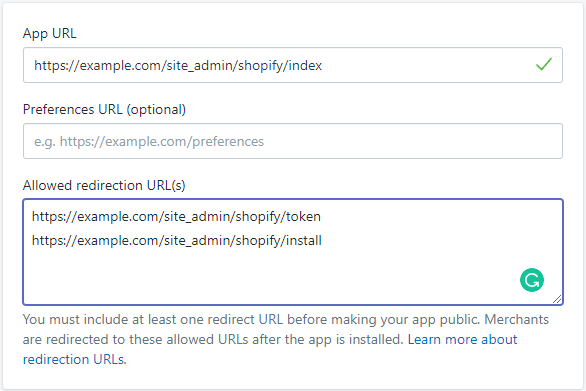
1. In `App URL` enter `https://example.com/site_admin/shopify/index`
2. In `Allowed redirection URL(s)` enter
1. `https://example.com/site_admin/shopify/token`
2. `https://example.com/site_admin/shopify/install`
4. Activate extension in `settings/settings.ini.php` by putting `pluginshopify` in `extensions` section.
5. [Clear cache](https://doc.livehelperchat.com/docs/system/clearing-cache/) in system configuration
```
'extensions' =>
array (
'pluginshopify'
),
```
### Instructions Automated Hosting
1. Follow `Instructions Standalone` and in `extension/pluginshopify/settings/settings.ini.php` set `automated_hosting` to `true`
2. Extension has to be installed on client and manager at the same time.
3. Execute `doc/db.sql` on your manager database.