https://github.com/livehelperchat/twilio
Twilio SMS chat support for LiveHelperChat
https://github.com/livehelperchat/twilio
Last synced: 3 months ago
JSON representation
Twilio SMS chat support for LiveHelperChat
- Host: GitHub
- URL: https://github.com/livehelperchat/twilio
- Owner: LiveHelperChat
- Created: 2017-11-07T16:11:03.000Z (over 8 years ago)
- Default Branch: master
- Last Pushed: 2024-07-29T20:56:14.000Z (almost 2 years ago)
- Last Synced: 2025-06-28T22:34:50.252Z (11 months ago)
- Language: PHP
- Homepage:
- Size: 263 KB
- Stars: 10
- Watchers: 6
- Forks: 9
- Open Issues: 7
-
Metadata Files:
- Readme: readme.md
Awesome Lists containing this project
README
1. Just put in extensions folder twilio folder
2. Copy `extension/twilio/settings.ini.default.php` to extension/twilio/settings.ini.php
3. Execute
```
php cron.php -s site_admin -e twilio -c cron/update_structure
```
or
`https://github.com/LiveHelperChat/twilio/blob/master/doc/install.sql`
4. Enable extension in `settings/settings.ini.php`
```
'extensions' =>
array (
'twilio'
),
```
5. Clear cache from back office.
6. Twilio module you will find in left menu under Modules.
7. Register phone from Live Helper Chat back office.
Settings should look similar to this. P.s I have changed phone number and `Account SID` with `Auth Token`
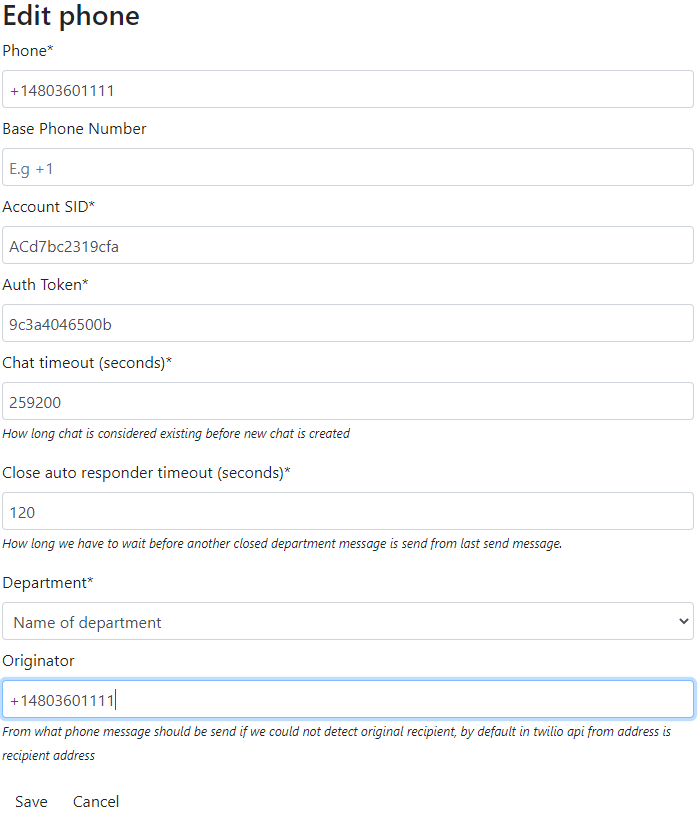
If you are using `WhatsApp` phone number should look like `whatsapp:+14155234444`
6. Send SMS to registered phone number
7. Enjoy :)
Callback URL you will find once your register phone in back office.