https://github.com/liying2008/easy-deployment
A vscode extension for building and deploying your projects.
https://github.com/liying2008/easy-deployment
deploy deployment extension ssh typescript vscode vscode-extension
Last synced: 9 months ago
JSON representation
A vscode extension for building and deploying your projects.
- Host: GitHub
- URL: https://github.com/liying2008/easy-deployment
- Owner: liying2008
- License: mit
- Created: 2020-09-13T02:31:03.000Z (almost 6 years ago)
- Default Branch: master
- Last Pushed: 2023-10-09T12:41:48.000Z (over 2 years ago)
- Last Synced: 2025-04-02T00:41:37.554Z (about 1 year ago)
- Topics: deploy, deployment, extension, ssh, typescript, vscode, vscode-extension
- Language: TypeScript
- Homepage: https://marketplace.visualstudio.com/items?itemName=liying.easy-deployment
- Size: 310 KB
- Stars: 2
- Watchers: 6
- Forks: 3
- Open Issues: 1
-
Metadata Files:
- Readme: README.md
- Changelog: CHANGELOG.md
- License: LICENSE
Awesome Lists containing this project
README
# Easy Deployment
[](https://marketplace.visualstudio.com/items?itemName=liying.easy-deployment)
[](https://marketplace.visualstudio.com/items?itemName=liying.easy-deployment)
[](https://marketplace.visualstudio.com/items?itemName=liying.easy-deployment)
**Deploy your frontend project quickly and easily.**
## Features
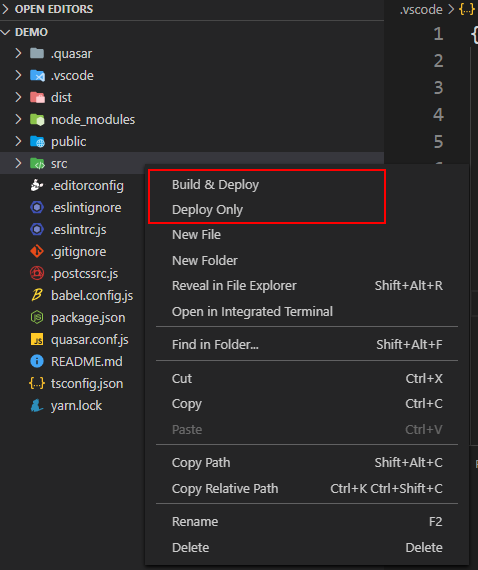
- Select "Build & Deploy" to build your project and deploy it to a remote server.
- Select "Deploy Only" to deploy your project build dist to the remote server.
Commands in command palette:

## Extension Settings
Two `settings.json` samples:
- The **FIRST** way to use
> Select "Build & Deploy" to build project locally and upload dist to the remote server.
```json
{
"easyDeployment.config": {
"configurations": [
{
"name": "dev",
"local": {
"projectPath": ".",
"buildCmd": "yarn build",
"outputDir": "dist"
},
"remote": {
"deploymentPath": "~/nginx/html",
"backupOriginalFiles": true,
"backupTo": "~/backup",
"deleteOriginalFiles": true
},
"ssh": {
"host": "192.168.1.200",
"port": 22,
"username": "pi",
"privateKey": "~/.ssh/id_rsa"
}
}
]
}
}
```
- The **SECOND** way to use
> Select "Deploy Only" to upload the project source code to the remote server and execute a script to build and deploy on the remote server.
```json
{
"easyDeployment.config": {
"configurations": [
{
"name": "dev",
"local": {
"projectPath": ".",
"outputDir": ".",
"exclude": ["**/node_modules/**", "dist/**"]
},
"remote": {
"deploymentPath": "~/web/projects/demo",
"deleteOriginalFiles": true,
"postCmd": "bash ./build_and_deploy.sh"
},
"ssh": {
"host": "192.168.1.200",
"port": 22,
"username": "pi",
"privateKey": "~/.ssh/id_rsa"
}
}
]
}
}
```
**Details for each configuration item are as follows:**
* `local` configuration (Configuration of local project):
| Key | Defaults | Required | Description |
| ---- | ---- | ---- | ---- |
| `projectPath` | . | √ | Project root path (relative path) |
| `buildCmd` | | | Build command for local project |
| `outputDir` | dist | √ | Compiled product output path. (path relative to the projectPath) |
| `exclude` | [] | | Files excluded on deployment. (path pattern relative to the outputDir) |
* `remote` configuration (Configuration of remote server):
| Key | Defaults | Required | Description |
| ---- | ---- | ---- | ---- |
| `deploymentPath` | | √ | Remote deployment path. (must be an absolute path) |
| `backupOriginalFiles` | false | | Do you need to back up the original files? |
| `backupTo` | ~/backup | | Backup path of the original files. (must be an absolute path) |
| `deleteOriginalFiles` | false | | Do you need to delete the original files? |
| `postCmd` | | | Command executed after deployment |
* `ssh` configuration (SSH configuration for connecting to remote server):
| Key | Defaults | Required | Description |
| ---- | ---- | ---- | ---- |
| `host` | | √ | Hostname or IP address of the server |
| `port` | 22 | √ | Port number of the server |
| `username` | | √ | Username for authentication |
| `password` | | | Password for password-based user authentication |
| `privateKey` | | | Private key (absolute path) for either key-based or hostbased user authentication (OpenSSH format) |
| `passphrase` | | | For an encrypted private key, this is the passphrase used to decrypt it. |
**Note:**
* Please set it according to your actual needs.
* You can choose between `password` and `privateKey` in the ssh configuration.
* If you use `privateKey`, remember to put the local ssh public key into the server's `authorized_keys` file.
* If you use `privateKey` and the `privateKey` is encrypted, fill in the `passphrase` field.
* The remote server needs to be a **Linux** machine.
* There can be multiple configurations in the outer configurations, and the `name` attribute cannot be repeated.
## Quick Start
- Install [Easy Deployment](https://marketplace.visualstudio.com/items?itemName=liying.easy-deployment).
- Configure `easyDeployment.config` in `settings.json` in the workspace.
- Right click in Explorer and select `Build & Deploy` or `Deploy Only`.
## Thanks
- [archiverjs/node-archiver](https://github.com/archiverjs/node-archiver)
- [steelbrain/node-ssh](https://github.com/steelbrain/node-ssh)
## Source Code
[https://github.com/liying2008/easy-deployment](https://github.com/liying2008/easy-deployment)
Binary package can be obtained from [this link.](https://marketplace.visualstudio.com/items?itemName=liying.easy-deployment)
## License
MIT © [Li Ying](https://github.com/liying2008)