https://github.com/ljmerza/harmony-remote-card
Harmony Hub Remote Control Card for Home Assistant
https://github.com/ljmerza/harmony-remote-card
hacs harmony home-assistant home-automation homeassistant remote
Last synced: 10 months ago
JSON representation
Harmony Hub Remote Control Card for Home Assistant
- Host: GitHub
- URL: https://github.com/ljmerza/harmony-remote-card
- Owner: ljmerza
- License: mit
- Created: 2021-05-06T03:09:56.000Z (about 5 years ago)
- Default Branch: master
- Last Pushed: 2024-07-24T19:15:07.000Z (almost 2 years ago)
- Last Synced: 2025-04-12T08:52:48.573Z (about 1 year ago)
- Topics: hacs, harmony, home-assistant, home-automation, homeassistant, remote
- Language: JavaScript
- Homepage:
- Size: 1.82 MB
- Stars: 16
- Watchers: 4
- Forks: 4
- Open Issues: 7
-
Metadata Files:
- Readme: README.md
- License: LICENSE
Awesome Lists containing this project
README
# Harmony Remote Card for Home Assistant
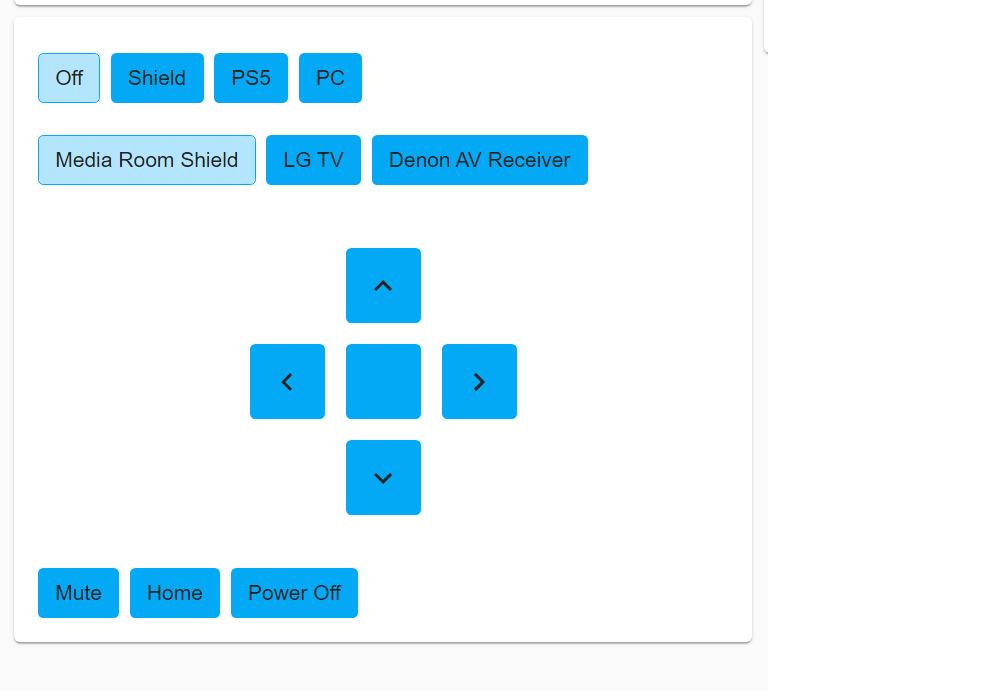
Control your media device through Harmony Hub with this card.
[![GitHub Release][releases-shield]][releases]
[![License][license-shield]](LICENSE.md)
![Project Maintenance][maintenance-shield]
[](https://github.com/hacs/integration)
## Support
For help, visit the Harmony Remote Card support thread [here](https://community.home-assistant.io/t/harmony-remote-card/474142)
## Installation through [HACS](https://github.com/hacs/integration)
## Configurations:
---
```yaml
type: custom:harmony-remote-card
entity: remote.harmony_hub
```
## Options:
---
| Name | Type | Requirement | Description
| ---- | ---- | ------- | -----------
| type | string | **Required** | `custom:harmony-remote-card`
| entity | string | **Required** | `remote.harmony_hub` the name of the harmony hub entity
| activityEntity | string | **Optional** | `select.harmony_hub_activities` the name of the harmony hub activities select entity. Required to set activities.
| devices | Array | **Optional** | a list of devices to add custom commands to. See below for more info.
| activities | Array | **Optional** | a list of activities. Note this will override the default activities shown
| vibrate | Boolean | **Optional** | `true` vibrate on button push
| showPad | Boolean | **Optional** | `true` show D-Pad
| leftPad | String | **Optional** | `DirectionLeft` command sent for the left pad
| rightPad | String | **Optional** | `DirectionRight` command sent for the right pad
| upPad | String | **Optional** | `DirectionUp` command sent for the up pad
| downPad | String | **Optional** | `DirectionDown` command sent for the down pad
| centerPad | String | **Optional** | `OK` command sent for the center pad
### devices Options:
| Name | Type | Requirement | Description
| ---- | ---- | ------- | -----------
| name | string | **Required** | the name of the device you want custom commands on (must match the harmony integration device name)
| friendly_name | string | **Required** | the display name of the device
| commands | string | **Required** | the name of the command in your harmony.conf file for this device. Can be a simple list or a list of objects with name and command properties. Can also be a service call with `service`, `domain`, `data` options
| icon | string | **Optional** | show an icon for the device
| hide_name | boolean | **Optional** | hide the name of the device
### activites Options:
| Name | Type | Requirement | Description
| ---- | ---- | ------- | -----------
| activity | string | **Required** | the name of the activity. Must match the exact name in the harmony.conf file
| name | string | **Optional** | custom name of the activity
| icon | string | **Optional** | show an icon for the activity
| hide_name | boolean | **Optional** | hide the name of the activity
| entity | string | **Optional** | set the entity name for the activity
### commands Options:
| Name | Type | Requirement | Description
| ---- | ---- | ------- | -----------
| name | string | **Required** | the custom name of the command
| icon | string | **Optional** | show an icon for the command
| hide_name | boolean | **Optional** | hide the name of the command
| command | string | **Optional** | the name of the command in your harmony.conf file.
| service | string | **Optional** | the name of the service call
| domain | string | **Optional** | the domain of the service call
| data | object | **Optional** | the data for the service call
---
Example config:
```yaml
type: custom:harmony-remote-card
entity: remote.harmony_hub
activities:
- activity: PC
icon: mdi:laptop
hide_icon: true
- activity: XBox
name: Xbox One
- activity: PS5
- activity: Shield
devices:
- name: Media Room Shield
commands:
- Mute
- Home
- name: Power Off
command: PowerOff
- name: LG TV
icon: mdi:television
hide_icon: true
commands:
- Mute
- Info
- name: InputHdmi1
command: InputHdmi1
show_pad: false
- name: Denon AV Receiver
commands:
- Mute
- Info
- InputTVAudio
- InputGame
- name: Volume Down
command: VolumeDown
- name: Volume Up
command: VolumeUp
- name: Lights
service: toggle
domain: lights
data:
- entity_id: light.main_lights
```
Enjoy my card? Help me out for a couple of :beers: or a :coffee:!
[](https://www.buymeacoffee.com/JMISm06AD)
[commits-shield]: https://img.shields.io/github/commit-activity/y/ljmerza/harmony-remote-card.svg?style=for-the-badge
[commits]: https://github.com/ljmerza/harmony-remote-card/commits/master
[license-shield]: https://img.shields.io/github/license/ljmerza/harmony-remote-card.svg?style=for-the-badge
[maintenance-shield]: https://img.shields.io/badge/maintainer-Leonardo%20Merza%20%40ljmerza-blue.svg?style=for-the-badge
[releases-shield]: https://img.shields.io/github/release/ljmerza/harmony-remote-card.svg?style=for-the-badge
[releases]: https://github.com/ljmerza/harmony-remote-card/releases