https://github.com/llm-red-team/jimeng-free-api
🚀 即梦3.0逆向API【特长:图像生成顶流】,零配置部署,多路token支持,仅供测试,如需商用请前往官方开放平台。
https://github.com/llm-red-team/jimeng-free-api
bytedance chatbot chatgpt-api image-generation image-generation-ai jimeng llm
Last synced: about 1 year ago
JSON representation
🚀 即梦3.0逆向API【特长:图像生成顶流】,零配置部署,多路token支持,仅供测试,如需商用请前往官方开放平台。
- Host: GitHub
- URL: https://github.com/llm-red-team/jimeng-free-api
- Owner: LLM-Red-Team
- License: gpl-3.0
- Created: 2024-12-05T17:00:12.000Z (over 1 year ago)
- Default Branch: master
- Last Pushed: 2025-04-09T01:52:59.000Z (about 1 year ago)
- Last Synced: 2025-06-01T20:30:44.361Z (about 1 year ago)
- Topics: bytedance, chatbot, chatgpt-api, image-generation, image-generation-ai, jimeng, llm
- Language: TypeScript
- Homepage:
- Size: 801 KB
- Stars: 678
- Watchers: 11
- Forks: 135
- Open Issues: 15
-
Metadata Files:
- Readme: README.md
- License: LICENSE
Awesome Lists containing this project
README
# Jimeng AI Free 服务
[](LICENSE)



支持即梦超强图像生成能力(目前官方每日赠送 66 积分,可生成 66 次),零配置部署,多路 token 支持。
与 OpenAI 接口完全兼容。
还有以下十个 free-api 欢迎关注:
Moonshot AI(Kimi.ai)接口转 API [kimi-free-api](https://github.com/LLM-Red-Team/kimi-free-api)
阶跃星辰 (跃问 StepChat) 接口转 API [step-free-api](https://github.com/LLM-Red-Team/step-free-api)
阿里通义 (Qwen) 接口转 API [qwen-free-api](https://github.com/LLM-Red-Team/qwen-free-api)
智谱 AI (智谱清言) 接口转 API [glm-free-api](https://github.com/LLM-Red-Team/glm-free-api)
秘塔 AI (Metaso) 接口转 API [metaso-free-api](https://github.com/LLM-Red-Team/metaso-free-api)
字节跳动(豆包)接口转 API [doubao-free-api](https://github.com/LLM-Red-Team/doubao-free-api)
讯飞星火(Spark)接口转 API [spark-free-api](https://github.com/LLM-Red-Team/spark-free-api)
MiniMax(海螺 AI)接口转 API [hailuo-free-api](https://github.com/LLM-Red-Team/hailuo-free-api)
深度求索(DeepSeek)接口转 API [deepseek-free-api](https://github.com/LLM-Red-Team/deepseek-free-api)
聆心智能 (Emohaa) 接口转 API [emohaa-free-api](https://github.com/LLM-Red-Team/emohaa-free-api)
## 目录
- [Jimeng AI Free 服务](#jimeng-ai-free-服务)
- [目录](#目录)
- [免责声明](#免责声明)
- [接入准备](#接入准备)
- [多账号接入](#多账号接入)
- [效果展示](#效果展示)
- [Docker 部署](#docker-部署)
- [Docker-compose 部署](#docker-compose-部署)
- [Render 部署](#render-部署)
- [Vercel 部署](#vercel-部署)
- [原生部署](#原生部署)
- [推荐使用客户端](#推荐使用客户端)
- [接口列表](#接口列表)
- [对话补全](#对话补全)
- [图像生成](#图像生成)
- [Star History](#star-history)
## 免责声明
**逆向 API 是不稳定的,建议前往即梦 AI 官方 https://jimeng.jianying.com/ 体验功能,避免封禁的风险。**
**本组织和个人不接受任何资金捐助和交易,此项目是纯粹研究交流学习性质!**
**仅限自用,禁止对外提供服务或商用,避免对官方造成服务压力,否则风险自担!**
**仅限自用,禁止对外提供服务或商用,避免对官方造成服务压力,否则风险自担!**
**仅限自用,禁止对外提供服务或商用,避免对官方造成服务压力,否则风险自担!**
## 接入准备
从 [即梦](https://jimeng.jianying.com/) 获取 sessionid
进入即梦登录账号,然后 F12 打开开发者工具,从 Application > Cookies 中找到`sessionid`的值,这将作为 Authorization 的 Bearer Token 值:`Authorization: Bearer sessionid`

### 多账号接入
你可以通过提供多个账号的 sessionid 并使用`,`拼接提供:
`Authorization: Bearer sessionid1,sessionid2,sessionid3`
每次请求服务会从中挑选一个。
## 效果展示
```text
可爱的熊猫漫画,熊猫看到地上有一个叫“即梦”的时间机器,然后说了一句“我借用一下没事吧”
```

## Docker 部署
请准备一台具有公网 IP 的服务器并将 8000 端口开放。
拉取镜像并启动服务
```shell
docker run -it -d --init --name jimeng-free-api -p 8000:8000 -e TZ=Asia/Shanghai vinlic/jimeng-free-api:latest
```
查看服务实时日志
```shell
docker logs -f jimeng-free-api
```
重启服务
```shell
docker restart jimeng-free-api
```
停止服务
```shell
docker stop jimeng-free-api
```
### Docker-compose 部署
```yaml
version: "3"
services:
jimeng-free-api:
container_name: jimeng-free-api
image: vinlic/jimeng-free-api:latest
restart: always
ports:
- "8000:8000"
environment:
- TZ=Asia/Shanghai
```
### Render 部署
**注意:部分部署区域可能无法连接即梦,如容器日志出现请求超时或无法连接,请切换其他区域部署!**
**注意:免费账户的容器实例将在一段时间不活动时自动停止运行,这会导致下次请求时遇到 50 秒或更长的延迟,建议查看[Render 容器保活](https://github.com/LLM-Red-Team/free-api-hub/#Render%E5%AE%B9%E5%99%A8%E4%BF%9D%E6%B4%BB)**
1. fork 本项目到你的 github 账号下。
2. 访问 [Render](https://dashboard.render.com/) 并登录你的 github 账号。
3. 构建你的 Web Service(New+ -> Build and deploy from a Git repository -> Connect 你 fork 的项目 -> 选择部署区域 -> 选择实例类型为 Free -> Create Web Service)。
4. 等待构建完成后,复制分配的域名并拼接 URL 访问即可。
### Vercel 部署
**注意:Vercel 免费账户的请求响应超时时间为 10 秒,但接口响应通常较久,可能会遇到 Vercel 返回的 504 超时错误!**
请先确保安装了 Node.js 环境。
```shell
npm i -g vercel --registry http://registry.npmmirror.com
vercel login
git clone https://github.com/LLM-Red-Team/jimeng-free-api
cd jimeng-free-api
vercel --prod
```
## 原生部署
请准备一台具有公网 IP 的服务器并将 8000 端口开放。
请先安装好 Node.js 环境并且配置好环境变量,确认 node 命令可用。
安装依赖
```shell
npm i
```
安装 PM2 进行进程守护
```shell
npm i -g pm2
```
编译构建,看到 dist 目录就是构建完成
```shell
npm run build
```
启动服务
```shell
pm2 start dist/index.js --name "jimeng-free-api"
```
查看服务实时日志
```shell
pm2 logs jimeng-free-api
```
重启服务
```shell
pm2 reload jimeng-free-api
```
停止服务
```shell
pm2 stop jimeng-free-api
```
## 推荐使用客户端
使用以下二次开发客户端接入 free-api 系列项目更快更简单,支持文档/图像上传!
由 [Clivia](https://github.com/Yanyutin753/lobe-chat) 二次开发的 LobeChat [https://github.com/Yanyutin753/lobe-chat](https://github.com/Yanyutin753/lobe-chat)
由 [时光@](https://github.com/SuYxh) 二次开发的 ChatGPT Web [https://github.com/SuYxh/chatgpt-web-sea](https://github.com/SuYxh/chatgpt-web-sea)
## 接口列表
目前支持与 openai 兼容的 `/v1/chat/completions` 接口,可自行使用与 openai 或其他兼容的客户端接入接口,或者使用 [dify](https://dify.ai/) 等线上服务接入使用。
### 对话补全
对话补全接口,与 openai 的 [chat-completions-api](https://platform.openai.com/docs/guides/text-generation/chat-completions-api) 兼容。
**POST /v1/chat/completions**
header 需要设置 Authorization 头部:
```
Authorization: Bearer [sessionid]
```
请求数据:
```json
{
// jimeng-3.0(默认) / jimeng-2.1 / jimeng-2.0-pro / jimeng-2.0 / jimeng-1.4 / jimeng-xl-pro
"model": "jimeng-3.0",
"messages": [
{
"role": "user",
"content": "少女祈祷中..."
}
],
// 如果使用SSE流请设置为true,默认false
"stream": false
}
```
响应数据:
```json
{
"id": "b400abe0-b4c3-11ef-b2eb-4175f5393bfd",
"model": "jimeng-3.0",
"object": "chat.completion",
"choices": [
{
"index": 0,
"message": {
"role": "assistant",
"content": "\n\n\n\n"
},
"finish_reason": "stop"
}
],
"usage": {
"prompt_tokens": 1,
"completion_tokens": 1,
"total_tokens": 2
},
"created": 1733593810
}
```
### 图像生成
图像生成接口,与 openai 的 [images-create-api](https://platform.openai.com/docs/api-reference/images/create) 兼容。
**POST /v1/images/generations**
header 需要设置 Authorization 头部:
```
Authorization: Bearer [sessionid]
```
请求数据:
```json
{
// jimeng-3.0(默认) / jimeng-2.1 / jimeng-2.0-pro / jimeng-2.0 / jimeng-1.4 / jimeng-xl-pro
"model": "jimeng-3.0",
// 提示词,必填
"prompt": "少女祈祷中...",
// 反向提示词,默认空字符串
"negativePrompt": "",
// 图像宽度,默认1024
"width": 1024,
// 图像高度,默认1024
"height": 1024,
// 精细度,取值范围0-1,默认0.5
"sample_strength": 0.5
}
```
响应数据:
```json
{
"created": 1733593745,
"data": [
{
"url": "https://p9-heycan-hgt-sign.byteimg.com/tos-cn-i-3jr8j4ixpe/61bceb3afeb54c1c80ffdd598ac2f72d~tplv-3jr8j4ixpe-aigc_resize:0:0.jpeg?lk3s=43402efa&x-expires=1735344000&x-signature=DUY6jlx4zAXRYJeATyjZ3O6F1Pw%3D&format=.jpeg"
},
{
"url": "https://p3-heycan-hgt-sign.byteimg.com/tos-cn-i-3jr8j4ixpe/e37ab3cd95854cd7b37fb697ea2cb4da~tplv-3jr8j4ixpe-aigc_resize:0:0.jpeg?lk3s=43402efa&x-expires=1735344000&x-signature=oKtY400tjZeydKMyPZufjt0Qpjs%3D&format=.jpeg"
},
{
"url": "https://p9-heycan-hgt-sign.byteimg.com/tos-cn-i-3jr8j4ixpe/13841ff1c30940cf931eccc22405656b~tplv-3jr8j4ixpe-aigc_resize:0:0.jpeg?lk3s=43402efa&x-expires=1735344000&x-signature=4UffSRMmOeYoC0u%2B5igl9S%2BfYKs%3D&format=.jpeg"
},
{
"url": "https://p6-heycan-hgt-sign.byteimg.com/tos-cn-i-3jr8j4ixpe/731c350244b745d5990e8931b79b7fe7~tplv-3jr8j4ixpe-aigc_resize:0:0.jpeg?lk3s=43402efa&x-expires=1735344000&x-signature=ywYjZQeP3t2yyvx6Wlud%2BCB28nU%3D&format=.jpeg"
}
]
}
```
## Star History
[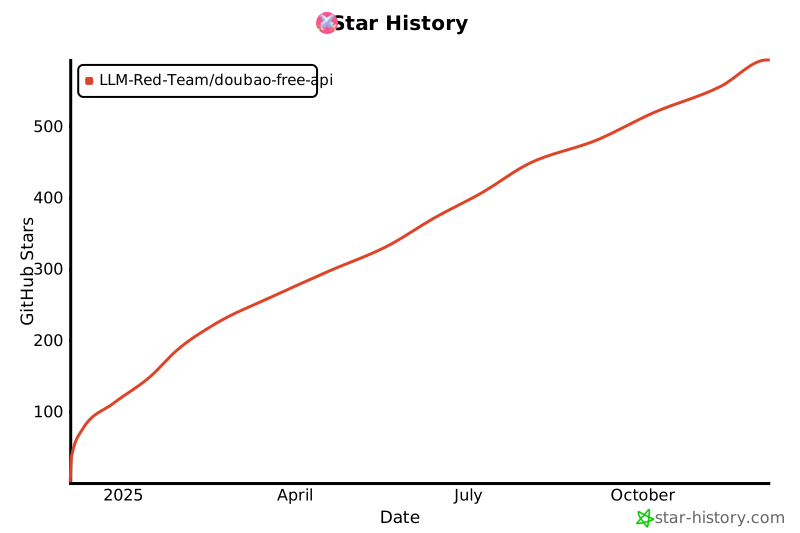](https://star-history.com/#LLM-Red-Team/doubao-free-api&Date)