https://github.com/lmlk-seal/dev-starter
NPM Development Launcher
https://github.com/lmlk-seal/dev-starter
automation code dev developer developer-tools lightweight luncher nodejs npm python server
Last synced: 2 months ago
JSON representation
NPM Development Launcher
- Host: GitHub
- URL: https://github.com/lmlk-seal/dev-starter
- Owner: LMLK-seal
- Created: 2025-05-24T05:34:55.000Z (about 1 year ago)
- Default Branch: main
- Last Pushed: 2025-05-27T12:18:43.000Z (about 1 year ago)
- Last Synced: 2025-07-21T09:55:53.417Z (12 months ago)
- Topics: automation, code, dev, developer, developer-tools, lightweight, luncher, nodejs, npm, python, server
- Language: Python
- Homepage:
- Size: 1.03 MB
- Stars: 0
- Watchers: 0
- Forks: 0
- Open Issues: 0
-
Metadata Files:
- Readme: README.md
Awesome Lists containing this project
README
# NPM Development Launcher
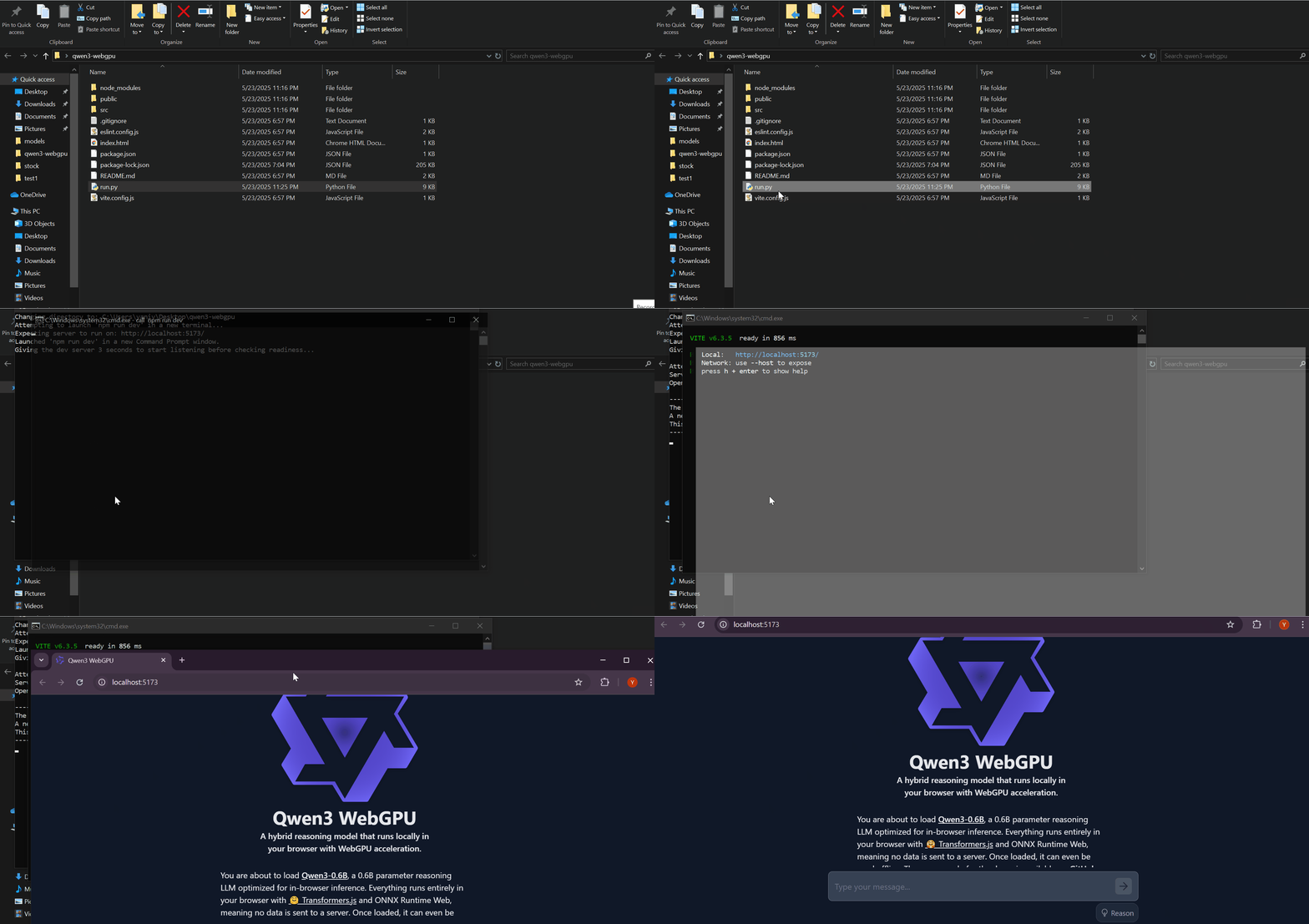
A Python script that automates the process of starting your npm development and opening it in your browser. Perfect for streamlining your web development workflow!
## 🚀 Features
- **Cross-Platform**: Works seamlessly on Windows, macOS, and Linux
- **Smart Terminal Detection**: Automatically finds and uses available terminal emulators
- **Server Readiness Check**: Waits for your dev server to be fully ready before opening the browser
- **Configurable**: Easy to customize for different ports and timeouts
- **Error Handling**: Graceful fallbacks and clear error messages
## 📋 Prerequisites
- Python 3.6 or higher
- Node.js and npm installed
- A project with `npm run dev` script configured
Install the required Python package:
```bash
pip install requests
```
## 🛠️ Installation
1. Download the `run.py` or `run2.py` script (Read useage for the difference between them)
2. Place it in your project's root directory (same level as your `package.json`)
3. Make sure it's executable (Linux/macOS):
```bash
chmod +x run.py
```
4. Windows: No additional setup needed - Python files run directly.
## 🎯 Usage
Open and run the script `Run.py` from your project directory.
### What happens next:
1. 🖥️ Opens a new terminal window
2. 🏃 Runs `npm run dev` in that terminal
3. ⏳ Waits for the development server to start
4. 🌐 Automatically opens your browser to `http://localhost:5173`
Open and run the script `Run2.py` from your project directory.
### What happens next:
1. 📝 Checks if dependencies are installed (node_modules).
2. 🔧 Runs npm install if necessary.
3. 🖥️ Opens a new terminal window
4. 🏃 Runs `npm run dev` in that terminal
5. ⏳ Waits for the development server to start
6. 🌐 Automatically opens your browser to `http://localhost:5173`
Note:
If dependencies are already installed the program will skip this part and runs `npm run dev`.
## ⚙️ Configuration
You can customize the script by modifying these variables at the top of `run.py`:
```python
LOCALHOST_PORT = 5173 # Change if your project uses a different port
SERVER_CHECK_TIMEOUT = 60 # How long to wait for server (seconds)
RETRY_INTERVAL = 1 # Check frequency (seconds)
```
### Common Port Configurations:
- **Vite**: 5173 (default)
- **Create React App**: 3000
- **Next.js**: 3000
- **Vue CLI**: 8080
- **Angular**: 4200
## 🖥️ Platform-Specific Behavior
### Windows
- Uses Command Prompt (`cmd`)
- Keeps the terminal window open after npm command
### macOS
- Uses Terminal.app
- Creates a new tab/window with the running process
### Linux
- Tries multiple terminal emulators in order:
- gnome-terminal
- konsole
- xfce4-terminal
- terminator
- lxterminal
- xterm
- x-terminal-emulator
## 🔧 Troubleshooting
### "requests library not installed"
```bash
pip install requests
```
### Server doesn't start or wrong port
- Check your `package.json` scripts section
- Verify the correct port in the configuration
- Ensure your project has `npm run dev` configured
### Terminal doesn't open (Linux)
- Install a supported terminal emulator
- Or run `npm run dev` manually after the script reports the issue
### Browser doesn't open automatically
- The script will still work; manually navigate to the displayed URL
- Check if `webbrowser` module can access your default browser
## 📁 Project Structure Example
```
my-web-project/
├── package.json
├── run.py ← Place the script here
├── src/
├── public/
└── ...
```
## 🤝 Contributing
Feel free to submit issues, suggestions, or improvements! This script is designed to be simple and easily customizable for different development workflows.
## 📝 License
This script is provided as-is for development convenience. Feel free to modify and distribute according to your needs.
---
**Happy coding! 🎉**
*No more manually opening terminals and browsers - let Python handle the boring stuff while you focus on building amazing applications.*