https://github.com/lmlk-seal/github-readme-generator
An AI-powered tool to generate professional GitHub README files for your projects.
https://github.com/lmlk-seal/github-readme-generator
ai-assistant ai-powered automated-readme code-documentation developer-tools documentation-tool file-uploader gemini-api github-readme local-processing markdown-generator privacy-focused project-analyzer react readme-generator tailwind-css typescript-project vite-build web-application
Last synced: 3 months ago
JSON representation
An AI-powered tool to generate professional GitHub README files for your projects.
- Host: GitHub
- URL: https://github.com/lmlk-seal/github-readme-generator
- Owner: LMLK-seal
- License: mit
- Created: 2025-06-26T19:58:54.000Z (about 1 year ago)
- Default Branch: main
- Last Pushed: 2025-06-26T20:31:06.000Z (about 1 year ago)
- Last Synced: 2025-06-26T21:36:47.303Z (about 1 year ago)
- Topics: ai-assistant, ai-powered, automated-readme, code-documentation, developer-tools, documentation-tool, file-uploader, gemini-api, github-readme, local-processing, markdown-generator, privacy-focused, project-analyzer, react, readme-generator, tailwind-css, typescript-project, vite-build, web-application
- Language: TypeScript
- Homepage:
- Size: 3.59 MB
- Stars: 0
- Watchers: 0
- Forks: 0
- Open Issues: 0
-
Metadata Files:
- Readme: README.md
- License: LICENSE
Awesome Lists containing this project
README
# GitHub-README-Generator using AI




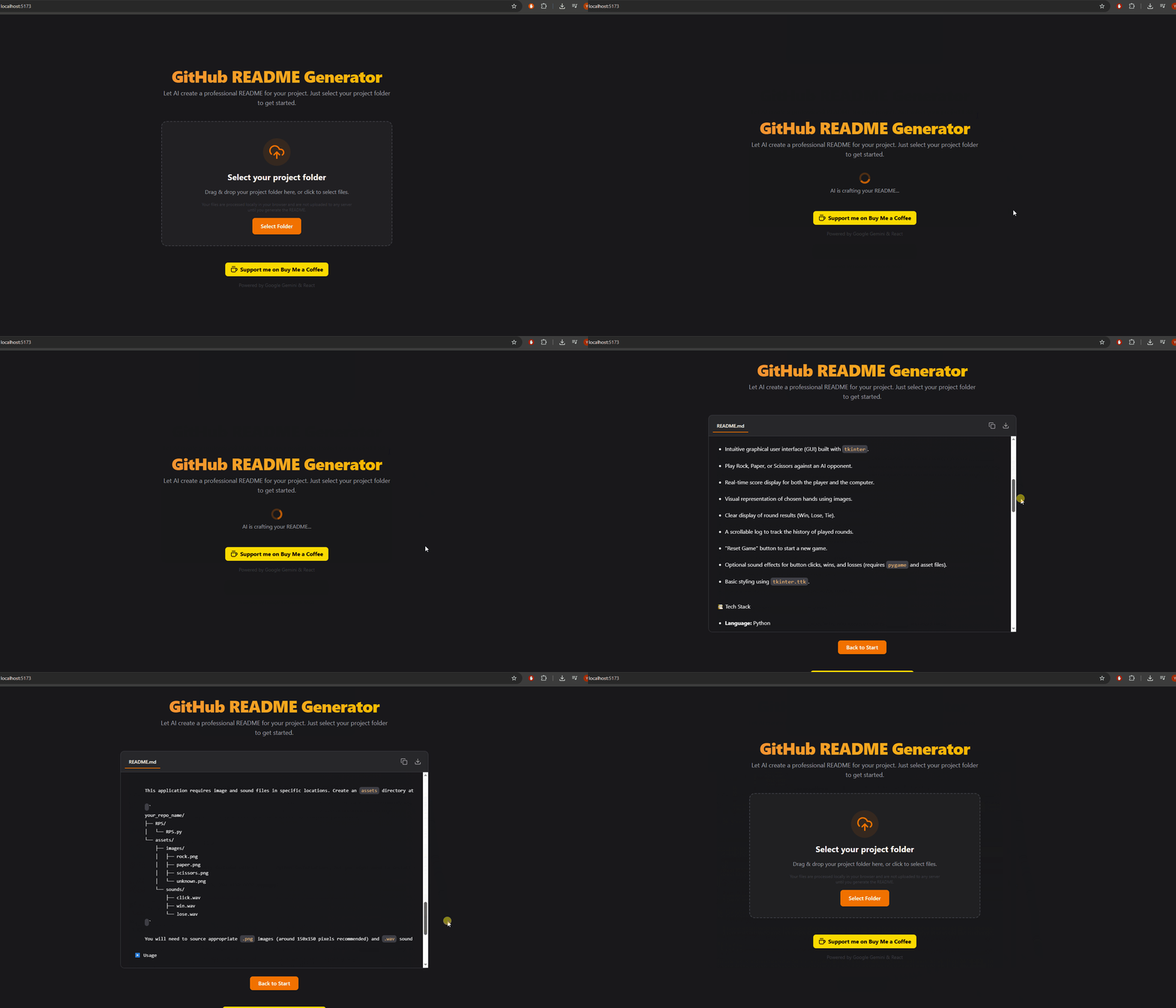
An AI-powered tool to generate professional GitHub README files for your projects. Simply upload your project files and let Google Gemini craft a high-quality, well-structured README.md for you. This application processes your files locally in the browser, ensuring your code remains private.
[Live DEMO](https://idyllic-pasca-d716d1.netlify.app/).
✨ Features
* 📝 **AI-Powered Generation:** Uses Google Gemini to analyze your project code and create a comprehensive README.md.
* 📤 **Local File Processing:** Files are read and processed directly in your browser; nothing is uploaded to a server (except to the Gemini API, which receives project structure and selected file contents).
* 📁 **Folder Upload Support:** Easily upload your entire project folder (browser support may vary).
* 👀 **README Preview:** See a rendered preview of the generated README.
* 📋 **Copy & Download:** Quickly copy the generated Markdown or download it as a `.md` file.
* 🔄 **State Management:** Clear UI states for file loading, generation, success, and error.
📚 Tech Stack
* **Frontend:** React
* **Language:** TypeScript
* **Build Tool:** Vite
* **Styling:** Tailwind CSS (via CDN)
* **AI Integration:** Google Gemini API (`@google/genai`)
🚀 Installation
To run this project locally, follow these steps:
1. **Clone the repository:**
```bash
git clone https://github.com/LMLK-seal/GitHub-README-Generator.git
cd GitHub-README-Generator
```
2. **Install dependencies:**
```bash
npm install
```
3. **Set up Google Gemini API Key:**
* Obtain a Google Gemini API key from the [Google AI Studio](https://aistudio.google.com/).
* use the `.env` file in the root of the project.
* Add your API key to the file:
```dotenv
GEMINI_API_KEY=YOUR_API_KEY
```
4. **Run the development server:**
```bash
npm run dev
```
5. Open your browser and navigate to `http://localhost:5173` (or the address shown in your terminal).
▶️ Usage
1. **Launch the application:** Run the development server (`npm run dev`).
2. **Upload Files:** On the homepage, click the "Select Folder" button or drag and drop your project folder onto the designated area. The application will read the structure and content of your files locally.
3. **Generate README:** Once the files are loaded, a list of files will be displayed. Click the "Generate README" button. The AI will analyze your project and generate the README content.
4. **Preview and Actions:** The generated README.md will be displayed in a preview area. You can then:
* Copy the Markdown content to your clipboard using the copy icon.
* Download the content as a `README.md` file using the download icon.
* Click "Back to Start" to generate a README for another project.
🤝 Contributing
Pull requests are welcome. For major changes, please open an issue first to discuss what you would like to change.
📝 License
This project is licensed under the MIT License