https://github.com/lmlk-seal/printext
Printext is a lightweight, application that extracts text from images.
https://github.com/lmlk-seal/printext
app application extract-data image-processing imagerecognition images imagetotext img2txt lightweight tesseract-ocr text tkinter-gui windows
Last synced: 3 months ago
JSON representation
Printext is a lightweight, application that extracts text from images.
- Host: GitHub
- URL: https://github.com/lmlk-seal/printext
- Owner: LMLK-seal
- License: mit
- Created: 2024-08-26T10:53:00.000Z (almost 2 years ago)
- Default Branch: main
- Last Pushed: 2024-08-26T11:07:10.000Z (almost 2 years ago)
- Last Synced: 2025-03-23T06:23:14.044Z (over 1 year ago)
- Topics: app, application, extract-data, image-processing, imagerecognition, images, imagetotext, img2txt, lightweight, tesseract-ocr, text, tkinter-gui, windows
- Language: Python
- Homepage:
- Size: 404 KB
- Stars: 1
- Watchers: 1
- Forks: 0
- Open Issues: 0
-
Metadata Files:
- Readme: README.md
- License: LICENSE
Awesome Lists containing this project
README
# Printext: lightweight application that extracts text from images.
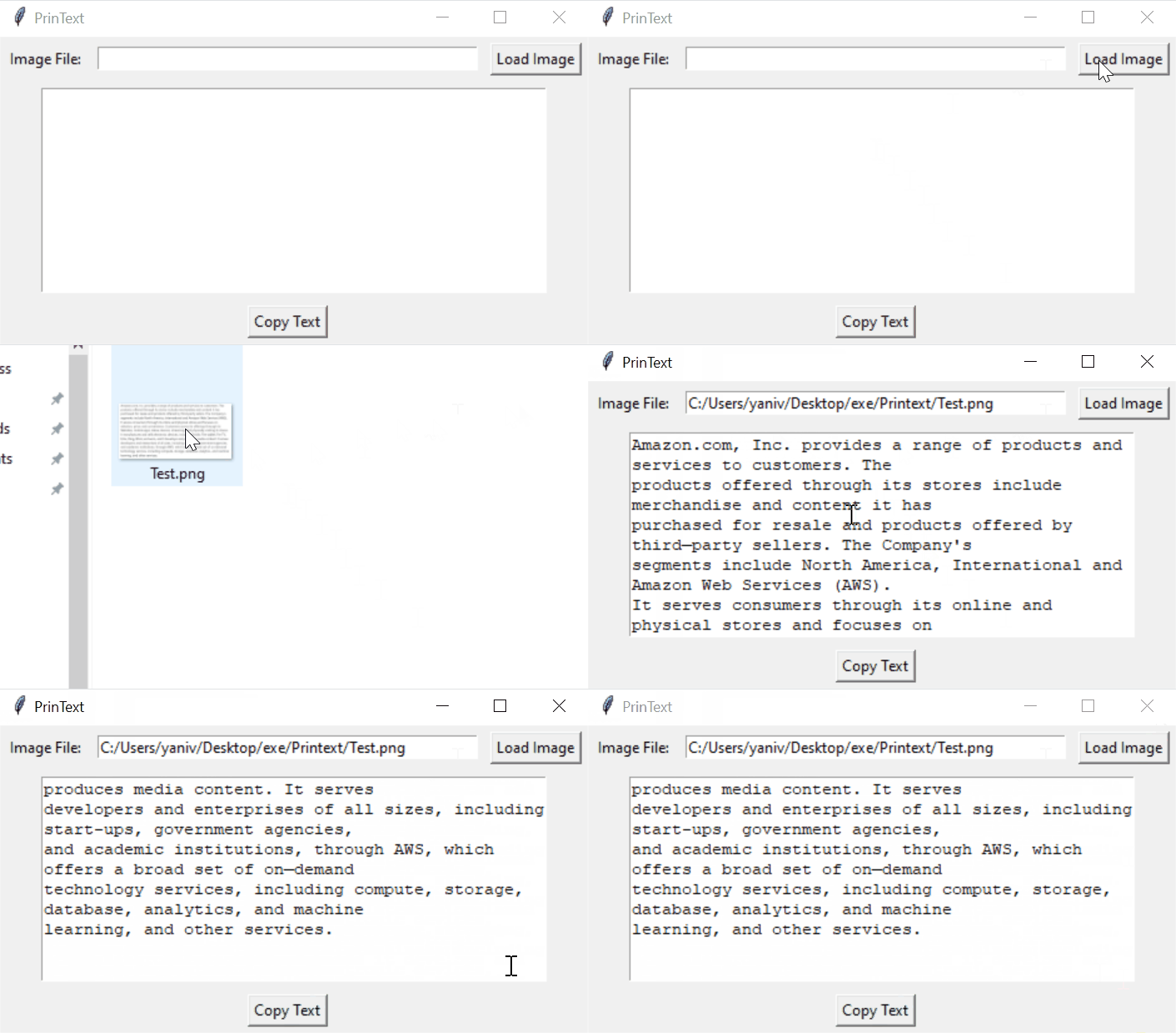
Printext is a lightweight, user-friendly desktop application that extracts text from images using Optical Character Recognition (OCR) technology. Built with Python, it provides a simple graphical interface for users to load images, extract text, and easily copy the results to their clipboard.
## Features
- Load images through a file dialog
- Extract text from various image formats (JPEG, PNG, BMP)
- Display extracted text in a text area
- Copy extracted text to clipboard with one click
- Simple and intuitive graphical user interface
## Requirements
- Python 3.x
- tkinter
- Pillow (PIL)
- pytesseract
- pyperclip
## Installation
1. Ensure you have Python 3.x installed on your system.
2. Install the required libraries:
```
pip install pillow pytesseract pyperclip
```
3. Install Tesseract-OCR on your system:
- For Windows: Download and install from [GitHub](https://github.com/UB-Mannheim/tesseract/wiki)
- For macOS: Use Homebrew: `brew install tesseract`
- For Linux: Use your distribution's package manager, e.g., `sudo apt-get install tesseract-ocr`
4. Download the `printext.py` file.
## Usage
1. Run the script:
```
python printext.py
```
2. Click "Load Image" to select an image file.
3. The extracted text will appear in the text area.
4. Click "Copy Text" to copy the extracted text to your clipboard.
## How It Works
PrinText uses the following libraries:
- `tkinter` for the graphical user interface
- `PIL` (Python Imaging Library) for image processing
- `pytesseract` for OCR (Optical Character Recognition)
- `pyperclip` for clipboard operations
The application loads an image, processes it using Tesseract-OCR, and displays the extracted text. Users can then easily copy the text for use in other applications.
## Contributing
Contributions, issues, and feature requests are welcome! Feel free to check the [issues page](link-to-your-issues-page).
## License
[MIT License](link-to-your-license-file)
## Acknowledgements
- This project uses [Tesseract-OCR](https://github.com/tesseract-ocr/tesseract) for text extraction.