https://github.com/lob2018/sudokufx
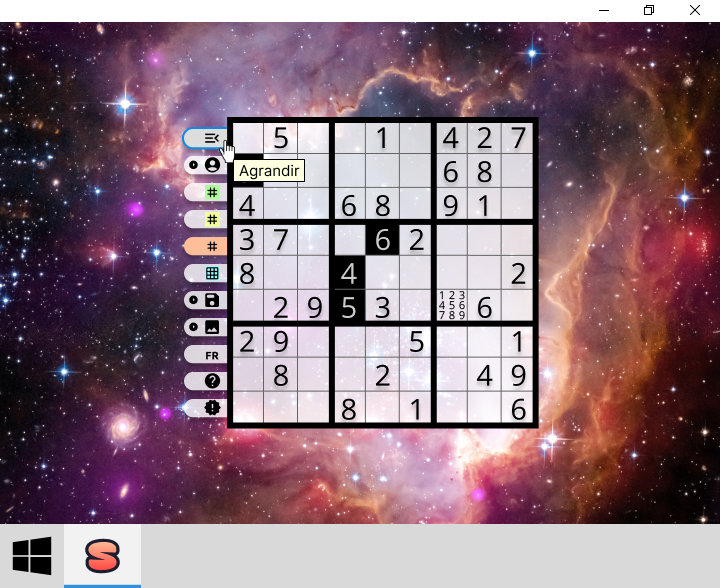
🚧 Work in progress... ▪ Sudoku game ▪ Cross-platform desktop application developed in Java using JavaFX, Maven, FXML, Spring Boot, HSQLDB, and SonarCloud, following the Model-View-ViewModel-Coordinator (MVVM-C) architecture.
https://github.com/lob2018/sudokufx
debian-based fxml hsqldb-embedded-database java javafx linux macos sonarcloud spring-boot windows
Last synced: 4 months ago
JSON representation
🚧 Work in progress... ▪ Sudoku game ▪ Cross-platform desktop application developed in Java using JavaFX, Maven, FXML, Spring Boot, HSQLDB, and SonarCloud, following the Model-View-ViewModel-Coordinator (MVVM-C) architecture.
- Host: GitHub
- URL: https://github.com/lob2018/sudokufx
- Owner: Lob2018
- License: other
- Created: 2024-01-22T07:40:05.000Z (over 2 years ago)
- Default Branch: main
- Last Pushed: 2026-03-05T14:19:17.000Z (4 months ago)
- Last Synced: 2026-03-05T17:29:27.943Z (4 months ago)
- Topics: debian-based, fxml, hsqldb-embedded-database, java, javafx, linux, macos, sonarcloud, spring-boot, windows
- Language: Java
- Homepage: https://lob2018.github.io/SudokuFX/
- Size: 87.6 MB
- Stars: 0
- Watchers: 1
- Forks: 2
- Open Issues: 0
-
Metadata Files:
- Readme: README.md
- Contributing: CONTRIBUTING.md
- Funding: FUNDING.yml
- License: LICENSE.txt
- Code of conduct: CODE_OF_CONDUCT.md
- Codeowners: CODEOWNERS
- Security: SECURITY.md
Awesome Lists containing this project
README
# 🎲 SudokuFX
Dive into the world of Sudoku with a game that offers:
- 🧩 **Play challenging 9x9 puzzles**: Enjoy grids ranging from beginner to expert levels.
- 🤖️ **Solve any 9x9 Sudoku grid**: Let the game solve your puzzles or input custom ones.
- ✨ **Create profiles**: Save progress and manage personalized profiles for each player.
- 💾 **Save anytime**: Effortlessly continue your puzzle-solving journey.
Challenge your mind and enjoy hours of logical fun with SudokuFX!
[](https://github.com/Lob2018/SudokuFX/blob/main/LICENSE.txt)
[](https://www.w3.org/WAI/WCAG21/quickref/)
[](https://www.bestpractices.dev/projects/10875)
[](https://scorecard.dev/viewer/?uri=github.com/Lob2018/SudokuFX)
[](https://app.snyk.io/org/lob2018/project/eb67e66c-32ab-4713-af25-6438d35db490)
[](https://github.com/lob2018/SudokuFX/actions/workflows/codeql.yml)
[](https://github.com/Lob2018/SudokuFX/actions/workflows/dependabot/dependabot-updates)
[](https://github.com/Lob2018/SudokuFX/actions/workflows/qodana_code_quality.yml)
[](https://sonarcloud.io/summary/new_code?id=Lob2018_SudoFX2024)
[](https://sonarcloud.io/summary/new_code?id=Lob2018_SudoFX2024)
[](https://sonarcloud.io/summary/new_code?id=Lob2018_SudoFX2024)
[](https://sonarcloud.io/summary/new_code?id=Lob2018_SudoFX2024)
[](https://sonarcloud.io/summary/new_code?id=Lob2018_SudoFX2024)
[](https://github.com/Lob2018/SudokuFX/actions/workflows/coverage_report.yml)
[](https://github.com/Lob2018/SudokuFX/issues)
[](https://github.com/Lob2018/SudokuFX/pulls)
[](https://github.com/Lob2018/SudokuFX/releases)
[](https://github.com/Lob2018/sudokufx/releases)
# [](https://github.com/Lob2018/SudokuFX/releases/latest)
## Contents
- [System requirements](#system-requirements)
- [Installation](#installation)
- [Verifying downloaded assets](#verifying-downloaded-assets)
- [Use](#use)
- [Examples](#examples)
- [Update](#update)
- [Uninstallation](#uninstallation)
- [Documentation](https://lob2018.github.io/SudokuFX/)
- [Security](https://github.com/Lob2018/SudokuFX?tab=security-ov-file#readme)
- [Project](#project)
- [Overview](#overview)
- [Package structure](#package-structure)
- [Roadmap](#roadmap)
- [Mockup](#mockup)
- [Build with](#build-with)
- [Required Application Properties to Run](#required-application-properties-to-run)
- [How to develop on Windows with IntelliJ IDEA](#how-to-develop-on-windows-with-intellij-idea)
- [DEV Debugging with Remote JVM](#dev-debugging-with-remote-jvm)
- [DEV Runtime monitoring with VisualVM](#dev-runtime-monitoring-with-visualvm)
- [DEV Diagnostic Commands Examples](#dev-diagnostic-commands-examples)
- [Contributing](#contributing)
- [Code of Conduct](#code-of-conduct)
- [Contributors](#contributors)
- [Licence](https://github.com/Lob2018/SudokuFX/blob/main/LICENSE.txt)
## System requirements
### Minimum specifications
- **Operating System:** Windows 10/11, macOS 11 (Big Sur) or later, Ubuntu 20.04 LTS (64-bit)
- **Processor:** Dual-core 2.0 GHz (Intel x86_64 or Apple Silicon ARM64)
- **Memory:** 4 GB RAM
- **Storage:** 1 GB free disk space
- **Audio:** Sound card (integrated or dedicated)
- **Display:** 1024 × 768 pixels
- **Other:** Java JRE (included in MSI/DEB/DMG versions)
### Recommended specifications
- **Processor:** Quad-core 2.5 GHz or higher (Intel x86_64 or Apple Silicon ARM64)
- **Memory:** 8 GB RAM
- **Storage:** 2 GB free disk space (SSD recommended)
- **Display:** 1920 × 1080 pixels
- **Audio:** Stereo audio system for optimal experience
## Installation
[](https://github.com/Lob2018/SudokuFX/releases/latest)
[](https://github.com/Lob2018/SudokuFX/releases/latest)
[](https://github.com/Lob2018/SudokuFX/releases/latest)
- Windows
- Application with Java Runtime Environment (JRE) included
- Download and install the latest Windows version of the MSI file, [available in Assets.](https://github.com/Lob2018/SudokuFX/releases/latest)
- The MSI file does not have a code signing certificate, Microsoft Defender SmartScreen can inform you of this during installation; to continue the installation click on **additional information**, then **Run anyway**.
- Application without Java Runtime Environment (JRE) included
- [The latest Adoptium Temurin JRE](https://adoptium.net/temurin/releases/?package=jre) must be installed on your machine with the corresponding JAVA_HOME environment variable set
- Download, unzip, and keep all the files together, from the latest Windows version of the ZIP file, [available in Assets.](https://github.com/Lob2018/SudokuFX/releases/latest)
- Linux (Debian-based distributions)
- Application with Java Runtime Environment (JRE) included
- Download and install the latest Linux version of the DEB file, [available in Assets.](https://github.com/Lob2018/SudokuFX/releases/latest)
- Run `sudo apt install ./sudokufx-jvm_v.v.v.v_amd64.deb`
- Application without Java Runtime Environment (JRE) included
- [The latest Adoptium Temurin JRE](https://adoptium.net/temurin/releases/?package=jre) must be installed on your machine with the corresponding JAVA_HOME environment variable set
- Download, untar, and keep all the files together, from the latest Linux version of the TAR file, [available in Assets.](https://github.com/Lob2018/SudokuFX/releases/latest)
- MacOS
- Application with Java Runtime Environment (JRE) included
- Download and install the latest MacOS version of the DMG file, [available in Assets.](https://github.com/Lob2018/SudokuFX/releases/latest)
- Application without Java Runtime Environment (JRE) included
- [The latest Adoptium Temurin JRE](https://adoptium.net/temurin/releases/?package=jre) must be installed on your machine with the corresponding JAVA_HOME environment variable set
- Download, unzip, and keep all the files together, from the latest MacOS version of the ZIP file, [available in Assets.](https://github.com/Lob2018/SudokuFX/releases/latest)
### Verifying downloaded assets
To ensure the integrity of downloaded assets, import the GPG public key with `gpg --import sudokufx-public-key.asc`, then verify the files, e.g., the MSI file, using `gpg --verify SudokuFX_JVM-v.v.v.v.msi.asc SudokuFX_JVM-v.v.v.v.msi`. For more information, refer to the [GnuPG Manual](https://www.gnupg.org/gph/en/manual.html).
## Use
### Launch and play SudokuFX
#### Windows
- **Application with Java Runtime Environment (JRE) included**: Launch SudokuFX from the Start Menu after installing the MSI file.
- **Application without Java Runtime Environment (JRE) included**: Run from the extracted ZIP folder:
```
./SudokuFX-v.v.v.v.bat
```
#### Linux
- **Application with Java Runtime Environment (JRE) included**: Launch from the applications menu or run from the terminal in the folder where the DEB file was installed:
```
/opt/sudokufx-jvm/bin/SudokuFX-JVM
```
- **Application without Java Runtime Environment (JRE) included**: Navigate to the extracted TAR folder and run:
```
./SudokuFX-v.v.v.v.sh
```
#### MacOS
- **Application with Java Runtime Environment (JRE) included**: Launch from the Applications folder or Launchpad after installing the DMG file.
- **Application without Java Runtime Environment (JRE) included**: Navigate to the extracted ZIP folder and run:
```
./SudokuFX-v.v.v.v.sh
```
### Basic gameplay
1. **Select difficulty**: Choose from Easy, Medium, or Difficult levels to start a new game.
2. **Fill the grid**: Click on any empty cell and enter numbers 1-9.
3. **Check progress**: The game automatically validates your entries.
4. **Save and load**:
- Progress is automatically saved for the **current player**, so ongoing games are preserved.
- You can also **switch between players** and **resume previously saved games**.
### Features
- **Multiple difficulty levels**: From beginner-friendly to difficult challenges.
- **Auto save**: Your progress is automatically saved.
- **Clean interface**: Modern, intuitive design.
- **Cross-platform**: Works seamlessly on Windows, Linux, and MacOS.
### Troubleshooting
If you encounter any issues:
1. **Game won't start**: Ensure you have the correct Java version if using the non-JRE version.
2. **Performance issues**: Try closing other applications to free up system resources.
3. **Display problems**: Check your system's display scaling settings.
4. **Save and load issues**: Verify that SudokuFX has write permissions to your user directory.
For additional help, check the application logs or [file an issue](https://github.com/Lob2018/SudokuFX/issues) on GitHub.
## Examples
## Update
- Windows
- Application with Java Runtime Environment (JRE) included (from MSI file)
- [Follow the installation instructions](#installation)
- Application without Java Runtime Environment (JRE) included (ZIP file with the .bat file and the JAR)
- Delete your old unzipped folder from the ZIP file, and follow [the installation instructions](#installation)
- Linux
- Application with Java Runtime Environment (JRE) included (from .deb file)
- [Follow the installation instructions](#installation)
- Application without Java Runtime Environment (JRE) included (TAR file with the .sh file and the JAR)
- Delete your old untarred folder from the TAR, and follow [the installation instructions](#installation)
- MacOS
- Application with Java Runtime Environment (JRE) included (from .dmg file)
- [Follow the installation instructions](#installation)
- Application without Java Runtime Environment (JRE) included (ZIP file with the .sh file and the JAR)
- Delete your old unzipped folder from the ZIP file, and follow [the installation instructions](#installation)
## Uninstallation
- Windows
- Application with Java Runtime Environment (JRE) included (from MSI file)
- **Uninstall from the Control Panel (for programs)**
1. In the search box on the taskbar, type **Control Panel** and select it from the results.
2. Select **Programs > Programs and Features**.
3. Press and hold (or right-click) on the program you want to remove and select **Uninstall** or *
*Uninstall/Change**. Then follow the directions on the screen.
- Application without Java Runtime Environment (JRE) included (ZIP file with the .bat file and the JAR)
- **Delete your unzipped folder from SudokuFX-v.v.v.v_windows.zip**
- Linux
- Application with Java Runtime Environment (JRE) included (from .deb file)
- Run `sudo apt purge sudokufx-jvm`
- Application without Java Runtime Environment (JRE) included (TAR file with the .sh file and the JAR)
- **Delete your untarred folder from SudokuFX-v.v.v.v_linux.tar.gz**
- MacOS
- Application with Java Runtime Environment (JRE) included (from .dmg file)
- Drag the application to the Trash
- Application without Java Runtime Environment (JRE) included (ZIP file with the .sh file and the JAR)
- **Delete your unzipped folder from SudokuFX-v.v.v.v_macos.zip**
> [!IMPORTANT]
> **To completely remove your application data and logs, delete the following folder (this action is irreversible):**
>- Windows:
>
> C:/Users/\**[^1]**/AppData/Local/Soft64.fr/SudokuFX
>- Linux:
>
> /home/\**[^1]**/.local/share/Soft64.fr/SudokuFX **[^2]**
>- MacOS:
>
> /Users/\**[^1]**/Library/Application Support/Soft64.fr/SudokuFX
[^1]:Replace \ with your actual username on the system.
[^2]: `.local/share` may be replaced by `$XDG_DATA_HOME` if defined.
## Project
### Overview
Cross-platform desktop application developed in Java using JavaFX, Spring Boot, HSQLDB, Maven, and SonarCloud, following the Model-View-ViewModel-Coordinator (MVVM-C) architecture.
### Package structure
```
.
├── benchmark // performance and load testing utilities
├── common // shared utilities, annotations, enums, exceptions, interfaces
│ ├── annotation // custom annotations
│ ├── enums // shared enums and constants
│ ├── exception // common exception classes
│ ├── interfaces // reusable interfaces
│ │ └── mapper // data mapping interfaces
│ └── util // general utility classes
│ └── sudoku // sudoku-related utilities
├── config // application configuration (database, OS settings)
│ ├── database // database configurations
│ └── os // operating system specific configs
├── dto // data transfer objects
│ └── github // github-specific DTOs
├── model // domain/business models
├── navigation // navigation management for the Coordinator
├── repository // data access layer
├── service // business services and logic
│ ├── business // core business services
│ ├── external // integration with external APIs or systems
│ └── ui // services interacting with the UI (audio, file processing, etc.)
├── view // UI views and components
│ ├── main // MainView
│ └── component // reusable UI components
│ │ ├── list // list components
│ │ └── toaster // toaster notifications
│ └── util // utilities for bindings and factories
└── viewmodel // view models for MVVM pattern
└── state // state holders (observable state for ViewModels, e.g., PlayerStateHolder)
```
### Roadmap
- [The project roadmap](https://github.com/users/Lob2018/projects/4)
### Mockup
- [The application mockup (Figma)](https://www.figma.com/design/GiSwlg2mZofXalf1Quaa5w/SudokuFX?node-id=0-1&t=smJqt7CQuD0zZuUP-1)
> [!IMPORTANT]
>
>### Required Application Properties to Run
>
>For the application to work properly, the following application properties must be set at the JVM level:
>
>- **app.name**: This property specifies the name of the application.
>- **app.version**: Specifies the application version in stable SemVer format with numeric MAJOR, MINOR, and PATCH only (e.g. 1.2.3; not 1.2.3-beta.1 or 1.2.3+build.5).
>- **app.organization**: Specifies the organization responsible for the application.
>- **app.license**: Specifies the license under which the application is distributed.
### Build with
- Java LTS (e.g. 25)
- JavaFX
- WiX Toolset v3.11
- Dependencies:
- Development
- javafx-controls
- javafx-fxml
- commons-lang3 (utility classes for strings, objects, numbers, etc.)
- DTOs
- MapStruct
- SGBDR & SPRING BOOT
- HSQLDB
- Spring boot
- Starter
- Gluon Ignite with Spring
- Starter data JPA
- Starter validation
- flyway (database migration)
- passay (generate and validate secrets)
- datasource-proxy-spring-boot-starter (intercepts and logs SQL queries for debugging and performance analysis)
- Logs
- logback from Spring Boot
- Build dependencies:
- spotless-maven-plugin (ensures consistent code formatting across the project)
- maven-checkstyle-plugin (static code analysis to enforce code style rules)
- maven-compiler-plugin
- annotationProcessorPaths:
- MapStruct processor (for code generation)
- maven-enforcer-plugin (to define the minimum Maven version)
- javafx-maven-plugin
- spring-boot-maven-plugin (create the uber JAR)
- exec-maven-plugin (for scripts generating the packages)
- jmh (for temporary performance evaluation)
- Test dependencies:
- spring boot starter test (JUnit, Mockito, Hamcrest)
- surefire
- jacoco
- testfx-junit5 (ex.:FxRobot to execute actions within the UI, or custom Hamcrest matchers org.testfx.matcher.*.)
### How to develop on Windows with IntelliJ IDEA
- Download and install [the LTS version of the Adoptium Temurin JDK Downloads](https://adoptium.net/temurin/releases/?package=jdk)
- Download and install [WiX Toolset v3.11](https://github.com/wixtoolset/wix3/releases/tag/wix3112rtm) (in order to package the application)
- Activate .NET framework 3.5.1 (Control Panel > Programs > Programs and Features > Turn Windows features on or off)
- Launch wix311.exe
- Configured the necessary environment variables
- JDK
- name:JAVA_HOME
- value LTS (e.g. 25):C:\Program Files\Eclipse Adoptium\jdk-25.0.1
- WiX
- name:WIX
- value:C:\Program Files (x86)\WiX Toolset v3.11\
- IntelliJ IDEA
- Clone the repository
- Select the project's JDK
- File > Project Structure > SDK > Add SDK from disk (select the JDK)
- Run Maven configurations (in the top right corner)
- SudoMain.java is the main class
- Maven run configurations are saved as project files in .idea/runConfigurations
- Temporary performance evaluation with Java Microbenchmark Harness (JMH):
1. Comment out `org.openjdk.jmh`
and `fr/softsf/sudokufx/benchmark/**/*.java` in the `pom.xml`
2. Run `mvn clean` and execute the `[Jmh init.]` configuration
3. Manage your benchmark tests in the `fr.softsf.sudokufx.benchmark` package
4. **Once benchmarking is complete, uncomment `org.openjdk.jmh`
and `fr/softsf/sudokufx/benchmark/**/*.java` in the `pom.xml`**
#### DEV Debugging with Remote JVM
- Use the following IntelliJ Run Configurations to debug the application via a suspended JVM:
- Run Configuration: `SudokuFX [debug]`
Launches the application using Maven with JDWP enabled on port `5005`, using `suspend=y` to pause execution until a debugger is attached
- Command: `clean javafx:run -Pdev -f pom.xml`
- Environment variable: `JAVA_TOOL_OPTIONS=-agentlib:jdwp=transport=dt_socket,server=y,suspend=y,address=*:5005`
- JVM starts and waits for debugger connection
- Run Configuration: `Debug JavaFX Maven`
Attaches IntelliJ's debugger to the suspended JVM on port `5005`
- Configuration type: Remote JVM Debug
- Host: `localhost`, Port: `5005`, Transport: `Socket`
- Debug workflow:
- Add breakpoints in the source code
- Run `SudokuFX [debug]` (Run mode) to start the JVM in suspended state
- Immediately launch `Debug JavaFX Maven` (Debug mode) to attach and resume execution
- Application starts with breakpoints active
#### DEV Runtime monitoring with VisualVM
- Install [VisualVM](https://visualvm.github.io/) and the following plugins:
- **VisualVM-MBeans**
Enables real-time monitoring of JMX-exposed metrics (e.g., internal HikariCP connection pool metrics) via the MBeans tab
- Add `config.setRegisterMbeans(true)` in HikariCP configuration or `config.properties`
- Plugin adds a new **MBeans** tab
- **VisualGC**
Visualizes JVM memory regions and garbage collection activity; useful for diagnosing memory usage and detecting leaks
- Plugin adds a new **Visual GC** tab
- Use the dedicated Maven profile `visualvm-monitoring` to launch the application with JMX and GC logging enabled
- Profile declared in `pom.xml`
- Run Configuration: `SudokuFX run with VisualVM Monitoring`
- Command: `clean javafx:run -Pvisualvm-monitoring -f pom.xml`
- Enables VisualVM sampling and MBeans access via JMX (`localhost:9010`)
- In VisualVM, **Add JMX Connection for localhost:9010** in order to access full JMX metrics, otherwise only a local jvmstat connection is available.
#### DEV Diagnostic Commands Examples
Detecting **classloader leaks**, **Metaspace growth**, and **heap retention patterns** in JVM applications. Each command is paired with actionable indicators to support reproducible analysis.
Run Configuration: `SudokuFX run with VisualVM Monitoring`
| Component | Commands | Purpose | Diagnostic Indicators |
|:--|:--|:--|:---------------------------------------------------------------------------------------------------------------------------------------------------------------------------------------------------------------------------------------------|
| **🧠 Native Memory** | `jcmd VM.native_memory summary`
**with** `-XX:MaxMetaspaceSize=128m` (adjust as needed) | Monitor off-heap growth and Metaspace usage under constrained conditions | **Off-Heap Leak:** Sustained increase in `Internal` or `Unknown` regions
**Metaspace Growth:** Continued increase in committed size and class count after application has reached steady state |
| **📦 Classloaders** | `jcmd GC.run` **THEN** `jmap -clstats ` (requires full JDK)
**with** `-XX:MaxMetaspaceSize=128m` (adjust as needed) | Trigger GC and validate loader retention under constrained Metaspace | **Leak Evidence:** Loader count remains stable (e.g., 80) after forced GC
**Metaspace Pressure:** Class count per loader remains high despite GC
**OOM Trigger:** `OutOfMemoryError: Metaspace` occurs earlier if loaders are retained |
| **🧮 Heap Objects** | `jcmd GC.class_histogram` **OR** `jmap -histo:live \| head -50` (requires full JDK) | Identify dominant heap objects and retention | **Dominant heap objects:** 32Mo domain object (e.g. `Model.Grid`) |
## Contributing
We welcome all contributions to SudokuFX — whether it's bug fixes, new features, documentation, or ideas.
Please read our [Contributing Guide](./CONTRIBUTING.md) to get started.
It includes setup instructions, coding standards, commit conventions, and more.
## Code of Conduct
We are committed to fostering a welcoming and respectful community.
Please read our [Code of Conduct](./CODE_OF_CONDUCT.md) before participating.
## Contributors
[Lob2018](https://github.com/Lob2018)