https://github.com/lobodol/drone-flight-controller
A quadcopter flight controller based on Arduino Uno
https://github.com/lobodol/drone-flight-controller
arduino flight-controller quadcopter
Last synced: 5 months ago
JSON representation
A quadcopter flight controller based on Arduino Uno
- Host: GitHub
- URL: https://github.com/lobodol/drone-flight-controller
- Owner: lobodol
- License: mit
- Created: 2015-08-06T13:24:00.000Z (almost 11 years ago)
- Default Branch: main
- Last Pushed: 2023-12-05T15:37:08.000Z (over 2 years ago)
- Last Synced: 2023-12-05T16:49:21.841Z (over 2 years ago)
- Topics: arduino, flight-controller, quadcopter
- Language: C++
- Homepage:
- Size: 130 KB
- Stars: 258
- Watchers: 26
- Forks: 79
- Open Issues: 9
-
Metadata Files:
- Readme: README.md
- License: LICENSE
Awesome Lists containing this project
README
# Quadcopter PID implementation
[](https://travis-ci.org/lobodol/drone-flight-controller)
[](https://opensource.org/licenses/MIT)
[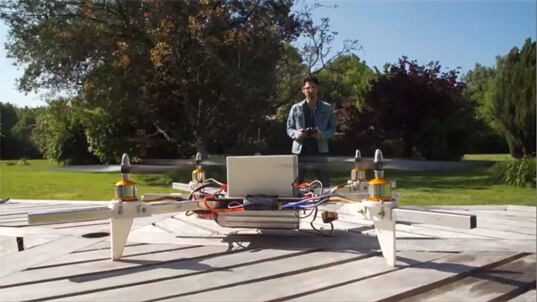](https://www.firediy.fr/article/asservissement-pid-drone-ch-8)
## 1. Introduction
This Arduino sketch provides a flight controller for an X quadcopter based on an Arduino Uno board and the [MPU6050 sensor](https://www.invensense.com/wp-content/uploads/2015/02/MPU-6000-Datasheet1.pdf).
Basically, this automation routine is an implementation of a digital PID with a refresh rate of 250Hz.
The method used to calculate PID coefficients is [Ziegler Nichols method](https://en.wikipedia.org/wiki/PID_controller#Ziegler%E2%80%93Nichols_method).
The frame of the quadcopter is based on the [F450](https://www.qwant.com/?q=f450%20frame&t=images).
You can use [this](https://github.com/lobodol/ESC-calibration) to calibrate your ESCs.
A detailed article is available [here](https://www.firediy.fr/article/asservissement-pid-drone-ch-8) (in french).
(i) Currently under active development.
## 2. Requirements
Arduino libraries:
* [Wire](https://www.arduino.cc/en/Reference/Wire)
## 3. Pin connection:
```
+-------------------------+
| MPU-6050 |
| |
| 3V3 SDA SCL GND INT |
+--+----+----+----+----+--+
| | | |
| | | |
+---------+----+----+----+----------------+
| 3.3V A4 A5 GND |
| |
| |
| Arduino Uno |
| |
| #4 #5 #6 #7 #8 #9 #10 #11 |
+--+----+----+----+----+----+----+----+---+
| | | | | | | |
(M1) (M2) (M3) (M4) | | | |
| | | |
| | | |
+--+----+----+----+---+
| C1 C2 C3 C4 |
| |
| RF Receiver |
+---------------------+
Legend:
Mx: Motor X
Cx: Receiver channel x
```
## 4. Configuration
### 4.1 Remote configuration
By default, this sketch uses the mode 2 for RF remote, according to the following picture:
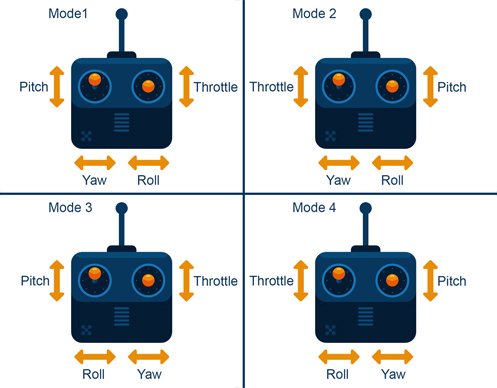
The channel mapping is then:
| Channel | Command |
| :-----: | :--------: |
| 1 | ROLL |
| 2 | PITCH |
| 3 | THROTTLE |
| 4 | YAW |
To change the channel mapping, update the function `configureChannelMapping` according to your needs:
```c
void configureChannelMapping() {
mode_mapping[YAW] = CHANNEL4;
mode_mapping[PITCH] = CHANNEL2;
mode_mapping[ROLL] = CHANNEL1;
mode_mapping[THROTTLE] = CHANNEL3;
}
```
### 4.2 PID tuning
The default PID coeffcient values might work for an F450-like quadcopter.
However, you can tune them in the global variable declaration section:
```c
// PID coefficients
float Kp[3] = {4.0, 1.3, 1.3}; // P coefficients in that order : Yaw, Pitch, Roll
float Ki[3] = {0.02, 0.04, 0.04}; // I coefficients in that order : Yaw, Pitch, Roll
float Kd[3] = {0, 18, 18}; // D coefficients in that order : Yaw, Pitch, Roll
````
## 5. Quadcopter orientation
```
Front
(1) (2) x
\ / z ↑
X \|
/ \ +----→ y
(3) (4)
```
* Motor 1: front left - clockwise
* Motor 2: front right - counter-clockwise
* Motor 3: rear left - clockwise
* Motor 4: rear left - counter-clockwise
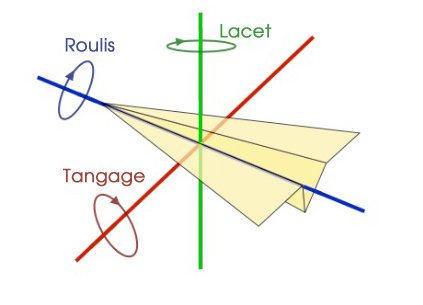
* Left wing **up** implies a positive roll
* Nose **up** implies a positive pitch
* Nose **right** implies a positive yaw
The MPU6050 must be oriented as following:
* X axis: roll
* Y axis: pitch
* Z axis: yaw
## 6. Start/stop
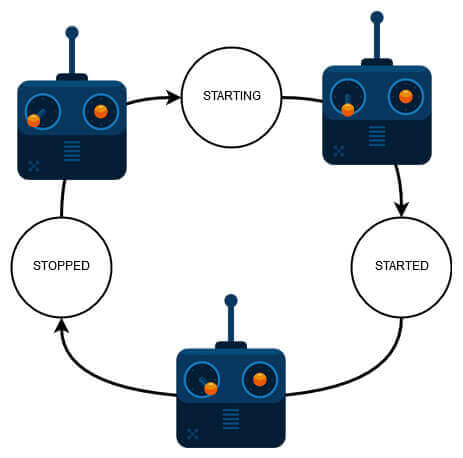
This sketch comes with a safety process: to start the quadcopter, move the left stick of the remote in the bottom left corner. Then move it back in center position.
To stop the quadcopter, move the left stick in the bottom right corner.
## 7. Debug
If you need to print debug messages, make sure to init Serial at **57600 bauds**:
```c
void setup() {
Serial.begin(57600);
// ...
}
void loop() {
Serial.println(measures[ROLL]);
// ...
}
```