https://github.com/localgpt-app/localgpt
Local AI assistant, dreaming explorable worlds.
https://github.com/localgpt-app/localgpt
agent ai bevy rust world
Last synced: 26 days ago
JSON representation
Local AI assistant, dreaming explorable worlds.
- Host: GitHub
- URL: https://github.com/localgpt-app/localgpt
- Owner: localgpt-app
- License: apache-2.0
- Created: 2026-02-01T17:32:52.000Z (6 months ago)
- Default Branch: main
- Last Pushed: 2026-06-21T18:54:39.000Z (about 1 month ago)
- Last Synced: 2026-06-21T20:19:38.129Z (about 1 month ago)
- Topics: agent, ai, bevy, rust, world
- Language: Rust
- Homepage: https://localgpt.app/
- Size: 8.84 MB
- Stars: 1,107
- Watchers: 6
- Forks: 100
- Open Issues: 6
-
Metadata Files:
- Readme: README.md
- Changelog: CHANGELOG.md
- License: LICENSE
- Security: docs/security/SECURITY-TODO.md
- Roadmap: docs/roadmap/gen/Doc-0-Implementation-Tracker.md
- Agents: AGENTS.md
Awesome Lists containing this project
- my-awesome-github-stars - localgpt-app/localgpt - Local AI assistant, dreaming explorable worlds. (Rust)
README
#  LocalGPT
[](https://github.com/localgpt-app/localgpt#license)
[](https://crates.io/crates/localgpt)
[](https://crates.io/crates/localgpt)
[](https://docs.rs/localgpt/latest/localgpt)
[](https://github.com/localgpt-app/localgpt/actions)
[](https://discord.gg/spKRr6mRyp)
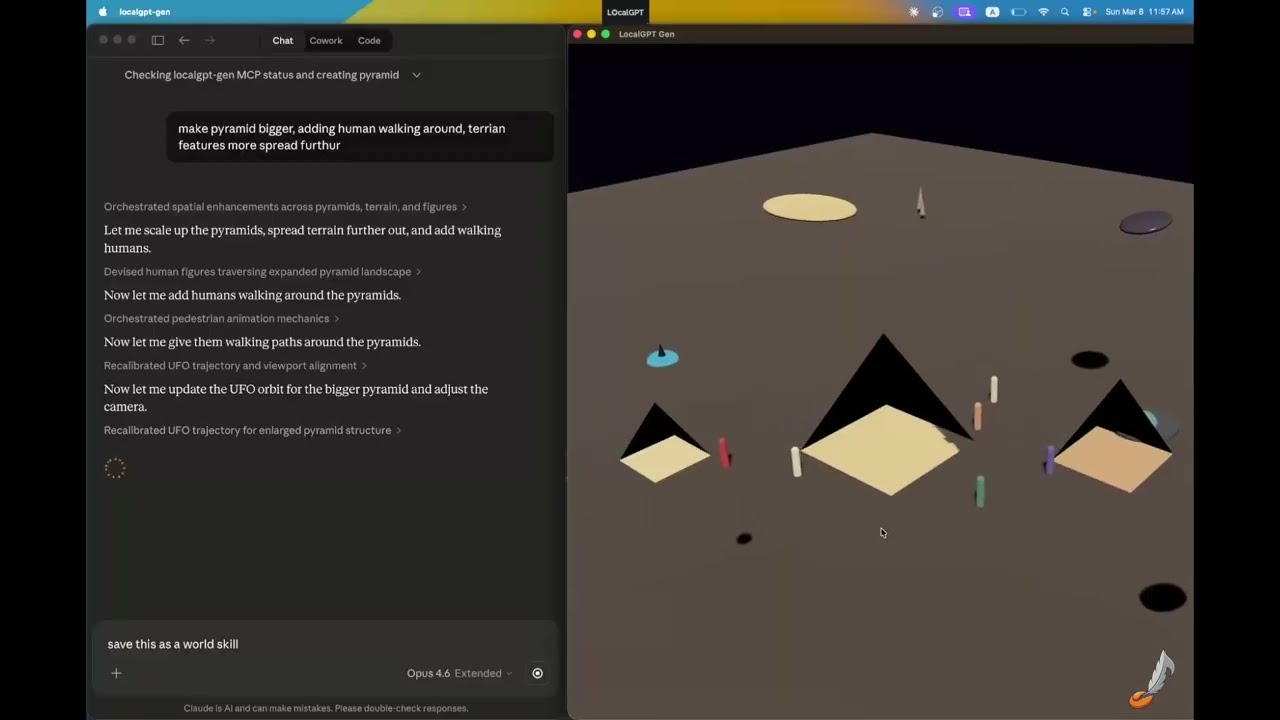
Build explorable 3D worlds with natural language — geometry, materials, lighting, audio, and behaviors. Open source, runs locally.
[](https://www.youtube.com/watch?v=R__tg7YY0T8)
## Install
### From crates.io (for users)
If you just want to run LocalGPT — no source checkout needed:
```bash
# World Building
cargo install localgpt-gen
# AI Assistant (chat, memory, daemon)
cargo install localgpt
```
### From source (for developers)
If you've cloned the repository and want to hack on the code, use `cargo run` to iterate without installing:
```bash
git clone https://github.com/localgpt-app/localgpt.git
cd localgpt
# World Building
cargo run -p localgpt-gen -- "Create a desert scene with pyramids"
# AI Assistant
cargo run -- chat
cargo run -- daemon start
```
Full options (feature flags, headless builds, Docker): see [Installation](https://localgpt.app/docs/installation).
##  Gen Mode (World Building)
`localgpt-gen` is a standalone binary for AI-driven 3D world creation with the Bevy game engine.
```bash
# Start interactive mode
localgpt-gen
# Start with an initial prompt
localgpt-gen "Create a desert scene with pyramids and a UFO hovering above"
# Load an existing scene
localgpt-gen --scene ./world.glb
# Verbose logging
localgpt-gen --verbose
```
### Features
- **Parametric shapes** — box, sphere, cylinder, capsule, plane, torus, pyramid, tetrahedron, icosahedron, wedge
- **PBR materials** — color, metalness, roughness, emissive, alpha, double-sided
- **Lighting** — point, spot, directional lights with color and intensity
- **Behaviors** — orbit, spin, bob, look_at, pulse, path_follow, bounce
- **Audio** — ambient sounds (wind, rain, forest, ocean, cave) and spatial emitters
- **Export** — glTF/GLB, HTML (browser-viewable), screenshots
- **World skills** — save/load complete worlds as reusable skills
### Headless Mode & Experiment Queue
Queue world experiments and generate without a window — overnight batch runs, CI pipelines, or scripted variations:
```bash
# Generate a single world (no window)
localgpt-gen headless --prompt "Build a cozy cabin in a snowy forest"
# With style hint
localgpt-gen headless --prompt "Village marketplace" --style "Studio Ghibli"
```
The memory system learns your creative style across sessions — palettes, lighting preferences, entity templates — and applies them automatically in future generations.
Full docs: [Headless Mode & Experiment Queue](https://localgpt.app/docs/gen/headless)
### MCP Server
Use Gen from Claude Desktop, Codex Desktop, or any MCP-compatible editor (VS Code, Zed, Cursor):
```bash
localgpt-gen mcp-server
```
Add to Claude Desktop config (`~/Library/Application Support/Claude/claude_desktop_config.json` on macOS):
```json
{
"mcpServers": {
"localgpt-gen": {
"command": "localgpt-gen",
"args": ["mcp-server"]
}
}
}
```
For CLI tools (Claude CLI, Gemini CLI, Codex CLI), use `--connect` to route tool calls to your existing window. See [CLI Mode (MCP Relay)](https://localgpt.app/docs/gen/cli-mode).
Full docs: [LocalGPT Gen](https://localgpt.app/docs/gen) | [MCP Server](https://localgpt.app/docs/gen/mcp-server)
Built something cool? Share on [Discord](https://discord.gg/spKRr6mRyp) or [YouTube](https://www.youtube.com/@localgpt-gen)!
---
## AI Assistant
`localgpt` is a local-first AI assistant with persistent memory, autonomous tasks, and multiple interfaces.
```bash
# Interactive chat
localgpt chat
# Single question
localgpt ask "What is the meaning of life?"
# Run as daemon with HTTP API and web UI
localgpt daemon start
```
### Why LocalGPT?
- **Single binary** — no Node.js, Docker, or Python required
- **Local device focused** — runs entirely on your machine, your data stays yours
- **Persistent memory** — markdown-based knowledge store with full-text and semantic search
- **Hybrid web search** — native provider search passthrough plus client-side fallback
- **Autonomous heartbeat** — delegate tasks and let it work in the background
- **Multiple interfaces** — CLI, web UI, desktop GUI, Telegram bot
- **Defense-in-depth security** — signed policy files, kernel-enforced sandbox, prompt injection defenses
- **Multiple LLM providers** — LM Studio, Ollama, Anthropic, OpenAI, xAI, GLM, Vertex AI, CLI providers
### How It Works
LocalGPT uses XDG-compliant directories for config/data/state/cache. Run `localgpt paths` to see resolved paths.
Workspace memory layout:
```
/
├── MEMORY.md # Long-term knowledge (auto-loaded each session)
├── HEARTBEAT.md # Autonomous task queue
├── SOUL.md # Personality and behavioral guidance
└── knowledge/ # Structured knowledge bank
```
Files are indexed with SQLite FTS5 for keyword search and sqlite-vec for semantic search with local embeddings.
### Configuration
Stored at `/config.toml`:
**Local models via LM Studio** (no API key, fully offline):
```toml
[agent]
default_model = "openai/qwen/qwen3.5-35b-a3b"
[providers.openai]
api_key = "lm-studio"
base_url = "http://127.0.0.1:1234/v1"
```
**Cloud providers** (Anthropic, OpenAI, etc.):
```toml
[agent]
default_model = "claude-cli/opus"
[providers.anthropic]
api_key = "${ANTHROPIC_API_KEY}"
```
Full config reference: [`website/docs/configuration.md`](website/docs/configuration.md)
### Security
- **Kernel-enforced sandbox** — Landlock/seccomp on Linux, Seatbelt on macOS
- **Signed policy files** — HMAC-SHA256 signed `LocalGPT.md` with tamper detection
- **Prompt injection defenses** — marker stripping, pattern detection, content boundaries
- **Audit chain** — hash-chained security event log
Security docs: [`website/docs/sandbox.md`](website/docs/sandbox.md) | [`website/docs/localgpt.md`](website/docs/localgpt.md)
### HTTP API
| Endpoint | Description |
|----------|-------------|
| `GET /` | Embedded web UI |
| `POST /api/chat` | Chat with assistant |
| `POST /api/chat/stream` | SSE streaming chat |
| `GET /api/memory/search?q=` | Search memory |
Full API reference: [`website/docs/http-api.md`](website/docs/http-api.md)
### CLI Commands
```bash
localgpt chat # Interactive chat
localgpt ask "question" # Single question
localgpt daemon start # Start daemon
localgpt memory search "query" # Search memory
localgpt config show # Show config
localgpt paths # Show resolved paths
```
Full CLI reference: [`website/docs/cli-commands.md`](website/docs/cli-commands.md)
## Blog
- [Explorable World as Agent Skill](https://localgpt.app/blog/world-as-skill)
- [Why I Built LocalGPT in 4 Nights](https://localgpt.app/blog/why-i-built-localgpt-in-4-nights)
## Built With
Rust, Tokio, Axum, Bevy, SQLite (FTS5 + sqlite-vec), fastembed, eframe
## Contributors

## License
[Apache-2.0](LICENSE)