https://github.com/logicalicy/resume
A simple timeline resume website.
https://github.com/logicalicy/resume
bootstrap rails resume-template
Last synced: 3 months ago
JSON representation
A simple timeline resume website.
- Host: GitHub
- URL: https://github.com/logicalicy/resume
- Owner: logicalicy
- License: mit
- Created: 2015-01-22T00:36:01.000Z (over 11 years ago)
- Default Branch: master
- Last Pushed: 2015-01-29T23:08:33.000Z (over 11 years ago)
- Last Synced: 2025-12-28T06:56:16.234Z (6 months ago)
- Topics: bootstrap, rails, resume-template
- Language: CSS
- Homepage: http://cv.logicalicy.com
- Size: 1.59 MB
- Stars: 2
- Watchers: 1
- Forks: 0
- Open Issues: 0
-
Metadata Files:
- Readme: README.md
- License: LICENSE
Awesome Lists containing this project
README
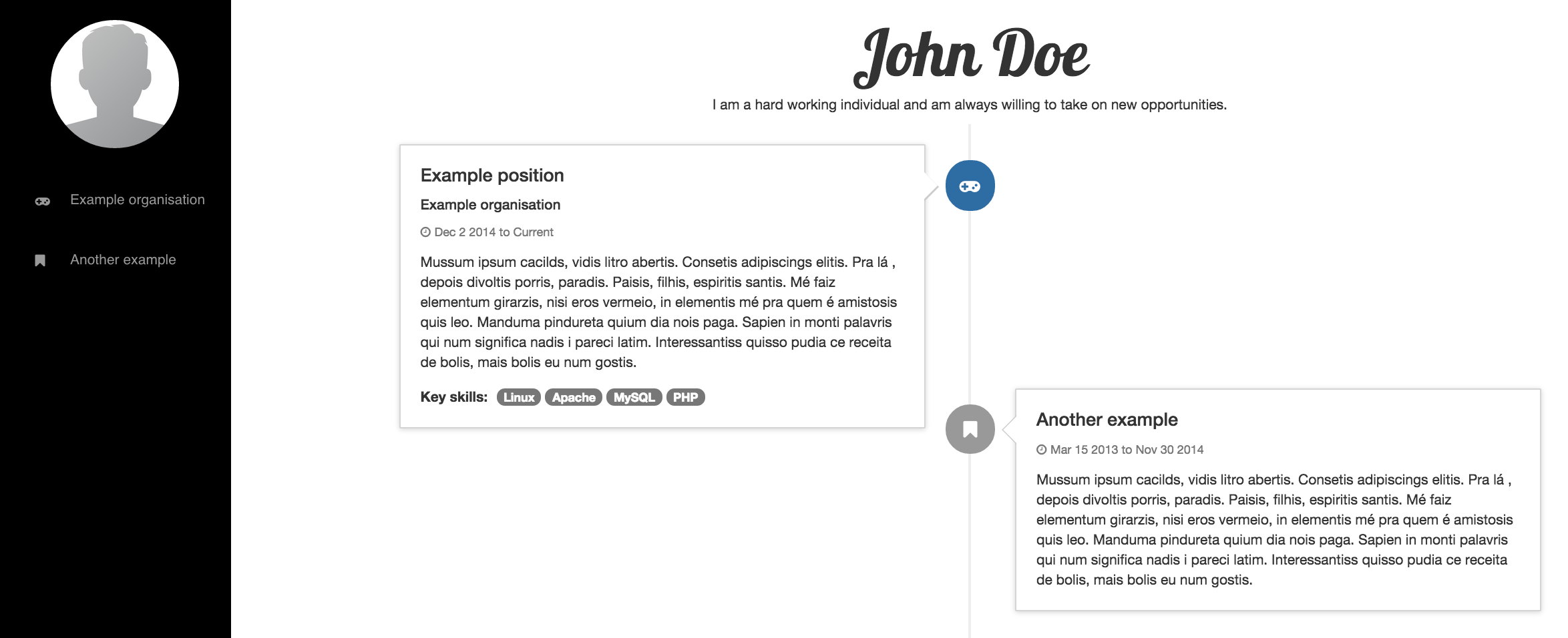
# Timeline Resume
A simple resume with experiences listed in a timeline.
Your resume is configurable through a single JSON file called `profile.json`.
## Screenshot
## Installation
You'll need:
- [Ruby on Rails](http://guides.rubyonrails.org/getting_started.html)
- [git](http://git-scm.com/)
## Usage
_Note: Full deployment instructions are not in the scope of this README._
1. Clone the repository:
# git clone git@github.com:logicalicy/resume.git
2. Configure your resume and upload an avatar/profile picture. (See "Configure Your Resume" below.)
3. Install dependencies and start your server:
# cd resume
# bundle install
# rake assets:precompile
# rails server
4. Access your resume at `http://localhost:3000`
### Configure Your Resume
Write everything you want your resume to show in `app/assets/config/profile.json`.
`profile.json` looks like this:
{
"name": "John Doe",
"personal_profile": "An description of yourself.",
"avatar": "avatar.png",
"sidebar": {
"background_color": "#000",
"text": {
"color": "#999",
"color_on_hover": "#FFF"
},
"icon_color": "#999"
},
"experiences": [
{
"organisation": "Example organisation",
"responsibility": "Example position",
"start_date": "Dec 2 2014",
"description": "Description.",
"icon": {
"fontawesome_class": "gamepad",
"bootstrap_state": "primary"
},
"key_skills": [
"Linux", "Apache", "MySQL", "PHP"
]
},
{
"organisation": "Another example",
"start_date": "Mar 15 2013",
"end_date": "Nov 30 2014",
"description": "Another description."
}
]
}
All colors are CSS colors. So, if you want:
- Black, use `"#000"` or `"black"`
- White, use `"#FFF"` or `"white"`
See next sections about `avatar` and `icon` properties in `profile.json`.
#### `avatar` Property
This property controls which image to display in the top left corner of the resume.
You can add your own image in the path `app/assets/images` and change the `avatar` property to the image filename.
E.g. If you have an image called `image.jpeg`, add your image to `app/assets/images` and set `avatar` property:
{
...
"avatar": "image.jpeg",
...
}
#### `icon` Property
This is a property in the `experiences` property.
It controls:
- The [Font Awesome](http://fortawesome.github.io/Font-Awesome/icons/) icon to display next to your experience.
- The [Bootstrap](http://getbootstrap.com/css/) color/state to use for the badge/icon in the timeline for your experience.
If you want the `facebook-official` [Font Awesome](http://fortawesome.github.io/Font-Awesome/icons/) icon and `primary` [Bootstrap](http://getbootstrap.com/css/) state, for example, set them in the `icon` property:
{
"experiences": [
{
...
"icon": {
"fontawesome_class": "facebook-official",
"bootstrap_state": "primary"
}
},
...
}
## Contributing
TODO: Write about contributing.
## History
TODO: Write about history
## Credits
Credits to some resources and snippet creators that helped create this simple resume:
- [Bootsnipp.com](http://bootsnipp.com)
- [Michael V Nguyen](http://mvnguyen.com)
- [sergiors](http://bootsnipp.com/snippets/featured/timeline)
A special thanks to [Faethon](https://github.com/faethonm) for his timeline idea for resumes.
## License
See [LICENSE](LICENSE) file.