https://github.com/loginov-rocks/build-react-static-in-lambda
Static Site Generation in Lambda with React Static
https://github.com/loginov-rocks/build-react-static-in-lambda
aws docker lambda react static-site-generator
Last synced: 4 months ago
JSON representation
Static Site Generation in Lambda with React Static
- Host: GitHub
- URL: https://github.com/loginov-rocks/build-react-static-in-lambda
- Owner: loginov-rocks
- License: mit
- Created: 2022-04-22T17:51:33.000Z (about 4 years ago)
- Default Branch: main
- Last Pushed: 2024-07-11T04:29:49.000Z (almost 2 years ago)
- Last Synced: 2025-01-12T16:38:01.470Z (over 1 year ago)
- Topics: aws, docker, lambda, react, static-site-generator
- Language: JavaScript
- Homepage: https://loginov-rocks.medium.com/static-site-generation-in-lambda-with-react-static-bdba551e4fe4
- Size: 218 KB
- Stars: 2
- Watchers: 1
- Forks: 0
- Open Issues: 0
-
Metadata Files:
- Readme: README.md
- License: LICENSE
Awesome Lists containing this project
README
# Build React Static in Lambda
Static Site Generation in Lambda with React Static: [Medium](https://loginov-rocks.medium.com/static-site-generation-in-lambda-with-react-static-bdba551e4fe4)
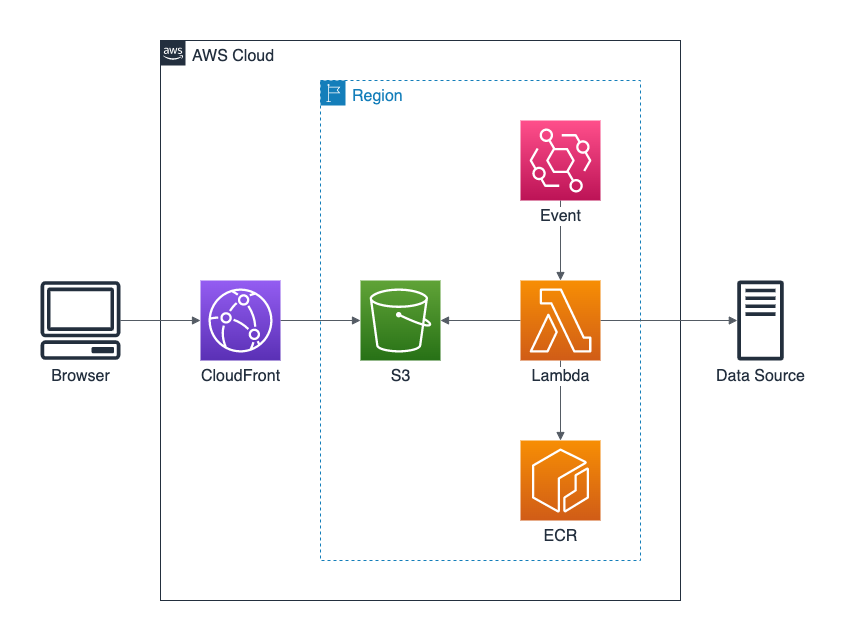
## Configuration
### Lambda
* Architecture: `x86_64`
* Memory: `1024` MB (at least)
* Ephemeral storage: `512` MB (at least)
* Timeout: `15` min (maximum available)
#### Permissions
Configure the policy:
```json
{
"Version": "2012-10-17",
"Statement": [
{
"Sid": "VisualEditor0",
"Effect": "Allow",
"Action": "s3:PutObject",
"Resource": "arn:aws:s3:::${LAMBDA_S3_BUCKET_NAME}/*"
}
]
}
```
#### Environment Variables
* `LAMBDA_ACCESS_KEY_ID` and `LAMBDA_SECRET_ACCESS_KEY` - credentials for the AWS user to deploy files, for local
development usage,
* `LAMBDA_S3_BUCKET_NAME` - S3 bucket name to deploy files to,
* `LAMBDA_USE_POLICY` - to use (`true`) or not to use (`false`) IAM policy instead of the AWS user, convenient in the
actual Lambda environment,
* `LAMBDA_USE_TMPDIR` - to use (`true`) or not to use (`false`) temporary directory for the build artifacts, must
be `true` in the actual Lambda environment, can be `false` for local development usage.
## Development
Make sure to set up environment variables in the `.env` file (see `.env.example`).
### Docker
#### Build
```sh
docker build -t build-react-static-in-lambda .
```
#### Run
```sh
docker run --env-file .env -p 9000:8080 build-react-static-in-lambda
```
#### Test
```sh
curl -XPOST "http://localhost:9000/2015-03-31/functions/function/invocations" -d '{}'
```
#### Explore container
```sh
docker ps
docker exec -it bash
```
### Without Docker
```sh
npm install
node lambda/without-docker
```
## Reference
* [Creating Lambda container images](https://docs.aws.amazon.com/lambda/latest/dg/images-create.html)
* [Running Gatsby in an AWS Lambda](https://www.jameshill.dev/articles/running-gatsby-within-aws-lambda/)