https://github.com/loginov-rocks/contentstack-store-locator
Contentstack Store Locator
https://github.com/loginov-rocks/contentstack-store-locator
contentstack google-apis nextjs react store-locator
Last synced: about 2 months ago
JSON representation
Contentstack Store Locator
- Host: GitHub
- URL: https://github.com/loginov-rocks/contentstack-store-locator
- Owner: loginov-rocks
- License: mit
- Created: 2023-06-30T21:14:24.000Z (almost 3 years ago)
- Default Branch: main
- Last Pushed: 2023-11-27T04:34:40.000Z (over 2 years ago)
- Last Synced: 2025-02-14T00:48:43.913Z (over 1 year ago)
- Topics: contentstack, google-apis, nextjs, react, store-locator
- Language: TypeScript
- Homepage:
- Size: 10.9 MB
- Stars: 1
- Watchers: 1
- Forks: 0
- Open Issues: 0
-
Metadata Files:
- Readme: README.md
- License: LICENSE
Awesome Lists containing this project
README
# Contentstack Store Locator
Boilerplate Store Locator implementation for Contentstack based on Next.js and Google APIs: [screenshots](https://github.com/loginov-rocks/Contentstack-Store-Locator/blob/main/docs/Screenshots.md).
[Primark Store Locator](https://www.primark.com/en-gb/stores) taken as demonstration example, no affiliation.
## Features
1. Configurable SEO-friendly pages per country, locality, and store details.
2. Dynamic stores map powered by Google Maps JavaScript API.
3. Distance-based geo search with keyword suggestions powered by Google Geocoding and Places APIs.
4. Distance-based Nearby Stores list on Store Detail page.
5. Automatic redirect on locality click if it contains only one store.
## Architecture
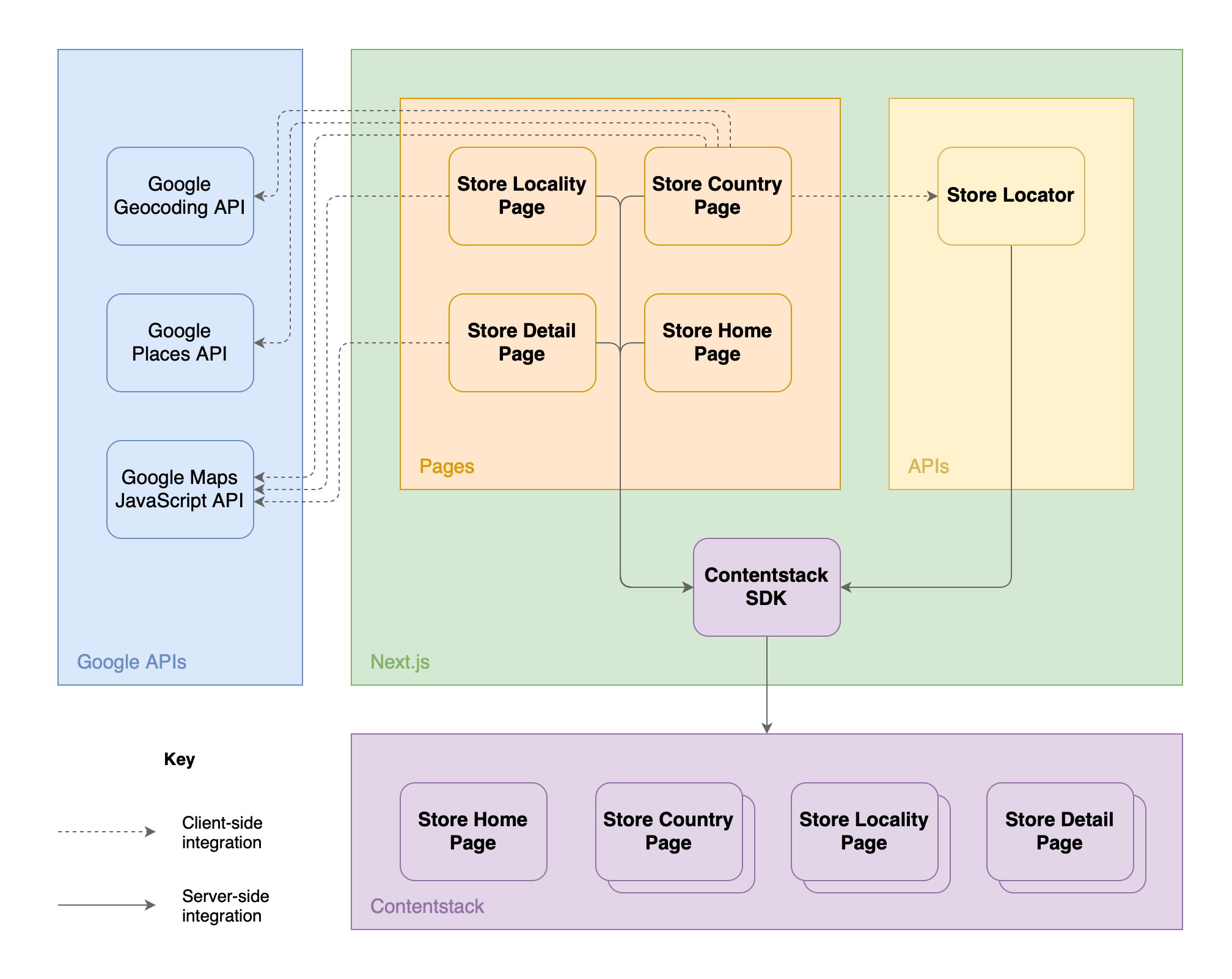
Contentstack serves as a data source and is integrated only on the server side with the help of Contentstack SDK.
Store Locator pages are built on top of the Contentstack entries on the server side at the moment of request. This enables SEO capabilities but also pages can be cached at the CDN level.
Store Locator API returns stores within the current country sourced from Contentstack based on proximity to the requested geo coordinates. Calculations are done on the server side, so the API can be cached at the HTTP layer.
Google Maps JavaScript API is used on the client side to build the map and show store markers dynamically based on the selected page or search.
Google Places API is used on the client side at the moment of the search query to suggest places for the user to select from, and then Google Geocoding API is used on the client side as well to translate selected address suggestions to geo coordinates to make a request to Store Locator API.
## Getting Started
### Contentstack
Unfortunately, exported content types could not be imported without some adjustments:
1. Remove `format` property from `store_detail_page.json` for Latitude and Longitude (lines 87 and 106).
2. Remove the `Brand Color` custom field completely (lines 122-135).
3. Import `store_detail_page.json` content type.
4. Enable (or make sure it's enabled) the out-of-the-box `Color Picker` extension.
5. Add the `Brand Color` custom field manually using the `Color Picker` extension with a configuration similar to the exported in JSON.
6. Import `store_locality_page.json` content type.
7. Import `store_country_page.json` content type.
8. Import `store_home_page.json` content type.
Entries could not be imported into Contentstack as is, so just use data from JSON to create and deploy them manually.
Next, [Create a Delivery Token](https://www.contentstack.com/docs/developers/create-tokens/create-a-delivery-token).
### Google APIs
[Create API key](https://developers.google.com/maps/documentation/javascript/get-api-key) restricted to Geocoding API, Maps JavaScript API, and Places API.
### Next.js
Copy `.env.local.sample` to `.env.local` and configure at least the following environment variables:
1. `CONTENTSTACK_API_KEY`
2. `CONTENTSTACK_DELIVERY_TOKEN`
3. `CONTENTSTACK_ENVIRONMENT`
4. `NEXT_PUBLIC_GOOGLE_MAPS_API_KEY`
This is a [Next.js](https://nextjs.org/) project bootstrapped with [`create-next-app`](https://github.com/vercel/next.js/tree/canary/packages/create-next-app).
Run the development server:
```bash
npm run dev
# or
yarn dev
# or
pnpm dev
```
Open [http://localhost:3000/store-locator](http://localhost:3000/store-locator) with your browser to see the result.
## Reference
1. https://github.com/contentstack/contentstack-nextjs-starter-app
2. https://www.99darshan.com/posts/interactive-maps-using-nextjs-and-google-maps
3. https://www.npmjs.com/package/@react-google-maps/api
4. https://www.npmjs.com/package/use-places-autocomplete