https://github.com/longbkit/clisbot
Agentic Coding CLI & chat bot
https://github.com/longbkit/clisbot
agentic-ai ai-agents chatbot claude-code cli codex coding-agent gemini-cli llm openclaw slack-bot telegram-bot tmux
Last synced: about 1 month ago
JSON representation
Agentic Coding CLI & chat bot
- Host: GitHub
- URL: https://github.com/longbkit/clisbot
- Owner: longbkit
- License: mit
- Created: 2026-04-08T11:17:02.000Z (3 months ago)
- Default Branch: main
- Last Pushed: 2026-05-24T11:09:30.000Z (about 2 months ago)
- Last Synced: 2026-05-24T13:09:40.105Z (about 2 months ago)
- Topics: agentic-ai, ai-agents, chatbot, claude-code, cli, codex, coding-agent, gemini-cli, llm, openclaw, slack-bot, telegram-bot, tmux
- Language: TypeScript
- Homepage: https://github.com/longbkit/clisbot
- Size: 23.5 MB
- Stars: 61
- Watchers: 3
- Forks: 26
- Open Issues: 0
-
Metadata Files:
- Readme: README.md
- Changelog: CHANGELOG.md
- License: LICENSE
- Agents: AGENTS.md
Awesome Lists containing this project
README

English |
Tiếng Việt |
简体中文 |
한국어






Follow product updates on x.com/clisbot.
# clisbot - Turn your favorite coding CLI into an agentic personal assistant, workplace assistant, coding partner - on the go
Want to use OpenClaw / Hermes Agent but are struggling because:
- API cost is too high, so you end up looking for LLM proxy workarounds
- you have to switch between OpenClaw / Hermes Agent for daily work and Claude / Codex / Gemini for real coding
- you want to code on the go and work on the go
`clisbot` is the right solution for you.
`clisbot` turns native frontier agent CLIs like Claude Code, Codex, and Gemini CLI into durable chat-native bots across multiple channels. Current channels include Slack, Telegram, Zalo Bot, and Zalo Personal, with more to come. Each agent runs inside its own tmux session, keeps a real workspace, and can behave like a coding bot, a daily-work assistant, or a team assistant with SOUL, IDENTITY, and MEMORY.
It is not just a tmux bridge with chat glued on top. `clisbot` treats chat platforms as real channel surfaces, including Slack, Telegram, Zalo Bot, and Zalo Personal today, with routing, durable conversation state, pairing, follow-up control, file sending and receiving, and the ability to keep frontier coding agents inside the tools and communication surfaces where teams already work.
`clisbot` is also meant to grow into a reusable agent runtime layer that can support many CLI tools, many channels, and many workflow shapes on top of the same durable agent session.
## Why I Built This
I’m Long Luong (Long), Co-founder & CTO of Vexere, Vietnam’s #1 transportation booking platform, where we also build SaaS and inventory distribution infrastructure for transportation operators. As we scale a 300-person company with a 100-member Engineering, Product, and Design team, I’ve been searching for the most practical way to roll out AI-native workflows across the organization.
The challenge is not whether AI is useful. It is how to make it work at enterprise scale without creating a fragmented, expensive, or ungovernable stack. In practice, that means solving several hard problems at once: cost control, workflow truthfulness, team accessibility, governance, and the ability to bring frontier AI into the real tools and communication surfaces where work already happens.
`clisbot` is the approach I landed on. Instead of building yet another isolated AI layer, it turns the coding CLIs we already trust into durable, chat-native agents that can work across Slack, Telegram, Zalo surfaces, and real team workflows.
If `clisbot` helps your workflow, a GitHub star is a simple way to let me know
it is useful and help more people discover it.
## Quick Start
### AI-Assisted Setup
If you already use Codex, Claude Code, or Gemini CLI, open this repo in that
CLI and paste this short prompt first:
```text
Help me clarify and set up clisbot from this GitHub repo: https://github.com/longbkit/clisbot
```
If you already know what you want, paste this more specific prompt instead and
fill the placeholders:
```text
Help me clarify and set up clisbot from this GitHub repo: https://github.com/longbkit/clisbot
I want:
- target channel:
- coding CLI tool:
- usage shape:
```
For AI agents: use the guide below to help a user install, set up, and onboard
with `clisbot` with as little friction as possible.
1. Ask only the smallest number of clarify questions needed. In particular,
clarify:
- target channel: Slack, Telegram, Zalo Bot, or Zalo Personal
- coding CLI tool: Codex, Claude Code, or Gemini CLI
- usage shape: personal assistant or team assistant
2. Prefer persisting credentials by default after the first successful test, so
later restarts can use plain `clisbot start` without retyping tokens.
3. Read `README.md` and `docs/user-guide/README.md`, then guide the shortest
safe setup path. Run the right `clisbot` commands when the environment
allows it, and verify with status/logs.
4. If a step must be done manually, such as creating a bot, setting up a Slack
app, or logging in to Zalo Personal, explain exactly what the user must do
and wait for them before continuing.
5. If a technical limit prevents running a command, give the exact terminal
command for the user to run. If an unresolved bug blocks setup, help the user
report a GitHub issue or submit feedback at
https://docs.google.com/forms/d/e/1FAIpQLSd7L7mHOo0ea8YXFI4tGnyDIj94ESn4hbbDa5YTbcEKTVOKTA/viewform.
Platform support:
- Linux and macOS are the supported host environments today.
- If you use Windows, run `clisbot` inside WSL2 because native Windows is not supported yet; `clisbot` currently depends on `tmux` and Bash-based runtime flows.
### Manual Setup
Most people should start here:
```bash
npm install -g clisbot
clisbot start \
--cli codex \
--bot-type personal \
--telegram-bot-token \
--persist
```
If you want to try first without persisting the token yet, just remove `--persist`.
Day-to-day rescue commands are `clisbot stop`, `clisbot restart`,
`clisbot status`, and `clisbot logs`.
Next steps:
- For security, DMs default to pairing.
- `clisbot` also has a smart autopairing path to reduce first-run friction. If
you send the bot a DM within the first 30 minutes, you can usually claim the
owner role immediately and start using it without a separate pairing round.
Need the step-by-step setup docs instead of the shortest path?
- Telegram: [Telegram Bot Setup](docs/user-guide/telegram-setup.md)
- Slack: [Slack App Setup](docs/user-guide/slack-setup.md)
- Zalo Bot: [Zalo Bot Setup](docs/user-guide/zalo-bot-setup.md)
- Zalo Personal: [Zalo Personal](docs/user-guide/zalo-personal.md)
- Release history: [CHANGELOG.md](CHANGELOG.md), [release notes](docs/releases/README.md), [update guide](docs/updates/update-guide.md), [release guides](docs/updates/README.md), and [migration index](docs/migrations/index.md)
- Slack app manifest template: [app-manifest.json](templates/slack/default/app-manifest.json)
- Slack app manifest guide: [app-manifest-guide.md](templates/slack/default/app-manifest-guide.md)
What happens next:
- `--bot-type personal` creates one assistant for one human
- `--bot-type team` creates one shared assistant for a team, channel, or group workflow
- literal token input stays in memory unless you also pass `--persist`
- `--persist` promotes the token into the canonical credential file so the next `clisbot start` can reuse it without retyping
- fresh bootstrap only enables the channels you name explicitly
- after the persisted first run, later restarts can use plain `clisbot start`
## Page Index
- [Start By Need](#start-by-need)
- [Supported Channels](#supported-channels)
- [Who It Is For](#who-it-is-for)
- [How clisbot Fits](#how-clisbot-fits)
- [Use Case Map](#use-case-map)
- [First Setup FAQ](#first-setup-faq)
- [Routing And Access FAQ](#routing-and-access-faq)
- [Chat-Native Operator Experience](#chat-native-operator-experience)
- [Runtime And Workflow FAQ](#runtime-and-workflow-faq)
- [Troubleshooting By Symptom](#troubleshooting-by-symptom)
- [Troubleshooting Playbooks](#troubleshooting-playbooks)
- [Command Cheat Sheet](#command-cheat-sheet)
- [Related Docs](#related-docs)
## Start By Need
| Need | Best first path | Why it fits | Read next |
| --- | --- | --- | --- |
| Personal coding assistant in chat | Telegram DM + `codex` | Lowest setup friction, strong routed coding behavior, durable workspace. | [Telegram Bot Setup](docs/user-guide/telegram-setup.md), [Codex CLI Guide](docs/user-guide/codex-cli.md) |
| Team assistant in a shared room | Slack channel or Telegram group/topic + `codex` | Explicit routes, mention defaults, and sender policy make shared use safer. | [Slack App Setup](docs/user-guide/slack-setup.md), [Routes](docs/user-guide/channels.md) |
| Claude Code from chat | Any routed surface + `claude` | Keeps Claude-native commands and skills reachable from chat. | [Claude CLI Guide](docs/user-guide/claude-cli.md), [Native CLI Commands](docs/user-guide/native-cli-commands.md) |
| OpenClaw-style assistant with local memory | Personal or team bot + bootstrapped workspace | `AGENTS.md`, `USER.md`, `MEMORY.md`, pairing, routes, and channel-native UX map well to OpenClaw habits. | [User Guide](docs/user-guide/README.md), [Authorization And Roles](docs/user-guide/auth-and-roles.md) |
| Hermes-agent-style background workflow | Schedule review of repeated and struggled tasks to create and improve skills. | One chat surface can turn hard recurring work into reusable skills, review loops, and recurring briefs. | [Slash Commands](docs/user-guide/slash-commands.md), [Runtime Operations](docs/user-guide/runtime-operations.md) |
| Operator rescue and inspection | `clisbot status`, `logs`, `watch`, `runner inspect` | Shows channel health, runtime pid, active runs, and live runner panes. | [Runtime Operations](docs/user-guide/runtime-operations.md), [CLI Commands](docs/user-guide/cli-commands.md) |
| Zalo automation | Zalo Bot or Zalo Personal | Zalo Bot is official-DM oriented; Zalo Personal supports local personal-account DM and group workflows while staying silent until users or groups are allowlisted. | [Zalo Bot Setup](docs/user-guide/zalo-bot-setup.md), [Zalo Personal](docs/user-guide/zalo-personal.md) |
## Supported Channels
Current user-facing channel guides:
- [Slack App Setup](docs/user-guide/slack-setup.md)
- [Telegram Bot Setup](docs/user-guide/telegram-setup.md)
- [Zalo Bot Setup](docs/user-guide/zalo-bot-setup.md)
- [Zalo Personal](docs/user-guide/zalo-personal.md)
| Channel | Best fit | Supported surfaces | Routing shape | Status |
| --- | --- | --- | --- | --- |
| Slack | Team channels, private groups, workplace assistant flows. | DM, public/private channel, thread continuity. | `dm:`, `group:`, `group:*` | Stable primary channel |
| Telegram | Personal bot, mobile coding, groups, topic-isolated team workflows. | DM, group, forum topic. | `dm:`, `group:`, `topic::` | Stable primary channel |
| Zalo Bot | Official Zalo bot DM flows and Vietnam-market experiments. | DM-focused today. | `dm:`, `dm:*` | Alpha; polling-first |
| Zalo Personal | Local personal-account automation. | DM and group, silent by default until users or groups are allowlisted. | `dm:`, `dm:*`, `group:` | Supported local channel |
Simple capability map:
| Capability | Slack | Telegram | Zalo Bot | Zalo Personal |
| --- | --- | --- | --- | --- |
| Direct messages | Yes | Yes | Yes | Yes |
| Shared rooms | Channels and groups | Groups | No current group model | Groups |
| Child conversation isolation | Threads | Forum topics | No | No topic/thread model |
| Pairing / first access flow | Yes | Yes | Yes | Opt-in; default silent |
| Route allowlists | Yes | Yes | DM allowlists | DM and group allowlists |
| Chat-native queue/loop use | Yes | Yes | Yes, DM-oriented | Yes, route-scoped |
| Message send CLI | Yes | Yes | Yes, text and URL-backed photo path | Yes, text and file/URL media path |
| Inbound attachments | Supported through routed attachments | Supported through routed attachments | Images/stickers to `.attachments/` | Images and grouped image handling |
| Best default runner | `codex` | `codex` | `codex` | `codex` |
Use the channel guide that matches the target surface. Slack and Telegram are
the most stable public user experience today; Zalo Bot and Zalo Personal are
the right fit when the target market or test surface specifically needs Zalo,
with the safety notes in the channel guide close at hand.
## Who It Is For
| Audience | Common goal | Recommended shape | Main risk to manage |
| --- | --- | --- | --- |
| Solo builder | Code from phone or chat without losing a real repo workspace. | `--bot-type personal`, Telegram DM, `codex`. | Native CLI auth or missing host dependencies. |
| Office worker | Use a frontier agent for business work, marketing, research, writing, planning, reporting, and follow-up without living in a terminal or separate AI app. | `--bot-type personal`, the channel you already use most, `codex` or your preferred CLI. | Giving the bot too broad a workspace before you have clear habits and permissions. |
| Team member | Bring an assistant into the work channel where decisions, files, and follow-ups already happen. | `--bot-type team`, shared room route, mention required, queue/loop for follow-up. | Confusing a shared assistant with a private assistant; route and sender policy should be explicit. |
| Business, marketing, or operations team | Turn recurring reports, campaign briefs, customer or market research, document updates, reviews, reminders, and cross-functional requests into chat-native workflows. | Slack, Telegram, Zalo Bot, or Zalo Personal depending on the team's real channel; queues and loops for repeated work. | Scheduling with the wrong timezone, sender identity, or target channel. |
| Engineering lead | Put an assistant in a team channel without opening it to everyone. | `--bot-type team`, shared route allowlist, mention required. | Route admission and sender policy confusion. |
| AI workflow operator | Run repeated reviews, status checks, and follow-up work. | Chat-native requests backed by `/queue`, `/loop`, `clisbot queues`, and `clisbot loops`. | Loops or queues created with the wrong sender, target, or timezone. |
| Claude-heavy team | Keep existing Claude Code command and skill habits. | `claude` runner, native command pass-through, streaming on for long tasks. | Claude plan approval and auto-mode behavior may still appear. |
| OpenClaw / Hermes Agent user | Keep channel-native assistant ergonomics, memory, background work, and skill evolution while using frontier coding CLIs. | Routed chat surfaces, memory files, workspace bootstrap, scheduled skill review loops. | Assuming every OpenClaw or Hermes behavior maps one-to-one. |
| Platform builder | Evaluate clisbot as a local agent runtime layer. | Multiple agents, explicit routes, runtime inspection, queue/loop primitives. | Blurring channel, control, agents, and runner ownership. |
## How clisbot Fits
`clisbot` turns native CLI agents such as Codex, Claude Code, and Gemini CLI
into durable Slack, Telegram, and Zalo-accessible bots. Each agent runs in a
real workspace through a tmux-backed runner, while channels own chat-native
presentation, routing, pairing, file handling, and follow-up behavior.
The main problem it solves is not just "send terminal text to chat." It gives
operators a safer way to expose expensive, subscription-backed coding agents to
real communication surfaces without rebuilding every workflow around an API-only
assistant product.
Key fit:
- Use Codex when you want the safest default for routed coding work.
- Use Claude when Claude Code itself is the priority and you accept more
operator supervision on long tasks.
- Use Gemini when Gemini auth is already clean and you specifically want Gemini.
- Use clisbot as a lower-cost replacement for most OpenClaw-style assistant
workflows when the goal is memory, workspace continuity, pairing,
channel-native UX, and routed chat access to powerful agents.
- Use clisbot for Hermes-agent-style background workflow when you want durable
queue and loop primitives plus skill creation and skill improvement inside a
real coding-agent workspace.
- Use chat-native operation first: ask the bot to create loops, add routes,
update clisbot, summarize release changes, or inspect its own runtime. Slash
commands and CLI commands are still available as explicit control surfaces and
reliable fallbacks.
## Use Case Map
| Use case | Typical prompt | Useful controls | Notes |
| --- | --- | --- | --- |
| Quick coding task | "Fix the failing test and send me the diff." | `/streaming on`, `/watch every 30s`, `/stop` | Start with Codex unless another CLI is required. |
| Code review loop | "After this implementation, queue a code review against architecture and fix the issues." | Bot-created queue, `/queue`, `clisbot queues list` | Queue keeps steps sequential instead of steering the current run. |
| Team group assistant | "@bot summarize this incident thread" | `routes add`, `routes add-allow-user`, `/mention` | Keep mention required in shared groups by default. |
| Recurring operations brief | "Create a weekday 09:00 loop that checks CI and summarizes risk." | Bot-created loop, `/loop status`, `/loop cancel ` | Verify timezone in the creation response. |
| Native Claude skill | "`/code-review`" | Native command pass-through | In Slack, send a leading space if Slack intercepts `/...`. |
| Personal memory assistant | "Remember this project rule and update the workspace docs." | Bootstrapped `AGENTS.md`, `USER.md`, `MEMORY.md` | Keep private memory out of shared contexts. |
| Mobile coding companion | "Continue the repo task from my phone." | `/attach`, `/detach`, `/watch`, `/new` | The workspace stays on the machine; chat is the control surface. |
| Bot self-update | "Update clisbot, follow the update guide, then summarize what changed." | Bot checks `clisbot update --help`, operator auth, `clisbot status` | The bot can perform the routine update path when it has permission. |
| Zalo local automation | "Allow this Zalo user or group to use the work bot." | `dm:*` allowUsers or exact `group:` routes | Keep Zalo Personal silent except for intentionally allowlisted users or groups. |
## First Setup FAQ
### Which CLI should I choose first?
Choose `codex` for the safest general routed coding experience. It currently
has the strongest default operator stability in clisbot.
Choose `claude` when your team already depends on Claude Code, Claude-native
commands, or Claude-specific skills. Turn streaming on for longer tasks so you
can see if Claude is waiting at a plan approval step.
Choose `gemini` when Gemini is already authenticated in the runtime environment
and you specifically want Gemini. If Gemini opens OAuth or setup screens, fix
Gemini auth directly first.
Related pages: [Codex CLI Guide](docs/user-guide/codex-cli.md), [Claude CLI Guide](docs/user-guide/claude-cli.md),
[Gemini CLI Guide](docs/user-guide/gemini-cli.md).
### Should I start with Telegram or Slack?
Use Telegram when you want the simplest personal bot path. Use Slack when the
workflow is team-channel first. Telegram topics and Slack threads both work well
as isolated conversation surfaces once routes are explicit.
Related pages: [Telegram Bot Setup](docs/user-guide/telegram-setup.md), [Slack App Setup](docs/user-guide/slack-setup.md).
### What is the difference between personal and team bot type?
`--bot-type personal` creates a default assistant shaped for one human. It is a
good default for Telegram DM or a private assistant.
`--bot-type team` creates a shared assistant shape for a team, group, channel, or
topic workflow. It is a good default for Slack channel use.
### Why does the first run require both `--cli` and `--bot-type`?
A fresh config starts with no agents. `--cli` chooses the runner family, and
`--bot-type` chooses the workspace/bootstrap shape for the first `default`
agent.
Example:
```bash
clisbot start --cli codex --bot-type personal --telegram-bot-token --persist
```
### Is clisbot an OpenClaw replacement?
For most OpenClaw-style workflows, yes. clisbot is intended to be a better
replacement when you want the same assistant shape: memory, workspace
continuity, pairing, channel-native routing, and chat access from Slack,
Telegram, or Zalo.
The main difference is the execution model. OpenClaw-style systems usually point
you toward API-backed agents. clisbot runs frontier coding CLIs such as Codex,
Claude Code, and Gemini CLI as durable agents behind chat surfaces. That can be
much cheaper for many users because it reuses the CLI subscriptions they already
pay for instead of forcing every useful workflow through API-metered usage.
It is also stronger for coding-native work. The same bot can act as a daily
assistant, workplace assistant, and team assistant, but when the task becomes
"edit the repo, run tests, improve docs, create a skill, or fix the workflow,"
it is already sitting inside the native coding-agent environment where those
tasks are strongest.
### Is clisbot a Hermes agent?
It can cover most Hermes-agent-style use cases, but it reaches them through
durable coding agents instead of a separate agent product boundary.
Hermes-style self-evolution maps naturally to clisbot because an agent can keep
working in a real workspace, use `/queue` for sequential follow-up, use `/loop`
for daily or weekly review, and update its own operating files, docs, tools, or
skills after hard tasks. If a task exposes a repeated weakness, you can ask the
agent to create a new skill or improve an existing one, then reuse that skill in
future work. Daily and weekly loops can do the same thing as a deliberate
maintenance rhythm.
The practical positioning is: clisbot is both an assistant and a native coding
agent surface. It can handle general office-worker workflows through chat,
files, memory, and tools, while still being unusually strong when the work
requires code, repo edits, tests, automation scripts, or skill evolution.
## Routing And Access FAQ
### Why does the bot answer in DM but not in a group?
DMs and shared surfaces are gated separately. Fresh configs do not automatically
admit Slack channels, Telegram groups, Telegram topics, or Zalo Personal groups.
Add an explicit route:
```bash
clisbot routes add --channel telegram group: --bot default
clisbot routes add --channel telegram topic:: --bot default
clisbot routes add --channel slack group: --bot default
```
Use `/whoami` in the target surface to discover ids where supported.
### What does `group:*` mean?
`group:*` is the default multi-user sender policy node under one bot. It is not
the same thing as admitting every group. Exact shared routes still decide which
groups, topics, or channels are admitted when the bot's shared admission policy
is `allowlist`.
### Why does the deny message say "group" in Slack channels or Telegram topics?
The deny text intentionally uses one common human-facing word for multi-user
surfaces. Internally, provider-specific surfaces still map to canonical route
concepts such as `group` and `topic`.
### Why does the bot require a mention in groups?
Shared surfaces default toward safer behavior. Mention-required routes reduce
accidental bot activation in busy rooms. Use `/mention`, `/mention channel`, or
`/mention all` to tighten mention behavior, or `routes set-require-mention` when
you intentionally want a route to listen without mention.
### How do I let only selected people use the bot in a shared surface?
Add the route, keep or set its policy to `allowlist`, then add allowed users:
```bash
clisbot routes add --channel telegram group: --bot default --policy allowlist
clisbot routes add-allow-user --channel telegram group: --bot default --user
```
Surface policy decides who may reach the bot. Auth roles decide what they may do
after they get in.
Related page: [Authorization And Roles](docs/user-guide/auth-and-roles.md).
## Chat-Native Operator Experience
### Do I need to memorize slash commands and CLI commands?
No. The preferred product experience is chat-native: ask the bot what you want,
and let it inspect the relevant help, run the right `clisbot` command, and
report the result.
Good prompts:
```text
Create a loop every weekday at 09:00 that checks CI and summarizes risk here.
Queue a code review after the current implementation finishes, then run tests.
Add this Telegram topic to the default bot if I am allowed to manage routes.
Update clisbot, follow the update guide, restart safely, and summarize what changed.
```
Slash commands such as `/loop`, `/queue`, `/watch`, and `/status` still matter.
They are the precise chat control surface for users who already know the command
they want. The CLI remains the explicit operator surface and fallback when you
need exact, scriptable control.
### How does bot-native configuration stay safe?
clisbot is designed so the bot can help configure itself without treating every
chat message as permission to mutate protected state.
The important guardrails are:
- surface routes decide where the bot may answer at all
- auth roles and permissions decide whether a sender may manage routes, queues,
loops, runtime operations, or protected resources
- the agent prompt tells the bot to use `clisbot` CLI help for configuration,
update, loop, queue, and route requests instead of inventing commands
- sensitive actions should be preceded by a read-only permission check such as
`clisbot auth get-permissions --sender --agent --json`
- runtime monitoring, `status`, `logs`, `watch`, `/attach`, `/stop`, and
`stop --hard` give operators recovery paths if a native CLI or runner gets
stuck
That is the intended balance: you can operate clisbot by chatting with it, while
configuration changes still pass through explicit command surfaces, auth checks,
durable state, and observable recovery mechanisms.
## Runtime And Workflow FAQ
### What should I use when a run is taking a long time?
Use `/attach` to resume live updates in the current thread. Use
`/watch every 30s` for periodic updates. Use `/detach` when you want the run to
continue quietly and still post the final result.
Use `/stop` only when you want to interrupt the current run.
### What is the difference between queue and steer?
`/queue ` stores a prompt behind the current run and executes it later
in order. Use it for review-after-code, test-after-fix, or deliberate
multi-step work.
`/steer ` injects a prompt into the active run now. Use it when the
current run is going in the wrong direction and must be corrected immediately.
### When should I create a loop?
Use loops for repeated or scheduled work. The easiest path is to ask the bot to
create the loop in plain language:
```text
Create a loop every weekday at 09:00 that summarizes open operational risks here.
Run this review prompt 3 times, one after another, until the issues are fixed.
Check CI every 2 hours and summarize only actionable failures.
```
The bot should inspect the live loop help when needed, create the loop through
the clisbot control surface, and report the resolved timezone and cancel
command. Direct `/loop ...` commands still work when you want exact syntax.
Loops are durable and session-scoped. Check loop state by asking the bot, with
`/loop status`, or with `clisbot loops status`. Cancel stale loops before
creating replacements.
### Why did a queued or looped prompt not run immediately?
Managed loops are skip-if-busy, and queues wait for the current logical run to
settle. This avoids corrupting the active conversation or piling unrelated
prompts into one run.
### How do native CLI commands work?
clisbot reserves a small set of control commands such as `/status`, `/stop`,
`/queue`, and `/loop`. Other slash commands are forwarded unchanged to the
underlying CLI. That is why Claude-native commands like `/code-review` and
Codex-native habits such as `/review` or `$code-review` can still work.
Related page: [Native CLI Commands](docs/user-guide/native-cli-commands.md).
## Troubleshooting By Symptom
| Symptom | First check | Likely cause | Fix |
| --- | --- | --- | --- |
| `clisbot start` says no agents are configured | `clisbot start --help` | Fresh config has no agent yet. | Start with both `--cli` and `--bot-type`. |
| Token refs show `missing` | `clisbot status` | Env var is not visible to the runtime. | Pass token again, persist it, or restart from a shell with the env exported. |
| Channel stays `starting` | `clisbot logs` | Credential, network, auth, or provider startup failure. | Fix the provider error shown in logs, then restart. |
| Bot answers in DM but not group | `/whoami` in group/topic | Missing shared route or mention requirement. | Add `group:` or `topic::` route. |
| Message accepted but no answer arrives | `clisbot watch --latest --lines 100` | Runner is blocked, unauthenticated, or waiting at a prompt. | Fix the native CLI state in the workspace, then restart or `/new`. |
| Native CLI runner does not answer | `codex`, `claude`, or `gemini` directly in terminal | The underlying coding CLI is not installed, authenticated, trusted, or able to run on this machine. | Fix the native CLI first; clisbot only works after the CLI can answer normally. |
| Channel or runtime feels stuck | `clisbot status` and `clisbot logs` | Channel worker, detached runtime, or tmux runner state is stale. | Try `clisbot restart`; if that is not enough, run `clisbot stop --hard` then `clisbot start`. |
| Claude appears stuck | `/streaming on` and `/watch every 30s` | Claude plan approval or auto-mode behavior. | Send `/nudge` if it is waiting for default confirmation. |
| Gemini startup blocks | `clisbot logs` | Gemini OAuth or setup screen. | Authenticate Gemini directly or provide a headless auth path. |
| Codex reports missing env var | `clisbot watch --latest` | Detached runtime did not inherit your shell env. | Restart clisbot from a shell with the env, or configure the service env. |
| Slack slash command does not reach clisbot | Slack client behavior | Slack intercepts leading `/...`. | Send a leading space, for example ` /status`, or use `\status`. |
| Old behavior survives restart | `clisbot runner list` | Stale tmux runner or old environment. | Use `clisbot stop --hard`, then start again. |
| Update or restart seems stuck | `clisbot status` | Worker already exited or monitor is in transition. | Check status first; then run `clisbot start` if runtime is down. |
## Troubleshooting Playbooks
### Check The Native CLI First
When clisbot accepts a message but the agent does not answer, first separate
clisbot from the underlying coding CLI.
1. Open a terminal on the same machine.
2. Go to the workspace you expect clisbot to use, usually
`~/.clisbot/workspaces/default`.
3. Start the configured CLI directly:
```bash
codex
claude
gemini
```
4. Say `hi` and confirm the CLI can answer.
5. If the CLI cannot start or reply, fix its install, login, trust prompt,
model access, or local dependency issue first. clisbot cannot make a broken
native CLI work; it can only run and route a CLI that already works on the
machine.
### Reset A Stuck Channel Or Runtime
If the native CLI works in terminal but the chat channel is still stuck, reset
the clisbot runtime boundary.
1. Try the normal restart first:
```bash
clisbot restart
```
2. If stale tmux sessions or old channel state still survive, hard-stop all
clisbot tmux sessions and start fresh:
```bash
clisbot stop --hard
clisbot start
```
3. After the restart, run `clisbot status` and send one small test message from
the target channel.
### Bot Does Not Start
1. Run `clisbot status`.
2. Run `clisbot logs`.
3. Confirm token refs are present and the channel is enabled.
4. If this is the first run, include both `--cli` and `--bot-type`.
5. If a normal restart is not enough, run `clisbot stop --hard`, then start
again from a shell with the correct environment.
### Bot Does Not Reply In A Routed Surface
1. Send `/whoami` in the surface.
2. Confirm the exact route exists with `clisbot routes list --channel `.
3. Confirm sender policy does not block the user.
4. Confirm the message mentions the bot when `requireMention` is true.
5. Run `clisbot watch --latest --lines 100` after one test message to inspect
the runner pane.
### Runner Looks Stuck
1. Run `clisbot runner list`.
2. Run `clisbot runner inspect --latest`.
3. Use `clisbot watch --latest --lines 100` to see the live pane.
4. Open the workspace directly, usually `~/.clisbot/workspaces/default`.
5. Start the native CLI there and clear auth, trust, or dependency prompts.
6. Use `/nudge`, `/stop`, or `/new` depending on whether the run is waiting,
wrong, or needs a fresh conversation.
### Access Control Is Confusing
1. Separate the two questions:
- route policy: may this sender reach this surface?
- auth role: what may this sender do after admission?
2. Use `clisbot routes get --channel --bot `.
3. Use:
```bash
clisbot auth get-permissions --sender --agent --json
```
4. Remember that `disabled` wins over owner/admin, and `blockUsers` still wins.
### Queue Or Loop Behavior Is Surprising
1. Check the current session with `/status`.
2. List pending queue items with `/queue list` or `clisbot queues list`.
3. Check loops with `/loop status` or `clisbot loops status`.
4. Confirm the loop timezone in the creation response.
5. Cancel stale loops before creating replacement schedules.
## Command Cheat Sheet
| Job | Command |
| --- | --- |
| Start first Telegram personal bot | `clisbot start --cli codex --bot-type personal --telegram-bot-token --persist` |
| Start first Slack team bot | `clisbot start --cli codex --bot-type team --slack-app-token --slack-bot-token --persist` |
| Check runtime health | `clisbot status` |
| Read recent logs | `clisbot logs` |
| Inspect live runner output | `clisbot watch --latest --lines 100` |
| Add Telegram group route | `clisbot routes add --channel telegram group: --bot default` |
| Add Telegram topic route | `clisbot routes add --channel telegram topic:: --bot default` |
| Add Slack channel route | `clisbot routes add --channel slack group: --bot default` |
| Approve DM pairing | `clisbot pairing approve ` |
| Hard reset runtime sessions | `clisbot stop --hard` |
| Show update instructions | `clisbot update --help` |
## Related Docs
- [User Guide](docs/user-guide/README.md)
- [CLI Commands](docs/user-guide/cli-commands.md)
- [Runtime Operations](docs/user-guide/runtime-operations.md)
- [Routes](docs/user-guide/channels.md)
- [Surface Access Model](docs/user-guide/surface-access-model.md)
- [Bots And Credentials](docs/user-guide/bots-and-credentials.md)
- [Authorization And Roles](docs/user-guide/auth-and-roles.md)
- [Slash Commands](docs/user-guide/slash-commands.md)
- [Agent Progress Replies](docs/user-guide/agent-progress-replies.md)
- [Telegram Bot Setup](docs/user-guide/telegram-setup.md)
- [Slack App Setup](docs/user-guide/slack-setup.md)
- [Zalo Bot Setup](docs/user-guide/zalo-bot-setup.md)
- [Zalo Personal](docs/user-guide/zalo-personal.md)
## CLI Compatibility Snapshot
`clisbot` currently works well with Codex, Claude, and Gemini.
| CLI | Current Stability | Short Take |
| ----------| ---------------------| -------------------------------------------------------------------------------------------------------------|
| `codex` | Best today | Strongest default for routed coding work. |
| `claude` | Usable with caveats | Claude can surface its own plan-approval and auto-mode behavior even when launched with bypass-permissions. |
| `gemini` | Fully compatible | Gemini is supported as a first-class runner for routed chat-native workflows. |
CLI-specific operator notes:
- [Codex CLI Guide](docs/user-guide/codex-cli.md)
- [Claude CLI Guide](docs/user-guide/claude-cli.md)
- [Gemini CLI Guide](docs/user-guide/gemini-cli.md)
## Recent Release Highlights
- `v0.1.53`: refreshes the main README and localized user guides, adds Zalo Bot QR onboarding and Zalo Personal media guidance, fixes queue/loop/message-tool edge cases, tightens Slack/Telegram/Zalo channel behavior, and adds admin-only sensitive channel permissions for contact, group, and channel-native actions.
- `v0.1.52`: clarifies shared-route setup so `routes add ...` clearly means “use the agent currently assigned to that bot by default,” and prunes stale short `startupDelayMs` overrides so upgraded installs can actually inherit the newer 60-second startup default.
- `v0.1.51`: raises the default runner startup window to 60 seconds across the
standard CLI families and the shared runner fallback, so slower fresh launches
are less likely to fail before the first prompt can be submitted.
- `v0.1.50`: a much more AI-native operator experience, where you can
increasingly talk to the bot to manage itself; plus safer personal and team
bots in real shared chat surfaces, automatic direct updates from older
installs, durable queue control, clearer session continuity truth, more
reliable scheduled loops, stronger trust/restart behavior, and stricter
streaming/session isolation.
- `v0.1.43`: more durable runtime recovery, clearer routed follow-up controls, more truthful tmux prompt submission checks, better queued-start notifications, and safer Slack thread attachment behavior.
What the current stable line most likely means for you:
- The headline is AI-native control: ask the bot in chat to queue work,
schedule recurring briefs, help update itself, explain release changes, or
guide setup and routing instead of dropping to the shell for every action.
- personal user: fewer fragile long-run failures, better `/queue`, better media
handling on Telegram
- shared bot owner: clearer route safety, easier direct upgrade from older
installs, and more interesting team use cases where one bot lives in the
group but only responds to selected people there
- operator: better queue visibility, better session continuity truth, and
restart behavior that is less misleading during updates, plus faster
`watch` and `inspect` shortcuts when something goes wrong
There are many more useful fixes and operator improvements in the full release
notes, including config update safety, CLI help, setup docs, runner debugging,
route policy behavior, channel-specific polish, and the broader AI-native
workflow direction behind this release.
Read the full notes here:
- [CHANGELOG.md](CHANGELOG.md)
- [Release Notes Index](docs/releases/README.md)
- [v0.1.53 Release Notes](docs/releases/v0.1.53.md)
- [v0.1.52 Release Notes](docs/releases/v0.1.52.md)
- [v0.1.51 Release Notes](docs/releases/v0.1.51.md)
- [v0.1.50 Release Notes](docs/releases/v0.1.50.md)
- [v0.1.43 Release Notes](docs/releases/v0.1.43.md)
- [v0.1.39 Release Notes](docs/releases/v0.1.39.md)
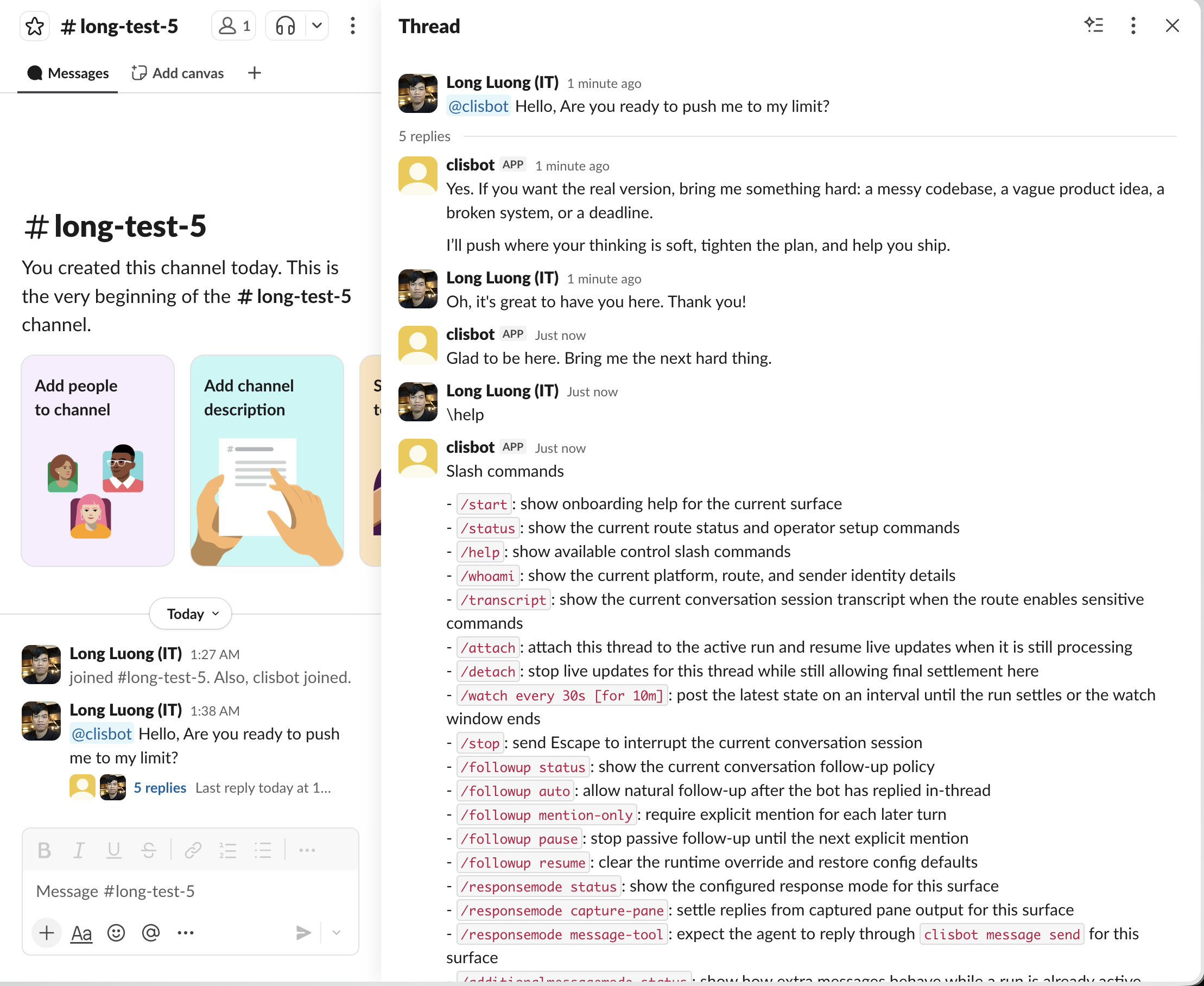
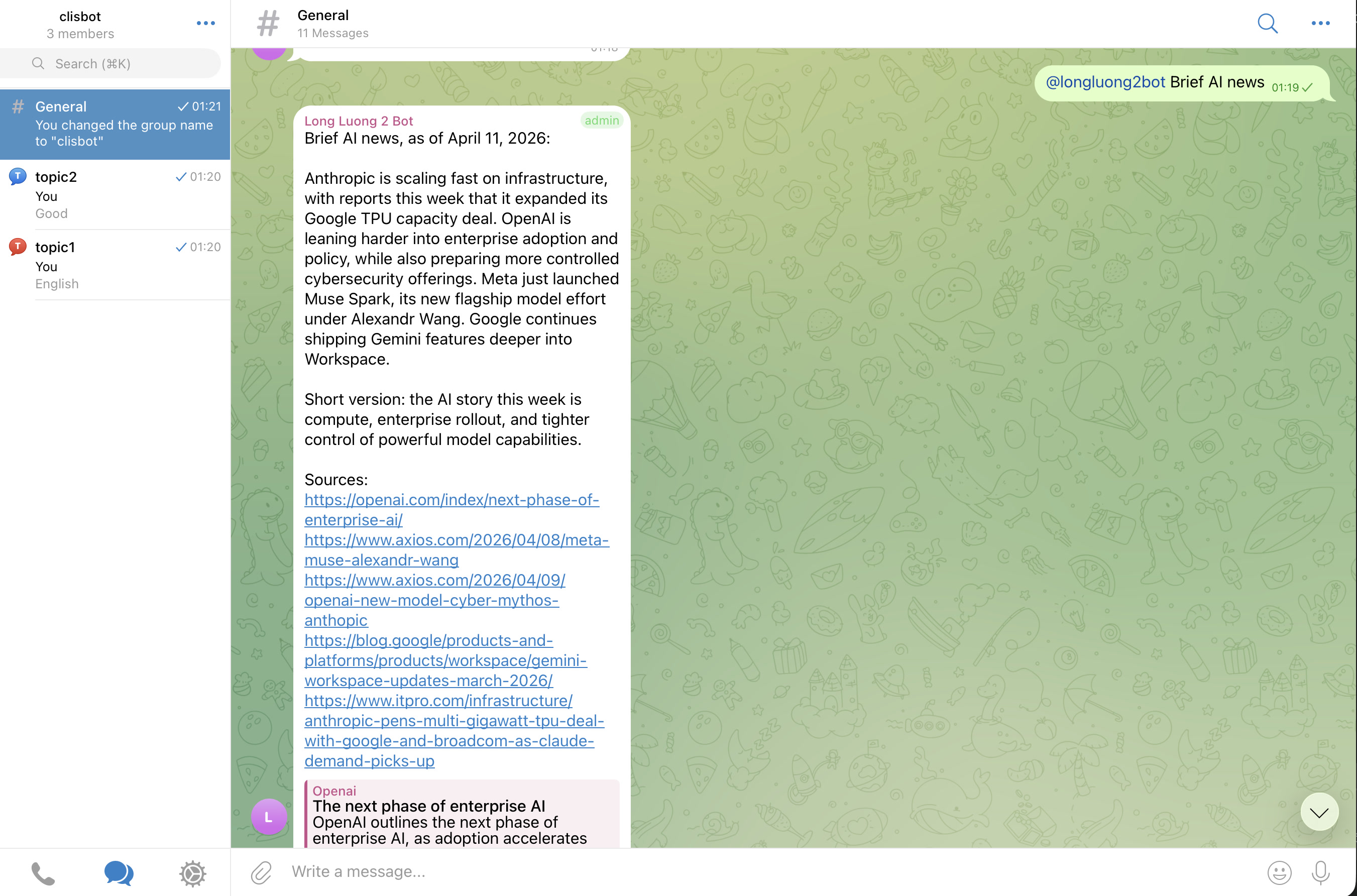
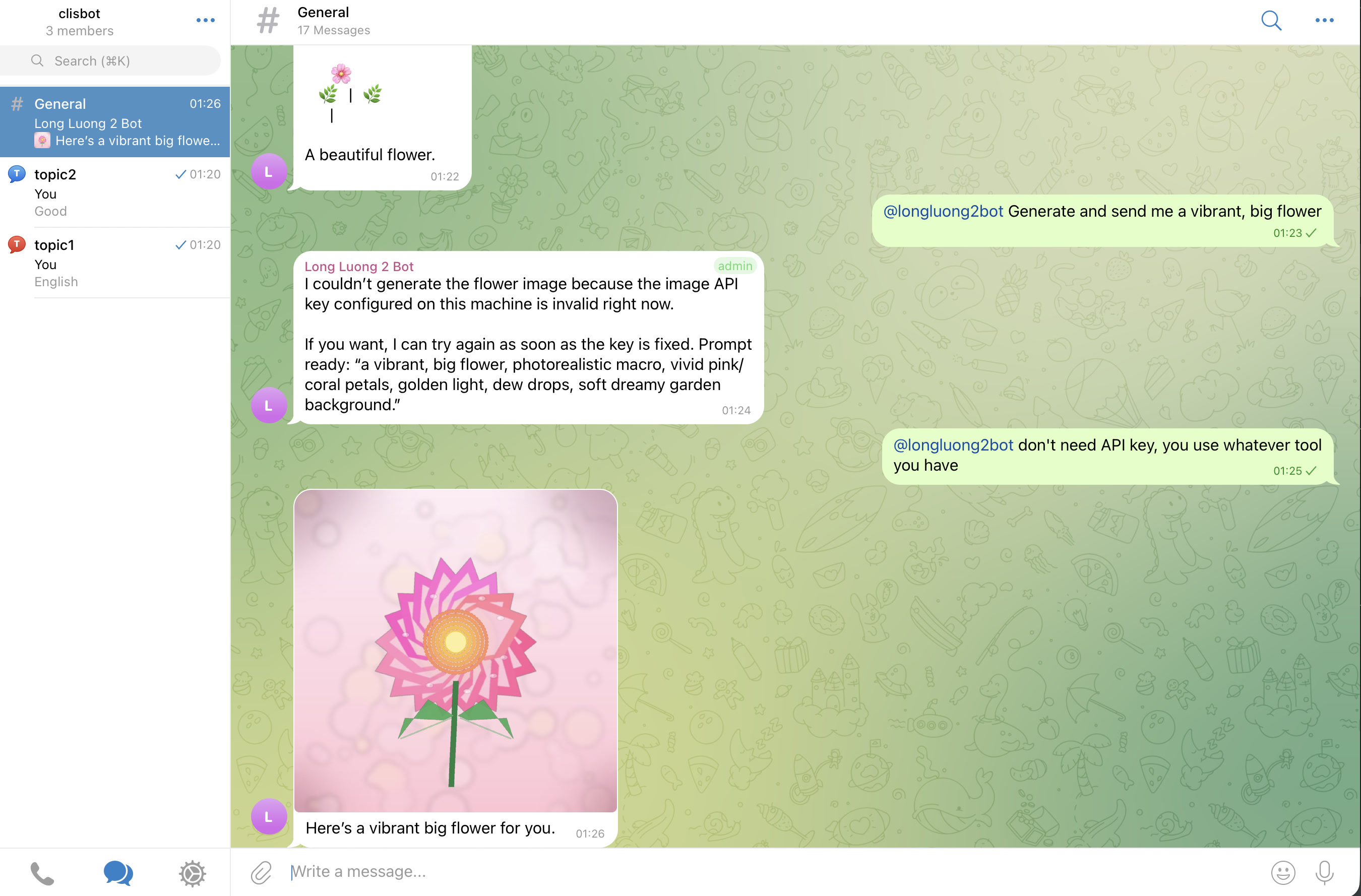
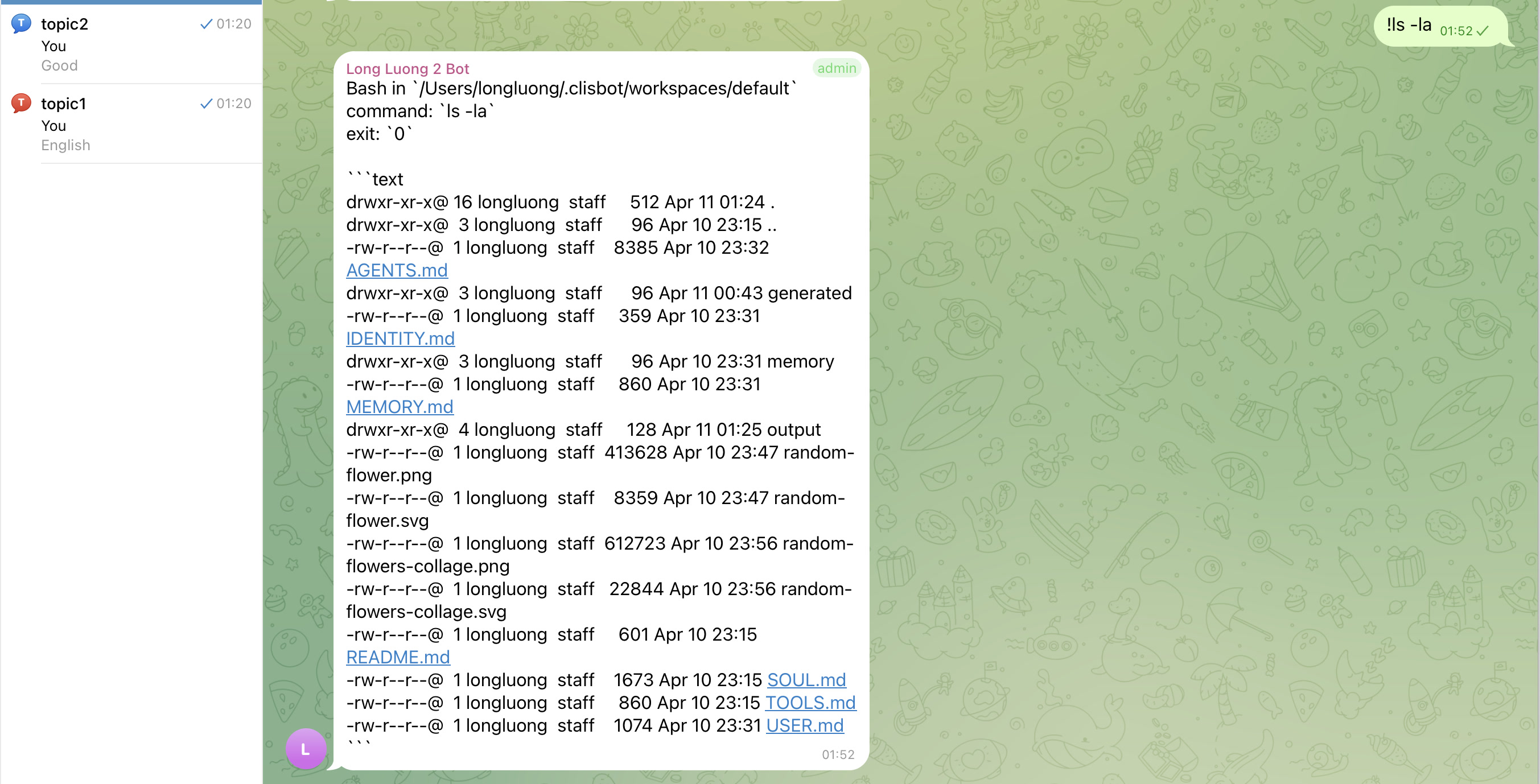
## Showcase
The goal is a real chat-native agent surface, not a terminal transcript mirror: threads, topics, follow-up behavior, and file-aware workflows should feel native to each supported channel surface.
Slack
Telegram
## Important caution
Strong vendor investment in security and safety does not make frontier agentic CLI tools inherently safe. `clisbot` exposes those tools more broadly through chat and workflow surfaces, so you should treat the whole system as high-trust software and use it at your own risk.
## Acknowledgements
`clisbot` would not exist without the ideas, momentum, and practical inspiration created by OpenClaw. Many configuration, routing, and workspace concepts here were learned from studying OpenClaw, then adapted to `clisbot`'s own direction. Respect and thanks to the OpenClaw project and community.
## Docs
- [Localized Docs Hub](docs/langs/README.md)
- [Vietnamese Repo README](docs/langs/root/README.vi.md)
- [Simplified Chinese Repo README](docs/langs/root/README.zh-CN.md)
- [Korean Repo README](docs/langs/root/README.ko.md)
- [Overview](docs/overview/README.md)
- [Architecture](docs/architecture/README.md)
- [Development Guide](docs/development/README.md)
- [Feature Tables](docs/features/feature-tables.md)
- [Backlog](docs/tasks/backlog.md)
- [User Guide](docs/user-guide/README.md)
## Roadmap
Current shipped foundation:
- Native CLI runners: Codex, Claude Code, and Gemini CLI.
- Channels: Telegram, Slack, Zalo Bot, and Zalo Personal.
- Workflow primitives: durable queues and loops are stable enough for real chat-native operations work.
Next focus:
- Standardize auto-skill creation and improvement, similar to the Hermes agent pattern: repeated or struggled tasks should become reusable skills over daily and weekly review loops.
- Add the next channel wave: Discord and WhatsApp Personal unofficial.
- Keep improving runtime safety, recovery, and channel-native operator experience around the durable tmux runner boundary.
## AI-Native Workflow
This repo also serves as a small example of an AI-native engineering workflow:
- simple `AGENTS.md`-style operating rules, with Claude and Gemini compatibility files able to symlink back to the same source
- lessons-learned docs to capture repeated feedback and pitfalls
- architecture docs used as a stable implementation contract
- end-to-end validation expectations to close the feedback loop for AI agents
- workflow docs for shortest-review-first artifacts, repeated review loops, and task-readiness shaping in [docs/workflow/README.md](docs/workflow/README.md)
## Bug Report
The preferred way to report bugs is to create an issue in this GitHub repo.
You can also report through this
[Google Form](https://docs.google.com/forms/d/e/1FAIpQLSd7L7mHOo0ea8YXFI4tGnyDIj94ESn4hbbDa5YTbcEKTVOKTA/viewform).
Please include:
- your clisbot version
- channel and runner used
- what you expected
- what happened instead
- relevant `clisbot status` or `clisbot logs` output with secrets removed
## Contributing
Merge requests are welcome.
MRs with real tests, screenshots, or recordings of the behavior under test will be merged faster.