https://github.com/longqt-sea/macos-iso-builder
Generate bootable macOS installer ISO or DMG images directly from Apple servers via GitHub Actions - no Mac required. Mac OS X 10.7 - macOS 26 Tahoe
https://github.com/longqt-sea/macos-iso-builder
hackintosh macos-dmg macos-installer macos-iso macos-virtual-machine macos-vm proxmox-ve vmware
Last synced: about 1 month ago
JSON representation
Generate bootable macOS installer ISO or DMG images directly from Apple servers via GitHub Actions - no Mac required. Mac OS X 10.7 - macOS 26 Tahoe
- Host: GitHub
- URL: https://github.com/longqt-sea/macos-iso-builder
- Owner: LongQT-sea
- License: gpl-3.0
- Created: 2025-10-30T16:12:38.000Z (9 months ago)
- Default Branch: main
- Last Pushed: 2026-05-31T02:52:25.000Z (2 months ago)
- Last Synced: 2026-05-31T04:19:05.629Z (2 months ago)
- Topics: hackintosh, macos-dmg, macos-installer, macos-iso, macos-virtual-machine, macos-vm, proxmox-ve, vmware
- Language: Shell
- Homepage:
- Size: 2.69 MB
- Stars: 1,494
- Watchers: 4
- Forks: 3,685
- Open Issues: 1
-
Metadata Files:
- Readme: README.md
- License: LICENSE
Awesome Lists containing this project
README
# Overview
Build bootable macOS installer ISOs and DMGs directly from Apple's servers — no Mac required.
This project has two parts:
1. A script (`mkmaciso`) that uses only macOS built-in tools and commands to download and install the full macOS installer from Apple's servers into **/Applications**, and then creates bootable ISO/DMG images.
2. GitHub Action workflows that run `mkmaciso` on Azure datacenter-hosted Mac minis if you don't have macOS.
## Before you start
Check [Release page](https://github.com/LongQT-sea/mkmaciso/releases/latest) first - someone might've already built what you need. If not, see [How to use](#how-to-use) to build your own.
> [!Important]
> GitHub-hosted runners are a free public resource — please use them responsibly.
## Disk Image Formats
| | ISO | DMG |
|---|---|---|
| Best for | Virtual Machines | Bootable USB |
| VM Support | Attach as virtual DVD | Attach as virtual hard disk |
| Layout | Hybrid UDF/HFS | Raw GPT disk image |
**ISO files** - These work great for VMs *(Proxmox, QEMU, VirtualBox, VMware)*. Just attach them like a virtual DVD. They'll even mount in Windows if you need to poke around inside.
**DMG files** - Flash these to a USB drive with [Rufus](https://rufus.ie/en/#download) *(Windows)*, `dd` *(Linux)*, or `asr` *(macOS)* to make bootable installation media. For VM use, convert them to `.vhd` *(for Hyper-V)* or `.vmdk` *(for VMware)* with `qemu-img`. QEMU/Proxmox can use the raw disk image without conversion.
> Note: DMG files ship with a `.img` suffix *(e.g. macOS_Sequoia.dmg.img)* so Rufus can find them without switching to "All files" in Explorer.
## Supported versions
Pretty much everything from OS X Lion (10.7, 2011) through the latest macOS Tahoe (26, 2025). Full list:
Lion, Mountain Lion, Mavericks, Yosemite, El Capitan, Sierra, High Sierra, Mojave, Catalina, Big Sur, Monterey, Ventura, Sonoma, Sequoia, Tahoe.
---
## How to use
### Don't have macOS? Use GitHub Actions
> [!TIP]
>
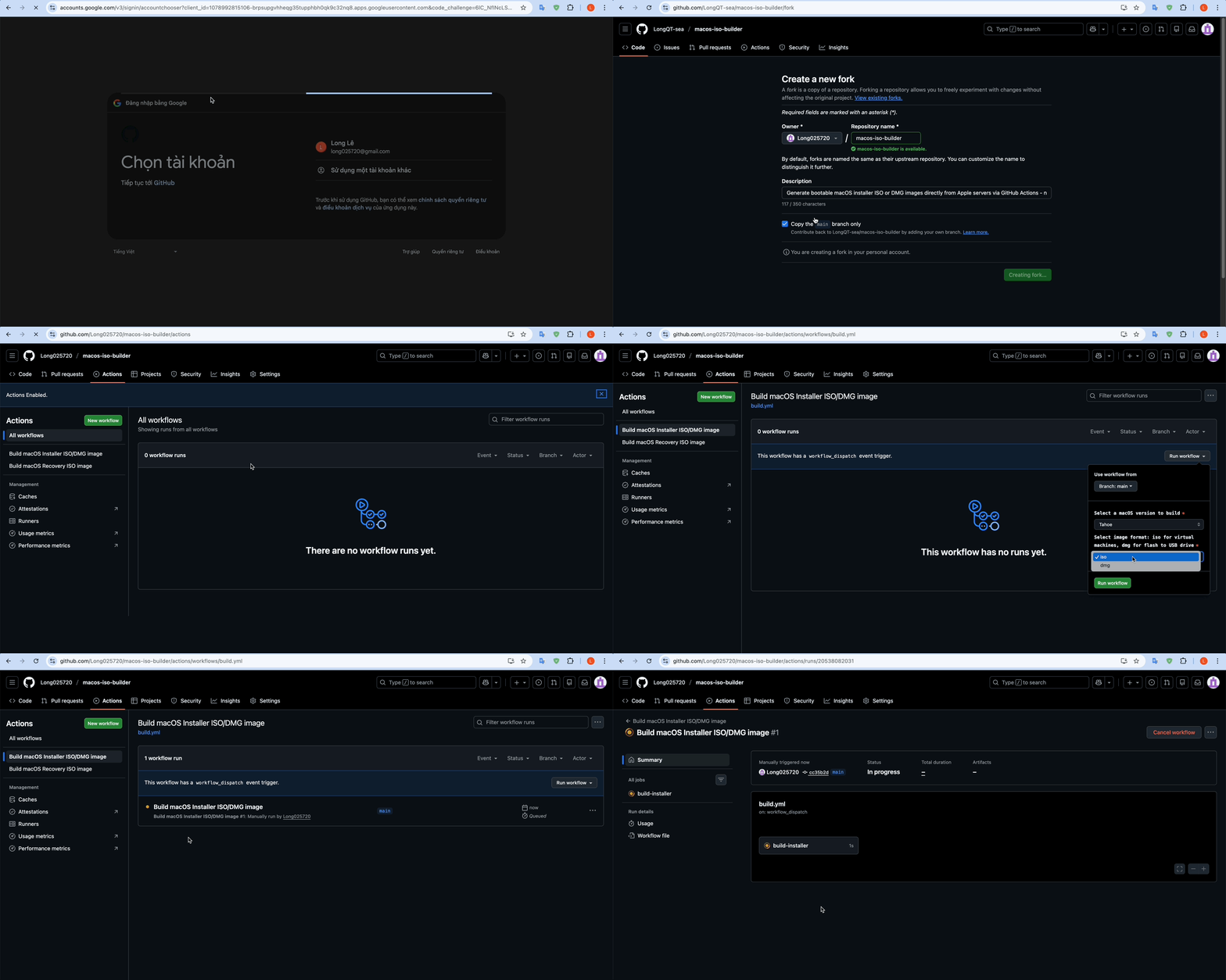
> Click here to watch a visual guide (GIF)
>
> 
>
>
1. [Click here](https://github.com/LongQT-sea/macos-iso-builder/fork) to Fork this repository (requires a GitHub account).
2. Navigate to the **Actions** tab in your forked repository.
3. Click the green **"I understand my workflows, go ahead and enable them"** button.
4. Select a workflow from the left sidebar:
* **Recovery ISO** *(recommended)* - Small recovery image, builds in 2-5 minutes. Good for VMs.
* **Full Installer** - Complete offline installer, 5-18GB, takes 5-60 minutes to build.
5. Click the **"Run workflow"** button and configure the workflow inputs:
* **macOS version** – Choose a version (*Sequoia*, *Sonoma*, etc.).
* **Image format** – Choose `iso` for virtual machines or `dmg` for bootable USB drives.
6. Click the green **"Run workflow"** button to start the build, then wait for the workflow to complete.
7. Once completed, reload the page and scroll down to the **Artifacts** section. Click the artifact link to start downloading (e.g., `macOS_Sequoia_15.7.4.iso`).
8. **Recovery ISO** artifacts are zipped — unzip before use.
---
### Already have macOS? Run `mkmaciso` locally
Quick run using Terminal.app (change `tahoe` to whatever you want):
```bash
curl -s https://raw.githubusercontent.com/LongQT-sea/mkmaciso/main/mkmaciso | bash -s tahoe
```
Or download the script first, then run with parameters:
```bash
curl -O https://raw.githubusercontent.com/LongQT-sea/mkmaciso/main/mkmaciso
chmod +x mkmaciso
./mkmaciso --help
```
Running `./mkmaciso` without arguments gives you an interactive menu.
---
## Tips
For VMs, just attach the ISO as a virtual CD drive. Proxmox users — if you want better performance, look into GPU passthrough. I have another repo ([OpenCore-ISO](https://github.com/LongQT-sea/OpenCore-ISO)) that might help with installation, and one for [Intel iGPU passthrough](https://github.com/LongQT-sea/intel-igpu-passthru) specifically.
For bootable USB drives, after you flash the DMG there will be leftover space on the drive. You can use that to create a FAT32 partition for your EFI folder if you need one.
If you're using `dd` on Linux, triple-check your target device. `dd` doesn't ask for confirmation.
## Requirements for mkmaciso
- macOS 10.9 or newer (11+ is better)
- Intel Mac recommended, Apple Silicon works but with some limitations
- 20-40GB of free space while building
- Internet connection
- sudo access
## Credits
Apple for macOS and their update servers, [Mavericks Forever](https://mavericksforever.com/) for documenting the Mavericks recovery protocol, and the [InsanelyMac community](https://www.insanelymac.com/forum/topic/338810-create-legit-copy-of-macos-from-apple-catalog/) for their research on downloading macOS directly from Apple's catalog.
## Legal stuff
This tool downloads macOS images directly from Apple's official servers. Users are responsible for complying with [Apple's Software License Agreement](https://www.apple.com/legal/sla/). macOS is a trademark of Apple Inc.
Licensed under GPLv3.