https://github.com/lopinx/serv00-auto-scripts
Serv00/CT8 - Free Host Auto Renewal (Automatic SSH and PM2) and Other Scripts
https://github.com/lopinx/serv00-auto-scripts
automation ct8 freehosting hosting login serv00 vps
Last synced: 10 months ago
JSON representation
Serv00/CT8 - Free Host Auto Renewal (Automatic SSH and PM2) and Other Scripts
- Host: GitHub
- URL: https://github.com/lopinx/serv00-auto-scripts
- Owner: lopinx
- License: gpl-3.0
- Created: 2024-12-15T07:18:07.000Z (over 1 year ago)
- Default Branch: main
- Last Pushed: 2025-02-12T13:44:04.000Z (over 1 year ago)
- Last Synced: 2025-02-15T04:42:01.877Z (over 1 year ago)
- Topics: automation, ct8, freehosting, hosting, login, serv00, vps
- Language: JavaScript
- Homepage: https://lopins.github.io/serv00-auto-scripts/
- Size: 26.4 KB
- Stars: 2
- Watchers: 1
- Forks: 2
- Open Issues: 0
-
Metadata Files:
- Readme: README.md
- License: LICENSE
Awesome Lists containing this project
README

serv00-auto-scripts
Serv00/CT8 - Free Host Auto Renewal (Automatic SSH and PM2) and Other Scripts
## Usage
1. In the GitHub repository, go to the top right corner and click on `Settings`
2. On the sidebar, find `Secrets and variables`, click to expand and select `Actions`, then click `New repository secret`
3. Then [create](https://lopins.github.io/serv00-auto-scripts/) a `Secret` named `ACCOUNTS_JSON`, set its value as the account and password string in JSON format, as follows:
``` json
[
{ "username": "qishihuang", "password": "zhanghao", "panel": "panel3.serv00.com" },
{ "username": "zhaogao", "password": "daqinzhonggong", "panel": "panel1.serv00.com" },
{ "username": "heiheihei", "password": "shaibopengke", "panel": "panel.ct8.pl" }
]
```
> The `panel` parameter is the panel number, which is the value in the `panel*.serv00.com` from the registration email you received.
4. **Optional** Creating two parameters `Secret` for the Telegram bot: `TELEGRAM_BOT_TOKEN` and `TELEGRAM_CHAT_ID`
## Unable to SSH Login
> If you cannot log in, it is due to an IP Ban, click here to unlock: [Ban](https://www.serv00.com/ip_unban/)
> If still unable to log in: Please use `FinalShell` below, and check `Smart Overseas Acceleration`. If login fails, choose `Cancel` in the pop-up box, and enter `[the SSH password from your email]` in the pop-up box.
## FinalShell
FinalShell is an integrated server and network management software, not only an SSH client but also a powerful development and operations tool that fully meets the needs of developers and operators.
### Features
Cloud synchronization, free overseas server remote desktop acceleration, SSH acceleration, localized command input box with auto-completion, command history, and custom command parameters.
- Windows X64 version, download address:
- macOS Arm version, supporting m1, m2, m3 CPUs, download address:
- macOS X64 version, supporting older Intel CPUs, download address:
- Linux X64 version, download address:
- Linux Arm64 version, download address:
- Linux LoongArch64 Longxin version, download address:
## Other Services
- PHP Configuration:
- Memcached Configuration:
Start: memcached -s /usr/home/LOGIN/domains/DOMAIN/memcached.sock -d
- Redis Configuration:
## Special Note
Although serv00 has a 10-year usage period, it cannot clear logs generated by Apache and other services. Under capacity constraints, high-traffic services that generate large logs and high-frequency tasks are not recommended.
## Star Trend
[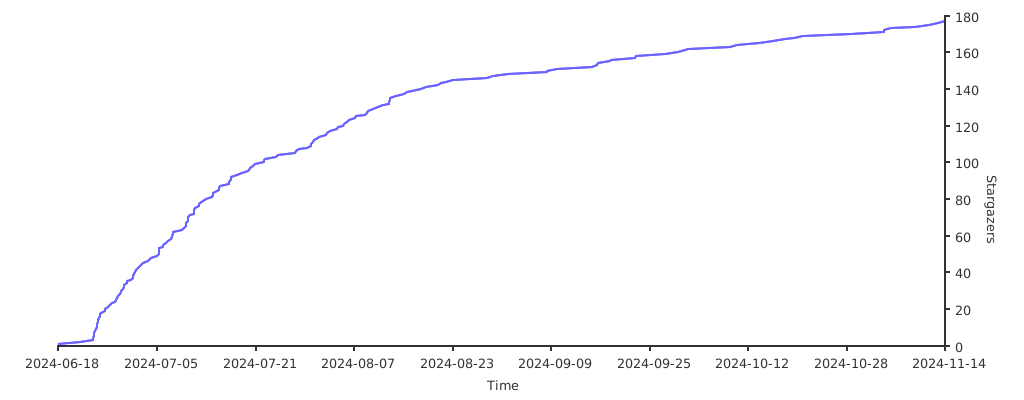](https://starchart.cc/lopins/serv00-auto-scripts)
## JSON Generator
-