https://github.com/lqss11/dindocker
Play around with your own cluster nodes using docker containers.
https://github.com/lqss11/dindocker
cluster docker docker-compose
Last synced: 2 months ago
JSON representation
Play around with your own cluster nodes using docker containers.
- Host: GitHub
- URL: https://github.com/lqss11/dindocker
- Owner: LQss11
- License: mit
- Created: 2022-01-06T21:45:33.000Z (over 4 years ago)
- Default Branch: main
- Last Pushed: 2022-03-01T09:34:53.000Z (over 4 years ago)
- Last Synced: 2025-11-22T00:03:32.330Z (7 months ago)
- Topics: cluster, docker, docker-compose
- Language: Dockerfile
- Homepage:
- Size: 27 MB
- Stars: 2
- Watchers: 1
- Forks: 0
- Open Issues: 0
-
Metadata Files:
- Readme: README.md
Awesome Lists containing this project
README
# dindocker
`DinDocker` helps you play around with a cluster of nodes as docker containers.
## Working environment
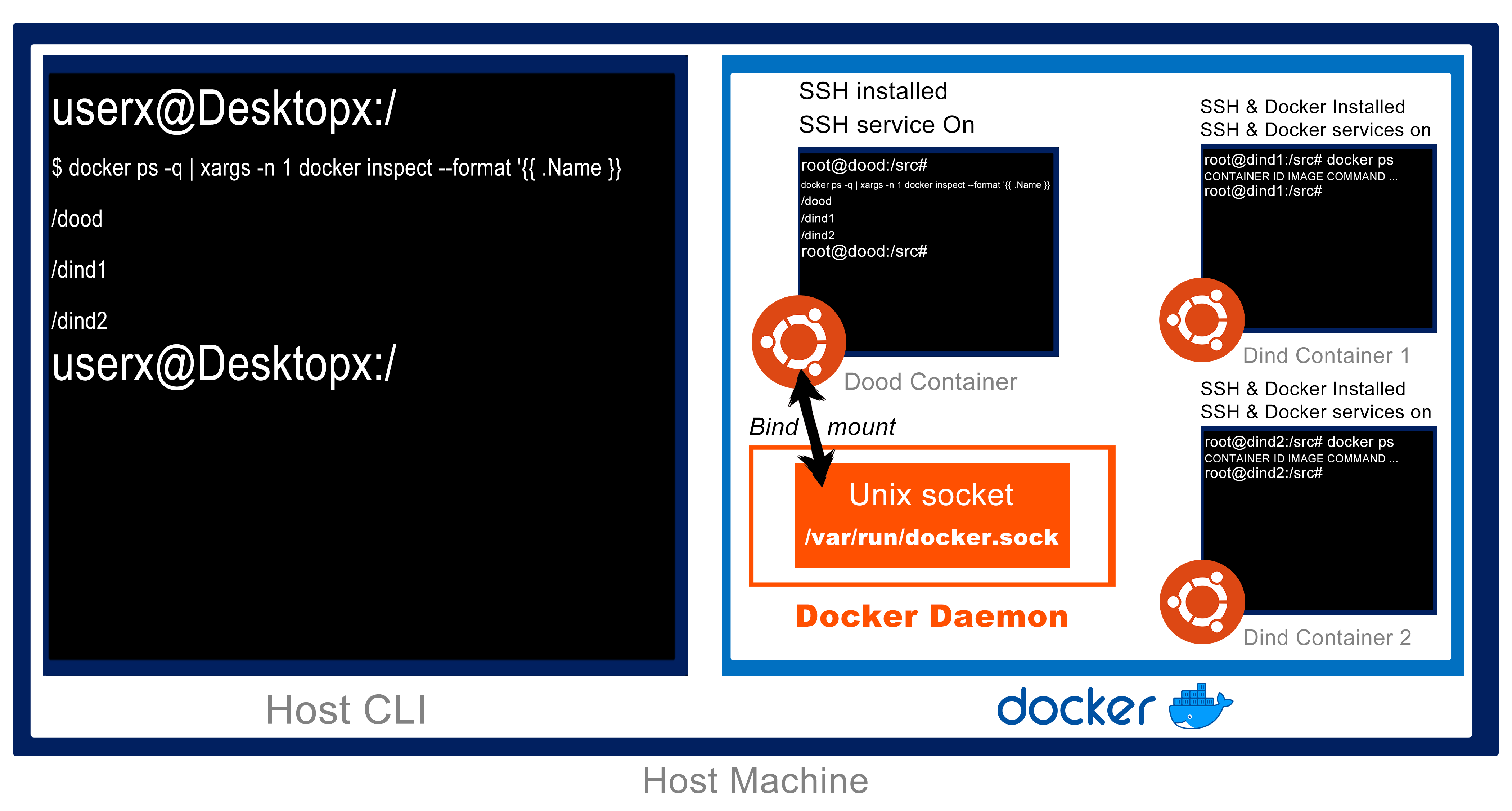
In order to help you understand the working environment you will first need to learn the difference between **dind** and **dood**:
- `DinD` includes a whole **Docker installation inside** of it.
- `DooD` uses its underlying host’s Docker installation by **bind-mounting the Docker socket**.
You can see that we have only one DooD Container and at the same time we could have multiple DinD containers running, that would in fact create a **cluster-like** environment.
**Environment template**
### DinD Configuration
1. Pull a linux Distribution Docker Image.
1. Install few packages that we might need (curl wget..).
1. Install docker and docker-compose.
1. Install OpenSSH.
1. Expose port 22 for ssh.
1. Change root password and update ssh as root permission.
1. Start Dcoker and OpenSSH services.
Also one of the important things about it is that all the containers created as dind share the same images through the docker compose configuration through a volume called docker-storage.
### Dood Configuration
The configuration is basically the same except that we don't need to install docker or docker compose because simply we have a `/var/run/docker.sock` bind mount.
## Quick Start
In order to create your cluster with one **controller (DooD)** and multiple **agents (DinD)** as you can specify the number of agents you need, you can run:
```sh
docker-compose -p dindocker_cluster up -d --scale agent=2 --build
```
Now that you have your cluster up you can rescale the number of agents by running the same command with `--no-recreate` flag that will avoid recreating old containers (nodes):
```sh
docker-compose -p dindocker_cluster up -d --scale agent=4 --no-recreate
```
Once you are done with the cluster make sure to stop it by running:
```sh
docker-compose -p dindocker_cluster down
```
### Expose ports
In order to work with containers inside containers and get their output on your web browser for example you will need first to expose some ports, let's say for example you are using `nginx` container where it exposes port **80** so first in the dind configuration in the docker file you can map ports or just specify a range of maps like this:
```yaml
ports:
- "30080-30099:80-99"
```
OR dynamic mapping:
```yaml
ports:
- "80-99"
```
This will help you get ports mapped one by one if you are willing to work with multiple applications inside the Dind containers
>If you need to expose more ports from a container you can add `expose ` followed by the ports you want your container to expose so then you could map them later.
#### Set Up Portainer
Now that you once all your environment is running and you are willing to manage docker env easily from your web browser make sure to:
- have enough ports to map from the container inside the container in this example we have these ports host machine docker engine available
```yaml
ports:
- "30080-30081:80-81" # on host machine 30080 30081 is listening to the port 80 and 81 from container
```
- Get inside the dind container (eg controller as dind), then run these commands to create portainer volume then run container and attach its ports to your host machine:
```sh
docker exec -it dindocker_cluster_controller_1 sh -c "docker volume create portainer_data && docker run -d -p 80:8000 -p 81:9000 --name=portainer --restart=always -v /var/run/docker.sock:/var/run/docker.sock -v portainer_data:/data portainer/portainer-ce"
```
- dind will pull portainer image then run container and map ports as mentioned and now you can manage Dind from your host machine: localhost:30081
## Dotenv (.env)
| Variables | Values | Impact |
| ------ | ------ | ------ |
| DOCKERFILE | **ubuntu-20.04** or **docker-dind** | choose dockerfile name. (will use docker image as same value selected) |
| DIND_SERVICES | **ansible** or **kubernetes** or **swarm** | choose service name. (will install service on container with specified value)|