https://github.com/ltfschoen/wasm-test
Sample C/C++ programs compiled with WebAssembly (WASM) then served over HTTP to webpage and shown in Emscripten console
https://github.com/ltfschoen/wasm-test
c docker emscripten emscripten-console express isomorphic keepalive react wasm webassembly webpack
Last synced: 3 months ago
JSON representation
Sample C/C++ programs compiled with WebAssembly (WASM) then served over HTTP to webpage and shown in Emscripten console
- Host: GitHub
- URL: https://github.com/ltfschoen/wasm-test
- Owner: ltfschoen
- License: mit
- Created: 2017-12-06T09:49:47.000Z (over 8 years ago)
- Default Branch: master
- Last Pushed: 2017-12-10T23:57:58.000Z (over 8 years ago)
- Last Synced: 2025-09-11T17:37:46.968Z (10 months ago)
- Topics: c, docker, emscripten, emscripten-console, express, isomorphic, keepalive, react, wasm, webassembly, webpack
- Language: JavaScript
- Homepage:
- Size: 563 KB
- Stars: 2
- Watchers: 1
- Forks: 1
- Open Issues: 0
-
Metadata Files:
- Readme: README.md
- License: LICENSE
Awesome Lists containing this project
README
# README
---
WASM-TEST
---
Example programs compiled to [WebAssembly](http://webassembly.org/) (WASM), served over HTTP to a web server provided by Emscripted SDK, and then viewable in the Emscripten console of the webpage. See screenshots below.
# Table of Contents
* [Quick Start Guide](#chapter-0)
* [FAQ](#chapter-faq)
* [References](#chapter-faq)
* [TODO](#chapter-todo)
* Fork or Clone https://github.com/ltfschoen/wasm-test
* Install and run Docker for Mac
* Create container with image wasm_sandbox and run bash in it
```
docker-compose up --force-recreate --build -d && docker exec -it $(docker ps -q) bash
```
* Alternative `docker-compose up --force-recreate --build -d && docker-compose exec sandbox bash`
* Run code corresponding to an application option
* Basic apps
* STEP 1: Use Emscripten to generate a binary WASM module (`.wasm`) from our C program (`.c`), a HTML (`.html`) page and JavaScript (`.js`) "glue" code to load, compile, and instantiate the WASM code and display its output in a web browser. Note that some of the below use a [custom HTML template](https://developer.mozilla.org/en-US/docs/WebAssembly/C_to_wasm)
* Option 1 - Hello World 1 (simply shows Hello World from compiled C program)
```
emcc /code/apps/hello/hello.c -s WASM=1 -o /code/apps/hello/hello.html
```
* Option 2 - Question (simple program that asks your age)
```
emcc /code/apps/question/question.c -s WASM=1 -o /code/apps/question/question.html
```
* Option 3 - Quiz 1 (automatically starts C program)
```
emcc /code/apps/quiz/quiz.c -s WASM=1 -o /code/apps/quiz/quiz.html
```
* Option 4 - Hello World 2 (same as Hello World 1 but with default custom HTML template)
```
emcc -o /code/apps/hello2/hello2.html /code/apps/hello2/hello2.c -O3 -s WASM=1 --shell-file /emsdk/emscripten/incoming/apps/shell_minimal.html
```
* Option 5 - Quiz 2 (same as Quiz 1 but is run with button on webpage using custom HTML template)
```
emcc -o /code/apps/quiz2/quiz2.html /code/apps/quiz2/quiz2.c -O3 -s WASM=1 --shell-file /code/apps/quiz2/html_template/quiz2_minimal.html -s NO_EXIT_RUNTIME=1
```
* STEP 2:
* Run the Emrun Web Server in the container on port 8080, which has binding to port 5000 on the host machine
```
emrun --no_browser --no_emrun_detect --hostname=0.0.0.0 --port 8080 .
```
* STEP 3:
* View in a web browser by going to URL below corresponding to the chosen app from STEP 2
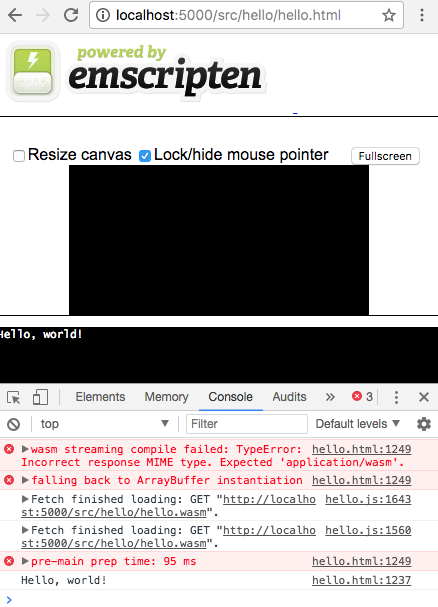
* Go to http://localhost:5000/apps/hello/hello.html (or http://:5000/apps/hello/hello.html)
* Screenshot
* Go to http://localhost:5000/apps/hello2/hello2.html
* Go to http://localhost:5000/apps/question/question.html, enter a number in the popup window and press ENTER, then press CANCEL when the popup appears again.
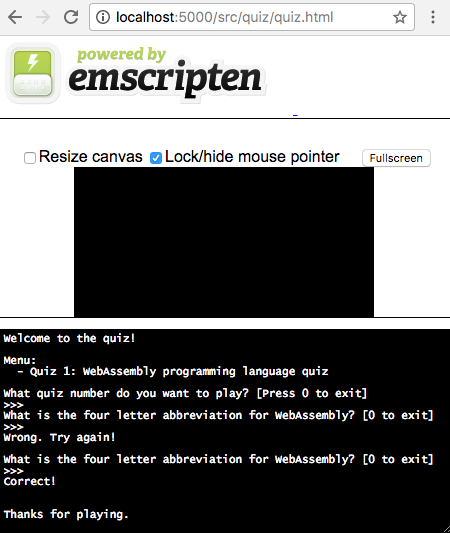
* Go to http://localhost:5000/apps/quiz/quiz.html, enter 1 in popup window and press ENTER, then enter "wasm" in next popup window and press ENTER, then press CANCEL. View the browser Console to debug if freezes to view the C program `prinf` outputs. WARNING: Do not press CANCEL before first entering 1 to play the game or it will freeze.
* Screenshot
* Go to http://localhost:5000/apps/quiz2/quiz2.html. Click the "Start Quiz" button. Enter 1 in popup window and press ENTER, then enter "wasm" in next popup window and press ENTER, then press CANCEL. View the browser Console to debug if freezes to view the C program `prinf` outputs. WARNING: Do not press CANCEL before first entering 1 to play the game or it will freeze.
* Complex apps
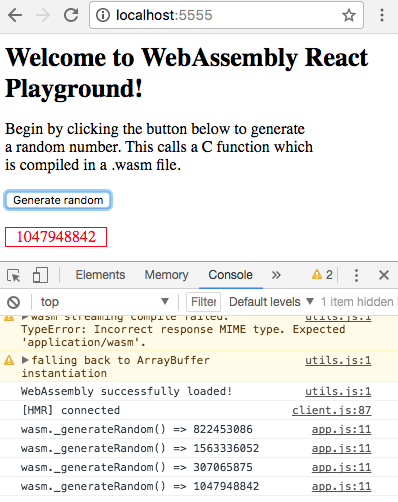
* STEP 1: Run WASM using an isomorphic app with React.js and Webpack front-end served from an Express.js back-end:
```
cd /code/apps/wasm-playground; yarn install; yarn start
```
* IMPORTANT NOTE: This will run an Express.js Web Server on the Docker container's port 3000, which has a binding to port 5555 on the host machine, so you will need to open a 2nd Terminal window to access the Docker container again with:
```
docker exec -it $(docker ps -q) bash
```
* STEP 2:
* View in a web browser by going to URL below. IMPORTANT: Use port 5555 for this app (NOT 5000 like for the Basic apps) since it is being served by Express.js Web Server
* Go to http://localhost:5555 (or http://:5555)
* Screenshot
* How to fix error due to port mapping after previously running Docker `Bind for 0.0.0.0:5000 failed: port is already allocated`.
* Solution: Restart Docker for Mac
* How to fix insufficient disc space problem
* Solution: Destroy all Docker images and containers
```
#!/bin/bash
# Delete all containers
docker rm $(docker ps -a -q)
# Delete all images
docker rmi $(docker images -q)
```
* What do you do if `quiz.c` initially does not show the output in the Emscripten console of the webpage, even though running the compiled C program works by running the compiled file with `./apps/quiz/quiz`
* Solution: After reading the ["Calling a custom function defined in C" section at this link](https://developer.mozilla.org/en-US/docs/WebAssembly/C_to_wasm) it highlighted that if you create any other functions in the C program such as `int menu()` other than the default `main()` function, then you have to apply the `EMSCRIPTEN_KEEPALIVE` declaration to it (i.e. `int EMSCRIPTEN_KEEPALIVE menu()` to adds the functions to the exported functions list, otherwise that function will be eliminated as dead code and vanish when you compile the C program to JavaScript. Additionally, in order to use `EMSCRIPTEN_KEEPALIVE`, you have to import `#include ` at the top of the same C program file.
* How to memove Docker images and containers
```
docker ps -l
docker ps -a
docker stop
docker rm
docker images
docker rmi
```
* How to show Docker Machine information
```
docker inspect
```
* How to show the IP Address of a container
* Reference: https://docs.docker.com/machine/reference/inspect/
```
docker inspect --format='{{.NetworkSettings.Networks.wasmtest_default.IPAddress}}'
```
* How can I compile a C program on macOS using GCC (without WASM)?
```
gcc ./apps/question/question.c -o ./apps/question/question; ./apps/question/question;
gcc ./apps/quiz/quiz.c -o ./apps/quiz/quiz; ./apps/quiz/quiz;
```
* How to write a basic C program?
* Reference: https://www.physics.ohio-state.edu/~ntg/780/handouts/interactive_input_in_C.pdf
* What are strings in C language?
* Reference: https://stackoverflow.com/questions/14709323/does-c-have-a-string-type
* How to use `sscanf` in C language?
* Reference: http://docs.roxen.com/pike/7.0/tutorial/strings/sscanf.xml
* How to assign to an array in C language?
* Reference: https://stackoverflow.com/questions/32313150/array-type-char-is-not-assignable
* Web Assembly (WASM) Developers Guide - http://webassembly.org/getting-started/developers-guide/
* Create a Dockerfile - https://docs.docker.com/compose/gettingstarted/#step-2-create-a-dockerfile
* Mozilla WASM - https://developer.mozilla.org/en-US/docs/WebAssembly/C_to_wasm
* WASM React.js - http://www.reactjunkie.com/webassembly-react/
* [ ] - Fix so displays outputs on screen immediately without blocking when requesting user input in popup window
* [ ] - Fix so compiling the programs within the Dockerfile generates all outputs. Currently it only works when you compile once you are in the container bash. The repository source control already contains all pre-compiled outputs.
* [ ] - Get CMake from apt-get if possible
* [ ] - Get Python 2.7 with apt-get install python2 and also python2-dev
* [ ] - Other WASM Dockerfile Example - https://github.com/bgard6977/docker-wasm/blob/master/Dockerfile