https://github.com/luc45/wp-benchmark-postmeta
https://github.com/luc45/wp-benchmark-postmeta
Last synced: 12 months ago
JSON representation
- Host: GitHub
- URL: https://github.com/luc45/wp-benchmark-postmeta
- Owner: Luc45
- Created: 2022-05-08T12:21:22.000Z (about 4 years ago)
- Default Branch: main
- Last Pushed: 2022-06-10T14:14:34.000Z (about 4 years ago)
- Last Synced: 2025-06-20T22:43:46.986Z (about 1 year ago)
- Language: PHP
- Size: 23.4 KB
- Stars: 2
- Watchers: 2
- Forks: 0
- Open Issues: 0
-
Metadata Files:
- Readme: README.md
Awesome Lists containing this project
README
This is a small WordPress plugin adds a WP-CLI command to benchmark postmeta performance.
This was done to answer a question: When does it make sense to use a custom table instead of postmeta in a WordPress plugin?
A lot of big plugins have migrated to a custom table structure due to poor scalability performance of the postmeta. This benchmark was put together to measure exactly where the trade-off of complexity vs. speed of a custom table makes sense.
The benchmarks suggests that there's a **linear** time increase **when inserting** posts with multiple postmeta, and an **exponential** time increase **when getting** posts by their postmeta value.
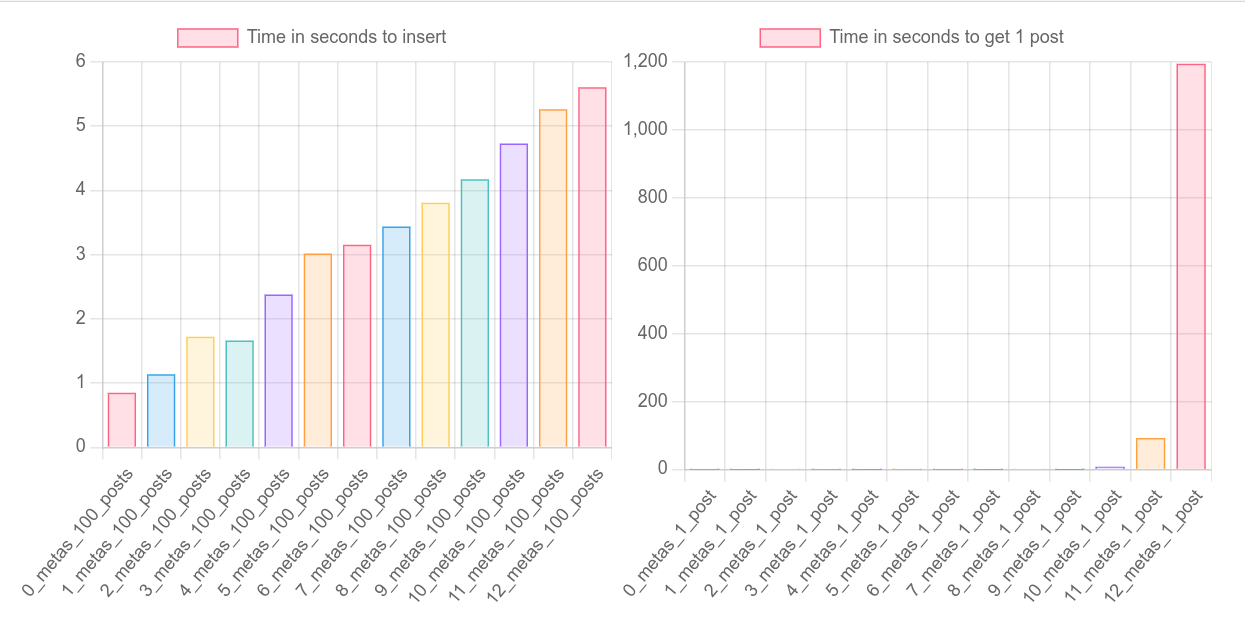
The code that results in those times is something similar to this:
```php
wp_insert_post( [
'post_title' => wp_generate_uuid4(),
'post_type' => 'benchmark',
'meta_input' => [
'foo1' => 'foo1',
'foo2' => 'foo2',
'foo3' => 'foo3',
'foo4' => 'foo4',
'foo5' => 'foo5',
'foo6' => 'foo6',
'foo7' => 'foo7',
'foo8' => 'foo8',
'foo9' => 'foo9',
'foo10' => 'foo10',
'foo11' => 'foo11',
'foo12' => 'foo12',
],
] );
get_posts( [
'posts_per_page' => 1,
'post_type' => 'benchmark',
'post_status' => 'draft',
'meta_query' => [
['key' => 'foo1','value' => 'nonexisting1',],
['key' => 'foo2','value' => 'nonexisting2',],
['key' => 'foo3','value' => 'nonexisting3',],
['key' => 'foo4','value' => 'nonexisting4',],
['key' => 'foo5','value' => 'nonexisting5',],
['key' => 'foo6','value' => 'nonexisting6',],
['key' => 'foo7','value' => 'nonexisting7',],
['key' => 'foo7','value' => 'nonexisting8',],
['key' => 'foo7','value' => 'nonexisting9',],
['key' => 'foo7','value' => 'nonexisting10',],
['key' => 'foo12','value' => 'nonexisting11',],
['key' => 'foo12','value' => 'nonexisting12',],
],
'cache_results' => false,
'suppress_filters' => true,
'fields' => 'ids',
] );
```
To fetch the posts, we use existing meta keys and random meta values, so that it always goes into a worst case scenario trying to find a match.
Essentially the answer seems to be: Custom table makes sense when you need to filter/find posts by multiple postmeta parameters. Another alternative before going down the route of custom tables, is using the available post table columns to store your data, such as excerpt, title, content, etc.
### How to run the benchmarks:
- Place `benchmark-postmeta.php` in your wp-content/plugins folder
- Run `wp benchmark run --post-mode=100_posts --postmeta-min=0 --postmeta-max=10`
This will:
- Insert 100 posts with 0 postmetas, and benchmark it.
- Insert 100 posts with 1 postmeta, and benchmark it.
- Insert 100 posts with 2 postmetas, and benchmark it. And so on until 10 postmetas.
- Then it fetches 1 random post using 0 postmetas, and benchmark it.
- Fetches 1 random post using 1 postmeta, and benchmark it.
- Provide a link to a graph of the benchmark, similar to the image above, which you can access in the browser.
### Other branches:
- [multi-thread](https://github.com/Luc45/wp-benchmark-postmeta/tree/multi-thread): An attempt to perform the benchmarks in multi-thread. The multi-threading works, but to be effective it needs to run each thread in a separate db/table, which I didn't pursue due to time reasons.
- [alternate-postmeta](https://github.com/Luc45/wp-benchmark-postmeta/tree/alternate-postmeta) - A suggestion made in Slack to change the way WordPress builds the query when using `get_posts` with `meta_query`. Instead of multiple JOINs, it generates another query. It solves the performance issue, but I haven't had time to confirm if the results remain accurate.