https://github.com/lucas-labs/coco
🥥 coco » interactive cli for creating conventional commits.
https://github.com/lucas-labs/coco
cli collaborate commit-message conventional-commits developer-tools git-tool
Last synced: 4 months ago
JSON representation
🥥 coco » interactive cli for creating conventional commits.
- Host: GitHub
- URL: https://github.com/lucas-labs/coco
- Owner: lucas-labs
- License: mit
- Created: 2024-09-24T14:47:57.000Z (almost 2 years ago)
- Default Branch: master
- Last Pushed: 2024-10-31T02:37:02.000Z (over 1 year ago)
- Last Synced: 2025-03-26T11:02:25.135Z (over 1 year ago)
- Topics: cli, collaborate, commit-message, conventional-commits, developer-tools, git-tool
- Language: Rust
- Homepage:
- Size: 741 KB
- Stars: 3
- Watchers: 1
- Forks: 0
- Open Issues: 6
-
Metadata Files:
- Readme: README.md
- Changelog: CHANGELOG.md
- Contributing: CONTRIBUTING.md
- License: LICENSE
Awesome Lists containing this project
README

🔎 coco is an interactive command line interface for creating conventional commits.
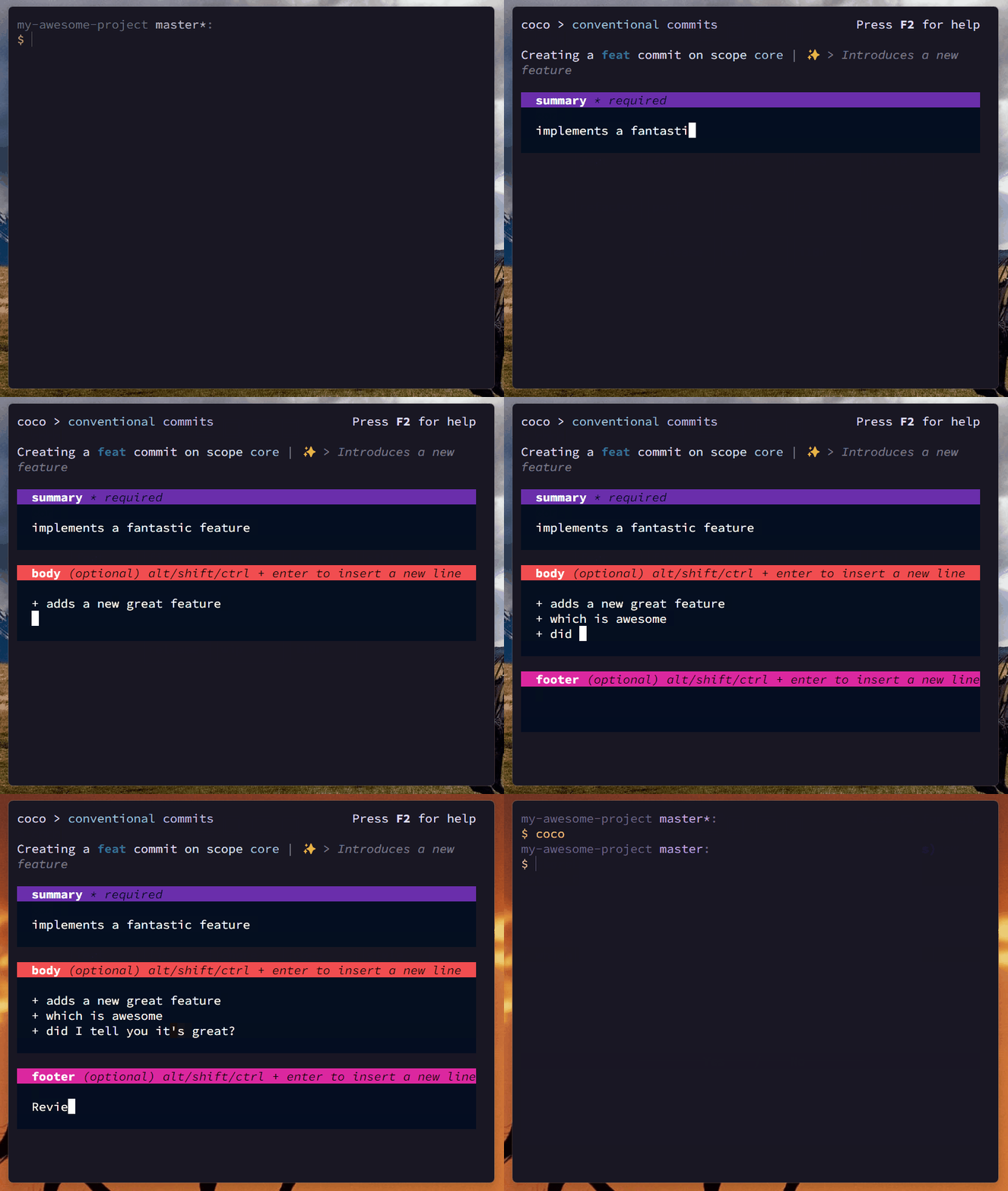
# `coco` › [![LICENSE_BADGE][LICENSE_BADGE]][LICENSE_LINK] [![CRATE_BADGE][CRATE_BADGE]][CRATE_LINK] [![ISSUES_BADGE][ISSUES_BADGE]][ISSUES_LINK]
This is a port to Rust ⚡ of the original (and slower)
[lucas-labs/coco-js](https://github.com/lucas-labs/coco-js), that was implemented using `node.js`.
This implementation, being written in Rust, is faster, more efficient and has implemented several
improvements over the original implementation.
## Installation
### From binary (github releases)
You can download the latest binary for your platform from the
[releases page](https://github.com/lucas-labs/coco/releases).
Then drop the binary in your `PATH` and you're good to go.
### From source (crates.io)
You can also install `coco` from source using `cargo`:
```bash
$ cargo install rs-coco
```
### Using `binstall`
If you have `binstall` installed, you can install `coco` with:
```bash
$ cargo binstall rs-coco
```
## Usage
Drop the `coco` binary somewhere in your `PATH`:
```bash
$ coco --version
rs-coco vx.y.z
```
Then you can use `coco` to create conventional commits by running it in your repository:
```bash
$ coco
# and follow the steps 😊
```
## Configuration
`coco` can be configured by creating a `coco.yaml`, `coco.yml` or `.cocorc` file in your project's
root (per repository config) or in your users home directory (global config). The file should be a
valid YAML.
See the [`coco.yml`](https://github.com/lucas-labs/coco/blob/master/coco.yml) file from this
repository for an example configuration.
> [!NOTE]
> Config is totally optional. If no config is provided, `coco` will use default values.
### Options
#### `types`
An array of commit types. Each type should be an object with the following properties:
* `name` - The name of the type
* `desc` - The description of the type
* `emoji` - The emoji to be used for the type if `useEmoji` is set to `true`
```yaml
types:
- name: feat
desc: A new feature
emoji: 🎉
- name: fix
desc: A bug fix
emoji: 🐛
```
#### `scopes`
An array of commit scopes.
```yaml
scopes:
- api
- ui
```
If provided, instead of asking you to type the scope, `coco` will prompt you to select one from the
list.
#### `useEmoji`
Whether to use emojis in the summary. If set to `true`, the `emoji` property of the type will be
used to create the commit message.
```yaml
useEmoji: true
```
Provided `useEmoji` is `true`, an example of a commit message would be:
`feat(api): ✨ add new endpoint`
#### `askScope`
Whether to ask for the scope of the commit. IF set to `true`, the user will be prompted to enter or
select a scope (depending if scope list was provided by user config or not). If set to `false`, the
scope will be omitted from the commit message and the cli won't ask for it.
```yaml
askScope: true
```
#### `askBody`
Whether to ask for the body of the commit. If set to `true`, the user will be prompted to enter the
body of the commit. If set to `false`, the body will be omitted from the commit message and the cli
won't ask for it.
```yaml
askBody: true
```
#### `askFooter`
Whether to ask for the footer of the commit. If set to `true`, the user will be prompted to enter
the footer of the commit. If set to `false`, the footer will be omitted from the commit message and
the cli won't ask for it.
```yaml
askFooter: true
```
#### `askBreakingChange`
Whether to ask for the breaking change of the commit. If set to `true`, the user will be prompted to
specify if the commit is a breaking change. If set to `false`, the breaking change information will
be omitted from the commit message and the cli won't ask for it.
```yaml
askBreakingChange: true
```
#### `maxSummaryLength`
Defines the maximum length of the commit summary (the "title" of the commit). The summary textarea
will be limited to this length.
The default value is `72`.
```yaml
maxSummaryLength: 72
```
#### `theme`
You can also customize the colors of the CLI by providing a `theme` object.
Check the [`coco.yml`](https://github.com/lucas-labs/coco/blob/master/coco.yml) file to a full list
of the available theme configuration tokens with their default values.
```yaml
theme:
logo:fg:1: blue
logo:fg:2: light-magenta
...
```
### Example
```yaml
# override the default commit types
types:
- name: feat
desc: A new feature
emoji: 🎉
- name: fix
desc: A bug fix
emoji: 🐛
# set of scopes to choose from
scopes:
- api
- ui
useEmoji: true # default
askScope: true # default
askBody: true # default
askFooter: true # default
askBreakingChange: true # default
```
[LICENSE_LINK]: https://github.com/lucas-labs/coco/blob/master/LICENSE
[LICENSE_BADGE]: https://img.shields.io/github/license/lucas-labs/coco?color=005af0&style=flat-square
[ISSUES_LINK]: https://github.com/lucas-labs/coco/issues
[ISSUES_BADGE]: https://img.shields.io/github/issues-raw/lucas-labs/coco?color=1ed760&style=flat-square
[CRATE_LINK]: https://crates.io/crates/rs-coco
[CRATE_BADGE]: https://img.shields.io/crates/v/rs-coco?style=flat-square&label=%20crate&color=%23fecc6a