https://github.com/lucasvtiradentes/dev-panel
⚡ all-in-one command center for ai-assisted development
https://github.com/lucasvtiradentes/dev-panel
ai-assisted-development claude-code cursor development-environment producitivity vscode-extension
Last synced: 5 months ago
JSON representation
⚡ all-in-one command center for ai-assisted development
- Host: GitHub
- URL: https://github.com/lucasvtiradentes/dev-panel
- Owner: lucasvtiradentes
- License: mit
- Created: 2025-12-18T03:50:20.000Z (6 months ago)
- Default Branch: main
- Last Pushed: 2026-01-18T01:02:22.000Z (5 months ago)
- Last Synced: 2026-01-18T06:58:12.477Z (5 months ago)
- Topics: ai-assisted-development, claude-code, cursor, development-environment, producitivity, vscode-extension
- Language: TypeScript
- Homepage:
- Size: 2 MB
- Stars: 0
- Watchers: 0
- Forks: 0
- Open Issues: 0
-
Metadata Files:
- Readme: README.md
- Changelog: CHANGELOG.md
- Funding: .github/FUNDING.yml
- License: LICENSE
Awesome Lists containing this project
README

## 🎺 Overview
All-in-one command center for AI-assisted development. A VSCode extension that integrates task management, AI prompt execution, branch context tracking, and productivity tools into a unified sidebar.
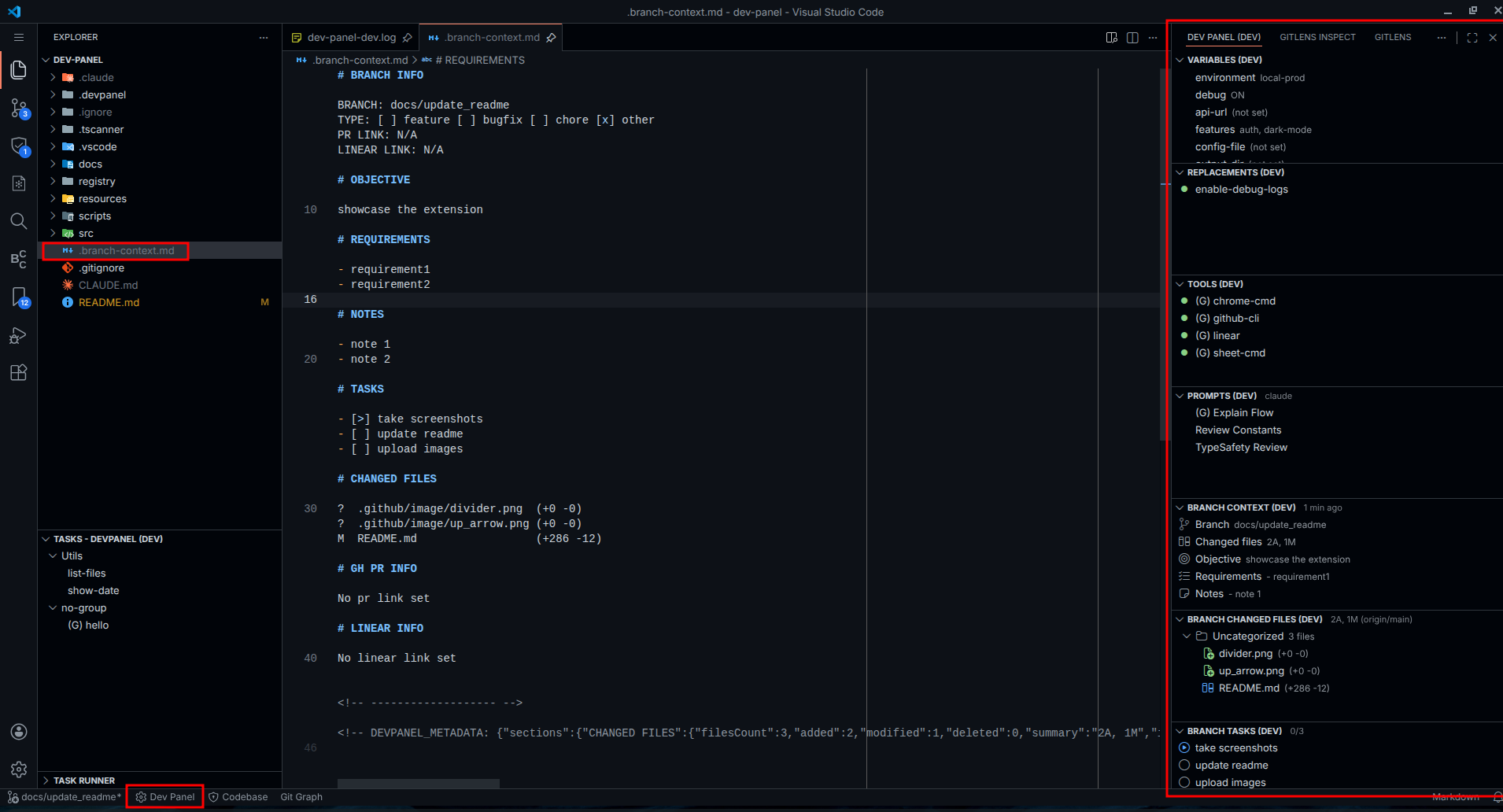
manage tasks, prompts, and branch context in the sidebar
## ⭐ Features
- **Multi-Source Task Runner** - Execute npm scripts, VSCode tasks, and custom DevPanel tasks from one place
- **AI Prompts Management** - Create and run prompts for Claude, Gemini, or Cursor Agent with input collection
- **Branch Context Tracking** - Track branch objective, notes, PR links, and Linear issues with auto-sync
- **Branch Tasks** - Manage tasks with status (todo/doing/done/blocked), priority, milestones, and subtasks
- **Changed Files View** - Visualize git diff with comparison branch selection and file categorization
- **Dynamic Variables** - Configure project options with choose, input, toggle, file, and folder types
- **Text Replacements** - Pattern-based text substitution with bulk activation control
- **Shell Tools** - Execute shell commands with UI and organize by groups
- **Keybinding Support** - Bind keyboard shortcuts to tasks, prompts, and variables
- **Global & Workspace Scopes** - Share items globally or keep them workspace-specific
## 🚀 Quick Start
### Installation
1. Clone the repository:
```bash
git clone https://github.com/lucasvtiradentes/dev-panel.git
cd dev-panel
```
2. Install dependencies and build:
```bash
npm install
npm run build
```
3. Load in VSCode:
- Open VSCode
- Press `F5` to launch Extension Development Host
- Or install the built `.vsix` file
## 📖 Usage
Variables View
Manage dynamic configuration options for your project.
**Variable Types:**
- **choose** - Single or multi-select from predefined options
- **input** - Text input field
- **toggle** - ON/OFF switch
- **file** - Single or multiple file selection
- **folder** - Single or multiple folder selection
**Features:**
- Group variables by category
- Set keybindings for quick access
- Run shell commands on value change
- Drag & drop to reorder
Tools View
Execute shell commands with a visual interface.
**Features:**
- Global and workspace-scoped tools
- Organize by groups
- Favorites and hide functionality
- Generate documentation for all tools
- Copy tools between global and workspace
Prompts View
Manage and execute AI prompts.
**Supported Providers:**
- Claude
- Gemini
- Cursor Agent
**Features:**
- Collect inputs before execution
- Save output to file
- Organize by groups
- Set keybindings for quick access
- Global and workspace scopes
Branch Context View
Track branch metadata in a `.branch-context.md` file.
**Tracked Information:**
- Branch name and type
- Objective/goal
- Linear issue link
- PR link
- Notes
- Tasks summary
- Changed files summary
**Features:**
- Auto-sync on branch checkout
- Hide empty sections
- Edit fields inline
Branch Tasks View
Manage tasks within the branch context file.
**Task Properties:**
- Status: todo, doing, done, blocked
- Priority: urgent, high, medium, low, none
- Assignee and due date
- Milestone grouping
- Subtasks
**Features:**
- Filter by status/priority
- Cycle status with one click
- Copy task text
- Open external links (for tracked tasks)
Changed Files View
Visualize git changes for the current branch.
**Features:**
- Select comparison branch
- Categorize by type (Added/Modified/Deleted)
- Group by topic
- Open file or diff view
- Auto-sync on git status changes
Task Runner (Explorer)
Multi-source task runner in the Explorer sidebar.
**Task Sources:**
- DevPanel Tasks
- npm Scripts
- VSCode Tasks
**Features:**
- Switch between sources
- Favorites and hide
- Organize by groups
- Set keybindings
- Navigate to task definition
Configuration
Configure Dev Panel in your workspace:
```
workspace-root/
.devpanel/
config.jsonc # Main configuration
.variables.jsonc # Variable definitions
prompts/ # Prompt files
branches/ # Branch-specific context
/
.branch-context.md # Branch metadata & tasks
```
The extension provides JSON schema validation for `config.jsonc`.
## 🤝 Contributing
Contributions are welcome! Feel free to open issues or submit pull requests.
```bash
npm run build # Build the extension
npm run lint # Check code style
npm run lint:fix # Fix code style issues
npm run format # Format code
npm run typecheck # Type checking
```
## 📜 License
MIT License - see [LICENSE](LICENSE) file for details.