https://github.com/lucjosin/astro-rename-example
How to use the astro-rename integration to hash all CSS class names from your astro project
https://github.com/lucjosin/astro-rename-example
astro css integration postcss
Last synced: 3 months ago
JSON representation
How to use the astro-rename integration to hash all CSS class names from your astro project
- Host: GitHub
- URL: https://github.com/lucjosin/astro-rename-example
- Owner: LucJosin
- Created: 2023-10-14T18:29:28.000Z (almost 3 years ago)
- Default Branch: main
- Last Pushed: 2023-10-20T00:10:55.000Z (almost 3 years ago)
- Last Synced: 2025-02-10T07:31:49.875Z (over 1 year ago)
- Topics: astro, css, integration, postcss
- Language: Astro
- Homepage: https://lucjos.in/b/pNCgOiQi
- Size: 304 KB
- Stars: 0
- Watchers: 1
- Forks: 0
- Open Issues: 0
-
Metadata Files:
- Readme: README.md
Awesome Lists containing this project
README
# Example of astro-rename integration
Final project of blog post: [How to hash class names in astro using astro-rename integration](https://lucjos.in/b/pNCgOiQi)
| Before | After |
| :------------------------------------------------------------------------------------------------------------------------------------------------------: | :-----------------------------------------------------------------------------------------------------------------------------------------------------------: |
| 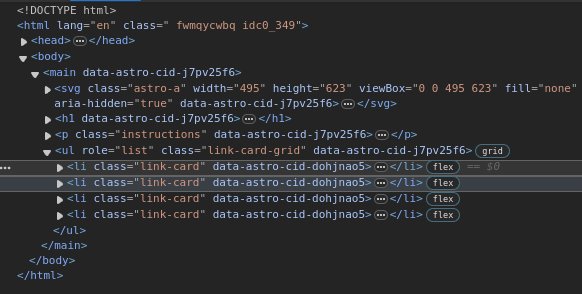 | 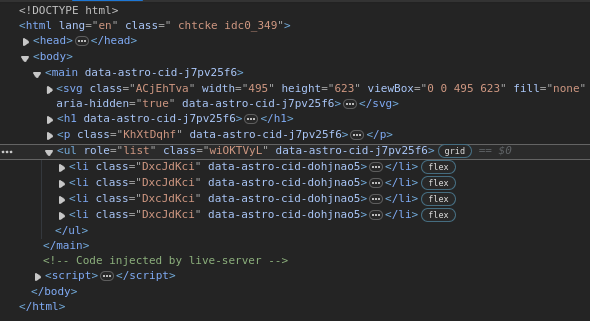 |

## 🚀 Project Structure
Inside of your Astro project, you'll see the following folders and files:
```text
/
├── public/
│ └── favicon.svg
├── src/
│ ├── components/
│ │ └── Card.astro
│ ├── layouts/
│ │ └── Layout.astro
│ └── pages/
│ └── index.astro
└── package.json
```
Astro looks for `.astro` or `.md` files in the `src/pages/` directory. Each page is exposed as a route based on its file name.
There's nothing special about `src/components/`, but that's where we like to put any Astro/React/Vue/Svelte/Preact components.
Any static assets, like images, can be placed in the `public/` directory.
## 🧞 Commands
All commands are run from the root of the project, from a terminal:
| Command | Action |
| :------------------------ | :----------------------------------------------- |
| `npm install` | Installs dependencies |
| `npm run dev` | Starts local dev server at `localhost:4321` |
| `npm run build` | Build your production site to `./dist/` |
| `npm run preview` | Preview your build locally, before deploying |
| `npm run astro ...` | Run CLI commands like `astro add`, `astro check` |
| `npm run astro -- --help` | Get help using the Astro CLI |