https://github.com/lucribas/logcat_monitor
Logcat monitor plugin to monitor the stream of system messages, stack traces etc using logcat command-line tool.
https://github.com/lucribas/logcat_monitor
android-plugin dart flutter logcat streaming
Last synced: 8 months ago
JSON representation
Logcat monitor plugin to monitor the stream of system messages, stack traces etc using logcat command-line tool.
- Host: GitHub
- URL: https://github.com/lucribas/logcat_monitor
- Owner: lucribas
- License: apache-2.0
- Created: 2022-12-01T14:17:55.000Z (over 3 years ago)
- Default Branch: main
- Last Pushed: 2023-02-17T01:36:32.000Z (over 3 years ago)
- Last Synced: 2024-05-01T18:40:56.363Z (about 2 years ago)
- Topics: android-plugin, dart, flutter, logcat, streaming
- Language: Dart
- Homepage: https://pub.dev/packages/logcat_monitor
- Size: 617 KB
- Stars: 2
- Watchers: 2
- Forks: 2
- Open Issues: 0
-
Metadata Files:
- Readme: README.md
- Changelog: CHANGELOG.md
- License: LICENSE
Awesome Lists containing this project
README
# logcat_monitor
Flutter plugin to monitor the stream of system messages, stack traces etc using *logcat* command-line tool.
NOTE: This plugin fetches logs only on Android Devices presently.
# how to use
1. Create a function to consume the *logcat* messages
```dart
void _mylistenStream(dynamic value) {
if (value is String) {
_logBuffer.writeln(value);
}
}
```
2. Register your function as a listener to get logs then use it in anyway within your app.
```dart
LogcatMonitor.addListen(_mylistenStream);
```
3. Start the logcat monitor passing the [filter parameters](#logcat_filter) as defined in *logcat* tool.
```dart
await LogcatMonitor.startMonitor("*.*");
```
## Installation
Need permission in AndroidManifest.xml:
```xml
```
[https://pub.dev/packages/logcat_monitor/install](https://pub.dev/packages/logcat_monitor/install)
# example
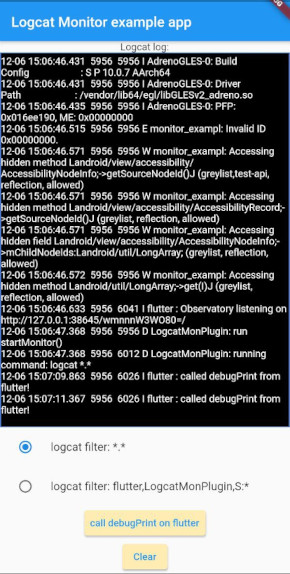
Follows a screenshot of example code in [example](https://github.com/lucribas/logcat_monitor/tree/main/example) folder.
Here we use a StringBuffer to store the messages and display them in the log screen.
# under the hood
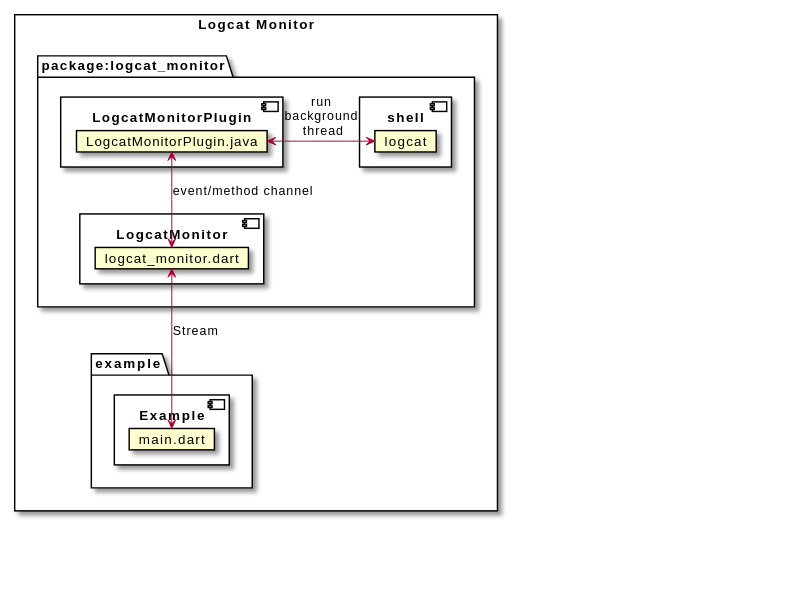
The LogcatMonitorPlugin runs event/method channel handlers in **UI-thread** and the *logcat* process monitor in a **background thread** as recomended by Google to not block the UI interface.
### logcat filter options
from `logcat -h`:
```txt
filterspecs are a series of
[:priority]
where is a log component tag (or * for all) and priority is:
V Verbose (default for )
D Debug (default for '*')
I Info
W Warn
E Error
F Fatal
S Silent (suppress all output)
'*' by itself means '*:D' and by itself means :V.
If no '*' filterspec or -s on command line, all filter defaults to '*:V'.
eg: '*:S ' prints only , ':S' suppresses all log messages.
```
Examples:
- `*.*` show ALL tags and priorities.
- `flutter,LogcatMonPlugin,S:*` show flutter and LogcatMonPlugin and suppresses all others.