https://github.com/ludwigaj/dash-prism
Prism: Powerful multi-panel workspace manager for Plotly Dash
https://github.com/ludwigaj/dash-prism
dash dashboard plotly plotly-dash python workspace
Last synced: 29 days ago
JSON representation
Prism: Powerful multi-panel workspace manager for Plotly Dash
- Host: GitHub
- URL: https://github.com/ludwigaj/dash-prism
- Owner: LudwigAJ
- License: apache-2.0
- Created: 2026-01-13T01:32:54.000Z (5 months ago)
- Default Branch: dev
- Last Pushed: 2026-01-18T02:31:47.000Z (5 months ago)
- Last Synced: 2026-01-18T15:56:23.493Z (5 months ago)
- Topics: dash, dashboard, plotly, plotly-dash, python, workspace
- Language: TypeScript
- Homepage: https://ludwigaj.github.io/dash-prism/
- Size: 12.8 MB
- Stars: 6
- Watchers: 0
- Forks: 0
- Open Issues: 0
-
Metadata Files:
- Readme: README.md
- Contributing: docs/contributing.rst
- License: LICENSE
Awesome Lists containing this project
README
# Dash Prism
[](https://github.com/LudwigAJ/dash-prism/actions/workflows/ci.yml)
[](https://github.com/LudwigAJ/dash-prism/actions/workflows/codeql.yml)
[](https://pypi.org/project/dash-prism/)
[](https://pepy.tech/projects/dash-prism)
[](https://pypi.org/project/dash-prism/)

A multi-panel workspace manager for Plotly Dash applications.
**Live Demo:** https://dash-prism-demo.vercel.app/
**Docs:** https://ludwigaj.github.io/dash-prism/
**PyPI:** https://pypi.org/project/dash-prism/
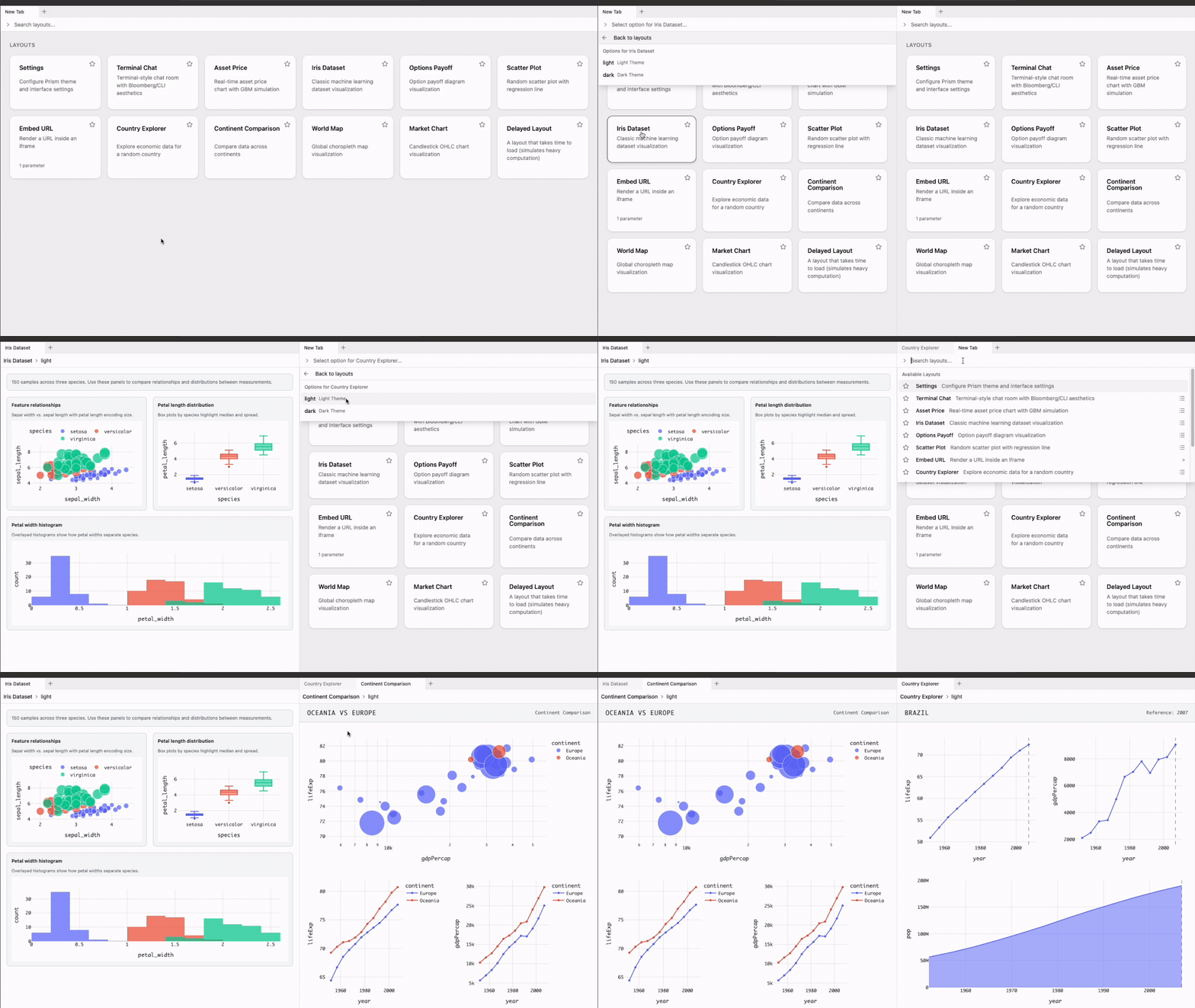
## What is Dash Prism?
Dash Prism provides a unified workspace where multiple Dash layouts coexist as
tabs within resizable, splittable panels. Users arrange their workspace via
drag-and-drop while developers focus on building content.
## The Problem
Building dashboards with Plotly Dash typically means:
- **Fragmented applications** - Each dashboard lives in isolation, requiring
users to switch between browser tabs or navigate complex menus.
- **Repetitive UI work** - Developers spend time on layout scaffolding, content
management, and styling instead of business logic.
- **One-size-fits-all layouts** - Users get a fixed arrangement that may not
match their workflow.
- **No personalization** - Workspaces reset on every visit; users cannot save
their preferred view.
## The Solution
Dash Prism addresses these issues by providing:
- **Unified workspace** - Register any number of layouts; users open them as
tabs in a single interface.
- **User-driven design** - Drag tabs to split panels, resize areas, and
rearrange freely. Developers define content; users define structure.
- **Persistence** - Workspace state saves to localStorage, sessionStorage, or
memory so users return to exactly where they left off.
- **Minimal boilerplate** - A decorator-based API keeps layout registration
concise and readable.
## Features
- **User-Driven Layout** - Users style tabs with colors and icons, reorder them
freely, and drag to panel edges to split the view. You create the content;
they make the dashboard.
- **Favorites & Search** - Find layouts instantly with the integrated search
bar. Mark frequently-used ones as favorites to pin them at the top.
- **On-Demand Loading** - Tab content loads dynamically when selected, keeping
initial page load fast even with many registered layouts.
- **Parameterized Layouts** - Capture user options before loading a layout,
minimizing server round-trips and delivering exactly what the user wants.
- **Custom Actions** - Add status bar buttons that trigger Dash callbacks for
saving workspaces, exporting data, or any custom functionality.
- **Persistence & Workspace State** - State saves to localStorage, sessionStorage,
or memory. Use `readWorkspace` and `updateWorkspace` for programmatic backup,
restore, or team sharing.
- **Context Menus** - Right-click tabs to rename, duplicate, lock, style, or
generate a shareable link to send a specific tab to someone else.
- **Keyboard Shortcuts** - Full keyboard navigation: new tab, close, rename,
undo close, switch tabs, and more.
- **Error Resilience** - Errors are captured at the tab level, guarding against
crashes that would otherwise take down the workspace.
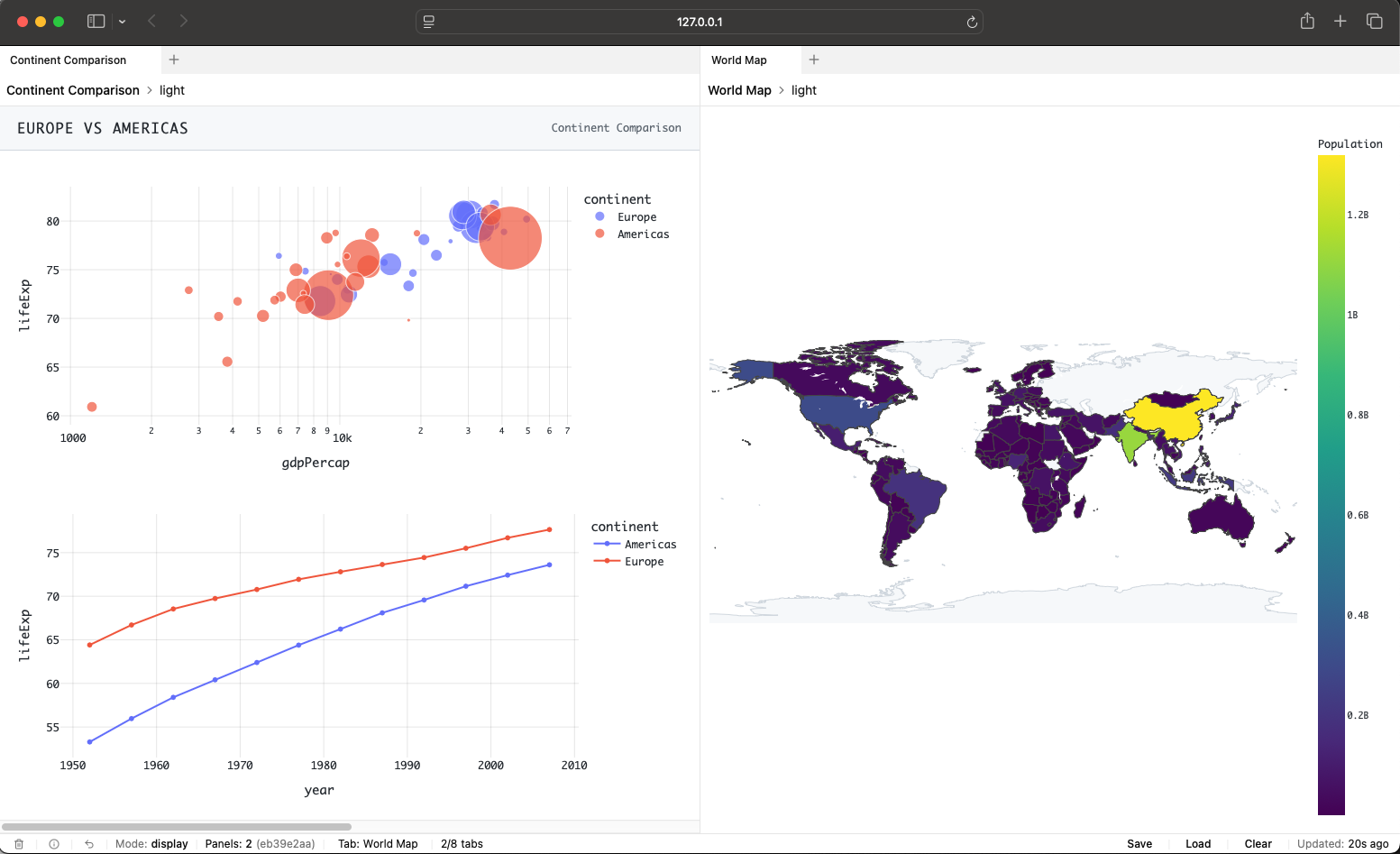
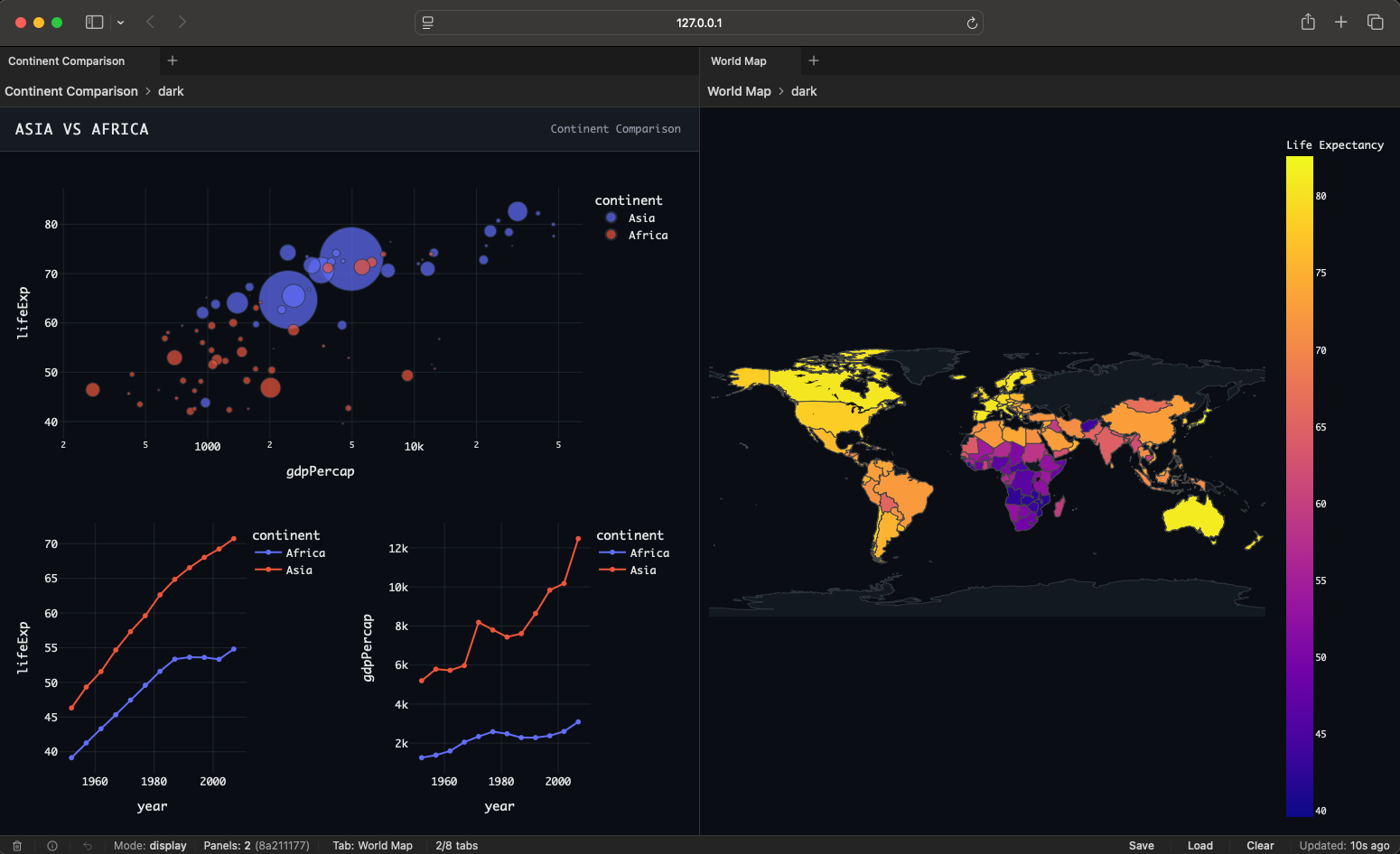
## Light and Dark Mode
Dash Prism supports both light and dark themes, so the workspace adapts to your style.
## Installation
**Requirements:** Python 3.10+, Dash 3.1.1+
```bash
pip install dash-prism
```
## Quick Start
```python
import dash
from dash import html
import dash_prism
app = dash.Dash(__name__)
@dash_prism.register_layout(id='home', name='Home')
def home():
return html.Div('Welcome to Dash Prism')
@dash_prism.register_layout(id='analytics', name='Analytics')
def analytics():
return html.Div('Analytics content here')
app.layout = html.Div([
dash_prism.Prism(id='workspace', persistence=True)
])
dash_prism.init('workspace', app)
if __name__ == '__main__':
app.run(debug=True)
```
## Development
This project uses [Poetry](https://python-poetry.org/) for dependency management and packaging.
### Setup
```bash
# Clone and enter the project
git clone https://github.com/LudwigAJ/dash-prism.git
cd dash-prism
# Create a virtual environment
python -m venv .venv
source .venv/bin/activate # Windows: .venv\Scripts\activate
# Install dependencies (pnpm via Corepack or `brew install pnpm`)
poetry install --with dev,test,docs,demo
pnpm install
# Build
pnpm run build
```
### Using Just
If you have [just](https://github.com/casey/just) installed:
```bash
just install # Install Python and pnpm dependencies
just build # Build the package
just test # Run tests
```
## Contributing
Contributions are welcome. Please:
1. Fork the repository.
2. Create a feature branch.
3. Write tests for new functionality.
4. Ensure all tests pass (`pytest`).
5. Submit a pull request.
See the [Contributing Guide](https://ludwigaj.github.io/dash-prism/contributing.html)
in the documentation for more details.
## License
Apache License 2.0. See [LICENSE](LICENSE) for details.