https://github.com/luis-codex/api-mcp
https://github.com/luis-codex/api-mcp
Last synced: 4 months ago
JSON representation
- Host: GitHub
- URL: https://github.com/luis-codex/api-mcp
- Owner: luis-codex
- Created: 2025-10-26T13:04:34.000Z (10 months ago)
- Default Branch: main
- Last Pushed: 2025-10-26T16:58:00.000Z (10 months ago)
- Last Synced: 2025-10-26T18:29:31.301Z (10 months ago)
- Language: TypeScript
- Size: 138 KB
- Stars: 0
- Watchers: 0
- Forks: 0
- Open Issues: 1
-
Metadata Files:
- Readme: README.md
Awesome Lists containing this project
README
# OpenAPI Template
[](https://deploy.workers.cloudflare.com/?url=https://github.com/cloudflare/templates/tree/main/chanfana-openapi-template)
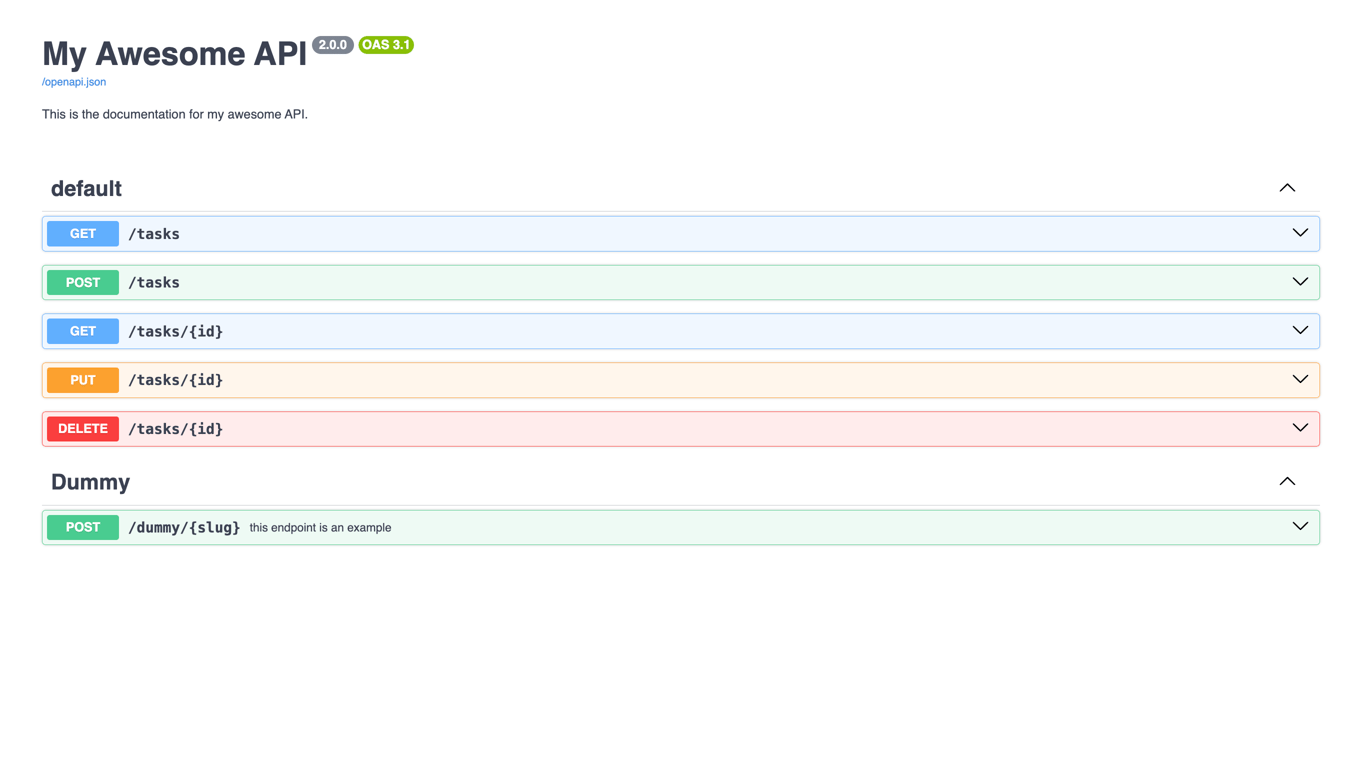
This is a Cloudflare Worker with OpenAPI 3.1 Auto Generation and Validation using [chanfana](https://github.com/cloudflare/chanfana) and [Hono](https://github.com/honojs/hono).
This is an example project made to be used as a quick start into building OpenAPI compliant Workers that generates the
`openapi.json` schema automatically from code and validates the incoming request to the defined parameters or request body.
This template includes various endpoints, a D1 database, and integration tests using [Vitest](https://vitest.dev/) as examples. In endpoints, you will find [chanfana D1 AutoEndpoints](https://chanfana.com/endpoints/auto/d1) and a [normal endpoint](https://chanfana.com/endpoints/defining-endpoints) to serve as examples for your projects.
Besides being able to see the OpenAPI schema (openapi.json) in the browser, you can also extract the schema locally no hassle by running this command `npm run schema`.
> [!IMPORTANT]
> When using C3 to create this project, select "no" when it asks if you want to deploy. You need to follow this project's [setup steps](https://github.com/cloudflare/templates/tree/main/openapi-template#setup-steps) before deploying.
## Getting Started
Outside of this repo, you can start a new project with this template using [C3](https://developers.cloudflare.com/pages/get-started/c3/) (the `create-cloudflare` CLI):
```bash
npm create cloudflare@latest -- --template=cloudflare/templates/openapi-template
```
A live public deployment of this template is available at [https://openapi-template.templates.workers.dev](https://openapi-template.templates.workers.dev)
## Setup Steps
1. Install the project dependencies with a package manager of your choice:
```bash
npm install
```
2. Create a [D1 database](https://developers.cloudflare.com/d1/get-started/) with the name "openapi-template-db":
```bash
npx wrangler d1 create openapi-template-db
```
...and update the `database_id` field in `wrangler.json` with the new database ID.
3. Run the following db migration to initialize the database (notice the `migrations` directory in this project):
```bash
npx wrangler d1 migrations apply DB --remote
```
4. Deploy the project!
```bash
npx wrangler deploy
```
5. Monitor your worker
```bash
npx wrangler tail
```
## Testing
This template includes integration tests using [Vitest](https://vitest.dev/). To run the tests locally:
```bash
npm run test
```
Test files are located in the `tests/` directory, with examples demonstrating how to test your endpoints and database interactions.
## Project structure
1. Your main router is defined in `src/index.ts`.
2. Each endpoint has its own file in `src/endpoints/`.
3. Integration tests are located in the `tests/` directory.
4. For more information read the [chanfana documentation](https://chanfana.com/), [Hono documentation](https://hono.dev/docs), and [Vitest documentation](https://vitest.dev/guide/).