https://github.com/luispadron/lpintegratedrating
Integrated rating view for iOS
https://github.com/luispadron/lpintegratedrating
ios library rating swift-4 ui-components uiview view
Last synced: about 1 year ago
JSON representation
Integrated rating view for iOS
- Host: GitHub
- URL: https://github.com/luispadron/lpintegratedrating
- Owner: luispadron
- License: mit
- Created: 2017-06-28T01:36:18.000Z (about 9 years ago)
- Default Branch: master
- Last Pushed: 2017-07-06T16:50:26.000Z (almost 9 years ago)
- Last Synced: 2025-01-14T01:53:51.984Z (over 1 year ago)
- Topics: ios, library, rating, swift-4, ui-components, uiview, view
- Language: Swift
- Size: 585 KB
- Stars: 7
- Watchers: 2
- Forks: 0
- Open Issues: 0
-
Metadata Files:
- Readme: README.md
- Changelog: CHANGELOG.md
- License: LICENSE
Awesome Lists containing this project
README
## LPIntegratedRating
##### Warning: According to [this](https://www.macrumors.com/2017/06/09/ios-11-in-app-ratings/) and some other sources, when iOS 11 and the new app store releases, no custom rating screens will be allowed. Use this library at your own risk since you may be rejected.
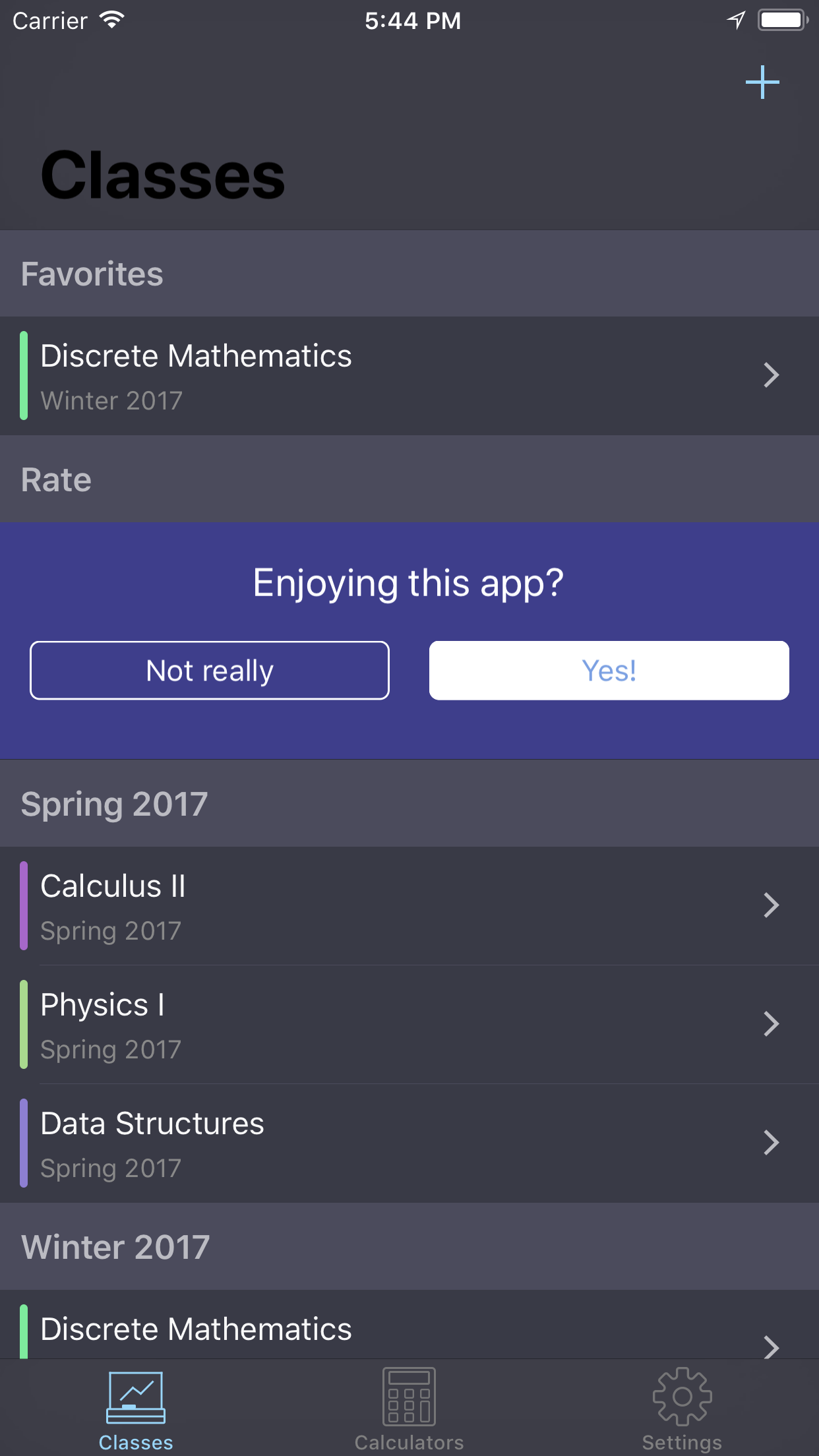
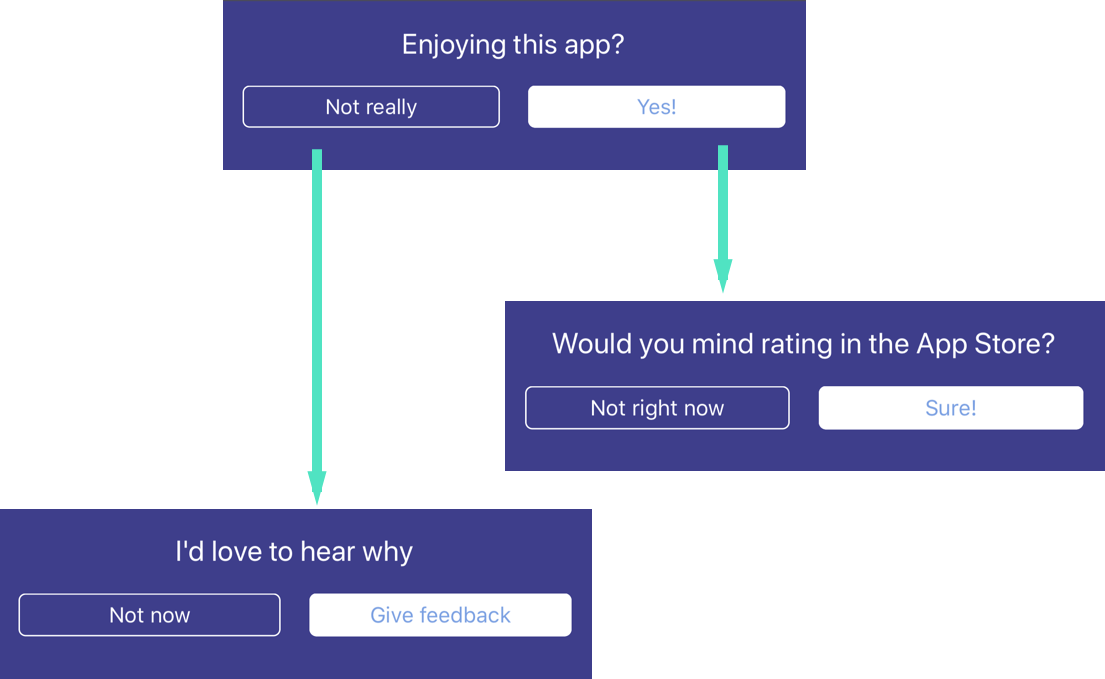
An integrated rating view for iOS built with Swift 4
## Features
- Stops users feeling annoyed from pop ups asking for ratings.
- Customizable for your app needs.
- Easy to use with `UITableView`'s and `UICollectionViews`'s.
## Installation
### Cocoapods (recommended)
1. Install [CocoaPods](https://cocoapods.org)
2. Add this pod to your `Podfile`
```ruby
target 'Example' do
use_frameworks!
pod 'LPIntegratedRating'
end
```
3. Run `pod install`
4. Open up the `.xcworkspace` that CocoaPods created
5. Import `LPIntegratedRating` into any source file where it's needed
### From Source
1. Simply download the source from [here](https://github.com/luispadron/LPIntegratedRating/tree/master/LPIntegratedRating) and add it to your Xcode project
## Usage
To learn how to properly ask users to rate your app, read the wonderful article which inspired this library [here.](https://medium.com/circa/the-right-way-to-ask-users-to-review-your-app-9a32fd604fca)
### Delegate conformance
You must conform to the delegate in order to customize the view.
Here is an example:
```swift
extension ViewController: LPRatingViewDelegate {
func ratingViewDidFinish(with status: LPRatingViewCompletionStatus) {
switch status {
case .ratingApproved:
print("Rating approved")
case .ratingDenied:
print("Rating denied")
case .feedbackApproved:
print("Feedback approved")
case .feedbackDenied:
print("Feedback denied")
}
}
func ratingViewConfiguration(for state: LPRatingViewState) -> LPRatingViewConfiguration? {
switch state {
case .initial:
let title = NSAttributedString(string: "Enjoying this app?",
attributes: [.foregroundColor: UIColor.white])
let title2 = NSAttributedString(string: "Yes!",
attributes: [.foregroundColor: UIColor(red: 0.376, green: 0.788, blue: 0.773, alpha: 1.00)])
let title3 = NSAttributedString(string: "Not really",
attributes: [.foregroundColor: UIColor.white])
return LPRatingViewConfiguration(title: title,
approvalButtonTitle: title2,
rejectionButtonTitle: title3)
case .approval:
let title = NSAttributedString(string: "How about rating, then?",
attributes: [.foregroundColor: UIColor.white])
let title2 = NSAttributedString(string: "Ok, sure",
attributes: [.foregroundColor: UIColor(red: 0.376, green: 0.788, blue: 0.773, alpha: 1.00)])
let title3 = NSAttributedString(string: "No, thanks",
attributes: [.foregroundColor: UIColor.white])
return LPRatingViewConfiguration(title: title,
approvalButtonTitle: title2,
rejectionButtonTitle: title3)
case .rejection:
let title = NSAttributedString(string: "Would you mind giving us some feedback",
attributes: [.foregroundColor: UIColor.white])
let title2 = NSAttributedString(string: "Ok, sure",
attributes: [.foregroundColor: UIColor(red: 0.376, green: 0.788, blue: 0.773, alpha: 1.00)])
let title3 = NSAttributedString(string: "No, thanks",
attributes: [.foregroundColor: UIColor.white])
return LPRatingViewConfiguration(title: title,
approvalButtonTitle: title2,
rejectionButtonTitle: title3)
}
}
}
```
### UITableView
Simply create an instance of `LPRatingTableViewCell`, assign the delegate and return it!
```swift
override func tableView(_ tableView: UITableView, cellForRowAt indexPath: IndexPath) -> UITableViewCell {
let cell = LPRatingTableViewCell(style: .default, reuseIdentifier: nil)
cell.delegate = self
return cell
}
```
### UICollectionView
First register the class
```swift
override func viewDidLoad() {
super.viewDidLoad()
// Register class
collectionView?.register(LPRatingCollectionViewCell.self, forCellWithReuseIdentifier: "testCell")
}
```
Then simply create an instance of `LPRatingCollectionViewCell`, assign the delegate and return it
```swift
override func collectionView(_ collectionView: UICollectionView, cellForItemAt indexPath: IndexPath) -> UICollectionViewCell {
let cell = collectionView.dequeueReusableCell(withReuseIdentifier: "testCell", for: indexPath) as! LPRatingCollectionViewCell
cell.delegate = self
return cell
}
```
## View Flow
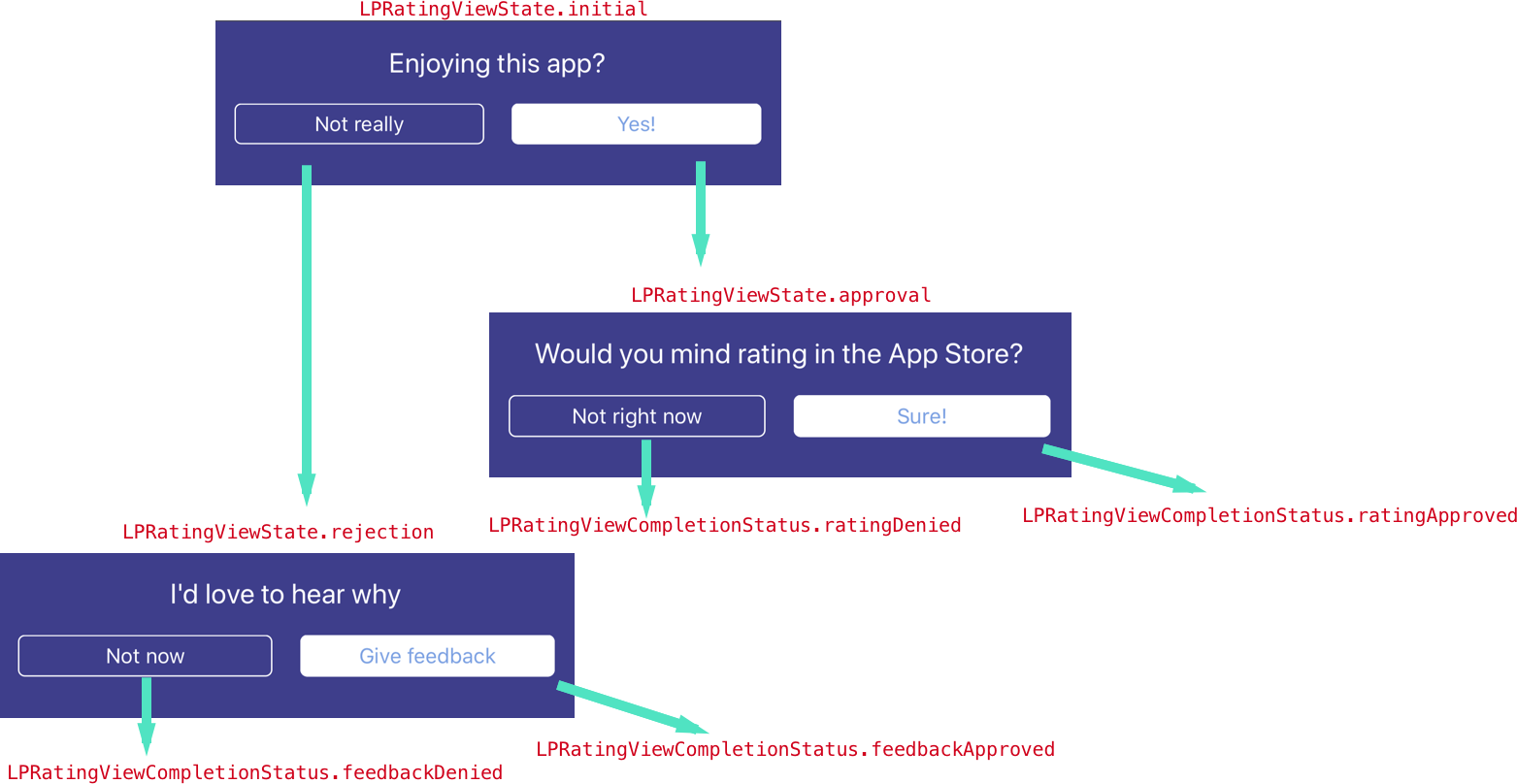
Here is the flow of the view, and the types of cases that will be passed to the delegate along the way.
## Documentation
Read the full documentation [here](https://htmlpreview.github.io/?https://raw.githubusercontent.com/luispadron/LPIntegratedRating/master/docs/index.html)